SSIS PowerPack
Transform Your SSIS Workflows with Powerful Drag-and-Drop Components
Build reliable SQL Server Integration Services workflows with 100+ high-performance, drag-and-drop components for REST APIs, JSON, XML, CSV, Excel, cloud services, databases, and SaaS applications.
- 30-day money-back guarantee
- Runs in your environment
- Get full support from trial to purchase and beyond
- 100+ SSIS components
- Drag-and-drop workflows
- Runs in your network
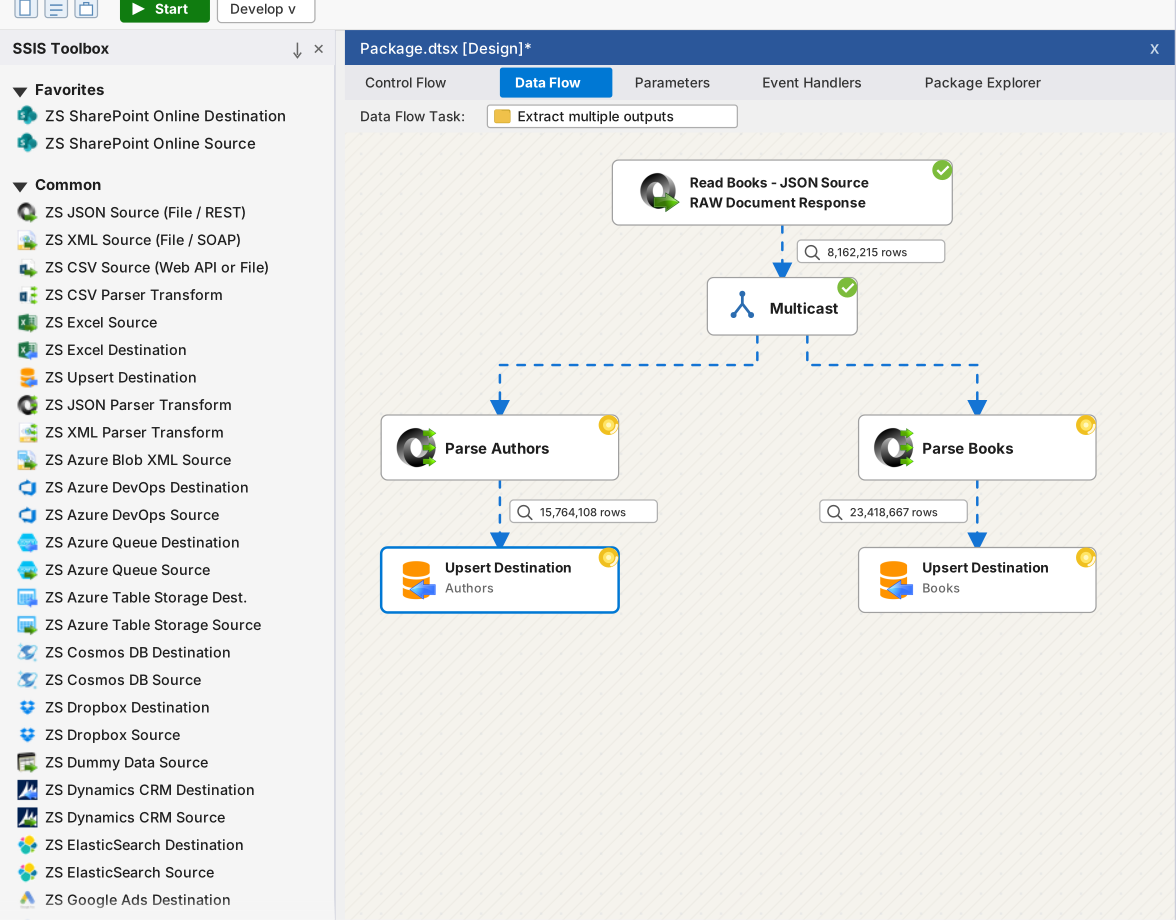















What is included
One toolbox for the integrations SSIS teams build every day.
Choose a workload to see representative components included across the PowerPack suite.
Turn web APIs into familiar SSIS data flows.
Read and write REST, SOAP, JSON, and XML without maintaining a custom script component for every endpoint.
 JSON File / REST API Source
 API Source and Destination
 REST API Task
 XML File / SOAP Source
 JSON Parser and Generator
 Web API Destination
Move files across local and cloud storage.
Build repeatable flows for delimited files, object storage, queues, and secure file transfer.
 Azure Blob Storage Task
 Amazon S3 Task
 CSV Source and Destination
 Excel Source and Destination
 SFTP Task
 Azure Queue connectors
Connect operational data without changing ETL tools.
Bring cloud databases, NoSQL platforms, Salesforce, PostgreSQL, and Dynamics CRM into the same package design experience.
 MongoDB Source and Destination
 Amazon Redshift connectors
- DynamoDB Source and Destination
 Salesforce Source and Destination
 PostgreSQL connectors
 Dynamics CRM connectors
Handle the work around the data flow, too.
Download, validate, compress, log, report, and send notifications with purpose-built control flow tasks.
 Advanced File System Task
 Validation and Logging Tasks
 Download File Task
- Compression Task
 Send HTML Email Task
- Report Generator Task
How it works
From endpoint to scheduled package in three clear steps.
Watch a short intro, then install, configure, and deploy in the SSIS designer your team already uses.
-
Install the PowerPack
Add the ZappySys sources, destinations, transforms, and tasks to your SSIS toolbox.
-
Configure your connection
Choose a component, enter the source details, preview the data, and map the fields.
-
Deploy and run
Execute in 32-bit or 64-bit environments and use the same familiar SSIS deployment path.

Explore the toolbox
Find the right component in seconds.
Search by name, jump to a category, or filter by source, destination, task, or transform – then open the component page for setup details.
All Components
Why teams choose ZappySys
Flexible components when pre-built schemas fall short.
Keep working in the SSIS designer your team already knows — with connectors that handle OAuth, paging, files, and APIs without locking you into a fixed schema.
Coding-free, still inspectable
Drag-and-drop sources, destinations, transforms, and tasks with the options you need to see what is happening under the hood.
Runs in your environment
Packages execute inside your SSIS / Azure-SSIS runtime. Data does not transit ZappySys servers.
Free while you develop
No license needed to design, test, or debug inside Visual Studio (SSDT). License each machine that runs packages outside Visual Studio. Free commercial tasks included.
Support that ships with the trial
Phone, email, chat, and web meetings during evaluation and with an active license. Rapid release cycle with ongoing updates.
Compare editions, read what’s new, or see why teams choose ZappySys over native SSIS and other competitors.
Package patterns
Start with the job — not a wall of component names.
These are the flows teams assemble in the same designer, logging, and deployment model they already know.
REST API → SQL Server
 JSON Source → Parser → Upsert
OAuth, paging, retries, nested arrays, preview, and database upserts — no custom API client.
Salesforce → warehouse
 Salesforce Source → SQL
Read objects with SOQL and write changes with insert, update, upsert, or delete.
S3, Azure, or SFTP files
 Cloud task → CSV/JSON
Move and parse files across object storage and secure transfer without extra download scripts.
Operational automation
 Validate → Zip → Email
Wrap data flows with validation, logging, compression, reports, and HTML notifications.
Technical validation
Built for long-lived SQL Server estates — and a checkable data path.
SQL Server, SSIS, and Visual Studio
32-bit and 64-bit execution on Windows. Azure-SSIS IR is licensed per cluster, not per node. SSIS is not included with SQL Express.
- SQL Server 2025
- 2022
- 2019
- 2017
- 2016
- 2014
- 2012
- Azure-SSIS IR
- VS 2026
- VS 2022
- VS 2019–2012
Runtime and security facts
- Components execute inside your SSIS process.
- Business data does not transit ZappySys servers.
- Credentials stay in your package / configuration model.
- No ZappySys cloud account is required to run packages.
- Design and debugging in Visual Studio remain free.
Don’t just take our word for it
Trusted by data teams.
Recognized by the industry.
Useful tools, clear documentation, and responsive support — validated by customer stories, independent ratings, and awards year after year.
“I submitted a support request and had someone logged in and fixing things within 2 hours.”
Barry Wilson
“The REST source is very powerful — the only thing I found I could use after trying components from major vendors.”
Jes Kirkup · KTC
“Whenever we run into an obstacle, ZappySys has a solution for us. We are so glad that we chose ZappySys PowerPack.”
Kevin Chen · Berricle
Transparent pricing
Simple per-server licensing. Free for developers.
Design, test, and debug in Visual Studio (SSDT) for free. License each machine where packages run outside Visual Studio (including DEV, QA, and production). Choose annual subscription or a one-time perpetual key.
Annual is pay-as-you-go. Perpetual is a one-time key that never expires.
Annual subscription
Full commercial license for one year. Support, upgrades, and new releases are included.
- Pay as you go, renew each year
- Must renew before expiration to keep using the software
- Credit card or PayPal for subscription purchases
Perpetual license – Lifetime key
One-time purchase. The license key does not expire. First-year support and upgrades are included.
- Keep using the version you bought after year one
- Optional support renewal after the first year
- Wire transfer and check are available for perpetual orders
Standard
Core connectivity for smaller ETL workloads
$1,499/ year / machine
- 40+ tasks and components
- JSON, XML, CSV and REST API essentials
- Secure FTP, Amazon S3, Azure Blob tasks
- Premium support and upgrades included
Professional
Broader coverage for growing integration teams
$1,899/ year / machine
- 70+ tasks and components
- Everything in Standard
- More cloud, database, and CRM connectors
- Premium support and upgrades included
Full toolbox
Enterprise
Everything ZappySys makes for SSIS
$2,299/ year / machine
- All 100+ tasks and components
- API Connectors pack (SharePoint, Google Sheets, HubSpot, ServiceNow, and more)
- Everything in Professional
- Premium support and upgrades included
One license covers an Azure-SSIS IR cluster (licensed per cluster, not per node). Refund may be available within 30 days — see the refund policy.
See the full feature-by-feature comparison (includes the FREE edition), compare vs native SSIS and competitors, call +1-800-444-5602, or talk to an engineer.
FAQ
Frequently asked questions
Don’t see your question? Ask an integration engineer — usually answered in under 2 hours during US business hours.
Product fit
What is SSIS PowerPack?
SSIS PowerPack is a collection of 100+ drag-and-drop connectors and tasks for Microsoft SQL Server Integration Services. After installation, the components appear in the SSIS Toolbox with the ZS prefix, so you can connect to APIs, files, cloud services, databases, SaaS apps, and common workflow utilities without writing custom code.
How is this different from ODBC PowerPack?
SSIS PowerPack is for drag-and-drop ETL inside SQL Server Integration Services. ODBC PowerPack is for querying APIs and files via ODBC from BI tools, apps, and SQL Server linked servers. Choose SSIS PowerPack when SSIS is your primary pipeline tool.
Are there free SSIS tasks included?
Yes. SSIS PowerPack includes some free commercial components and tasks. Check the FREE column on the compare editions page to see which items are included at no cost. Download the trial to evaluate the full suite for 30 days.
Which SQL Server versions are supported?
SSIS PowerPack supports SQL Server editions that include Integration Services (SSIS) on Windows, including current and earlier supported SQL Server / Visual Studio versions and Azure Data Factory SSIS-IR. Both 32-bit and 64-bit environments are supported. See the system requirements for the latest version list.
Technical
Do developers need a license for Visual Studio or SSDT?
No. Developers do not need a paid license when they only design, test, or debug packages inside Visual Studio/SSDT. You need a license on each machine where packages execute outside Visual Studio, including DEV, QA, and production servers that run jobs with SQL Agent, command line, PowerShell, SSIS Catalog, or custom applications.
Does my data pass through ZappySys servers?
No. All components run inside your own SSIS environment, behind your firewall. Data flows directly between your systems and the APIs, files, databases, or services you connect to. ZappySys does not process, store, or route your business data through ZappySys servers.
Can I run packages in Azure Data Factory?
Yes. Packages built with SSIS PowerPack can run in the Azure-SSIS Integration Runtime in Azure Data Factory. Licensing is per SSIS-IR cluster, not per node, so one license covers that cluster even if you scale it across multiple nodes.
Trial & pricing
How long is the free trial?
The trial is fully functional for 30 days and does not require a credit card. After the trial expires, you can still design, test, and debug packages inside Visual Studio/SSDT, but packages cannot run outside Visual Studio, such as through SQL Agent, command line, PowerShell, SSIS Catalog, or a custom scheduler, until a paid license is activated.
How is SSIS PowerPack licensed?
SSIS PowerPack is licensed by machine. You need a license on each machine where packages run outside Visual Studio, such as SQL Agent, command line, PowerShell, SSIS Catalog, or a custom app. Development and testing in Visual Studio/SSDT does not require a paid license. See pricing or compare editions to find the right fit.
Is there a money-back guarantee?
Refunds may be available for new subscription or perpetual license purchases when requested within 30 days of the original purchase date. Please review the ZappySys Refund Policy for full eligibility details.
Start with your own package
Put SSIS PowerPack through a real 30-day evaluation.
Install in Visual Studio this week, prove one hard endpoint, and use support while it is included. No credit card. Data stays in your runtime.