SSIS PostgreSQL ExecuteSQL Task
Execute DDL and DML statements for PostgreSQL without needing any extra driver.
PostgreSQL Execute SQL Task executes DDL and DML statements for PostgreSQL without needing any extra driver. You can issue SQL commands such as SELECT, INSERT, DROP, COPY and CREATE.
The trial includes PostgreSQL ExecuteSQL Task and every other PowerPack component
- Control Flow Task in SSIS
- Runs in your environment
- Also runs in Azure Data Factory
- Fully functional 30-day trial


At a glance
What PostgreSQL ExecuteSQL Task can do
PostgreSQL Execute SQL Task can be used to execute DDL and DML statements for PostgreSQL without needing any extra driver. You can issue SQL commands such as SELECT, INSERT, DROP, COPY and CREATE.
No extra driver needed
Execute queries against PostgreSQL without an ODBC driver.
- 100% managed code, so it works in 32-bit and 64-bit
DDL & DML statements
Issue SQL commands such as SELECT, INSERT, DROP, COPY and CREATE.
- Run multiple SQL statements in one task
- Example: drop a table if it exists, then create it
SQL from text or a variable
Type the SQL directly in the task, or load it at runtime from an SSIS variable.
SqlStatementSourceType: DirectValue or VariableSqlStatementVariableholds the variable name
Results into variables
Store query results in SSIS variables.
ResultsetType: None, FullResultset or SingleValue- FullResultset is an ADO.net DataTable stored in an Object variable
Timeout & logging
Control command timeout and how much is logged.
Timeoutin seconds (0 = no timeout)LoggingModeandPrefixTimestamp
PostgreSQL connection
Connect with host, port, database, user name and password through the PostgreSQL Connection Manager.
- Enable SSL
- Add the connection directly from the task UI
Connection performance
Tune how the connection behaves while the package runs.
- Connection pooling
RetainSameConnectionkeeps one connection open for multiple tasks- Separate command and connect timeouts
SQL Server 2012–2025 & ADF
Runs in your environment on SQL Server 2012–2025 and Azure-SSIS.
- SQL Server 2025, 2022, 2019, 2017, 2016, 2014, 2012 (32/64-bit)
- Azure Data Factory (SSIS IR)
- Design packages in Visual Studio 2017, 2019, 2022, or 2026
- Windows only (64-bit OS): Windows 7–11 or Windows Server 2012–2025
See all features
- Execute DDL and DML statements for PostgreSQL without needing any extra driver
- Issue SQL commands such as SELECT, INSERT, DROP, COPY and CREATE
- Run multiple SQL statements in one task
- Type the SQL directly or load it at runtime from an SSIS variable
- Store a full result set (ADO.net DataTable) or a single value in an SSIS variable
- Command timeout setting (0 = no timeout)
- 100% managed code, compatible with 32-bit and 64-bit
- SSL support on the PostgreSQL Connection Manager
- Connection pooling and
RetainSameConnectionto share one open connection across tasks - Logging modes (Normal, Medium, Detailed, Debugging) with optional timestamp prefix
Support for SQL Server 2025, 2022, 2019, 2017, 2016, 2014, 2012 (32/64-bit) and Azure Data Factory
SQL Server 2012–2025
How it works
From the toolbox to your first run.
Key steps from the PostgreSQL ExecuteSQL Task page and help file, with the screens you will see in SSDT.
PostgreSQL ExecuteSQL Task editor
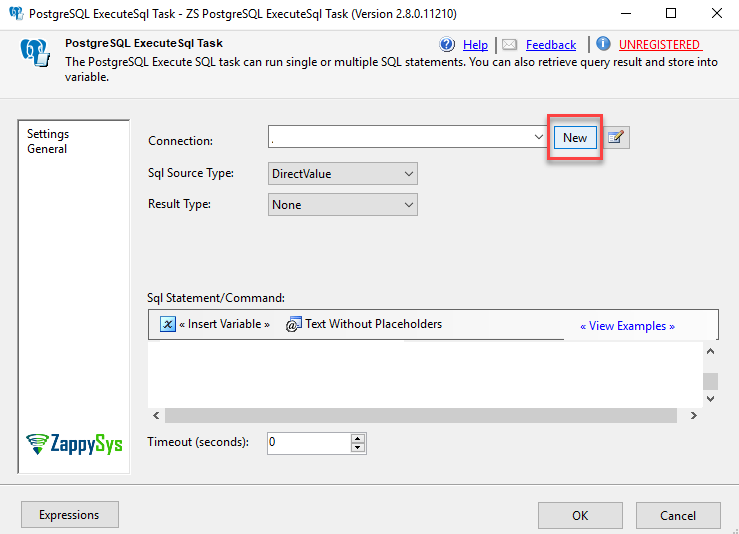
Double-click the task to open its editor. Pick an existing ZS-POSTGRESQL connection or add a new one directly from the task.
In the connection, enter the host name, database name, user name and password, then click Test Connection.
Execute PostgreSQL command from variable
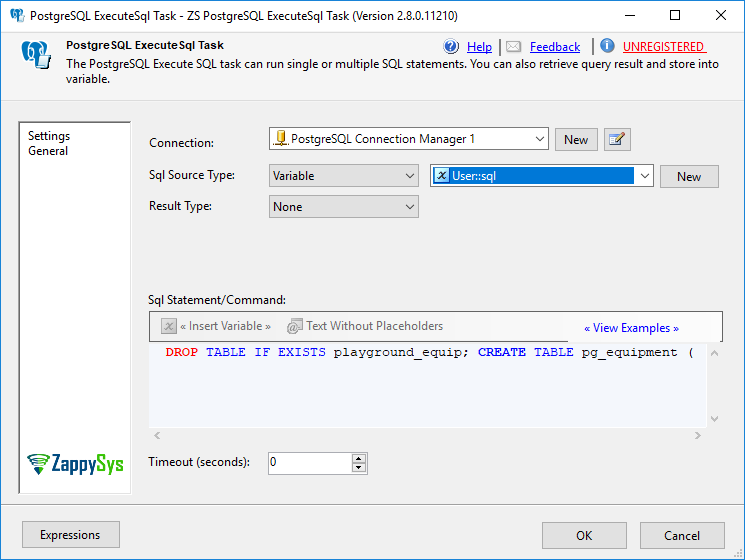
Set Sql Source Type to Variable to run the SQL stored in an SSIS variable; SqlStatementVariable holds the variable name.
To keep results, set ResultsetType to FullResultset (ADO.net DataTable in an Object variable) or SingleValue and choose the result variable.
Drop and create a table
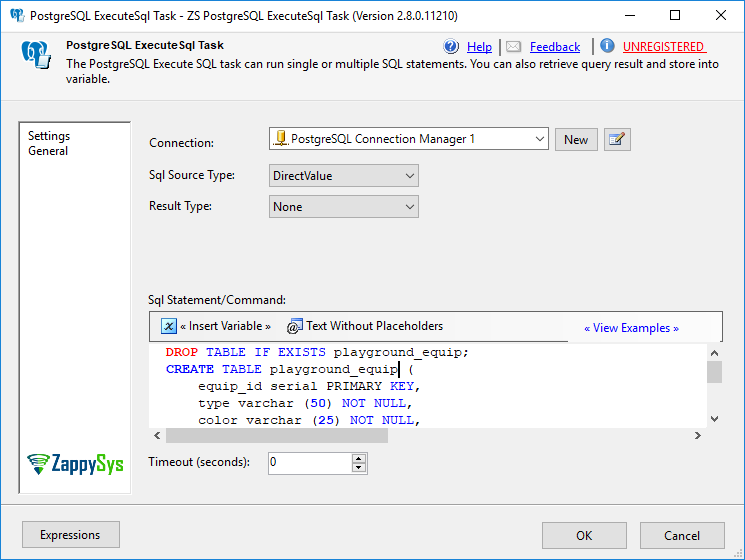
In the Sql Statement section, enter for example DROP TABLE IF EXISTS ...; followed by CREATE TABLE pg_equipment (...).
Click OK, then right-click the task and select Execute Task to run it.

Inside the UI
Key settings, as they appear in SSDT.
Real screens from the PostgreSQL ExecuteSQL Task product page. Step through them, or open any shot at full size.
Drag and drop the PostgreSQL ExecuteSQL Task
In Visual Studio, drag the ZS PostgreSQL ExecuteSQL Task from the SSIS Toolbox onto the design surface.
Articles
Worked examples that use PostgreSQL ExecuteSQL Task.
Compatibility and requirements
Designed to stay inside your SSIS runtime.
- SQL Server 2012 through 2025, 32-bit and 64-bit
- Windows only, 64-bit OS required. SQL Server Express and Web editions do not include SSIS
- Azure Data Factory SSIS Integration Runtime
- Self-hosted: credentials and data stay in your environment (external API calls still reach that service)
- Fully functional 30-day trial of SSIS PowerPack
FAQ
Questions teams ask before they drop PostgreSQL ExecuteSQL Task on the canvas.
What is PostgreSQL ExecuteSQL Task?
PostgreSQL Execute SQL Task executes DDL and DML statements for PostgreSQL without needing any extra driver. You can issue SQL commands such as SELECT, INSERT, DROP, COPY and CREATE.
What can PostgreSQL ExecuteSQL Task do?
It runs one or more SQL statements against PostgreSQL from the SSIS Control Flow through the ZappySys PostgreSQL Connection Manager, with no ODBC driver needed. The SQL can be typed directly or read from an SSIS variable, and results can be saved as a full result set (ADO.net DataTable in an Object variable) or a single value. It is 100% managed code, so it works in 32-bit and 64-bit.
Can the SQL be dynamic?
Yes. Set SqlStatementSourceType to Variable and put the variable name in SqlStatementVariable; the task runs whatever SQL the variable holds at runtime.
Which SQL Server versions can I run it on?
SQL Server 2025, 2022, 2019, 2017, 2016, 2014, and 2012 (32- and 64-bit), plus Azure Data Factory with an SSIS Integration Runtime (packages must target SQL Server 2017). See Compatibility and requirements.
See also
More from SSIS PowerPack.


What customers say
Start your free trial today
Install SSIS PowerPack and drag PostgreSQL ExecuteSQL Task onto the Control Flow.
Execute DDL and DML statements for PostgreSQL without needing any extra driver.
- Control Flow Task in SSISPostgreSQL ExecuteSQL Task appears in the toolbox after you install PowerPack.
- Fully functional 30-day trialSSIS PowerPack, running in your environment.
- Live supportHelp during your trial and after purchase.
Open Help FileBrowse all SSIS PowerPack tasks
New purchases may be eligible for refund review within 30 days. See the refund policy.
Talk to an engineer before or during your trial.