SSIS Download File Task
Download a file from any URL in an SSIS package, using a direct URL, a variable or a connection.
Download File Task is a free SSIS Control Flow task that downloads a file from any internet or intranet URL over HTTP or HTTPS. Supply the URL directly, from a variable or from a connection (with proxy settings), choose the target path the same way, and decide whether to overwrite an existing file.
Download File Task is free in every edition. The same download also includes a trial of the paid PowerPack components
- Control Flow Task in SSIS
- Runs in your environment
- Also runs in Azure Data Factory
- Free component (FREE edition)


At a glance
What Download File Task can do
Download File Task downloads a file from any URL in an SSIS package. Supply the URL directly, from a variable or from a connection, and save it to a direct path, a variable or a file connection.
Download from any URL
Download a file from any URL in an SSIS package.
- Internet or intranet over HTTP or HTTPS
- Web URL (e.g. a CSV or ZIP file) or a local / server file path
Three URL access modes
Supply the source URL directly, from a variable or from a connection.
UrlAccessMode: Direct, Variable or ConnectionUrlorUrlVariable
Flexible target path
Choose where to save the downloaded file in the same three ways.
TargetFileAccessMode: Direct, Variable or ConnectionTargetFilePath,TargetFileVariable,TargetFileConnection
Proxy support
Specify proxy settings on the URL connection manager used for the download.
Connectionproperty
Overwrite control
Choose whether to overwrite the target file if it already exists.
OverwriteTarget
Logging options
Control how much is logged while the task runs.
LoggingMode: Normal, Medium, Detailed or DebuggingPrefixTimestampadds a timestamp to log messages
Advanced download options
For OAuth or basic credentials, headers, body, SSL/TLS version or retry settings, use the REST API Task instead.
SQL Server 2012–2025 & ADF
Runs in your environment on SQL Server 2012–2025 and Azure-SSIS.
- SQL Server 2025, 2022, 2019, 2017, 2016, 2014, 2012 (32/64-bit)
- Azure Data Factory (SSIS IR)
- Design packages in Visual Studio 2017, 2019, 2022, or 2026
- Windows only (64-bit OS): Windows 7–11 or Windows Server 2012–2025
See all features
- Free component, included in every SSIS PowerPack edition
- Download a file from any internet or intranet URL over HTTP or HTTPS
- Direct URL, Variable or URL from Connection mode
- Target file path set directly, from a variable or from a file connection
- Proxy support via the URL connection manager
- Option to overwrite the target file if it already exists
- Make properties dynamic with SSIS expressions (numeric option values)
- Logging modes (Normal, Medium, Detailed, Debugging) with optional timestamp prefix
- Use the REST API Task for OAuth, headers, body or retry settings
Support for SQL Server 2025, 2022, 2019, 2017, 2016, 2014, 2012 (32/64-bit) and Azure Data Factory
SQL Server 2012–2025
How it works
From the toolbox to your first run.
Key steps from the Download File Task page and help file, with the screens you will see in SSDT.
Download from a URL you type in.
Drag ZS Download File Task onto the Control Flow and double-click it. Set Url AccessMode to Direct, enter the URL, set the target Path (for example c:\ssis\myfile.zip) and choose whether to overwrite the target file if it exists.
- Internet or intranet over HTTP or HTTPS
- Proxy settings on the Proxy tab
Use a variable for the URL and a file connection for the target.
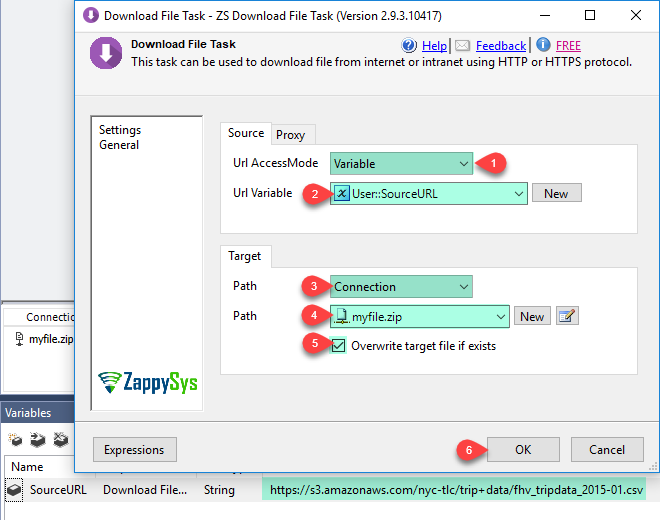
For a dynamic URL, create a string variable for the source URL and a File Connection for the target path. Then set Url AccessMode to Variable and pick the variable, set the target Path to Connection and pick the connection, and check Overwrite target file if exists.
UrlAccessMode: Direct, Variable or ConnectionTargetFileAccessMode: Direct, Variable or Connection- Set modes with expressions using their numeric values
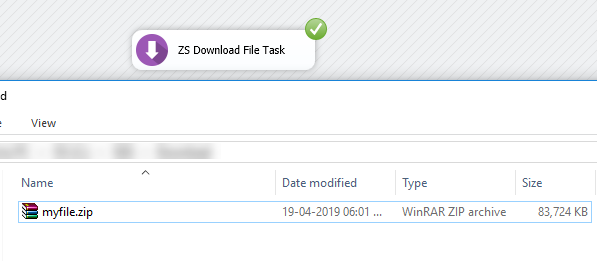
Run the package and check the file.
Click OK, then run the package and wait for the task to succeed. The downloaded file appears at the target path.
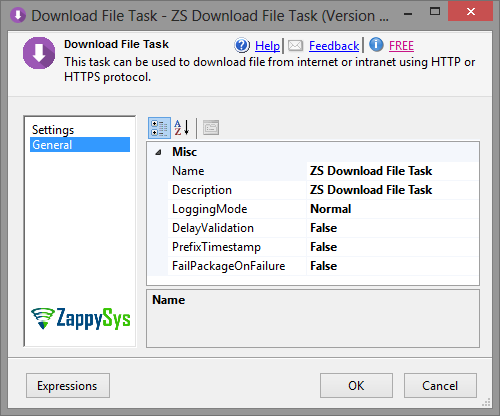
Control logging on the General tab.
On the General tab set LoggingMode (Normal, Medium, Detailed or Debugging) and turn on PrefixTimestamp to add a timestamp to log messages.
Inside the UI
Key settings, as they appear in SSDT.
Real screens from the Download File Task product page. Step through them, or open any shot at full size.
Direct URL mode
Enter the URL and target path directly, and choose whether to overwrite the target file.
Articles
Worked examples that use Download File Task.
Compatibility and requirements
Designed to stay inside your SSIS runtime.
- SQL Server 2012 through 2025, 32-bit and 64-bit
- Windows only, 64-bit OS required. SQL Server Express and Web editions do not include SSIS
- Azure Data Factory SSIS Integration Runtime
- Self-hosted: credentials and data stay in your environment (external API calls still reach that service)
- Fully functional 30-day trial of SSIS PowerPack
FAQ
Questions teams ask before they drop Download File Task on the canvas.
What is Download File Task?
Download File Task is a free SSIS Control Flow task that downloads a file from any URL. You can supply the URL directly, from a variable or from a connection, save the file to a direct path, a variable or a file connection, use a proxy, and choose whether to overwrite an existing file.
Is Download File Task free?
Yes. It is included in the FREE edition of SSIS PowerPack, as well as in the Standard, Professional and Enterprise editions. See compare editions.
How do I download a file from a URL that changes at runtime?
Store the URL in an SSIS variable and set Url AccessMode to Variable. The target path can come from a variable or a File Connection in the same way. See How it works.
What if the download needs OAuth, headers or retries?
Download File Task is the simple option, without advanced settings such as OAuth credentials, headers or body. For those, plus SSL/TLS version and error retry settings, use the REST API Task with its save-response-to-file option. See how to download a file from a URL using SSIS.
Which SQL Server versions can I run it on?
SQL Server 2025, 2022, 2019, 2017, 2016, 2014, and 2012 (32- and 64-bit), plus Azure Data Factory with an SSIS Integration Runtime (packages must target SQL Server 2017). See Compatibility and requirements.






What customers say
Free in every edition
Install SSIS PowerPack and drag Download File Task onto the Control Flow.
Download a file from any URL in an SSIS package, using a direct URL, a variable or a connection.
- Control Flow Task in SSISDownload File Task appears in the toolbox after you install PowerPack.
- Free to useDownload File Task is included in the FREE edition of SSIS PowerPack.
- Live supportQuestions? Talk to a ZappySys engineer.
Talk to an engineer before or during your trial.