SSIS HTML Table Source
Scrape HTML tables from web pages or local HTML files straight into your SSIS Data Flow, without coding.
HTML Table Source extracts data placed inside HTML TABLE tags from any URL or locally stored HTML file. Valuable data often sits on web pages with no file to download; pick the table by number, CSS class or XPath, read div-based tables with custom XPath, extract links and images from cells, and preview the rows without running the package.
The trial includes HTML Table Source and every other PowerPack component
- Data Flow Source in SSIS
- Runs in your environment
- Also runs in Azure Data Factory
- Fully functional 30-day trial


At a glance
What HTML Table Source can do
HTML Table Source scrapes data placed inside HTML TABLE tags from web pages or local HTML files. Valuable information is often published on web pages without a downloadable data file; this component extracts it in a few clicks without coding.
Scrape URLs or local files
Extract HTML table data from any URL or locally stored HTML files without coding.
AccessMode: Direct, Variable or Connection- Multiple URLs or paths (one per line) with combined results
TreatInputAsHtmlStringto parse a raw HTML string
Table number, CSS or XPath
Pick the table to extract by number, by CSS class or with an XPath expression.
TableExtractMethod: ByNumber, ByCss, ByXPath, ByXPathCustomTableNumber,TableClassorTableXPath(e.g.//table[@class='mydata'])
Div-based tables
Read tables built from div or other custom nodes with your own row and cell selectors.
RowXPath(e.g../div[contains(@class,'row')])CellXPath(e.g../div[contains(@class,'cell')])
Extract links & images
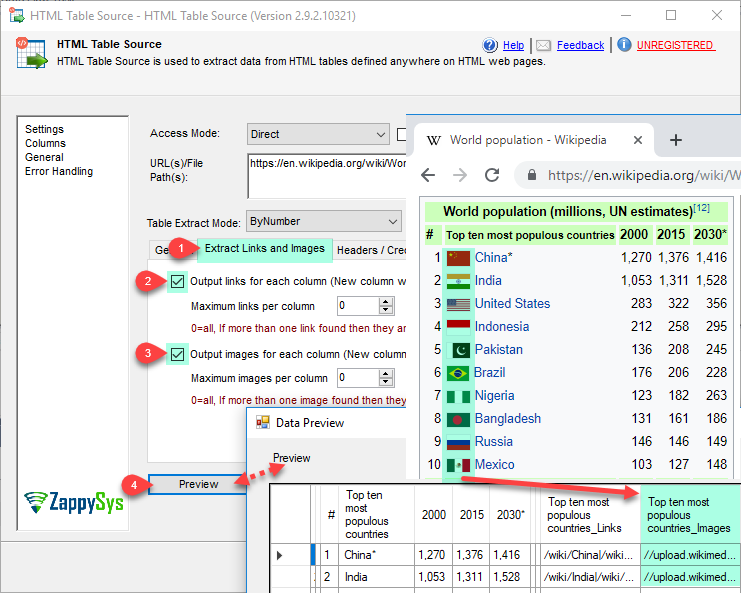
Output hyperlinks and images from each table cell as extra columns.
OutputLinksadds_Linkscolumns;OutputImagesadds_ImagescolumnsMaxLinksPerColumnandMaxImagesPerColumn
Header, skip rows & groups
Use a header row for column names, skip header or footer rows, detect grouping rows and number each extracted record.
HasHeaderRow,HeaderRowNumber,SkipRowsTopandSkipRowsBottomMaxRowsworks like TOP NEnableGroupDetectoutputs the group (rows using colspan) in a__groupNamecolumn
Extra columns via XPath
Add extra output columns taken from any node on the page with XPath.
ExtraColumns:Title1=//h1[contains(@class,'main-title')]
Preview & column control
Preview extracted data without running the package, then select, rename and retype columns.
MaxGuessRowsrows scanned to detect data typesDoNotFailWhenExprYieldsNoResultto continue when a table or XPath is not foundCharacterSet(e.g. windows-1250)
SQL Server 2012–2025 & ADF
Runs in your environment on SQL Server 2012–2025 and Azure-SSIS.
- SQL Server 2025, 2022, 2019, 2017, 2016, 2014, 2012 (32/64-bit)
- Azure Data Factory (SSIS IR)
- Design packages in Visual Studio 2017, 2019, 2022, or 2026
- Windows only (64-bit OS): Windows 7–11 or Windows Server 2012–2025
See all features
- HTML table scraping from any URL or local HTML file (direct value or SSIS variable)
- Scrape multiple URLs and combine the result set
- Extract by table number, CSS class used on the TABLE tag or XPath
- Custom XPath for row and cell nodes to read div-based tables
- Extract links and images from table cells
- Options to skip header and footer rows
- Automatically detect groups
- Automatically assign a row number to each extracted record
- Extra columns from any page node using XPath
- Parse a raw HTML string instead of a URL
- Preview support without running the actual package
- Select columns, rename them and change data types
- Trim whitespace, character set (e.g. windows-1250) and an option not to fail when a table or XPath finds nothing
Support for SQL Server 2025, 2022, 2019, 2017, 2016, 2014, 2012 (32/64-bit) and Azure Data Factory
SQL Server 2012–2025
How it works
From the toolbox to your first run.
Point at a URL or file, choose how to find the table, then preview the rows.
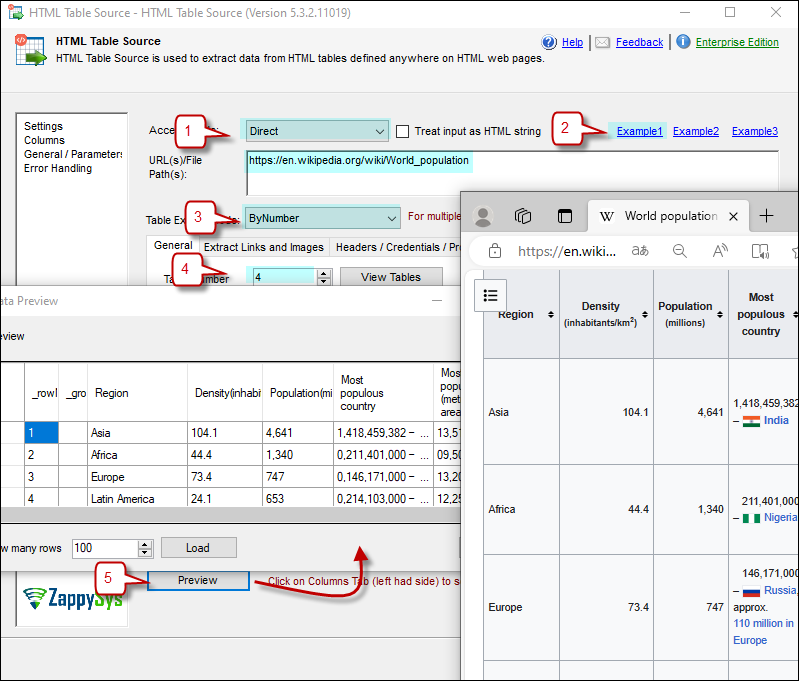
Extract a table by its position on the page.
Set Access Mode to Direct and enter a URL such as https://en.wikipedia.org/wiki/World_population. Select the ByNumber extract method, set the table number (starting at 1) and click Preview.
- URL(s) or local HTML file paths, one per line
- Direct value, SSIS variable or connection
- Header row, skip rows and TOP N options
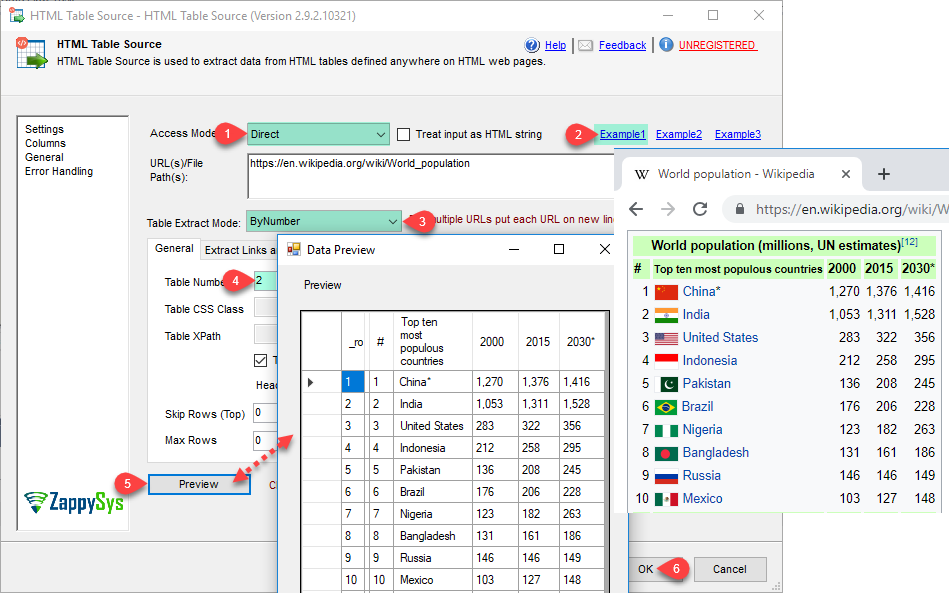
Extract the table that uses a CSS class.
When you do not know the table’s position but know its class, select the ByCss extract method and enter the class name, for example infobox, then click Preview.
TableClassmatches the CSS class on the TABLE tag- Useful when the table position changes
- Preview before you map a destination
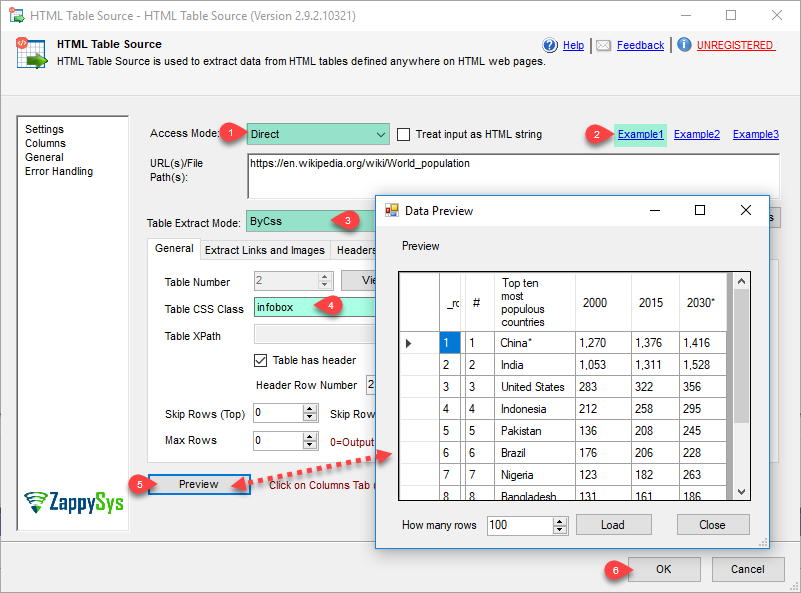
Target any table with an XPath expression.
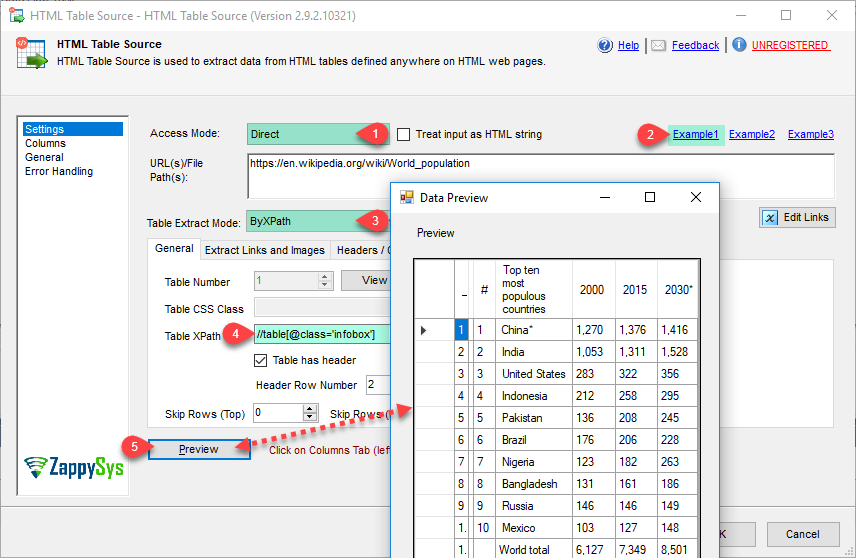
Select the ByXPath extract method and enter a table XPath such as //table[@class='infobox']. For tables built from div elements, use ByXPathCustom with your own row and cell XPath.
TableXPathfor TABLE nodesRowXPathandCellXPathfor div-based tablesExtraColumnspull text from any other node on the page
Extract links and images from each cell.
On the Extract Link and Images tab, check the options to output links and images for each column. New columns with a _Links or _Images suffix hold the values, separated by a vertical bar when a cell has several.
MaxLinksPerColumn/MaxImagesPerColumn(0 = all)- Loop through extracted links to download files
- Select, rename and retype output columns
Inside the UI
Key settings, as they appear in SSDT.
Real screens from the HTML Table Source product page. Step through them, or open any shot at full size.
Extract a table by number
Pick the table by its position on the page and preview the extracted rows.
Articles
Worked examples that use HTML Table Source.
Compatibility and requirements
Designed to stay inside your SSIS runtime.
- SQL Server 2012 through 2025, 32-bit and 64-bit
- Windows only, 64-bit OS required. SQL Server Express and Web editions do not include SSIS
- Azure Data Factory SSIS Integration Runtime
- Self-hosted: credentials and data stay in your environment (external API calls still reach that service)
- Fully functional 30-day trial of SSIS PowerPack
FAQ
Questions teams ask before they drop HTML Table Source on the canvas.
What is HTML Table Source?
A Data Flow source in SSIS PowerPack that scrapes data placed inside HTML TABLE tags from any URL or locally stored HTML file. Pick the table by number, CSS class or XPath, extract links and images from cells, and preview the result without running the package, all without coding.
Can I scrape several pages at once?
Yes. Enter multiple URLs or HTML file paths, one per line, or read them from an SSIS variable; the results are combined into one output. You can also parse a raw HTML string with TreatInputAsHtmlString.
Can it read tables built with div elements?
Yes. Use the ByXPathCustom extract method and set RowXPath (e.g. ./div[contains(@class,'row')]) and CellXPath (e.g. ./div[contains(@class,'cell')]) to define rows and cells.
How do I download files linked from a table?
Turn on OutputLinks to get a _Links column for each cell, then loop through the extracted links and download each file with the REST API Task. See read HTML table in SSIS and download links / images.
Which SQL Server versions can I run it on?
SQL Server 2025, 2022, 2019, 2017, 2016, 2014, and 2012 (32- and 64-bit), plus Azure Data Factory with an SSIS Integration Runtime (packages must target SQL Server 2017). See Compatibility and requirements.






What customers say
Start your free trial today
Install SSIS PowerPack and drag HTML Table Source onto the Data Flow.
Turn HTML tables on web pages into rows in your SSIS Data Flow, with no code.
- Data Flow Source in SSISHTML Table Source appears in the toolbox after you install PowerPack.
- Fully functional 30-day trialSSIS PowerPack, running in your environment.
- Live supportHelp during your trial and after purchase.
Open Help FileBrowse all SSIS PowerPack tasks
New purchases may be eligible for refund review within 30 days. See the refund policy.
Talk to an engineer before or during your trial.