SSIS XML Generator Transform
Build single or multiple XML documents from any data source inside the Data Flow, ready for files, SOAP calls or APIs.
XML Generator Transform builds single or multiple XML documents from any type of data source (e.g. SQL Server, MySQL, Flat File, Excel) inside the Data Flow. Join several inputs into parent/child nested XML with a drag-and-drop layout and live preview, add namespaces and prefixes, and pass the XML downstream, for example as a SOAP message for Web API Destination.
The trial includes XML Generator Transform and every other PowerPack component
- Data Flow Transform in SSIS
- Runs in your environment
- Also runs in Azure Data Factory
- Fully functional 30-day trial
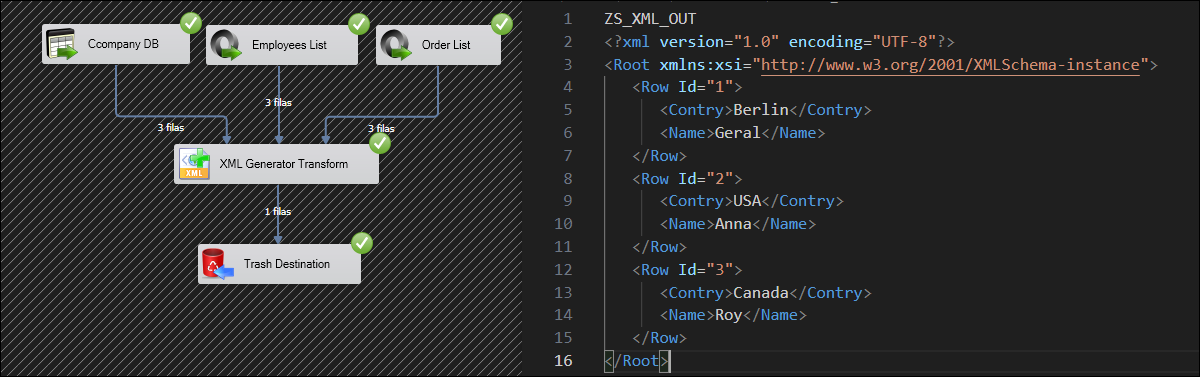


At a glance
What XML Generator Transform can do
XML Generator Transform creates single or multiple XML documents from any type of data source (e.g. SQL Server, MySQL, Flat File, Excel) inside the Data Flow Task. The XML output can be stored to a file or sent to any target.
XML inside the Data Flow
Generate single or multiple XML documents from any data source inside the Data Flow Task.
- Outputs an XML string column you can send to Web API Destination or save to a file
Nested XML from multiple datasets
Join different types of datasets (e.g. SQL Server, Flat File, Excel) to create parent-child relations for nested XML.
Layout editor with preview
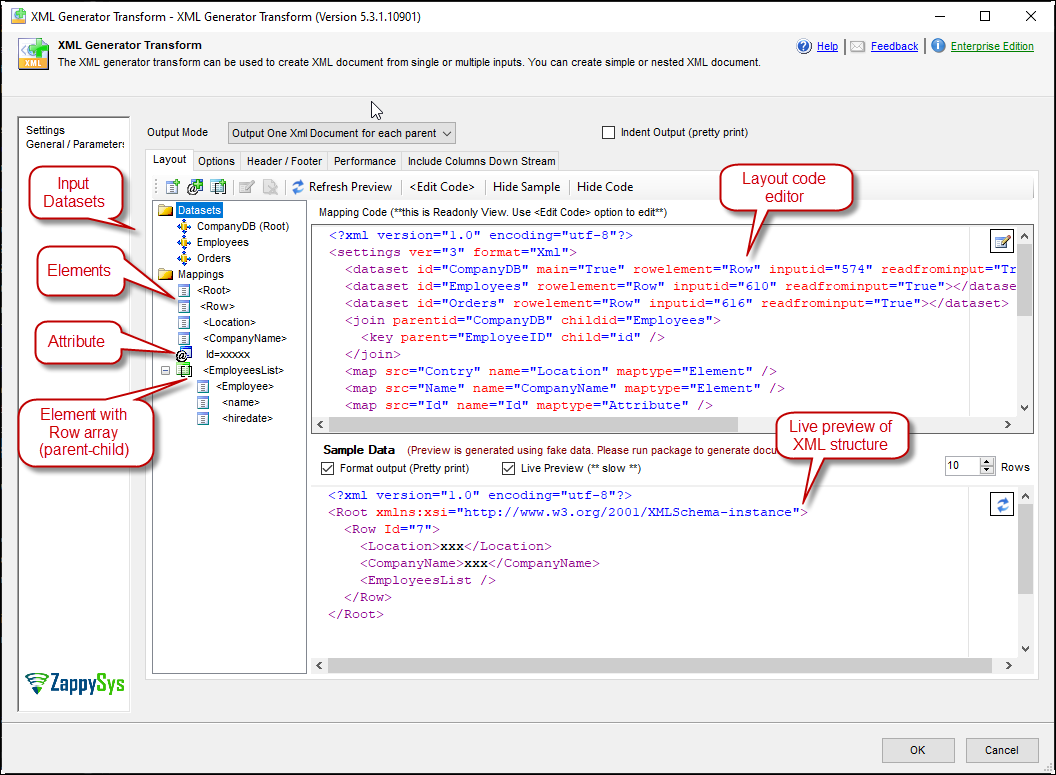
Build simple or nested XML with a drag-and-drop layout and preview the structure as you change it.
- Elements, attributes and document arrays
One, many or batched documents
Create one XML document for all input records, one per parent record, or group rows into batches for bulk API requests.
OutputMode: one document for all records (batching allowed), one per parent record, or single dataset arrayArrayBatchSizesets rows per batch in single dataset array mode
Namespaces & SOAP messages
Generate XML with namespaces and prefixes, for example a SOAP message for a web service.
NamespacesandRootElementPrefixDoNotOutputXmlDeclarationandXmlStandAlone
NULL & empty-node handling
Leave out NULL attributes or elements and empty nested nodes.
DoNotOutputNullAttributeDoNotOutputEmptyNestedAttribute
Header, footer & formatting
Add document header and footer text and control indentation, formats and encoding.
DocumentHeader/DocumentFooter, or from an upstream columnIndentOutput,DateTimeFormatandCultureEncodingorCharacterSet
SQL Server 2012–2025 & ADF
Runs in your environment on SQL Server 2012–2025 and Azure-SSIS.
- SQL Server 2025, 2022, 2019, 2017, 2016, 2014, 2012 (32/64-bit)
- Azure Data Factory (SSIS IR)
- Design packages in Visual Studio 2017, 2019, 2022, or 2026
- Windows only (64-bit OS): Windows 7–11 or Windows Server 2012–2025
See all features
- Create simple or nested XML documents inside the Data Flow Task with drag and drop
- Create nested XML from multiple datasets
- Join different types of datasets (e.g. SQL Server, Flat File, Excel) for parent-child relations
- Single XML document for all input records or one document per ROOT dataset row
- Preview XML structure as you change the layout
- Batch multiple rows into one XML document for API requests
- Namespaces and prefixes (e.g. for SOAP messages)
- Root element name, XML declaration and standalone options
- Skip NULL attributes/elements and empty nested nodes
- Document header and footer text
- Indent output, date/time format, culture and encoding options
- Logging modes up to Debugging, with optional timestamp prefix
Support for SQL Server 2025, 2022, 2019, 2017, 2016, 2014, 2012 (32/64-bit) and Azure Data Factory
SQL Server 2012–2025
How it works
From the toolbox to your first run.
Connect inputs, shape the XML in the layout editor, and pass the result downstream.
Generate XML in the Data Flow and pass it on.
Connect one or more sources (for example OLE DB Source, MongoDB Source or CSV File Source) to XML Generator Transform. It outputs XML in a column, which you can save to a file or send to another target such as Web API Destination.
- Single or multiple inputs from any Data Flow source
- One document for all records, per parent record, or single dataset array
- Batch rows into one document for bulk API requests
Define nested elements and parent/child relations.
Double-click the transform and build the layout tree under Mappings: attributes and elements bound to input columns, plus document arrays for child rows. The preview updates as you change the layout.
- Elements, attributes and document arrays
- Parent/child relations across different input types
- Skip NULL values and empty nested nodes
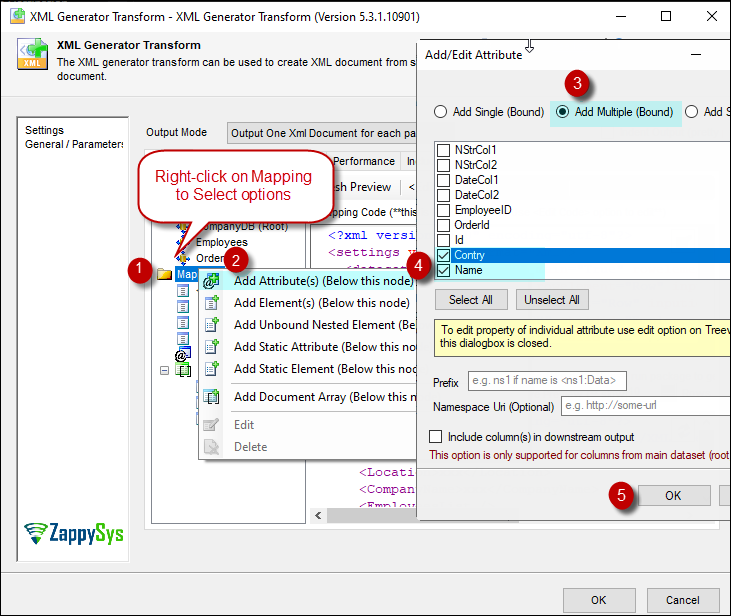
Bind columns as attributes or elements.
Right-click Mappings and choose Add Attribute(s) or Add Element(s), then pick Add Multiple (Bound) and check the columns to output.
- Bind several columns at once
- Namespaces and prefixes, e.g. for SOAP messages
- Optional XML declaration and standalone attribute
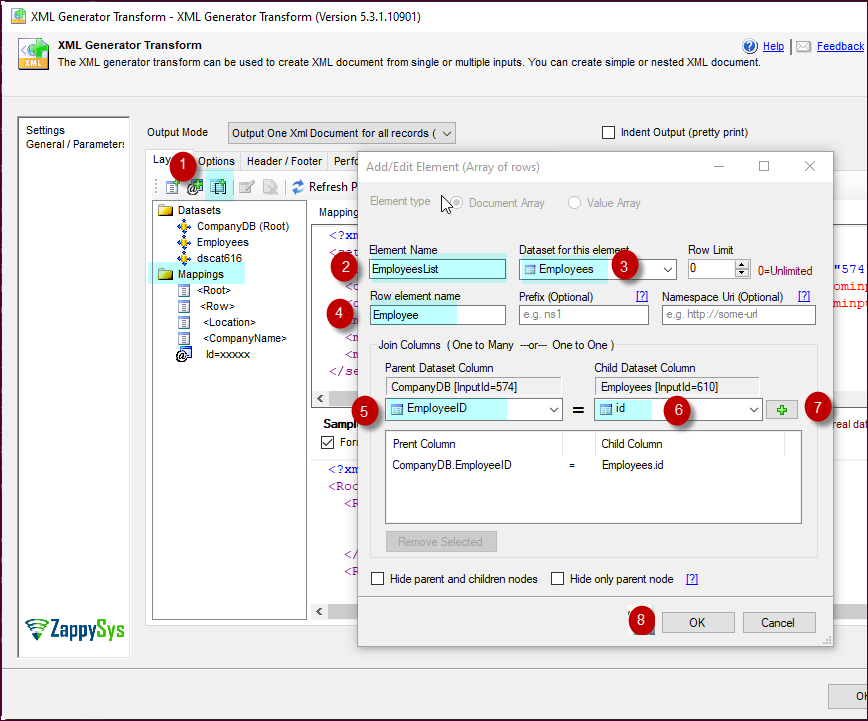
Nest child rows with a document array.
Right-click Mappings and choose Add Document Array to add an array of rows from a second dataset, such as Orders under Customers, then add elements under the new node.
- Parent/child relation between two datasets
- Elements and attributes under each array item
- Header and footer text around each document
Inside the UI
Key settings, as they appear in SSDT.
Real screens from the XML Generator Transform product page. Step through them, or open any shot at full size.
Generate XML and save to file
XML Generator Transform outputs XML in a column that can be saved to a file or sent to any target.
Articles
Worked examples that use XML Generator Transform.
Compatibility and requirements
Designed to stay inside your SSIS runtime.
- SQL Server 2012 through 2025, 32-bit and 64-bit
- Windows only, 64-bit OS required. SQL Server Express and Web editions do not include SSIS
- Azure Data Factory SSIS Integration Runtime
- Self-hosted: credentials and data stay in your environment (external API calls still reach that service)
- Fully functional 30-day trial of SSIS PowerPack
FAQ
Questions teams ask before they drop XML Generator Transform on the canvas.
What is XML Generator Transform?
A Data Flow transform in SSIS PowerPack that builds single or multiple XML documents from any type of data source (e.g. SQL Server, MySQL, Flat File, Excel). The XML is output in a column that you can store to a file or send to any target, and a drag-and-drop layout editor with live preview handles nested parent/child XML.
Can it generate XML with namespaces, such as a SOAP message?
Yes. Set Namespaces and RootElementPrefix, then send the generated SOAP message to a web service with Web API Destination. See how to generate XML with namespace / prefix in SSIS.
Can I batch rows into one XML document per API request?
Yes. Group multiple input rows into one XML document per batch and POST each one with Web API Destination. See how to batch REST API requests in SSIS.
How is it different from XML File Destination?
The layout editor is almost identical. XML Generator Transform outputs XML in a column for further processing, while XML File Destination writes the XML straight to a file through a File Connection.
Which SQL Server versions can I run it on?
SQL Server 2025, 2022, 2019, 2017, 2016, 2014, and 2012 (32- and 64-bit), plus Azure Data Factory with an SSIS Integration Runtime (packages must target SQL Server 2017). See Compatibility and requirements.



What customers say
Start your free trial today
Install SSIS PowerPack and drag XML Generator Transform onto the Data Flow.
Shape nested XML from any Data Flow source and pass it to files, SOAP services or REST APIs.
- Data Flow Transform in SSISXML Generator Transform appears in the toolbox after you install PowerPack.
- Fully functional 30-day trialSSIS PowerPack, running in your environment.
- Live supportHelp during your trial and after purchase.
Open Help FileBrowse all SSIS PowerPack tasks
New purchases may be eligible for refund review within 30 days. See the refund policy.
Talk to an engineer before or during your trial.