SSIS Amazon Redshift Cluster Management Task
Automate common Amazon Redshift cluster tasks: create or delete clusters, fetch cluster properties, and create or delete snapshots.
SSIS Amazon Redshift Cluster Management Task automates the most common Amazon Redshift cluster management tasks: create cluster, delete cluster, list cluster properties, create snapshot and delete snapshot.
The trial includes Amazon Redshift Cluster Management Task and every other PowerPack component
- Control Flow Task in SSIS
- Runs in your environment
- Also runs in Azure Data Factory
- Fully functional 30-day trial















At a glance
What Amazon Redshift Cluster Management Task can do
SSIS Amazon Redshift Cluster Management Task can be used to automate most common Redshift Cluster Management Tasks such as Create Cluster, Delete Cluster, List Cluster Properties, Create Snapshot, Delete Snapshot etc.
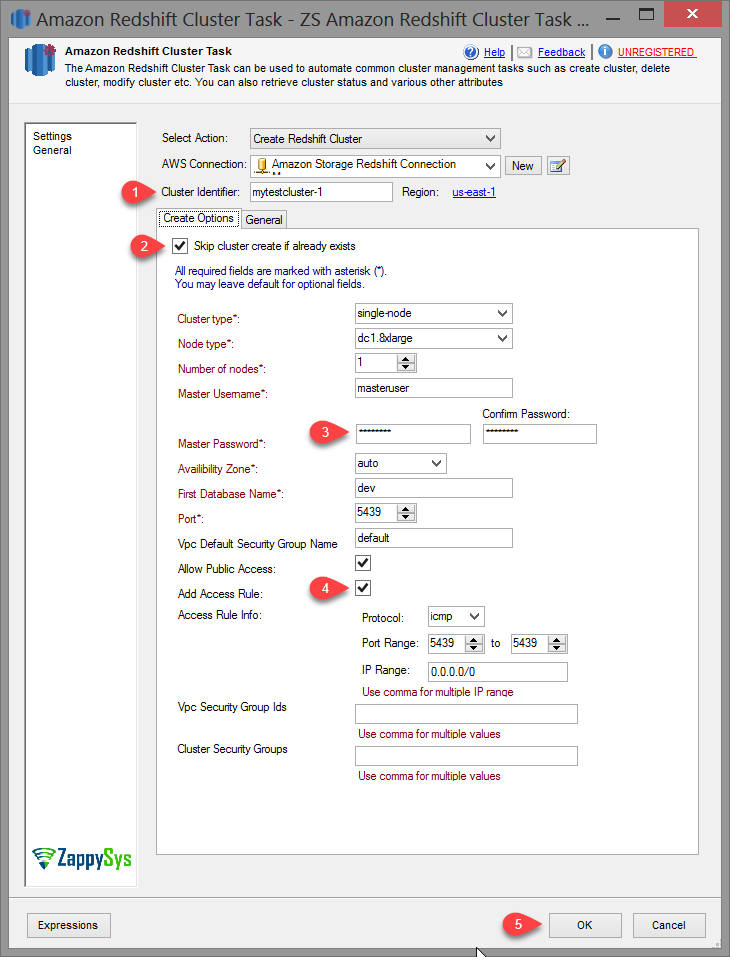
Create Redshift clusters
Automate the Create Redshift Cluster action in a few clicks.
- Cluster type (single-node or multi-node), node type and number of nodes
- Master user name and password, availability zone and first database name
- Skip cluster create if it already exists
Access rules on create
Add an access security rule while the cluster is created.
- Protocol: tcp, udp, icmp or all
- Port range and IP range
- VPC security group IDs, cluster security groups and Allow Public Access
Delete clusters safely
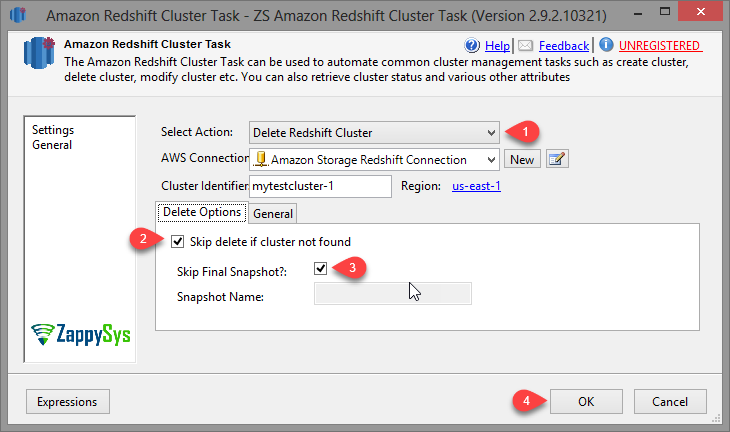
Automate the Delete Redshift Cluster action.
- Skip delete if the cluster is not found
- Skip the final snapshot, or give the final snapshot a name
Snapshot automation
Automate creating and deleting Redshift cluster snapshots.
- Create Snapshot with your own identifier, or leave it blank for a system-generated ID
- Delete Snapshot by snapshot identifier
Cluster property to variable
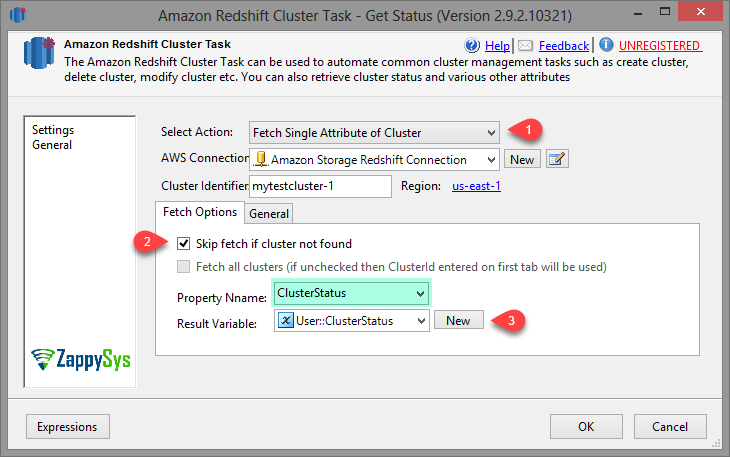
Fetch a single cluster attribute, such as cluster status, into an SSIS variable.
- Action: Fetch Single Attribute of Cluster
- Example: Property Name
ClusterStatussaved to a Result Variable - Skip fetch if the cluster is not found
Loop through all clusters
Fetch all clusters and their properties as a DataTable.
- Action: Fetch All Attributes of Cluster as Table
- Use a ForEach Loop to iterate through every cluster
Wait for completion
Wait until the selected cluster operation is done before the package continues.
- Set a maximum wait time on the General tab
SQL Server 2012–2025 & ADF
Runs in your environment on SQL Server 2012–2025 and Azure-SSIS.
- SQL Server 2025, 2022, 2019, 2017, 2016, 2014, 2012 (32/64-bit)
- Azure Data Factory (SSIS IR)
- Design packages in Visual Studio 2017, 2019, 2022, or 2026
- Windows only (64-bit OS): Windows 7–11 or Windows Server 2012–2025
AWS connection options
Connect through the Amazon Storage Connection Manager with Redshift as the storage service.
- Access key and secret key, or temporary token credentials with a session token
- Default credentials (IAM role)
- Region and proxy server settings
See all features
- Automate common Redshift cluster management tasks: create cluster, delete cluster, list cluster properties, create snapshot and delete snapshot
- Create a Redshift cluster with cluster type, node type, number of nodes, master user and first database name
- Add an access security rule (protocol, port range, IP range) when creating a cluster
- Skip cluster create if it already exists, or skip delete if the cluster is not found
- Optionally skip the final snapshot when deleting a cluster
- Create or delete cluster snapshots
- Fetch a Redshift cluster property (e.g. cluster status) into an SSIS variable
- Fetch all clusters and their properties as a DataTable to loop with a ForEach Loop
- Wait until the cluster operation is done, with a maximum wait time
- Key-based, temporary token or default (IAM role) credentials on the Amazon Storage Connection Manager
- Logging modes (Normal, Medium, Detailed, Debugging) with optional timestamp prefix
Support for SQL Server 2025, 2022, 2019, 2017, 2016, 2014, 2012 (32/64-bit) and Azure Data Factory
SQL Server 2012–2025
How it works
From the toolbox to your first run.
Key steps from the Amazon Redshift Cluster Management Task page and help file, with the screens you will see in SSDT.
Create a Redshift cluster
Set Action to Create Redshift Cluster, select the AWS connection and enter a Cluster Identifier.
On the Create Options tab, check Skip cluster create if already exists, set the master password and optionally Add Access Rule. On the General tab you can wait until the action completes, up to a maximum time.
Delete a Redshift cluster
Set Action to Delete Redshift Cluster, select the AWS connection and enter the Cluster Identifier.
Check Skip delete if cluster not found, and either skip the final snapshot or give it a name.
Fetch a cluster attribute into a variable
Set Action to Fetch Single Attribute of Cluster, select the AWS connection and enter the Cluster Identifier.
Set Property Name (for example ClusterStatus) and pick a Result Variable, or click New to create one. Check Skip fetch if cluster not found if needed.
Delete a cluster snapshot
Set Action to Delete Snapshot, select the AWS connection, enter the Cluster Identifier and the Snapshot Identifier to delete.
To take a snapshot instead, use the Create Snapshot action; leave its Snapshot Identifier blank to get a system-generated ID.

Inside the UI
Key settings, as they appear in SSDT.
Real screens from the Amazon Redshift Cluster Management Task product page. Step through them, or open any shot at full size.
Package design: create, delete, fetch and snapshot actions
One package that creates and deletes a Redshift cluster, loops through cluster properties, and creates and deletes snapshots.
Articles
Worked examples that use Amazon Redshift Cluster Management Task.
Compatibility and requirements
Designed to stay inside your SSIS runtime.
- SQL Server 2012 through 2025, 32-bit and 64-bit
- Windows only, 64-bit OS required. SQL Server Express and Web editions do not include SSIS
- Azure Data Factory SSIS Integration Runtime
- Self-hosted: credentials and data stay in your environment (external API calls still reach that service)
- Fully functional 30-day trial of SSIS PowerPack
FAQ
Questions teams ask before they drop Amazon Redshift Cluster Management Task on the canvas.
What is Amazon Redshift Cluster Management Task?
SSIS Amazon Redshift Cluster Management Task automates the most common Amazon Redshift cluster management tasks from the SSIS Control Flow: create cluster, delete cluster, list cluster properties, create snapshot and delete snapshot.
What can Amazon Redshift Cluster Management Task do?
Pick one action per task: Create Redshift Cluster (optionally with an access security rule), Delete Redshift Cluster (with or without a final snapshot), Create Snapshot, Delete Snapshot, Fetch Single Attribute of Cluster (for example ClusterStatus into an SSIS variable) or Fetch All Attributes of Cluster as Table (loop through clusters with a ForEach Loop). It can wait until the action is completed, up to a maximum time.
How does it connect to AWS?
It uses the Amazon Storage Connection Manager with Redshift selected as the storage service, using an access key and secret key, temporary token credentials or default credentials (IAM role).
Can I re-run a package without errors if the cluster already exists?
Yes. On create, check Skip cluster create if already exists; on delete, check Skip delete if cluster not found. Fetch actions also have Skip fetch if cluster not found.
Which SQL Server versions can I run it on?
SQL Server 2025, 2022, 2019, 2017, 2016, 2014, and 2012 (32- and 64-bit), plus Azure Data Factory with an SSIS Integration Runtime (packages must target SQL Server 2017). See Compatibility and requirements.





What customers say
Start your free trial today
Install SSIS PowerPack and drag Amazon Redshift Cluster Management Task onto the Control Flow.
Automate common Amazon Redshift cluster tasks: create or delete clusters, fetch cluster properties, and create or delete snapshots.
- Control Flow Task in SSISAmazon Redshift Cluster Management Task appears in the toolbox after you install PowerPack.
- Fully functional 30-day trialSSIS PowerPack, running in your environment.
- Live supportHelp during your trial and after purchase.
Open Help FileBrowse all SSIS PowerPack tasks
New purchases may be eligible for refund review within 30 days. See the refund policy.
Talk to an engineer before or during your trial.