SSIS Export JSON File Task
Generate simple or nested JSON files from SQL Server, Oracle, MySQL and other relational sources, without writing code.
Export JSON File Task generates simple or complex JSON files from tables, views or SQL queries in relational sources such as SQL Server, Oracle and MySQL. Use the Layout Editor to build parent/child nested documents from multiple tables in a few clicks, then save the result to a file or SSIS variable, or export it directly to Azure Blob Storage, Amazon S3 or SFTP.
The trial includes Export JSON File Task and every other PowerPack component
- Control Flow Task in SSIS
- Runs in your environment
- Also runs in Azure Data Factory
- Fully functional 30-day trial















At a glance
What Export JSON File Task can do
Export JSON File Task generates simple or complex JSON files from relational sources such as SQL Server, Oracle and MySQL. It can also export directly to cloud storage such as Azure Blob Storage, Amazon S3 and SFTP.
Export tables, views & queries
Generate JSON files from one or many tables, views or SQL query output from relational sources such as SQL Server, Oracle or MySQL.
- Multiple objects or patterns in
Source(e.g.Sales%orSalesJan|SalesFeb) - Multi-character
SourceSplitChar(e.g.||) to list multiple SQL statements - Source connection can be any ADO.NET or OLE DB connection manager
Nested JSON layout editor
Use the built-in Layout Editor to create complex JSON with nested structure from single or multiple tables.
- Document Array, Value Array and nested attributes
- Parent/child nested documents by joining datasets
- Live preview of the JSON output
JSON output formats
Choose the JSON shape: an array of documents, multi-content JSON or compact 2D arrays.
JsonSupportMultiContentappends records without commas or array brackets- Array2D, Array2DWithHeader, ArrayLines and ArrayLinesWithHeader
- Indent output (pretty print) and
DoNotOutputNullPropertyto skip NULLs
Export to cloud storage
Export directly to Azure Blob Storage, Amazon S3 or Secure FTP, and browse the cloud location from the task UI.
- Export multiple SQL tables dynamically to cloud storage (Pro Edition)
Split into multiple files
Automatically split exported JSON into multiple files by size, number of records or column value.
SplitFileswithMaxSizePerFileorMaxRowsPerFileGroupByColumn(e.g. Country) creates one file per value
File, variable, GZip & append
Save the JSON output to a file or an SSIS variable, compress it in GZip format and append to or overwrite existing files.
Compressto *.gz, withKeepRawto keep the uncompressed fileAppendandOverwriteoptions for the target file
Dynamic SQL & layout
Make exports dynamic with SSIS variables in dataset SQL or in the layout, or load the layout from a variable or file.
- Variable placeholders inside dataset SQL
- Layout read from direct value, variable or file (
MappingAccessMode)
SQL Server 2012–2025 & ADF
Runs in your environment on SQL Server 2012–2025 and Azure-SSIS.
- SQL Server 2025, 2022, 2019, 2017, 2016, 2014, 2012 (32/64-bit)
- Azure Data Factory (SSIS IR)
- Design packages in Visual Studio 2017, 2019, 2022, or 2026
- Windows only (64-bit OS): Windows 7–11 or Windows Server 2012–2025
See all features
- Export multiple tables/views to JSON files (e.g.
Sales%orSalesJan|SalesFeb) - Export SQL query output to JSON files (local disk or cloud storage)
- Save JSON output into an SSIS variable or file
- Built-in Layout Editor for complex nested JSON (Document Array, Value Array, nested attributes)
- Parent/child nested documents from multiple tables, with live preview
- Automatically split JSON into multiple files by size or number of records
- Split into one file per column value (e.g.
GroupByColumn= Country), with the value used as the file name suffix - Export to Azure Blob, Amazon S3, FTP/SFTP (multiple tables dynamically in Pro Edition)
- GZip compression and append support
- Multi-content JSON documents and 2D array formats (with or without header)
- Multiple characters allowed in
SourceSplitCharto list multiple SQL statements - Indent output (pretty print), skip NULL properties, date format and encoding options (ASCII, UTF-8, UTF-16, UTF-32, with or without BOM)
- Limit exported rows with
MaxRowsToExportand set a source queryTimeout - Dynamic SQL and layout using SSIS variables
Support for SQL Server 2025, 2022, 2019, 2017, 2016, 2014, 2012 (32/64-bit) and Azure Data Factory
SQL Server 2012–2025
How it works
From the toolbox to your first run.
Export with the default layout, or design nested JSON in the Layout Editor, then split and format the output.
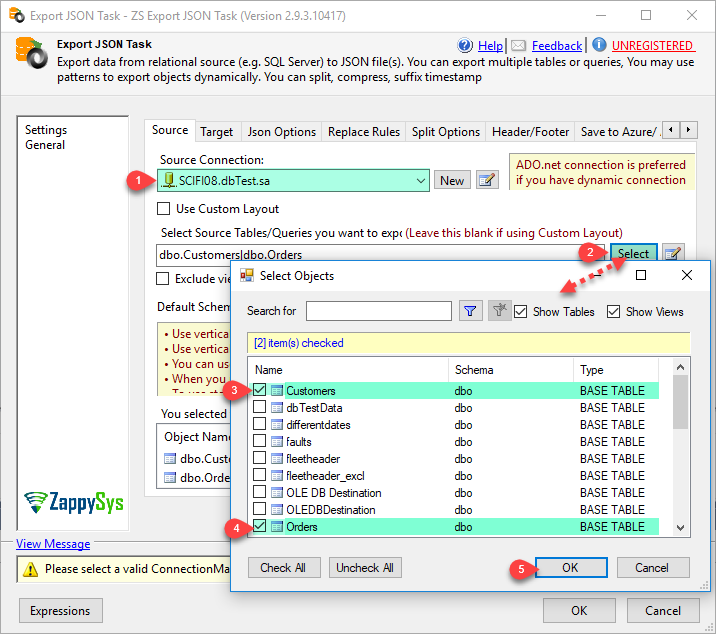
Export tables or queries with the default layout.
Set the source connection (any ADO.NET or OLE DB connection), then click Select to pick the tables, views or queries to export. Each record becomes a JSON document using the column names as attributes.
- Several objects with
table1|table2or patterns such asSales% - Narrow patterns with
Schema,ExcludeViewsandExcludeTables - No column metadata to maintain when a table changes
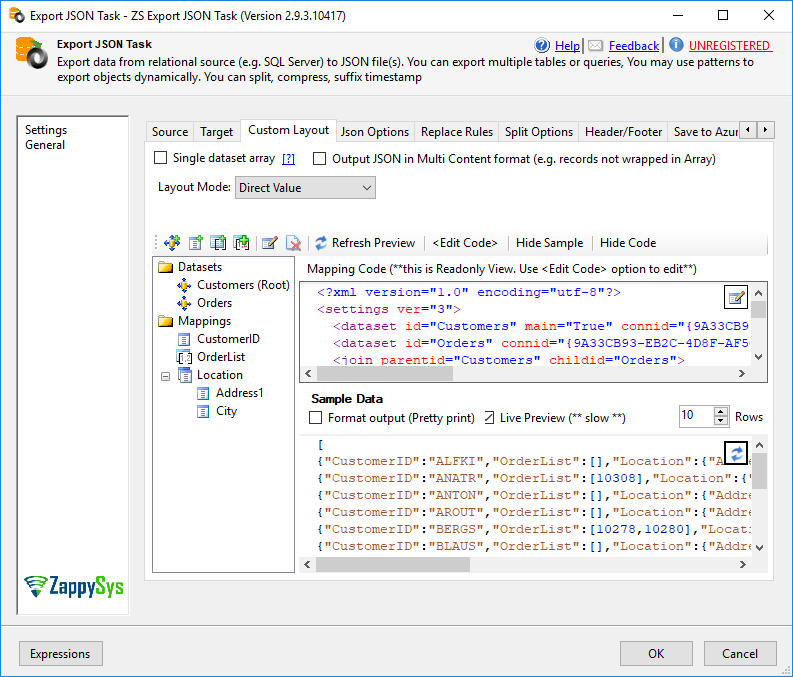
Build nested JSON in the Layout Editor.
Check Use Custom Layout on the Source tab, add datasets on the Custom Layout tab, then right-click Mappings to add elements, value arrays, document arrays and unbound nested elements. Child arrays join to their parent dataset on a key such as CustomerID.
- Document Array, Value Array and nested attributes
- Parent/child documents from multiple datasets
- Live preview of the JSON output
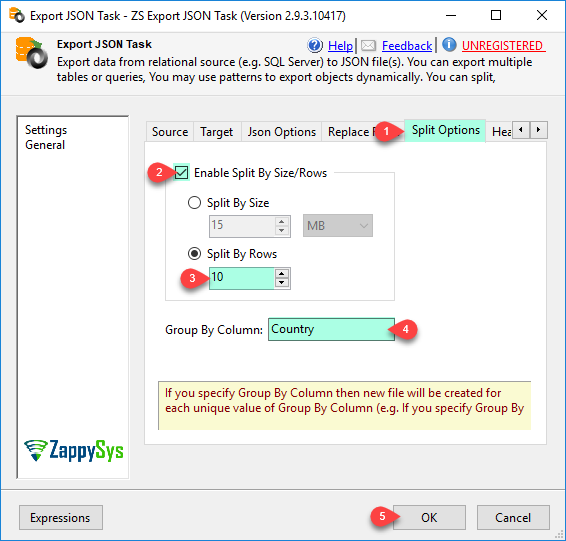
Split output by size, rows or a column value.
On the Split Options tab, enable Split By Size/Rows and choose Split By Rows or size. Set a Group By Column to create a new file for each unique value, for example one file per Country.
MaxSizePerFilein bytes, kb, mb or gb (e.g.10mb)MaxRowsPerFilefor a fixed row count per file- The group-by value becomes the file name suffix
Export JSON as documents, multi-content or 2D arrays.
Change the output format when a consumer expects compact arrays. For two rows with columns id and name, Array2D produces [[1,"AA"],[2,"BB"]] and Multicontent produces {id:1,name:"AA"}{id:2,name:"BB"}.
- Default / ArrayDocs: an array of documents
- Multicontent: one document after another, no brackets or commas
- Array2D, Array2DWithHeader, ArrayLines and ArrayLinesWithHeader

Inside the UI
Key settings, as they appear in SSDT.
Real screens from the Export JSON File Task product page. Step through them, or open any shot at full size.
Select tables, views or queries
Set the source connection and click Select to choose the tables, views or queries to export with the default layout.
Articles
Worked examples that use Export JSON File Task.
Compatibility and requirements
Designed to stay inside your SSIS runtime.
- SQL Server 2012 through 2025, 32-bit and 64-bit
- Windows only, 64-bit OS required. SQL Server Express and Web editions do not include SSIS
- Azure Data Factory SSIS Integration Runtime
- Self-hosted: credentials and data stay in your environment (external API calls still reach that service)
- Fully functional 30-day trial of SSIS PowerPack
FAQ
Questions teams ask before they drop Export JSON File Task on the canvas.
What is Export JSON File Task?
A Control Flow task in SSIS PowerPack that generates simple or complex JSON files from tables, views or SQL queries in relational sources such as SQL Server, Oracle and MySQL. A Layout Editor builds parent/child nested documents, and output can go to a file, an SSIS variable, or directly to Azure Blob Storage, Amazon S3 or SFTP.
How do I create nested JSON from several tables?
Check Use Custom Layout, add one dataset per table or query (one is the root dataset), then add a Document Array under Mappings and define its join to the parent dataset, for example Orders to Customers on CustomerID. The 5 ways to export JSON article walks through it, including live preview.
Can I output a 2D array or JSON Lines style output?
Yes. Besides the default array of documents, the task can write Multicontent (documents back to back with no brackets or commas), Array2D, Array2DWithHeader, ArrayLines and ArrayLinesWithHeader. See the 2D arrays tab above for sample output.
When should I use JSON File Destination instead?
Export JSON File Task reads datasets from OLE DB, ADO.NET or SQL Server connections and offers file splitting and direct cloud export. If your data comes from other Data Flow sources (flat files, Excel, APIs), use JSON File Destination in the Data Flow, which has no file splitting options.
Which SQL Server versions can I run it on?
SQL Server 2025, 2022, 2019, 2017, 2016, 2014, and 2012 (32- and 64-bit), plus Azure Data Factory with an SSIS Integration Runtime (packages must target SQL Server 2017). See Compatibility and requirements.



What customers say
Start your free trial today
Install SSIS PowerPack and drag Export JSON File Task onto the Control Flow.
Turn tables and queries into nested JSON files, then split, compress or send them to cloud storage.
- Control Flow Task in SSISExport JSON File Task appears in the toolbox after you install PowerPack.
- Fully functional 30-day trialSSIS PowerPack, running in your environment.
- Live supportHelp during your trial and after purchase.
Open Help FileBrowse all SSIS PowerPack tasks
New purchases may be eligible for refund review within 30 days. See the refund policy.
Talk to an engineer before or during your trial.