SSIS Amazon S3 CSV File Source
Read CSV files from Amazon S3 Storage.
SSIS Amazon S3 CSV File Source can be used to read CSV files from Amazon S3 Storage (i.e. AWS S3 Service). You can extract data from single or multiple files (wildcard pattern supported). Also you can read compressed files (*.gz) without extracting files on disk.
The trial includes Amazon S3 CSV File Source and every other PowerPack component
- Data Flow Source in SSIS
- Runs in your environment
- Also runs in Azure Data Factory
- Fully functional 30-day trial


At a glance
What Amazon S3 CSV File Source can do
SSIS Amazon S3 CSV File Source can be used to read CSV files from Amazon S3 Storage (i.e. AWS S3 Service). You can extract data from single or multiple files (wildcard pattern supported). Also you can read compressed files (*.gz) without extracting files on disk.
Read many S3 files
Read a single file or multiple files stored in Amazon S3 using a wildcard pattern (e.g. *.csv).
Recursiveincludes files from sub foldersEnableMultiPathModereads a list of paths in one step- Dynamic path with variable placeholders, e.g.
/myroot/{{User::MyFolder}}/*.csv
Read compressed files
Read Zip and GZip compressed files in stream mode, without extracting them on disk.
FileCompressionType: GZip, Zip or TarGZip
Advanced CSV parsing
Fine-tune how the CSV file is parsed.
TrimFields,TrimHeaders,SkipRows,SkipHeaderCommentRowsAllowCommentskips comment lines;IgnoreBlankLinesandSkipEmptyRecords- Custom
ColumnDelimiterandQuoteCharacter
Error handling options
Choose when the source should fail and capture bad records.
ThrowErrorOnColumnCountMismatchandThrowErrorOnNoRecordFound- Missing columns at the end are auto filled with null values
- Redirect bad records to the error output
Data pivot
Transform columns into rows with the pivot option.
EnablePivotoutputsPivot_NameandPivot_Valuecolumns
Null, date & culture handling
Control how blank values, dates and numbers are converted.
TreatBlankAsNull, plus blank-as-null for number, bool and date typesCulturefor culture specific number formats- Date/time parsing options
Metadata & file info
Control how column data types are detected and add file details to the output.
MetaDataScanMode: Auto, Strict, Guess2x to Guess10x, or all stringsOutputFilePath/OutputFileNameadd__FilePathand__FileNamecolumns- Design-time data preview
SQL Server 2012–2025 & ADF
Runs in your environment on SQL Server 2012–2025 and Azure-SSIS.
- SQL Server 2025, 2022, 2019, 2017, 2016, 2014, 2012 (32/64-bit)
- Azure Data Factory (SSIS IR)
- Design packages in Visual Studio 2017, 2019, 2022, or 2026
- Windows only (64-bit OS): Windows 7–11 or Windows Server 2012–2025
Flexible AWS credentials
Connect through the Amazon Storage Connection Manager with access keys, temporary credentials or the default instance credentials.
CredentialType: key-based, temporary token (withSessionToken) or default (IAM Role or anonymous)- Proxy server support with optional proxy authentication
ForcePathStylefor S3-compatible services such as MinIO, Ceph or Cloudian
See all features
- Read single or multiple files stored in Amazon S3 (wildcard pattern supported, e.g. *.csv)
- Read Zip and GZip compressed files in stream mode
- Dynamic file path using variable placeholders (e.g.
/myroot/{{User::MyFolder}}/*.csv) - Missing columns at the end are auto filled with null values
- Data pivot (transform columns into rows)
- Comment lines in the file can be skipped
- Error handling such as throw error for empty file or when column count mismatches
- Advanced parser options such as trim fields, trim headers and skip rows
- Ignore blank lines and blank rows (no data for each column)
- Custom search/replace (including regex) before the data is parsed
- Metadata scan modes to control detected data types and lengths
- Output source file path and file name as columns
- Server side and client side encryption using RSA/AES encryption keys
- Key-based, temporary token or default (IAM Role) credentials, with proxy support
Support for SQL Server 2025, 2022, 2019, 2017, 2016, 2014, 2012 (32/64-bit) and Azure Data Factory
SQL Server 2012–2025
How it works
From the toolbox to your first run.
Key steps from the Amazon S3 CSV File Source page and help file, with the screens you will see in SSDT.
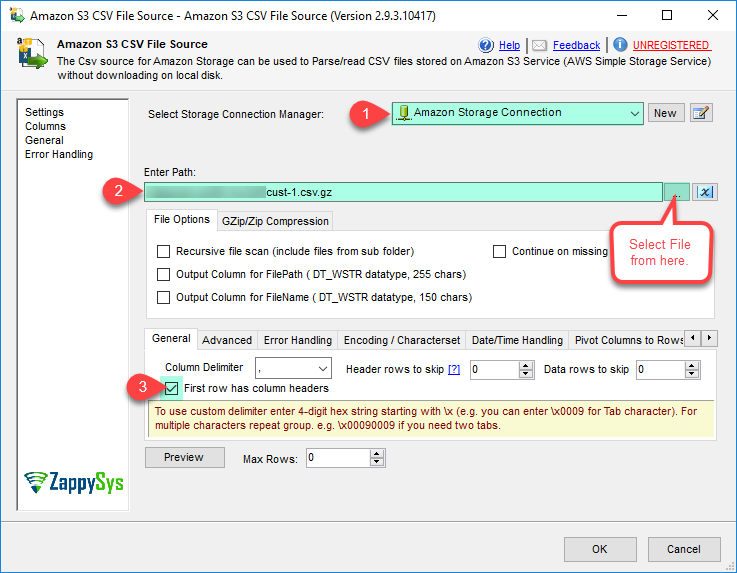
Amazon S3 CSV File Source – Read from CSV File Options
Double-click ZS Amazon S3 CSV File Source, select your Amazon Storage connection and pick the S3 file with the file browser, or type a wildcard pattern (e.g. *.csv) to read many files at once.
Check First row has column headers if the file has a header, then click Preview to see the data.
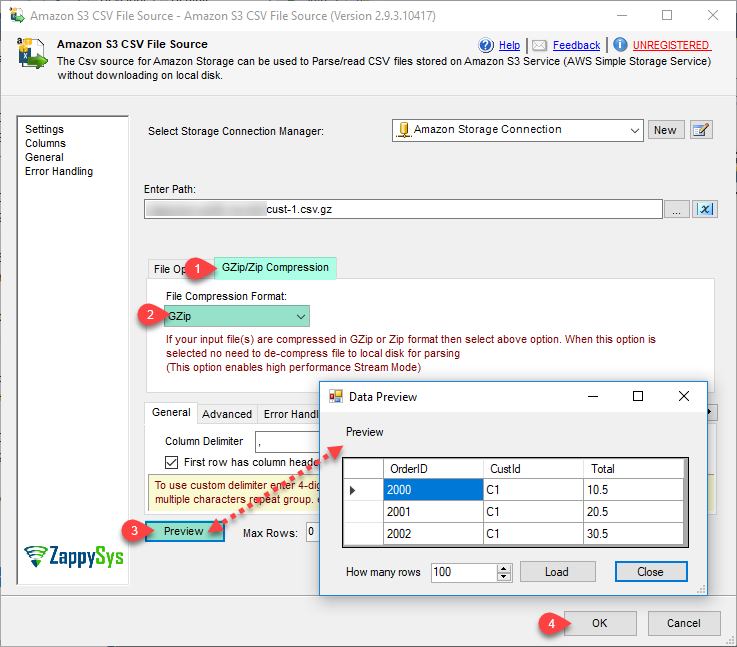
Amazon S3 CSV File Source – Read Compressed CSV File (GZip or Zip)
On the GZip/Zip Compression tab, set the file compression format (GZip, Zip or TarGZip).
Compressed files are read in stream mode, so nothing is extracted to local disk first.
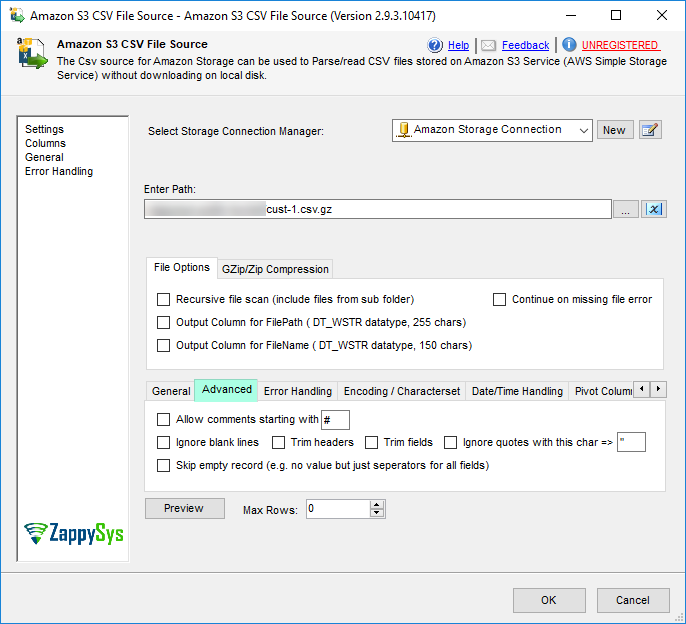
Amazon S3 CSV File Source – Advanced CSV Parsing Options
Fine-tune the parser: trim fields and headers, skip rows before or after the header, skip comment lines, ignore blank lines and empty records, and set the column delimiter and quote character.
Use TreatBlankAsNull and Culture to control how blank values and culture-specific numbers are converted.
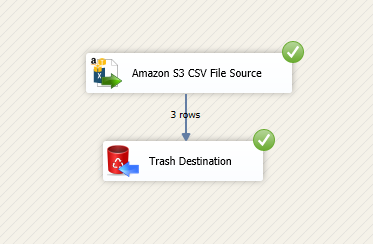
Amazon S3 CSV File Source – Redirect Bad Records (Error Handling)
Send rows that fail to parse to the error output instead of stopping the package, and handle them in a separate path.
ThrowErrorOnColumnCountMismatch and ThrowErrorOnNoRecordFound decide when the source should fail outright.
Inside the UI
Key settings, as they appear in SSDT.
Real screens from the Amazon S3 CSV File Source product page. Step through them, or open any shot at full size.
Amazon S3 CSV File Source – Read from CSV File Options
Select the connection, choose the S3 file or a wildcard pattern, and set header options.
Articles
Worked examples that use Amazon S3 CSV File Source.
Compatibility and requirements
Designed to stay inside your SSIS runtime.
- SQL Server 2012 through 2025, 32-bit and 64-bit
- Windows only, 64-bit OS required. SQL Server Express and Web editions do not include SSIS
- Azure Data Factory SSIS Integration Runtime
- Self-hosted: credentials and data stay in your environment (external API calls still reach that service)
- Fully functional 30-day trial of SSIS PowerPack
FAQ
Questions teams ask before they drop Amazon S3 CSV File Source on the canvas.
What is Amazon S3 CSV File Source?
SSIS Amazon S3 CSV File Source can be used to read CSV files from Amazon S3 Storage (i.e. AWS S3 Service). You can extract data from single or multiple files (wildcard pattern supported). Also you can read compressed files (*.gz) without extracting files on disk.
How do I read many CSV files from S3 in one go?
Use a wildcard pattern in the path (for example *.csv) and set Recursive to include sub folders. You can also turn on EnableMultiPathMode and list several paths separated by a new line or ::. Set OutputFileName or OutputFilePath to add __FileName / __FilePath columns so you know which file each row came from.
Can it read GZip or Zip files without extracting them?
Yes. Set FileCompressionType to GZip, Zip or TarGZip and the file is read in stream mode, without being extracted on local disk.
What happens with bad or incomplete rows?
Missing columns at the end of a row are filled with nulls. Turn on ThrowErrorOnColumnCountMismatch or ThrowErrorOnNoRecordFound to fail instead, or redirect bad records to the error output.
Can I read Amazon Athena query results?
Yes. Athena writes query output to S3 as CSV files, which this source can read. See Import / Export data from Amazon Athena using SSIS.
Which SQL Server versions can I run it on?
SQL Server 2025, 2022, 2019, 2017, 2016, 2014, and 2012 (32- and 64-bit), plus Azure Data Factory with an SSIS Integration Runtime (packages must target SQL Server 2017). See Compatibility and requirements.




What customers say
Start your free trial today
Install SSIS PowerPack and drag Amazon S3 CSV File Source onto the Data Flow.
Read CSV files from Amazon S3 Storage.
- Data Flow Source in SSISAmazon S3 CSV File Source appears in the toolbox after you install PowerPack.
- Fully functional 30-day trialSSIS PowerPack, running in your environment.
- Live supportHelp during your trial and after purchase.
Open Help FileBrowse all SSIS PowerPack tasks
New purchases may be eligible for refund review within 30 days. See the refund policy.
Talk to an engineer before or during your trial.