SSIS Secure FTP XML File Source
Read XML files from FTP, SFTP and FTPS servers.
SSIS Secure FTP Source for XML File can be used to read XML files from Secure FTP Storage (Classic FTP, SFTP, FTPS – i.e. FTP over SSL). You can extract data from single or multiple files (wildcard pattern supported). Also you can read compressed files (*.gz) without extracting files on disk.
The trial includes Secure FTP XML File Source and every other PowerPack component
- Data Flow Source in SSIS
- Runs in your environment
- Also runs in Azure Data Factory
- Fully functional 30-day trial


At a glance
What Secure FTP XML File Source can do
SSIS Secure FTP Source for XML File can be used to read XML files from Secure FTP Storage (Classic FTP, SFTP, FTPS – i.e. FTP over SSL). You can extract data from single or multiple files (wildcard pattern supported). Also you can read compressed files (*.gz) without extracting files on disk.
Read one or many files
Read a single XML file or many files from Secure FTP storage using a wildcard pattern such as *.xml.
Recursiveincludes files from sub folders- Dynamic path with variable placeholders, e.g.
/myroot/{{User::MyFolder}}/*.xml EnableMultiPathModereads a list of paths as one dataset
Compressed files in stream mode
Read zip and gzip compressed XML files without extracting them on disk.
FileCompressionType: GZip, Zip or TarGZip
FTP, SFTP & FTPS connections
Connect with Classic FTP, SFTP or FTPS (FTP over SSL/TLS) through the Secure FTP Connection Manager.
- Logon with user name and password, private key file, X509 certificate, Kerberos or NTLM
- FTPS implicit or explicit encryption, SSL 3.0 to TLS 1.3
- Proxy support: SOCKS4, SOCKS4a, SOCKS5 or HTTP CONNECT
Path expressions for nested data
Extract data from any level with a Filter expression, e.g. orders nested under each customer node.
IncludeParentColumnswith an optionalParentColumnPrefixIncludeParentColumnsWhenChildMissingworks like a LEFT OUTER JOINExcludedPropertiesandMaxLevelsToScan
Array handling for XML
Control which repeating elements become arrays and how arrays are flattened.
ElementsToTreatAsArraytreats named elements as arrays even when they appear onceEnableArrayFlatteningwithMaxArrayItemsToFlattenArrayTransformationTypefor 2D and key/value arrays
Pivot columns into rows
Turn columns into rows so each value is output in a separate row.
EnablePivotoutputsPivot_NameandPivot_ValuecolumnsIncludePivotPathadds aPivot_Pathcolumn showing the parent hierarchy
Raw XML or JSON output
Pass whole documents downstream instead of parsing them into columns.
OutputRawDocumentoutputs the raw documentConvertFormatconverts the raw XML document to JSON
SQL Server 2012–2025 & ADF
Runs in your environment on SQL Server 2012–2025 and Azure-SSIS.
- SQL Server 2025, 2022, 2019, 2017, 2016, 2014, 2012 (32/64-bit)
- Azure Data Factory (SSIS IR)
- Design packages in Visual Studio 2017, 2019, 2022, or 2026
- Windows only (64-bit OS): Windows 7–11 or Windows Server 2012–2025
Parsing, memory & errors
Tune parsing for dates, numbers, large files and bad records.
DateParseHandling,FloatParseHandlingandCultureEnablePerformanceMode: memory-optimized mode for out-of-memory errors- Redirect bad records to the error output
See all features
- Read single or multiple XML files stored in Secure FTP storage (wildcard pattern such as
*.xml) - Path expression to extract data from any level (e.g. orders nested under a customer node)
- Support for FTP (Classic FTP), SFTP, FTPS or FTP/SSL protocols
- Read zip and gzip compressed files in stream mode, without extracting them on disk
- Data pivot (transform columns into rows)
- Dynamic file path using variable placeholders (e.g.
/myroot/{{User::MyFolder}}/*.xml) - Include parent columns in the output, with optional prefix
- Treat chosen elements as arrays, plus array flattening options
- Output the raw XML document, optionally converted to JSON
- Memory-optimized performance mode
- Custom search / replace (including regular expressions) before the document is parsed
- Date/time, decimal and culture-specific number parsing
- Design-time data preview and redirect of bad records to the error output
- Encoding and character set options for the source file
Support for SQL Server 2025, 2022, 2019, 2017, 2016, 2014, 2012 (32/64-bit) and Azure Data Factory
SQL Server 2012–2025
How it works
From the toolbox to your first run.
Key steps from the Secure FTP XML File Source page and help file, with the screens you will see in SSDT.
Pick the connection and remote file, then filter the data you need.
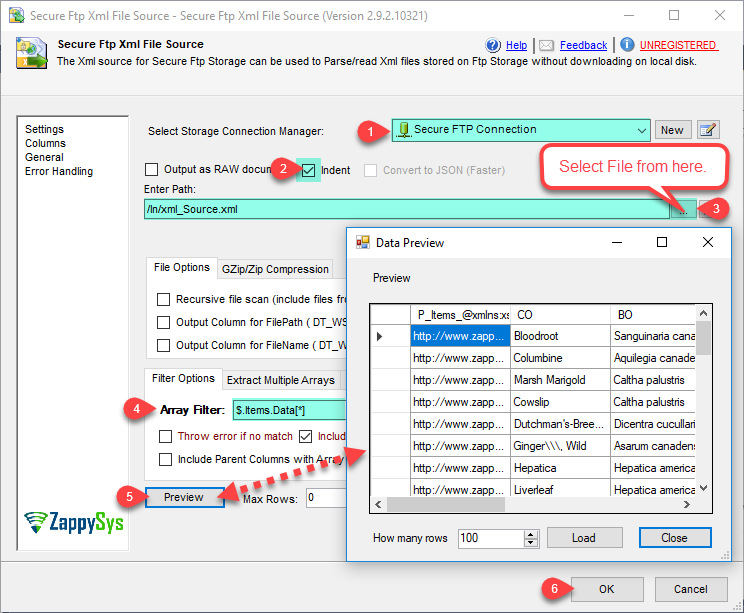
Select a Secure FTP connection, click the browse button to pick a remote file, enter an Array Filter such as $.Items.Data[*] to choose the nested node to return as rows, and click Preview.
- Single file or wildcard pattern such as
*.xml - Output the raw document instead of parsed columns
- Convert the raw XML document to JSON
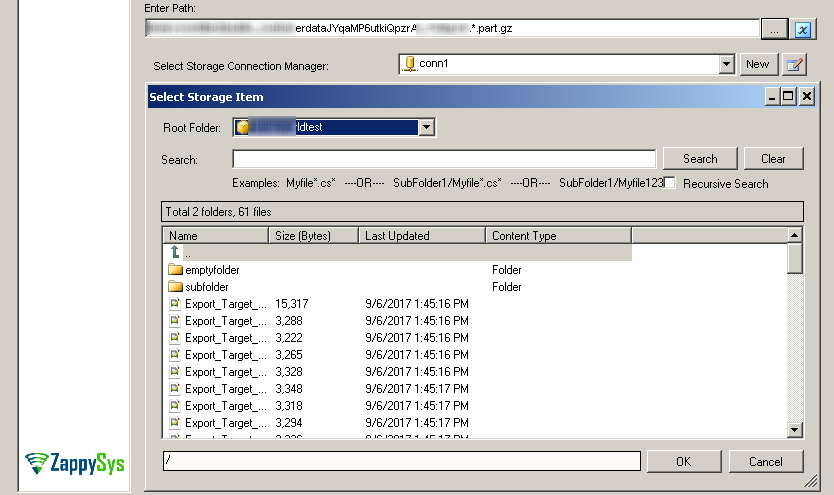
Find files on the server with the remote file browser.
The Select Storage Item dialog lists the folders and files on your FTP/SFTP server. Search with a pattern such as Myfile* or SubFolder1/Myfile*, optionally with Recursive Search, and pick the file to read.
- Shows size and last updated time for each file
- Use the same patterns in the path to read many files at once
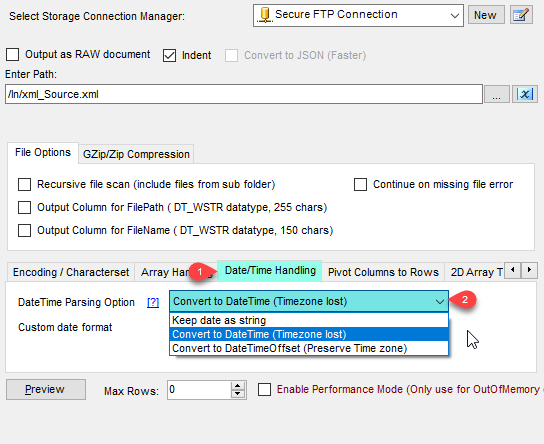
Control how date strings are converted.
On the Date/Time Handling tab, keep dates as strings, convert them to DateTime (time zone lost), or to DateTimeOffset to preserve the time zone. A custom date format can be set for non-standard values.
DateParseHandling: None, DateTime or DateTimeOffsetDateFormatStringfor custom formatsFloatParseHandlingDecimal for high precision
Run the package and send the rows downstream.
Connect the source to any destination. In this example Secure FTP XML File Source reads 36 rows from the remote file and passes them to a Trash Destination; in a real package use a SQL Server, Upsert or file destination.
- Redirect bad records to the SSIS error output
ContinueOnFileNotFoundErrorto skip missing files
Inside the UI
Key settings, as they appear in SSDT.
Real screens from the Secure FTP XML File Source product page. Step through them, or open any shot at full size.
Read from XML file options
Select the Secure FTP connection, browse to the remote file, set the Array Filter (e.g. $.Items.Data[*]) and click Preview.
Articles
Worked examples that use Secure FTP XML File Source.
Compatibility and requirements
Designed to stay inside your SSIS runtime.
- SQL Server 2012 through 2025, 32-bit and 64-bit
- Windows only, 64-bit OS required. SQL Server Express and Web editions do not include SSIS
- Azure Data Factory SSIS Integration Runtime
- Self-hosted: credentials and data stay in your environment (external API calls still reach that service)
- Fully functional 30-day trial of SSIS PowerPack
FAQ
Questions teams ask before they drop Secure FTP XML File Source on the canvas.
What is Secure FTP XML File Source?
A Data Flow Source in SSIS PowerPack that reads XML files stored on an FTP, SFTP or FTPS (FTP over SSL/TLS) server. It reads one file or many files with a wildcard pattern, extracts data from any level with a path filter, and can read compressed (zip / gzip) files without extracting them on local disk.
Which protocols and logon types does it support?
It uses the Secure FTP Connection Manager: Classic FTP, SFTP (SSH File Transfer Protocol) and FTPS with implicit or explicit TLS/SSL. Logon can use user name and password, a private key file, an X509 certificate, Kerberos or NTLM, and the connection supports SOCKS4, SOCKS4a, SOCKS5 or HTTP CONNECT proxies.
How do I extract nested data?
Set the Filter (Array Filter) to the node you want as rows, e.g. $.Items.Data[*]. Turn on IncludeParentColumns to add parent fields to each row, optionally with a ParentColumnPrefix.
Can I read many files or compressed files?
Yes. Use a wildcard path such as /In/*.xml, turn on Recursive to include sub folders, and set FileCompressionType to GZip, Zip or TarGZip to read compressed files in stream mode. If large files cause out-of-memory errors, EnablePerformanceMode switches to a memory-optimized mode (some functionality may not be available).
Which SQL Server versions can I run it on?
SQL Server 2025, 2022, 2019, 2017, 2016, 2014, and 2012 (32- and 64-bit), plus Azure Data Factory with an SSIS Integration Runtime (packages must target SQL Server 2017). See Compatibility and requirements.



What customers say
Start your free trial today
Install SSIS PowerPack and drag Secure FTP XML File Source onto the Data Flow.
Read XML files from FTP, SFTP and FTPS servers, extract nested data with a path filter, and read zip/gzip files without extracting them on disk.
- Data Flow Source in SSISSecure FTP XML File Source appears in the toolbox after you install PowerPack.
- Fully functional 30-day trialSSIS PowerPack, running in your environment.
- Live supportHelp during your trial and after purchase.
Open Help FileBrowse all SSIS PowerPack tasks
New purchases may be eligible for refund review within 30 days. See the refund policy.
Talk to an engineer before or during your trial.