SSIS Azure Blob Storage Task
Download, upload, copy, move, rename and delete Azure blobs and containers from the SSIS Control Flow.
Azure Blob Storage Task performs 30+ operations on Azure Storage blobs and containers, such as download, upload, copy, move, rename and delete. You can also read a single property of any blob, or get a list of blobs as an ADO.NET table to loop through with the ForEach Loop. Most operations support recursive search with wildcard patterns (e.g. Myfile*.txt).
The trial includes Azure Blob Storage Task and every other PowerPack component
- Control Flow Task in SSIS
- Runs in your environment
- Also runs in Azure Data Factory
- Fully functional 30-day trial


At a glance
What Azure Blob Storage Task can do
Azure Blob Storage Task can be used to perform various operations with Azure Storage objects (blobs and containers) (e.g. Download, Upload, Copy, Move, Rename, Delete etc).
30+ storage operations
Work with Azure Storage blobs and containers: download, upload, copy, move, rename, delete, create and more.
- Create or delete containers, including
CreateAzureContainerIfNotExists CreateNewAzureFilewrites content from a direct value or SSIS variableDeleteSourceWhenDoneremoves the source after upload or download
Fast parallel transfers
Download and upload small or very large files; download, upload, copy and delete run multi-threaded.
- Thread count set by
MaxParallelThreadson the connection
Wildcards & virtual folders
Most operations support recursive search using a wildcard pattern (e.g. Myfile*.txt).
Recursivescans subfolders- Virtual folder structure such as
myroot/folder1/subfolder/myfile.txt - Source and target paths from a direct value, variable or file connection
Advanced filter & sort
Filter files by name, size or date, then sort and limit the results.
WhereClause, e.g.Size>100 and Extension IN ('.txt','.csv')IncludeRegXPattern/ExcludeRegXPatternSortBy,SortDirectionandMaxItems(TOP)
Loop through blob lists
Get a list of blobs or containers as an ADO.NET table and loop through it with the SSIS ForEach Loop.
GetAzureFileListAsADONETDataTableGetAzureContainerListAsADONETDataTable
Read blob properties
Get a single property of any blob and store it in a result variable.
- File size, count, exists flag and last modified date
- Content type and metadata
- File content as a string or binary array
Metadata & content type
Set metadata key/value pairs and content types on new files.
EnableMetadataUpdatewithMetadataKeyValue, settable by expressionAutoSetContentType,UserDefinedContentTypesandDefaultContentType
SQL Server 2012–2025 & ADF
Runs in your environment on SQL Server 2012–2025 and Azure-SSIS.
- SQL Server 2025, 2022, 2019, 2017, 2016, 2014, 2012 (32/64-bit)
- Azure Data Factory (SSIS IR)
- Design packages in Visual Studio 2017, 2019, 2022, or 2026
- Windows only (64-bit OS): Windows 7–11 or Windows Server 2012–2025
Container permissions
Set access permission on a container path.
- Private container (default)
- Public read access, or public read and list access
See all features
- 30+ Azure Storage operations for Azure Blob Storage (such as Download, Upload, Copy, Delete)
- Download small or very large blobs to the local machine
- Upload small or very large local files to Azure Blob Storage
- Delete, Rename, List, Get Property, Copy, Move, Create and Set Permission operations
- Get List operation so you can loop through files with the SSIS ForEach Loop
- Download, Upload, Copy and Delete are multi-threaded (fast parallel operations)
- Virtual folder structure (e.g.
myroot/folder1/subfolder/myfile.txt) - Recursive search using wildcard patterns (e.g.
Myfile*.txt) - Advanced filtering by size, date or name with a where clause or regex, plus sorting and TOP
- Set metadata key/value pairs and content types
- Source and target paths from a direct value, variable or file connection
- Option to delete the source file after a successful upload or download
- Continue on error option so failed transfers do not stop the task
- Connect with access key, SAS URL/token, connection string or the Azure Storage Emulator
Support for SQL Server 2025, 2022, 2019, 2017, 2016, 2014, 2012 (32/64-bit) and Azure Data Factory
SQL Server 2012–2025
How it works
From the toolbox to your first run.
Key steps from the Azure Blob Storage Task page and help file, with the screens you will see in SSDT.
Pick a Storage Action and connect to Azure.
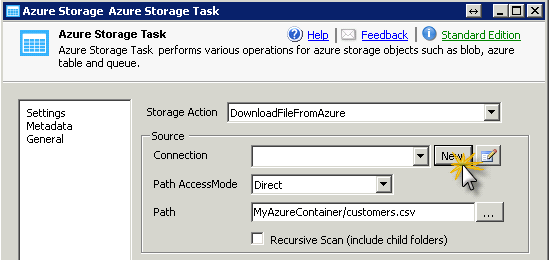
Drag the task onto the Control Flow and pick a Storage Action (DownloadFileFromAzure is the default). Under Source Connection click New, enter your storage account name and access key, click Test Connection and close the dialog.
- 30+ blob and container actions
- Account key, SAS URL/token or connection string
- Works with the local Azure Storage Emulator too
Set the source and target paths.
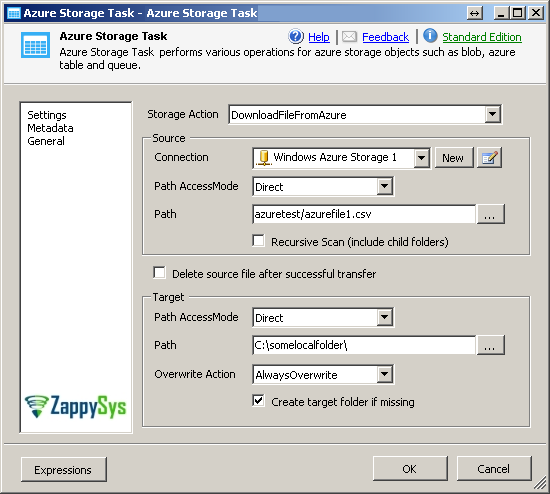
Browse to the source blob or use a wildcard such as mycontainer/myfile*.txt to process many files (the target is then treated as a folder). Paths can come from a direct value, an SSIS variable or a file connection. Choose the overwrite action and whether to delete the source after a successful transfer.
- Recursive scan of child folders
- Create target folder if missing
- Delete source file after successful transfer
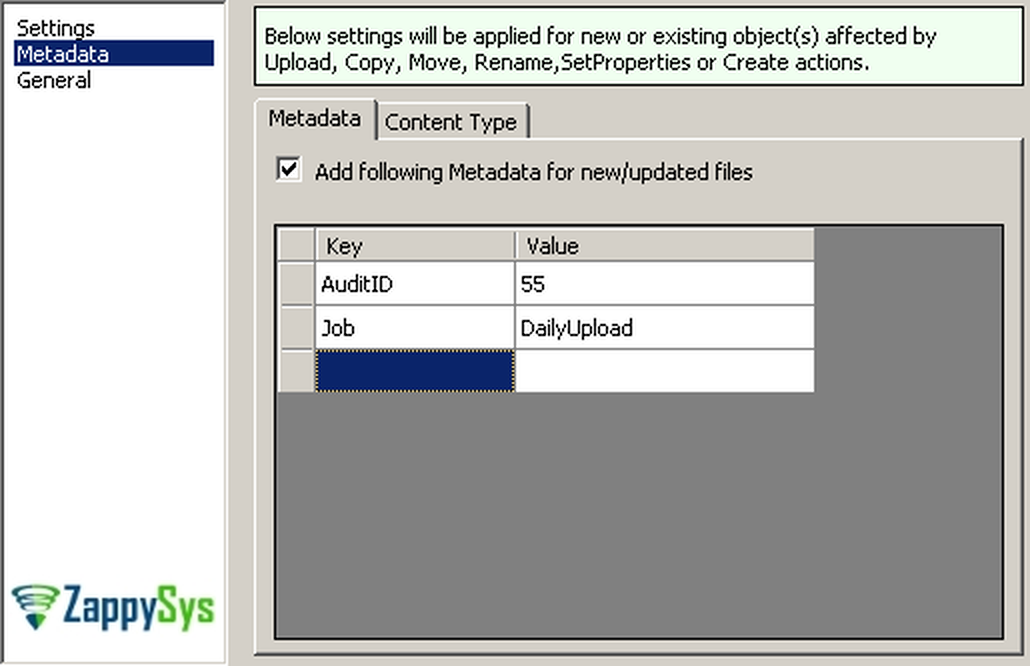
Attach key/value metadata to new files.
On the Metadata tab, enter key/value pairs that are applied to objects affected by upload, copy, move, rename, set-properties or create actions. To set them at runtime, use an expression on MetadataKeyValue with EnableMetadataUpdate turned on.
- Key/value pairs in the UI
- Dynamic values through SSIS expressions
Control the content type of new blobs.
On the Content Type tab, turn on auto-detect for known file extensions, add your own rules such as *.csv=text/plain, and set a default content type (application/octet-stream unless you change it).
AutoSetContentTypeUserDefinedContentTypesoverride the auto settingDefaultContentTypefallback

Inside the UI
Key settings, as they appear in SSDT.
Real screens from the Azure Blob Storage Task product page. Step through them, or open any shot at full size.
Drag and drop Azure Storage Task in Design Surface
From the SSIS Toolbox, drag the Azure Storage Task onto the Control Flow designer surface.
Articles
Worked examples that use Azure Blob Storage Task.
Compatibility and requirements
Designed to stay inside your SSIS runtime.
- SQL Server 2012 through 2025, 32-bit and 64-bit
- Windows only, 64-bit OS required. SQL Server Express and Web editions do not include SSIS
- Azure Data Factory SSIS Integration Runtime
- Self-hosted: credentials and data stay in your environment (external API calls still reach that service)
- Fully functional 30-day trial of SSIS PowerPack
FAQ
Questions teams ask before they drop Azure Blob Storage Task on the canvas.
What is Azure Blob Storage Task?
A Control Flow task that performs 30+ operations on Azure Storage blobs and containers, such as download, upload, copy, move, rename and delete. It can also read a single property of a blob, or return a list of blobs as an ADO.NET table for the ForEach Loop. Download, upload, copy and delete run multi-threaded.
How do I download or upload many files at once?
Use a wildcard in the source path, e.g. mycontainer/myfile*.txt or mycontainer/mysubfolder1/myfile*.txt. When the source contains a wildcard, the target path is treated as a folder. Turn on Recursive Scan to include child folders.
Can I loop through the blobs in a container?
Yes. Use GetAzureFileListAsADONETDataTable (or GetAzureContainerListAsADONETDataTable) to store the list in an object variable, then loop over it with the SSIS ForEach Loop.
Can I filter blobs by size, date or name?
Yes. Use WhereClause (e.g. Size>100 and Extension IN ('.txt','.csv')), IncludeRegXPattern / ExcludeRegXPattern, and SortBy with MaxItems for a TOP N result. See advanced path filtering.
What if the source file is missing?
By default the task throws an error when the source path is not found. Set ThrowErrorIfSourceNotFound to false to skip it, or use ContinueOnError so failed transfers or deletes do not fail the task. See the property reference.
Which SQL Server versions can I run it on?
SQL Server 2025, 2022, 2019, 2017, 2016, 2014, and 2012 (32- and 64-bit), plus Azure Data Factory with an SSIS Integration Runtime (packages must target SQL Server 2017). See Compatibility and requirements.
See also
More from SSIS PowerPack.


What customers say
Start your free trial today
Install SSIS PowerPack and drag Azure Blob Storage Task onto the Control Flow.
Download, upload, copy, move and delete Azure blobs and containers without writing code.
- Control Flow Task in SSISAzure Blob Storage Task appears in the toolbox after you install PowerPack.
- Fully functional 30-day trialSSIS PowerPack, running in your environment.
- Live supportHelp during your trial and after purchase.
Open Help FileBrowse all SSIS PowerPack tasks
New purchases may be eligible for refund review within 30 days. See the refund policy.
Talk to an engineer before or during your trial.