SSIS Amazon SQS Source
Read messages from Amazon AWS SQS using SSIS.
Amazon SQS Source can be used to read messages from Amazon AWS SQS (Simple Queue Service) using SSIS.
The trial includes Amazon SQS Source and every other PowerPack component
- Data Flow Source in SSIS
- Runs in your environment
- Also runs in Azure Data Factory
- Fully functional 30-day trial


At a glance
What Amazon SQS Source can do
Amazon SQS Source can be used to read messages from Amazon AWS SQS (Simple Queue Service) using SSIS.
Bulk read messages
Read Amazon SQS messages in bulk inside the SSIS Data Flow.
- Pick the queue from a dropdown (
QueueName) - Data preview at design time
FIFO & normal queues
Full support for FIFO queues along with normal queues.
- Read, process and delete FIFO messages in a loop until all are read
Read all messages
Keep fetching until the row limit is reached or the queue is empty.
MaxRows=0 reads all messagesMaxRetryOnNullMessageReceiveretries on empty receives
Visibility timeout
Hide messages from other readers for a set time after you read them.
VisibilityTimeoutin seconds; -1 uses the queue default
Message attributes
Read message attributes into separate output columns.
AttributeNameswith data types, e.g.MyProp1=string,MyProp2=intOutputAllAttributesadds anAll_AttributesJSON column
Local time & error output
Adjust UTC dates to local time and capture bad rows.
OutputDateAsLocalTime- Redirect bad rows to the error output with the error reason
AWS connection
Connect with the Amazon Storage Connection Manager set to the SQS service.
- Access key, secret key and region
- Temporary token or default (IAM Role) credentials
SQL Server 2012–2025 & ADF
Runs in your environment on SQL Server 2012–2025 and Azure-SSIS.
- SQL Server 2025, 2022, 2019, 2017, 2016, 2014, 2012 (32/64-bit)
- Azure Data Factory (SSIS IR)
- Design packages in Visual Studio 2017, 2019, 2022, or 2026
- Windows only (64-bit OS): Windows 7–11 or Windows Server 2012–2025
See all features
- Read Amazon SQS messages in bulk
- Visibility timeout (hide messages from others for a certain time after you read them)
- Full support for FIFO queues along with normal queues
- Data preview and max rows
- Read all messages from the queue (Max Rows=0 with Max Retry for NULL)
- Read message attributes in separate output columns, or all attributes as JSON
- Adjust UTC datetime to local time
- Error output to redirect bad rows with the error reason
- Key-based, temporary token or default (IAM Role) credentials on the AWS connection
- Logging modes (Normal, Medium, Detailed, Debugging) with optional timestamp prefix
Support for SQL Server 2025, 2022, 2019, 2017, 2016, 2014, 2012 (32/64-bit) and Azure Data Factory
SQL Server 2012–2025
How it works
From the toolbox to your first run.
Key steps from the Amazon SQS Source page and help file, with the screens you will see in SSDT.
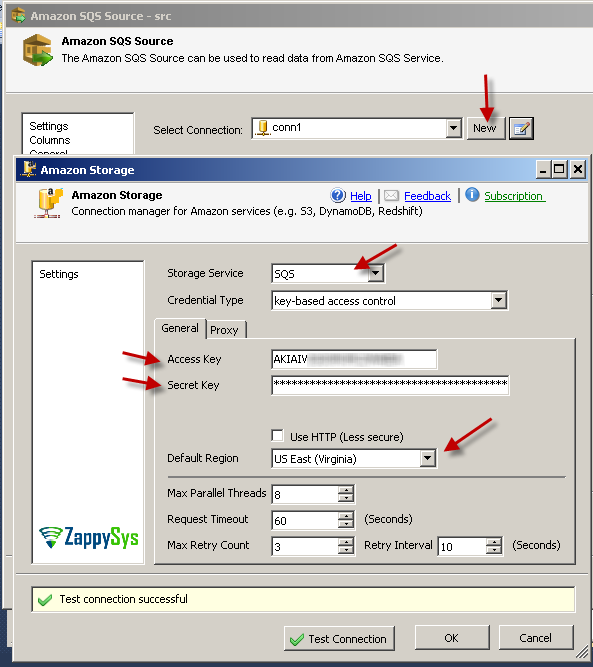
Amazon SQS Source – Create new connection
Double-click ZS Amazon SQS Source and click New next to the connection. Set the service type to SQS, enter your Access Key and Secret Key and click Test Connection.
Amazon SQS Source UI – Preview Data
Select the queue from the dropdown and click Preview to see the messages before you run the package.
Set MaxRows to limit how many messages are read, or 0 to keep reading until the queue is empty.

Read, process and delete FIFO queue messages
Amazon SQS will not return more messages from a FIFO message group until the ones already read are deleted, so read, process and delete them in the same Data Flow and loop until the queue is empty.
MaxRetryOnNullMessageReceive retries a few times on an empty receive before the source stops reading.

Amazon SQS – read SQS messages data using SSIS
Connect the source to any destination, add a Data Viewer and run the package to see the messages.
A message that has been read cannot be read again until its VisibilityTimeout expires (-1 uses the queue default).

Inside the UI
Key settings, as they appear in SSDT.
Real screens from the Amazon SQS Source product page. Step through them, or open any shot at full size.
Amazon SQS Source – Create new connection
Create the AWS connection with service type SQS, your Access Key and Secret Key.
Articles
Worked examples that use Amazon SQS Source.
Compatibility and requirements
Designed to stay inside your SSIS runtime.
- SQL Server 2012 through 2025, 32-bit and 64-bit
- Windows only, 64-bit OS required. SQL Server Express and Web editions do not include SSIS
- Azure Data Factory SSIS Integration Runtime
- Self-hosted: credentials and data stay in your environment (external API calls still reach that service)
- Fully functional 30-day trial of SSIS PowerPack
FAQ
Questions teams ask before they drop Amazon SQS Source on the canvas.
What is Amazon SQS Source?
Amazon SQS Source can be used to read messages from Amazon SQS (Simple Queue Service) in bulk inside an SSIS Data Flow. It supports normal and FIFO queues, visibility timeout, message attributes and data preview.
How do I read all messages in the queue?
Set MaxRows to 0 so the source keeps fetching until the queue returns no more messages, and set MaxRetryOnNullMessageReceive to retry a few times on an empty receive. For FIFO queues, delete messages as you process them, because SQS will not return more messages from the same message group until earlier ones are deleted. See the SQS tutorial.
Why can’t I read the same message twice?
After a message is read it stays hidden until its visibility timeout expires. VisibilityTimeout is in seconds; -1 uses the queue default and 0 allows the same message to be read again without waiting.
Can I read message attributes?
Yes. Turn on FetchAttributes and list attributes in AttributeNames (e.g. MyProp1=string,MyProp2=int) to get one Attr_ column per attribute, or set OutputAllAttributes to get an All_Attributes JSON column.
Which SQL Server versions can I run it on?
SQL Server 2025, 2022, 2019, 2017, 2016, 2014, and 2012 (32- and 64-bit), plus Azure Data Factory with an SSIS Integration Runtime (packages must target SQL Server 2017). See Compatibility and requirements.





What customers say
Start your free trial today
Install SSIS PowerPack and drag Amazon SQS Source onto the Data Flow.
Read messages from Amazon AWS SQS using SSIS.
- Data Flow Source in SSISAmazon SQS Source appears in the toolbox after you install PowerPack.
- Fully functional 30-day trialSSIS PowerPack, running in your environment.
- Live supportHelp during your trial and after purchase.
Open Help FileBrowse all SSIS PowerPack tasks
New purchases may be eligible for refund review within 30 days. See the refund policy.
Talk to an engineer before or during your trial.