SSIS MongoDB ExecuteSQL Task
Run ad-hoc MongoDB commands from the SSIS control flow and save the results to SSIS variables.
Run DDL commands such as create or drop collection, DML commands such as insert, update, upsert, find and count, and database or server commands such as getCollectionNames and getStats. Pick a ready-made command from View Examples, then save the output as a single value, raw JSON or an ADO.NET DataTable for a ForEach Loop.
The trial includes MongoDB ExecuteSQL Task and every other PowerPack component
- Control Flow Task in SSIS
- Runs in your environment
- Also runs in Azure Data Factory
- Fully functional 30-day trial
















At a glance
What MongoDB ExecuteSQL Task can do
MongoDB ExecuteSQL Task runs ad-hoc MongoDB commands (DDL, DML, database and server commands, server-side JavaScript) from the control flow and can store the result in an SSIS variable.
DDL commands
Create or drop collections and databases from the control flow.
create/createSafe(only if not found) collectiondrop/dropSafe(only if exists) collection or database
DML commands
Insert, update, upsert, find and count documents.
- Update modifiers such as
$pushto add a value to an array - Upsert inserts a document when no match is found
- Insert multiple documents in one call
Server-side JavaScript
Run simple or multi-line JavaScript on the server with the eval command.
- Call inbuilt or user-defined functions (stored in
system.js) - Call MongoDB shell commands, e.g. add or remove a user
evalneeds eval permission and MongoDB earlier than 4.2 (MongoDB removed eval in 4.2)
Database & server commands
Run commands at collection, database or server scope.
CommandType: Collection, Database or Server commandgetCollectionNames,getStatsand record counts
Save results to variables
Store the command result in an SSIS variable.
ResultsetType: None, FullResultset, SingleValue or RawResult- FullResultset is an ADO.NET DataTable you can loop with a ForEach Loop
- SingleValue for values such as count or size from
getStats
JSONPath output filter
Extract specific data from the JSON output with a JSONPath filter expression.
filterattribute in the command (e.g.$.result[*].CustomerID)
SQL query support
Fetch records with a familiar SQL query; it is translated to a MongoDB native query automatically.
- e.g.
SELECT top 10 * FROM Customer WHERE Country IN ('USA','Germany')
SQL Server 2012–2025 & ADF
Runs in your environment on SQL Server 2012–2025 and Azure-SSIS.
- SQL Server 2025, 2022, 2019, 2017, 2016, 2014, 2012 (32/64-bit)
- Azure Data Factory (SSIS IR)
- Design packages in Visual Studio 2017, 2019, 2022, or 2026
- Windows only (64-bit OS): Windows 7–11 or Windows Server 2012–2025
Examples & test preview
Pick a ready-made command from View Examples and run it with Test / Preview.
SqlStatementSourceType: direct value or SSIS variableTimeoutin seconds;LoggingModeandPrefixTimestamp- Insert Variable:
{{User::varName}}placeholders make any command dynamic
See all features
- Execute ad-hoc MongoDB commands from the SSIS control flow
- Intuitive user interface with many examples
- DDL statements such as Create / Drop collection or database (with safe options)
- DML statements such as Select / Insert / Update / Upsert / Delete
- Database, collection and server commands
- Run server-side JavaScript and shell commands with
eval(MongoDB earlier than 4.2) - Save RawResult (e.g. JSON response) into an SSIS variable
- Extract a SingleValue such as count or size from the
getStatsresponse - Save FullResultset as an ADO.NET DataTable for ForEach Loop iteration
- JSONPath filter expression to extract specific data from the output
- SQL query translated to MongoDB native query automatically
- Read the command text from a direct value or an SSIS variable
- SSIS variable placeholders such as
{{User::varMyJson}}anywhere inside the command Support for SQL Server 2025, 2022, 2019, 2017, 2016, 2014, 2012 (32/64-bit) and Azure Data Factory
SQL Server 2012–2025
How it works
From the toolbox to your first run.
Each command is a small JSON block with a scope, command and optional args. Start from View Examples, then click Test / Preview.
Create or drop collections and databases.
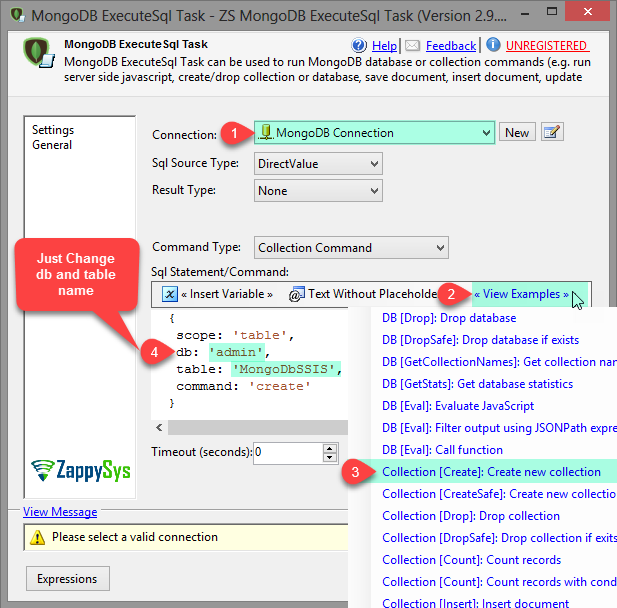
Choose Collection [Create] from View Examples and replace the database and collection name: { scope: 'table', db: 'admin', table: 'NewCollectionName', command: 'create' }. Use createSafe or dropSafe when the command should not fail if the collection already exists (or is missing).
create,createSafe,drop,dropSafe- Drop a whole database with
scope: 'database'
Insert, update or upsert documents.
Use command: 'insert' with the document in args.doc, or update / upsert with a query to match existing documents. Update modifiers such as $push add values to an array inside a document.
insert,update,upsert,find,count{{User::varName}}placeholders for dynamic values
Get collection names and loop through them.
Run { scope: 'database', db: 'local', command: 'getCollectionNames' } with Result Type FullResultset to store the list in an Object variable, then iterate it with a ForEach Loop container.
- FullResultset is an ADO.NET DataTable
- SingleValue for counts or
getStatsvalues

Call server-side MongoDB JavaScript.
Use command: 'eval' with a function in args.code, for example to find documents with a where condition, and add a JSONPath filter such as $.result[*].CustomerID to extract part of the output. The MongoDB user needs permission to run eval, and eval works only on MongoDB versions earlier than 4.2.
- Call inbuilt or user-defined functions
- Run shell commands such as createUser

Inside the UI
Key settings, as they appear in SSDT.
Real screens from the MongoDB ExecuteSQL Task product page. Step through them, or open any shot at full size.
Drag ZS MongoDB ExecuteSql Task from the toolbox
In Visual Studio, drag and drop ZS MongoDB ExecuteSQL Task from the SSIS Toolbox onto the Control Flow.
Articles
Worked examples that use MongoDB ExecuteSQL Task.
Compatibility and requirements
Designed to stay inside your SSIS runtime.
- SQL Server 2012 through 2025, 32-bit and 64-bit
- Windows only, 64-bit OS required. SQL Server Express and Web editions do not include SSIS
- Azure Data Factory SSIS Integration Runtime
- Self-hosted: credentials and data stay in your environment (external API calls still reach that service)
- Fully functional 30-day trial of SSIS PowerPack
FAQ
Questions teams ask before they drop MongoDB ExecuteSQL Task on the canvas.
What is MongoDB ExecuteSQL Task?
MongoDB ExecuteSQL Task is an SSIS control flow task that runs ad-hoc MongoDB commands: DDL such as create or drop collection, DML such as insert, update, upsert, find and count, database and server commands, and server-side JavaScript.
How do I save the result in an SSIS variable?
Set ResultsetType to SingleValue (for example a count or a value from getStats), RawResult (the JSON response) or FullResultset (an ADO.NET DataTable stored in an Object variable that a ForEach Loop can iterate), and pick the variable in ResultsetVariable.
Can I query MongoDB with SQL?
Yes. A query such as SELECT top 10 * FROM Customer WHERE Country IN ('USA','Germany') is translated to a MongoDB native query automatically, so you do not need the JSON query syntax.
Does the eval (JavaScript) command work on every MongoDB version?
No. MongoDB removed eval in version 4.2, so JavaScript examples need an earlier server, and the MongoDB user needs permission to call eval. See How to call MongoDB JavaScript using SSIS.
Which SQL Server versions can I run it on?
SQL Server 2025, 2022, 2019, 2017, 2016, 2014, and 2012 (32- and 64-bit), plus Azure Data Factory with an SSIS Integration Runtime (packages must target SQL Server 2017). See Compatibility and requirements.
See also
More from SSIS PowerPack.



What customers say
Start your free trial today
Install SSIS PowerPack and drag MongoDB ExecuteSQL Task onto the Control Flow.
Create collections, insert or update documents and fetch MongoDB results into SSIS variables without command-line tools.
- Control Flow Task in SSISMongoDB ExecuteSQL Task appears in the toolbox after you install PowerPack.
- Fully functional 30-day trialSSIS PowerPack, running in your environment.
- Live supportHelp during your trial and after purchase.
Open Help FileBrowse all SSIS PowerPack tasks
New purchases may be eligible for refund review within 30 days. See the refund policy.
Talk to an engineer before or during your trial.