SSIS Regex Parser Task
Extract values from any text with regular expressions and save them to SSIS variables.
SSIS Regex Parser Task is a free task that parses input text from a direct string, an SSIS variable or a file using regular expressions. Extract one or many values, pick the match and group you need, and save the results to SSIS variables.
Regex Parser Task is free in every edition. The same download also includes a trial of the paid PowerPack components
- Control Flow Task in SSIS
- Runs in your environment
- Also runs in Azure Data Factory
- Free component (FREE edition)
















At a glance
What Regex Parser Task can do
SSIS Regex Parser Task is a free task that parses input text from a direct string, an SSIS variable or a file using regular expressions. Extract one or many values, pick the match and group you need, and save the results to SSIS variables.
Extract text with regex
Read raw text and extract single or multiple values using regular expressions.
- Example: extract emails and phone numbers from text
Direct, file or variable input
Parse text from a direct string, a file or an SSIS variable.
SourceAccessMode: Direct, Variable or Connection- Variable placeholders in the direct string, e.g.
{{User::varHtml}}
Occurrence & group selection
Pick which match and which group to extract with the {{X,Y}} suffix at the end of your pattern.
{{*}}returns all matches;{{-0}}returns the last match{{0,2}}: first match, group index 2- Use named groups, e.g.
{{0,domain}}
Save to variables
Map each extracted value to an SSIS variable for use later in the package.
TargetSettingsper extracted value
Test regex settings
Test your regex parse settings in the task UI before running the package.
- Test shows the output of every pattern in one window
Extract HTML content
Combine with the REST API Task to fetch a web page into a variable and pull values out of the HTML.
- Example: read a search result count from an HTML tag
Logging control
Control what is logged, and show extracted values with the free ZS Logging Task.
LoggingMode: Normal, Medium, Detailed or DebuggingPrefixTimestampadds a timestamp to log messages
SQL Server 2012–2025 & ADF
Runs in your environment on SQL Server 2012–2025 and Azure-SSIS.
- SQL Server 2025, 2022, 2019, 2017, 2016, 2014, 2012 (32/64-bit)
- Azure Data Factory (SSIS IR)
- Design packages in Visual Studio 2017, 2019, 2022, or 2026
- Windows only (64-bit OS): Windows 7–11 or Windows Server 2012–2025
See all features
- Read raw text and extract single or multiple values using Regex (Regular expression)
- Read raw text from direct string, file or SSIS Variable
- Support for Test Regex Parse settings
- Save parsed data to SSIS variables
- Extract a specific occurrence and group with the
{{X,Y}}suffix - Return all matches with
{{*}}or the last match with{{-0}} - Named group support (e.g.
(?<domain>...)) - Variable placeholders in the direct input string
- Extract HTML content together with the REST API Task
LoggingModeandPrefixTimestamplogging options- Works with the free ZS Logging Task to display extracted values
Support for SQL Server 2025, 2022, 2019, 2017, 2016, 2014, 2012 (32/64-bit) and Azure Data Factory
SQL Server 2012–2025
How it works
From the toolbox to your first run.
Key steps from the Regex Parser Task page and help file, with the screens you will see in SSDT.
Read the text, add a pattern per value, map it.
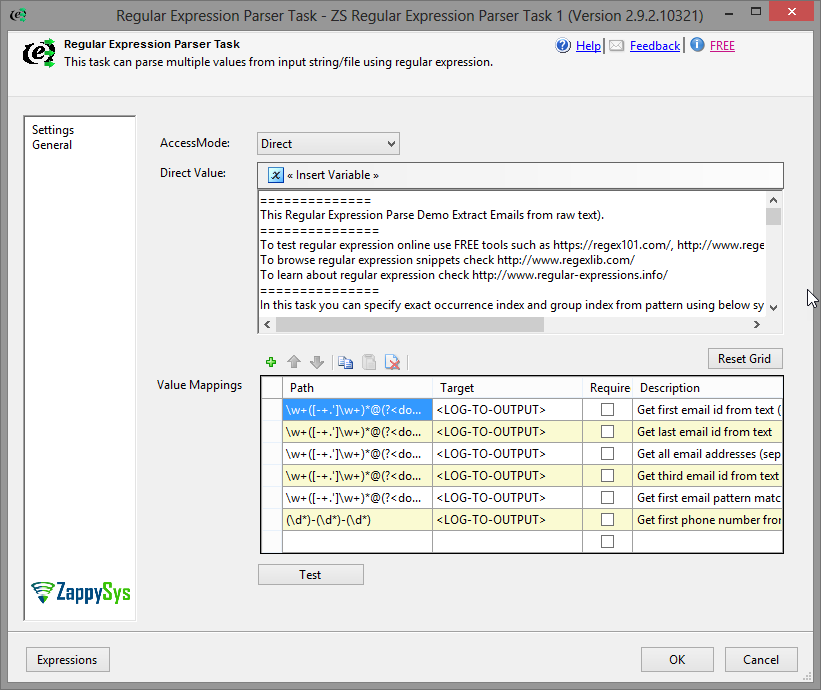
Set AccessMode to Direct, Variable or Connection (a file connection such as Raw File Source.txt). Add one row per value in Value Mappings with a regular expression, a Target variable or <LOG-TO-OUTPUT>, and a description. Test shows the output of every pattern.
- Example: first email to varFirstEmail, last email to varLastEmail, phone to varPhone
- Variable placeholder in direct text, e.g.
{{User::varHtml}} - Connect ZS Logging Task to show extracted values
Choose which match and which group to return.
End a pattern with the ZappySys {{X,Y}} suffix: X is the occurrence index (0 = first, * = all matches, -0 = last) and Y is a group index or group name. Without a suffix the first match is returned.
{{2}}: third match{{*}}: all matches, one per line(?<domain>...){{0,domain}}: named group
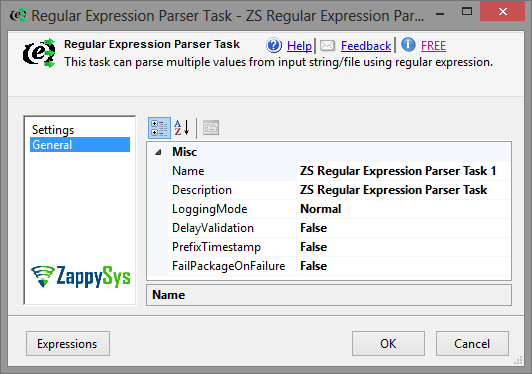
Logging and failure options.
The General page sets the task name and description, LoggingMode (Normal, Medium, Detailed or Debugging), PrefixTimestamp for log lines, DelayValidation and FailPackageOnFailure.
- Options can be set by SSIS expression using their numeric values
Inside the UI
Key settings, as they appear in SSDT.
Real screens from the Regex Parser Task product page. Step through them, or open any shot at full size.
Drag and drop the ZS Regular Expression Parser Task
In your SSIS project, drag ZS Regular Expression Parser Task from the SSIS Toolbox onto the Control Flow.
Articles
Worked examples that use Regex Parser Task.
Compatibility and requirements
Designed to stay inside your SSIS runtime.
- SQL Server 2012 through 2025, 32-bit and 64-bit
- Windows only, 64-bit OS required. SQL Server Express and Web editions do not include SSIS
- Azure Data Factory SSIS Integration Runtime
- Self-hosted: credentials and data stay in your environment (external API calls still reach that service)
- Fully functional 30-day trial of SSIS PowerPack
FAQ
Questions teams ask before they drop Regex Parser Task on the canvas.
What is Regex Parser Task?
SSIS Regex Parser Task is a free task that parses input text from a direct string, an SSIS variable or a file using regular expressions. Extract one or many values, pick the match and group you need, and save the results to SSIS variables.
Is Regex Parser Task free?
Yes. It is included in the FREE edition of SSIS PowerPack, as well as in the Standard, Professional and Enterprise editions. See compare editions.
How do I return a specific match or group?
Add {{X,Y}} at the end of the pattern. X is the occurrence index (0 is the first match, -0 the last, * all matches) and Y is the group index or group name, e.g. {{0,domain}} for a group named (?<domain>...). This syntax is ZappySys-specific. See Using Regular Expressions in SSIS.
Can it return every match?
Yes. End the pattern with {{*}} and all matches are returned, separated by new lines.
Can I extract values from a web page?
Yes. Fetch the page with the REST API Task and save the response to a variable, then point the Regex Parser Task at that variable. The HTML content tutorial pulls a search result count out of an HTML tag.
Where can I test my regular expressions?
Use the task’s Test button. The help also suggests online testers such as regex101.com and regexr.com.
Which SQL Server versions can I run it on?
SQL Server 2025, 2022, 2019, 2017, 2016, 2014, and 2012 (32- and 64-bit), plus Azure Data Factory with an SSIS Integration Runtime (packages must target SQL Server 2017). See Compatibility and requirements.






What customers say
Free in every edition
Install SSIS PowerPack and drag Regex Parser Task onto the Control Flow.
Extract emails, numbers or HTML values from text into SSIS variables with regex.
- Control Flow Task in SSISRegex Parser Task appears in the toolbox after you install PowerPack.
- Free to useRegex Parser Task is included in the FREE edition of SSIS PowerPack.
- Live supportQuestions? Talk to a ZappySys engineer.
Talk to an engineer before or during your trial.