SSIS Amazon S3 CSV File Destination
Write data in CSV file format to Amazon S3 Storage.
SSIS Amazon S3 CSV File Destination can be used to write data in CSV file format to Amazon S3 Storage (i.e. AWS S3 Service). You can automatically split large files by row count or size at runtime. It also supports writing files directly in compressed format such as GZip (*.gz).
The trial includes Amazon S3 CSV File Destination and every other PowerPack component
- Data Flow Destination in SSIS
- Runs in your environment
- Also runs in Azure Data Factory
- Fully functional 30-day trial


At a glance
What Amazon S3 CSV File Destination can do
SSIS Amazon S3 CSV File Destination can be used to write data in CSV file format to Amazon S3 Storage (i.e. AWS S3 Service). You can automatically split large files by row count or size at runtime. It also supports writing files directly in compressed format such as GZip (*.gz).
Write CSV straight to S3
Create CSV files directly in Amazon S3 from any source (e.g. SQL Server, Oracle, MySQL) without creating local files.
- Use any upstream Data Flow source and transformations
- Select which input columns go into the file on the Input Columns tab
Split large files
Automatically split large output into multiple files at runtime.
EnableFileSplitwithFileSplitModeByRowCount or BySizeMaxRowsPerFileorMaxSizePerFile(e.g. 100mb)
Compressed output
Write files directly in compressed format in stream mode.
CompressionType: GZip, Zip or TarGZip- Add the matching extension (e.g. *.gz) to the file path
Dynamic file path
Build the target S3 path at runtime from SSIS variables.
- Variable placeholders anywhere in
FilePath, e.g.file_{{System::StartTime,yyyyMMdd}}.dat AccessModeVariable reads the path fromFilePathVariable
CSV format options
Control how rows and values are written to the CSV file.
- Custom
ColumnDelimiterandRowDelimiter, including hex codes FirstRowHasColumnNames,QuotesAroundValue,QuoteChar,DateTimeFormatEncodingorCharacterSet(e.g. UTF-8 without BOM, ISO-8859-1)
File handling & escaping
Decide how existing files, empty inputs and special characters are handled.
OverwriteFileIfExistsandAppendDoNotCreateFileIfNoRowsskips empty filesCustomEscapeSequenceRulefor search/replace of special characters
Client & server side encryption
Encrypt content uploaded to or downloaded from Amazon S3.
EncryptionAlgorithm: AES256, RSA1024 or KMSEncryptionKeyFileholds the key file path, or the KMS Key ID
SQL Server 2012–2025 & ADF
Runs in your environment on SQL Server 2012–2025 and Azure-SSIS.
- SQL Server 2025, 2022, 2019, 2017, 2016, 2014, 2012 (32/64-bit)
- Azure Data Factory (SSIS IR)
- Design packages in Visual Studio 2017, 2019, 2022, or 2026
- Windows only (64-bit OS): Windows 7–11 or Windows Server 2012–2025
Flexible AWS credentials
Connect through the Amazon Storage Connection Manager with access keys, temporary credentials or the default instance credentials.
CredentialType: key-based, temporary token (withSessionToken) or default (IAM Role or anonymous)- Proxy server support with optional proxy authentication
ForcePathStylefor S3-compatible services such as MinIO, Ceph or Cloudian
See all features
- Create CSV files directly in Amazon S3 from any source (e.g. SQL Server, Oracle, MySQL) without creating local files
- Split data into multiple files by row count or file size
- Write compressed files in stream mode (GZip, Zip, TarGZip)
- Dynamic file path using variable placeholders (e.g.
{{User::FileName}}) or a path variable - Custom column and row delimiters, including special values and hex codes
- Header row, quoting, quote character and date/time format options
- Encoding and character set selection (e.g. UTF-8 without BOM)
- Overwrite or append options, and an option not to create a file when there are no rows
- Custom escape sequence rules to replace special characters
- Server side and client side encryption using RSA/AES encryption keys
- Key-based, temporary token or default (IAM Role) credentials, with proxy support
- Logging modes (Normal, Medium, Detailed, Debugging) with optional timestamp prefix
Support for SQL Server 2025, 2022, 2019, 2017, 2016, 2014, 2012 (32/64-bit) and Azure Data Factory
SQL Server 2012–2025
How it works
From the toolbox to your first run.
Key steps from the Amazon S3 CSV File Destination page and help file, with the screens you will see in SSDT.
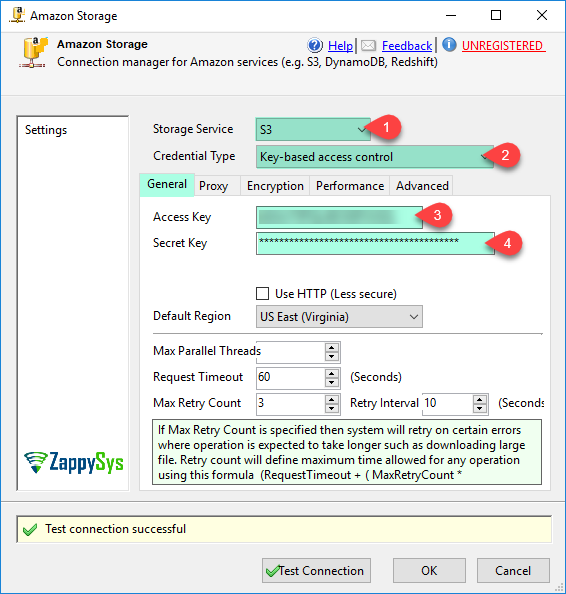
Amazon S3 CSV File Destination – Create Amazon Storage Connection Manager
Right-click the Connection Managers panel, choose New Connection and add ZS-AWS-STORAGE. Set the service to S3 and enter your Access Key and Secret Key (or use temporary token or default IAM Role credentials).
Optionally configure the Proxy and Encryption tabs, then click Test Connection.
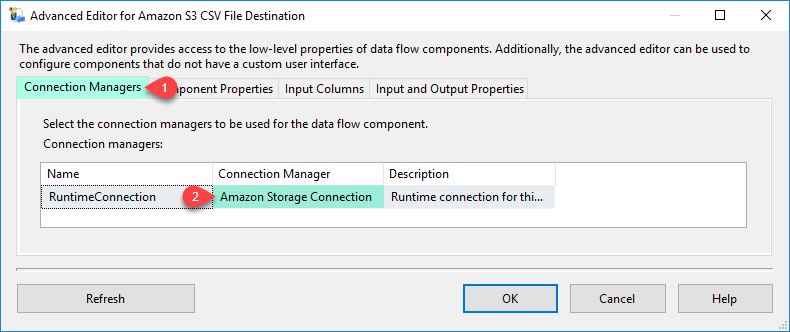
Amazon S3 CSV File Destination – Select Connection Manager
Drag ZS Amazon S3 CSV File Destination onto the Data Flow and connect your source to it.
Double-click the destination and, on the Connection Managers tab, select the Amazon Storage connection you created.
Set the S3 file path, split and compression options
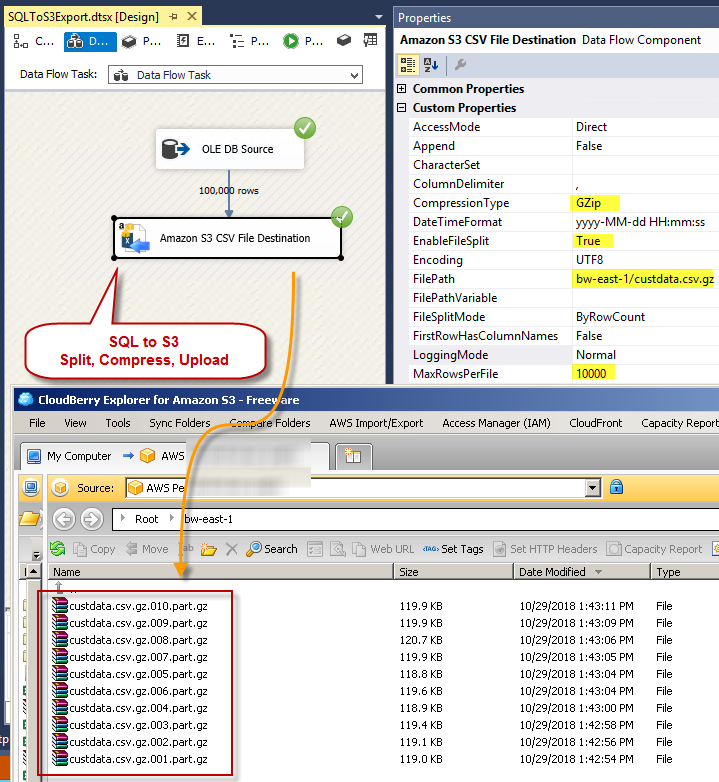
On Component Properties, enter the target FilePath (variable placeholders allowed), set Append to False and OverwriteFileIfExists to True.
To produce several smaller files, enable EnableFileSplit and split by row count or size. Set CompressionType to GZip and add .gz to the path to write compressed files.
Choose the columns and run the package
On the Input Columns tab, check the columns you want written to the CSV file, then click OK.
Run the package: rows from your source (for example SQL Server through an OLE DB Source) are written straight to the CSV file in your S3 bucket, without a local staging file.

Inside the UI
Key settings, as they appear in SSDT.
Real screens from the Amazon S3 CSV File Destination product page. Step through them, or open any shot at full size.
Amazon S3 CSV File Destination – Create Amazon Storage Connection
Create the Amazon Storage Connection Manager with your AWS credentials, then click Test Connection.
Articles
Worked examples that use Amazon S3 CSV File Destination.
Compatibility and requirements
Designed to stay inside your SSIS runtime.
- SQL Server 2012 through 2025, 32-bit and 64-bit
- Windows only, 64-bit OS required. SQL Server Express and Web editions do not include SSIS
- Azure Data Factory SSIS Integration Runtime
- Self-hosted: credentials and data stay in your environment (external API calls still reach that service)
- Fully functional 30-day trial of SSIS PowerPack
FAQ
Questions teams ask before they drop Amazon S3 CSV File Destination on the canvas.
What is Amazon S3 CSV File Destination?
SSIS Amazon S3 CSV File Destination can be used to write data in CSV file format to Amazon S3 Storage (i.e. AWS S3 Service). You can automatically split large files by row count or size at runtime. It also supports writing files directly in compressed format such as GZip (*.gz).
Can it split large output into several S3 files?
Yes. Set EnableFileSplit to True and choose FileSplitMode: ByRowCount with MaxRowsPerFile, or BySize with MaxSizePerFile (for example 100mb). A new file is started when the limit is reached.
Can I write GZip or Zip compressed files?
Yes. Set CompressionType to GZip, Zip or TarGZip and the file is compressed in stream mode while it is written. Add the matching extension (for example *.gz or *.zip) to FilePath yourself.
Can I set the S3 file name at runtime?
Yes. Use variable placeholders anywhere in FilePath, for example myroot/folder/file_{{System::StartTime,yyyyMMdd}}.dat, or set AccessMode to Variable and read the full path from FilePathVariable.
Does it work with S3-compatible storage such as MinIO or Ceph?
The Amazon Storage Connection Manager has a ForcePathStyle option for S3-protocol services hosted in the cloud or locally (for example MinIO, Cloudian or Ceph). See the connection manager help.
Which SQL Server versions can I run it on?
SQL Server 2025, 2022, 2019, 2017, 2016, 2014, and 2012 (32- and 64-bit), plus Azure Data Factory with an SSIS Integration Runtime (packages must target SQL Server 2017). See Compatibility and requirements.
See also
More from SSIS PowerPack.




What customers say
Start your free trial today
Install SSIS PowerPack and drag Amazon S3 CSV File Destination onto the Data Flow.
Write data in CSV file format to Amazon S3 Storage.
- Data Flow Destination in SSISAmazon S3 CSV File Destination appears in the toolbox after you install PowerPack.
- Fully functional 30-day trialSSIS PowerPack, running in your environment.
- Live supportHelp during your trial and after purchase.
Open Help FileBrowse all SSIS PowerPack tasks
New purchases may be eligible for refund review within 30 days. See the refund policy.
Talk to an engineer before or during your trial.