SSIS Compression Task
Zip, unzip or GZip multiple files and folders, with password protection and multi-threading.
SSIS Compression Task (Zip File Task) is a FREE task that compresses or uncompresses files in Zip or GZip format. It handles multiple files and folders with wildcards and regex filters, password-protects Zip files with AES encryption, and can use multiple CPU cores.
Compression Task is free in every edition. The same download also includes a trial of the paid PowerPack components
- Control Flow Task in SSIS
- Runs in your environment
- Also runs in Azure Data Factory
- Free component (FREE edition)


At a glance
What Compression Task can do
SSIS Compression Task (Zip File Task) is a FREE task that compresses or uncompresses files in Zip or GZip format. It handles multiple files and folders with wildcards and regex filters, password-protects Zip files with AES encryption, and can use multiple CPU cores.
Zip, GZip & unzip
Compress or uncompress multiple files or folders in Zip or GZip format.
- One archive for all files, or one archive per file
- Compress with folder structure
ArchiveFormat: Zip or GZip
Password & AES encryption
Password protect Zip files and choose the encryption algorithm.
- AES-128, AES-192, AES-256 or Zip20 (legacy PKWARE)
- Unzip password protected files with the same settings
- Password is available for Zip format only, not GZip
Multi-threaded compression
Use multiple CPU cores to speed up compression.
ParallelThreadssets the number of parallel compressors
Wildcards & regex filters
Select files with wildcard patterns and include or exclude them with regular expressions.
- Wildcards like
c:\data\file*.txt, with recursive scan IncludeRegXPattern/ExcludeRegXPattern(e.g.\.msi$|\.exe$)TreatRegXForFullPathmatches against the full path
Filter, sort & limit files
Filter, sort and limit the selected files before they are processed.
WhereClause, e.g.Size>100 and Extension IN ('.txt','.csv')SortBy/SortDirectionMaxItems(TOP) andSkipItems
Compression level & method
Balance speed and size with the compression level and method.
CompressionLevel: No, Fast, Default or BestCompressionMethod: None, Deflate or Enhanced Deflate (Deflate64 compatible)- Add a
Commentto the archive
Overwrite & target folder
Decide how existing target files are handled and create missing folders automatically.
OverwriteAction: skip, overwrite all, overwrite older, rename and moreCreateMissingTargetFolder- Source and target paths from direct value, variable or connection
SQL Server 2012–2025 & ADF
Runs in your environment on SQL Server 2012–2025 and Azure-SSIS.
- SQL Server 2025, 2022, 2019, 2017, 2016, 2014, 2012 (32/64-bit)
- Azure Data Factory (SSIS IR)
- Design packages in Visual Studio 2017, 2019, 2022, or 2026
- Windows only (64-bit OS): Windows 7–11 or Windows Server 2012–2025
Malformed Zip tolerance
Change header verification so the task can continue with a malformed Zip file.
LocalHeaderVerificationMode: set to None to skip verification- Or verify just CRC or lengths
See all features
- Zip/Unzip multiple files or folders using Zip or GZip format
- Support for password protected Zip files
- Support for various encryption algorithm for password protected archives (AES-128, AES-192, AES-256 and Zip20 for PKWARE encryption)
- Support multi threaded operations (Use of multiple CPU Cores)
- Support for wild card pattern (e.g.
File*.csv) - Support for regular expression (i.e. Regex) to include/exclude files (e.g.
.exe$|.msi$) - Create a single archive, one archive per file, or keep the folder structure
- Compression levels and Deflate / Enhanced Deflate methods
- Auto create missing target folder
- Overwrite options such as skip, overwrite older, overwrite different size and rename
- Filter, sort and limit files with a where clause, sort order, TOP and SKIP
- Relaxed header verification for malformed Zip files
- Hide file names inside an encrypted archive with the double zip technique
Support for SQL Server 2025, 2022, 2019, 2017, 2016, 2014, 2012 (32/64-bit) and Azure Data Factory
SQL Server 2012–2025
How it works
From the toolbox to your first run.
Key steps from the Compression Task page and help file, with the screens you will see in SSDT.
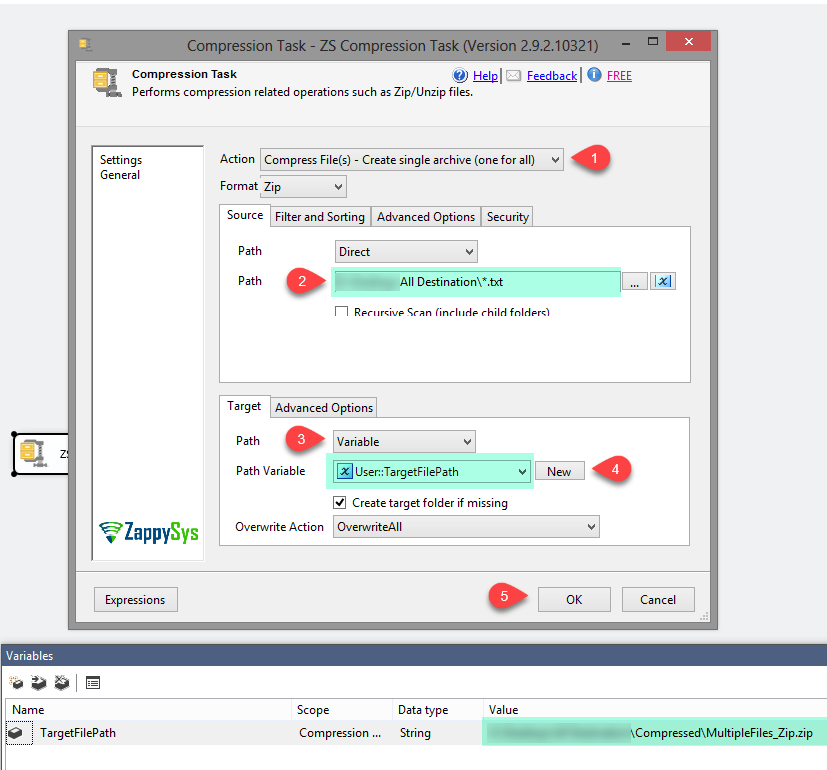
Zip every matching file into one archive.
Set Action to Compress File(s) – Create single archive (one for all), choose Zip or GZip, and enter a source path or wildcard such as c:\data\file*.txt. Set the target archive path, check Create target folder if missing and pick an Overwrite Action.
- Other actions: one archive per file, keep folder structure, uncompress
- Filter and Sorting, Advanced Options and Security tabs
- With a wildcard source, the target is treated as a folder
Make the archive path dynamic.
Create a String variable such as TargetFilePath, then set the Target Path to Variable and select it. Source and target paths can each come from a direct value, a variable or a connection.
SourcePathAccessMode/ target access mode: Direct, Variable or Connection- Options can be set by SSIS expression using their numeric values
Run the task and read the summary.
Execution Results show the parallel thread count, compression level, files found, where the Zip was saved and a summary with total file size, compressed size and compression ratio.
ParallelThreadsuses multiple CPU coresLoggingModecontrols log detail

Inside the UI
Key settings, as they appear in SSDT.
Real screens from the Compression Task product page. Step through them, or open any shot at full size.
Drag and Drop the ZS Compression Task from Toolbox
In Visual Studio, drag ZS Compression Task from the SSIS Toolbox onto the Control Flow.
Articles
Worked examples that use Compression Task.
Compatibility and requirements
Designed to stay inside your SSIS runtime.
- SQL Server 2012 through 2025, 32-bit and 64-bit
- Windows only, 64-bit OS required. SQL Server Express and Web editions do not include SSIS
- Azure Data Factory SSIS Integration Runtime
- Self-hosted: credentials and data stay in your environment (external API calls still reach that service)
- Fully functional 30-day trial of SSIS PowerPack
FAQ
Questions teams ask before they drop Compression Task on the canvas.
What is Compression Task?
SSIS Compression Task (Zip File Task) is a FREE task that compresses or uncompresses files in Zip or GZip format. It handles multiple files and folders with wildcards and regex filters, password-protects Zip files with AES encryption, and can use multiple CPU cores.
Is Compression Task free?
Yes. It is included in the FREE edition of SSIS PowerPack, as well as in the Standard, Professional and Enterprise editions. See compare editions.
Can I password-protect Zip files?
Yes. On the Security tab enter a password and choose AES-128, AES-192, AES-256 or Zip20 (PKWARE) encryption. Use the same settings with the Uncompress action to unzip protected files. Passwords work with Zip only, not GZip. See the password tutorial.
Can it create one archive per file?
Yes. The Action property offers Create single archive (one for all), Create multiple archives (one for each), Compress files with folder structure, and Uncompress File(s).
How do I select which files to compress?
Use a wildcard source path such as c:\data\subfolder\*.txt, optionally with recursive scan. Include or exclude files with a regular expression (e.g. \.msi$|\.exe$), and filter, sort and limit them with WhereClause, SortBy, MaxItems and SkipItems.
Can I hide file names inside an encrypted Zip?
Encryption protects file contents, but names stay visible. The ZappySys tutorial recommends a double zip: zip and encrypt the files, then zip and encrypt that archive again.
Which SQL Server versions can I run it on?
SQL Server 2025, 2022, 2019, 2017, 2016, 2014, and 2012 (32- and 64-bit), plus Azure Data Factory with an SSIS Integration Runtime (packages must target SQL Server 2017). See Compatibility and requirements.






What customers say
Free in every edition
Install SSIS PowerPack and drag Compression Task onto the Control Flow.
Zip, unzip and GZip files in the Control Flow, free.
- Control Flow Task in SSISCompression Task appears in the toolbox after you install PowerPack.
- Free to useCompression Task is included in the FREE edition of SSIS PowerPack.
- Live supportQuestions? Talk to a ZappySys engineer.
Talk to an engineer before or during your trial.