SSIS Azure Blob JSON File Source
Read one or many JSON files from Azure Blob Storage and extract data from any nesting level, including GZip and Zip files.
SSIS Azure Blob Source for JSON File can be used to read JSON files from Azure Blob Storage. You can extract data from single or multiple files (wildcard pattern supported). Also you can read compressed files (*.gz) without extracting files on disk.
The trial includes Azure Blob JSON File Source and every other PowerPack component
- Data Flow Source in SSIS
- Runs in your environment
- Also runs in Azure Data Factory
- Fully functional 30-day trial


At a glance
What Azure Blob JSON File Source can do
SSIS Azure Blob Source for JSON File can be used to read JSON files from Azure Blob Storage. You can extract data from single or multiple files (wildcard pattern supported). Also you can read compressed files (*.gz) without extracting files on disk.
Read one or many files
Read a single JSON file or many files from Azure Blob Storage using a wildcard pattern (e.g. *.json).
- Pick files with the Blob Browser UI
Recursiveincludes files from subfoldersEnableMultiPathModereads a list of paths as one dataset
Extract any level
Use a path expression to extract data from any level (e.g. Orders nested under a Customer node).
Filter, e.g.$.Customers[*].Orders[*]IncludeParentColumnsadds parent properties to each rowIncludeParentColumnsWhenChildMissingworks like a LEFT OUTER JOIN
Array flattening & transforms
Turn nested arrays and 2-dimensional arrays into columns.
EnableArrayFlatteningwithMaxArrayItemsToFlattenArrayTransformationType: 2D arrays, key/value to columns, JSON Lines and more
Compressed files
Read Zip and GZip compressed files in stream mode, without extracting them on disk.
FileCompressionType: GZip, Zip or TarGZip
Dynamic file path
Build the file path at runtime with variable placeholders (e.g. /myroot/{{User::MyFolder}}/*.json).
OutputFilePathandOutputFileNameadd__FilePath/__FileNamecolumnsContinueOnFileNotFoundErrorcontinues when a file is missing
Pivot columns into rows
Transform columns into rows for flexible downstream processing.
EnablePivotoutputsPivot_NameandPivot_ValueIncludePivotPathadds the parent hierarchy asPivot_Path
Raw document output
Pass JSON documents downstream as raw strings instead of parsing them into columns.
OutputRawDocument, with optionalIndentOutputExcludedPropertiesdrops properties you do not need
SQL Server 2012–2025 & ADF
Runs in your environment on SQL Server 2012–2025 and Azure-SSIS.
- SQL Server 2025, 2022, 2019, 2017, 2016, 2014, 2012 (32/64-bit)
- Azure Data Factory (SSIS IR)
- Design packages in Visual Studio 2017, 2019, 2022, or 2026
- Windows only (64-bit OS): Windows 7–11 or Windows Server 2012–2025
Parsing & data types
Control encoding, date and number parsing, and clean the text before it is parsed.
DateParseHandling(DateTime or DateTimeOffset) andFloatParseHandling(Decimal)Encoding,CharacterSetandCultureEnableCustomReplacewith plain or regex search/replace
See all features
- Read single or multiple files stored in Azure Blob Storage (wildcard pattern supported e.g. *.json)
- Path expression to extract data from any level (e.g. Orders nested under a Customer node)
- Include parent columns, optionally even when child records are missing
- Deep array flattening and 2-dimensional array transformations
- Read Zip and GZip compressed files in stream mode
- Data pivot (transform columns into rows)
- Dynamic file path using variable placeholders (e.g.
/myroot/{{User::MyFolder}}/*.json) - Select files with the Blob Browser UI and preview data at design time
- Output raw JSON documents instead of parsed columns
- DateTime parsing options and high-precision decimal handling
- Redirect bad records to the error output
- Output file path and file name as extra columns
- Connect with access key, SAS URL/token, connection string or the Azure Storage Emulator
Support for SQL Server 2025, 2022, 2019, 2017, 2016, 2014, 2012 (32/64-bit) and Azure Data Factory
SQL Server 2012–2025
How it works
From the toolbox to your first run.
Key steps from the Azure Blob JSON File Source page and help file, with the screens you will see in SSDT.
Pick the connection and the JSON file in the Blob Browser.
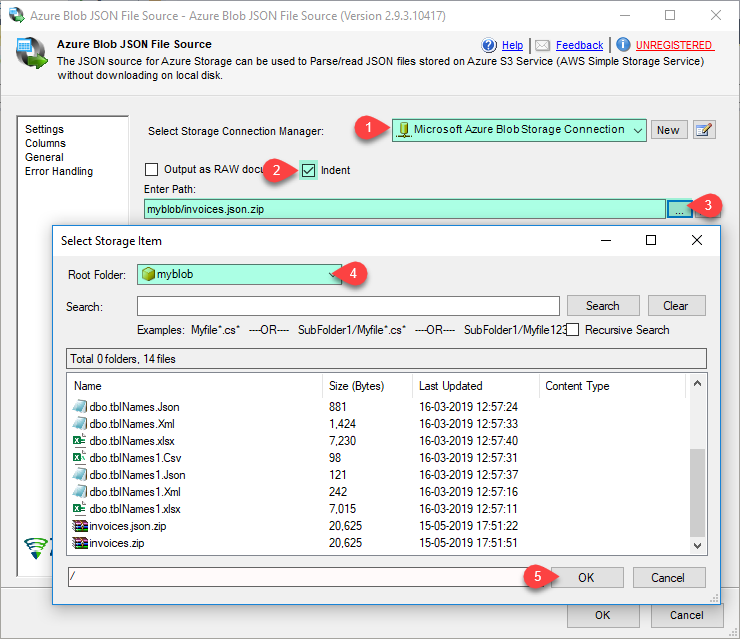
Select the Azure Storage connection, then type the path or click the browse button to pick a file in the Blob Browser. Use a wildcard such as *.json to read many files with a similar structure in one go.
- Single file or wildcard pattern
- Variable placeholders in the path
- Optional
Recursivesubfolder search
Choose which array becomes rows, then preview.
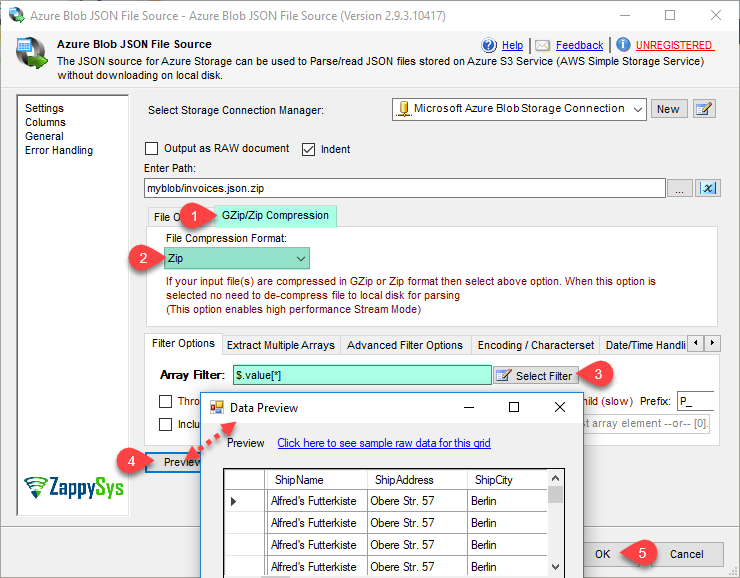
Enter an Array Filter (a path expression such as $.value[*]) or click Select Filter to pick the node visually. Data can be extracted from any level, for example Orders nested under a Customer node. Click Preview to check the rows before you map the destination.
- Path expression to any nesting level
- Include parent columns with child rows
- Design-time data preview
Read GZip or Zip files without extracting them.
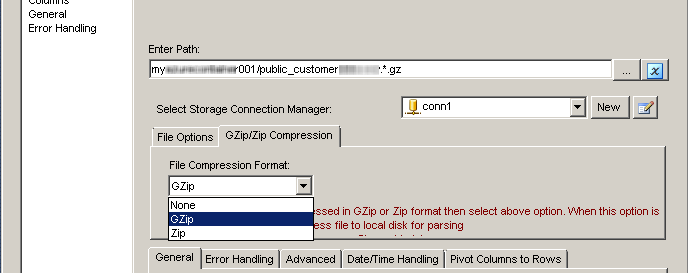
On the GZip/Zip Compression tab, choose the file compression format. The file is parsed in stream mode, so there is no need to decompress it to local disk first. Wildcards work here too (e.g. *.gz).
FileCompressionType: GZip, Zip or TarGZip- No local extract step
Decide how date strings are parsed.
On the Date/Time Handling tab, keep dates as strings, convert them to DateTime, or convert them to DateTimeOffset to preserve the time zone. You can also supply a custom date format.
DateParseHandling: None, DateTime or DateTimeOffsetDateFormatStringfor custom formats

Inside the UI
Key settings, as they appear in SSDT.
Real screens from the Azure Blob JSON File Source product page. Step through them, or open any shot at full size.
Azure Blob JSON File Source – Read from JSON File Options
Set the compression format, enter an Array Filter such as $.value[*] (or click Select Filter) and click Preview.
Articles
Worked examples that use Azure Blob JSON File Source.
Compatibility and requirements
Designed to stay inside your SSIS runtime.
- SQL Server 2012 through 2025, 32-bit and 64-bit
- Windows only, 64-bit OS required. SQL Server Express and Web editions do not include SSIS
- Azure Data Factory SSIS Integration Runtime
- Self-hosted: credentials and data stay in your environment (external API calls still reach that service)
- Fully functional 30-day trial of SSIS PowerPack
FAQ
Questions teams ask before they drop Azure Blob JSON File Source on the canvas.
What is Azure Blob JSON File Source?
A Data Flow source that parses JSON files stored in Azure Blob Storage. It reads a single file or many files with a wildcard pattern (e.g. *.json), extracts data from any nesting level with a path expression, and reads GZip or Zip files in stream mode without extracting them to local disk.
How do I extract a nested array such as Orders under Customers?
Set the Array Filter to a path expression, for example $.Customers[*].Orders[*], or click Select Filter to pick the node. Turn on IncludeParentColumns to keep parent properties on each row; IncludeParentColumnsWhenChildMissing keeps parents with no children, like a LEFT OUTER JOIN.
Can it handle 2-dimensional arrays or JSON Lines?
Yes. ArrayTransformationType offers simple and complex 2-dimensional arrays, key/value to columns, columnless arrays and JSON Lines arrays. See the property reference.
Can I tell which file each row came from?
Yes. Set OutputFileName or OutputFilePath to true to add __FileName or __FilePath columns to the output.
Which SQL Server versions can I run it on?
SQL Server 2025, 2022, 2019, 2017, 2016, 2014, and 2012 (32- and 64-bit), plus Azure Data Factory with an SSIS Integration Runtime (packages must target SQL Server 2017). See Compatibility and requirements.




What customers say
Start your free trial today
Install SSIS PowerPack and drag Azure Blob JSON File Source onto the Data Flow.
Read one or many JSON files from Azure Blob Storage, including compressed files, straight into your Data Flow.
- Data Flow Source in SSISAzure Blob JSON File Source appears in the toolbox after you install PowerPack.
- Fully functional 30-day trialSSIS PowerPack, running in your environment.
- Live supportHelp during your trial and after purchase.
Open Help FileBrowse all SSIS PowerPack tasks
New purchases may be eligible for refund review within 30 days. See the refund policy.
Talk to an engineer before or during your trial.