SSIS JSON Parser Transform
Turn JSON strings inside your data flow into columns and rows.
Parse raw JSON strings stored in a database column or coming from another source. De-normalize nested JSON into a flat structure and extract nested arrays as rows with expressions such as $.Customer.Orders[*], all without coding.
The trial includes JSON Parser Transform and every other PowerPack component
- Filter nested data with expressions
- Runs in your environment
- Also runs in Azure Data Factory
- Parse command-line output (cmd:>)















At a glance
What JSON Parser Transform can do
JSON Parser Transform parses a JSON string column into multiple columns and rows. It is helpful when raw JSON is stored as a database column or comes from another source.
Parse JSON strings
Parse source JSON strings or documents into multiple columns and rows.
- Select the input column that holds the JSON
- Sample JSON is used to detect output columns
- Optionally include all upstream columns in the output
Flatten nested data
De-normalize nested JSON data into a flat structure.
- Include parent properties along with filtered rows
- Optional deep array flattening
- Exclude properties you do not need
Filter expressions
Extract nested data and turn a single node into multiple rows.
- For example
$.Customer.Orders[*] - Select the filter visually in a tree
- Optionally throw an error if a property is missing
Multiple arrays
Extract several arrays from the same document.
- One parser per array after a Multicast
- Each output loads its own table
Pivot
Convert properties into Name / Value rows.
- Enable pivoting of child level properties
- Output Pivot_Name and Pivot_Value columns
Empty input handling
Decide what happens with NULL or empty documents.
- Skip, process as NULL, throw an error, or use a custom value
Command-line output
Parse output from the command line standard output stream.
- For example
cmd:>curl -k http://httpbin.org/get
SQL Server 2012–2025 & ADF
Runs in your environment on SQL Server 2012–2025 and Azure-SSIS.
- SQL Server 2025, 2022, 2019, 2017, 2016, 2014, 2012 (32/64-bit)
- Azure Data Factory (SSIS IR)
- Design packages in Visual Studio 2017, 2019, 2022, or 2026
- Windows only (64-bit OS): Windows 7–11 or Windows Server 2012–2025
See all features
- Parse source JSON strings / documents into multiple columns and rows
- De-normalize nested JSON data into a flat structure
- Expressions to extract nested data and convert a single node into multiple rows (e.g.
$.Customer.Orders[*]) - Parse output from the command line standard output stream (e.g.
cmd:>curl -k http://httpbin.org/get) Support for SQL Server 2025, 2022, 2019, 2017, 2016, 2014, 2012 (32/64-bit) and Azure Data Factory
SQL Server 2012–2025
Four ways to use it
Parse, split, filter, or pivot.
Point the parser at a column with JSON, give it sample JSON for metadata, then choose what rows to produce.
Convert a JSON column into rows.
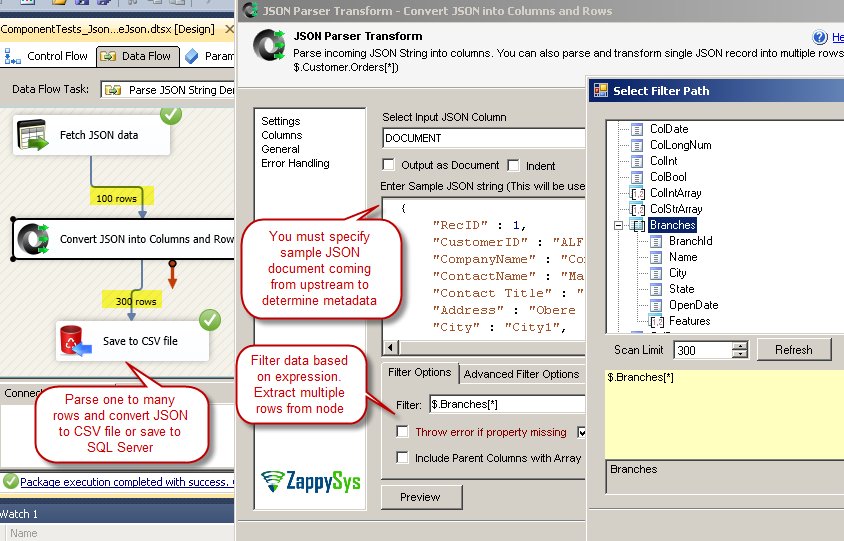
Select the input JSON column and provide a sample JSON document from upstream so the parser can determine metadata. Then set a filter to extract multiple rows from a node and save them to a CSV file or SQL Server.
- Input column from any upstream source
- Sample JSON determines output columns
- Filter extracts rows from a node
Read several arrays from one response.
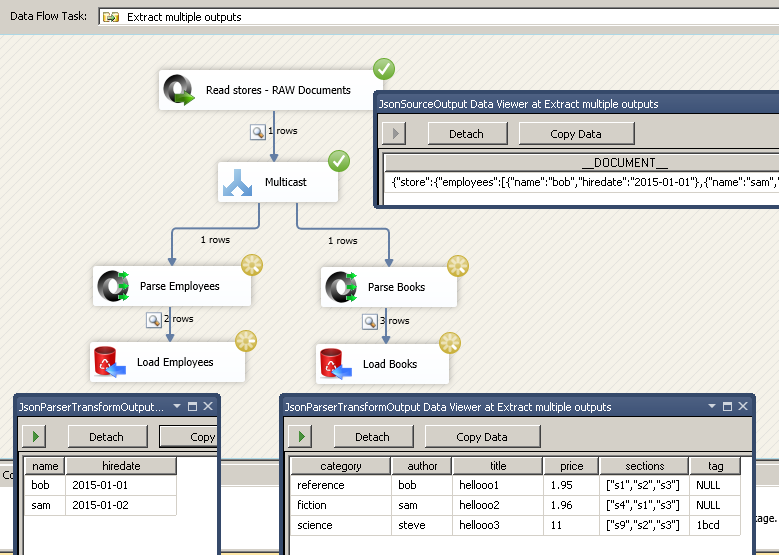
Read the raw document with JSON Source (Output as Document), split it with a Multicast, and add one JSON Parser per array, each with its own filter.
- Filter
$.store.employees[*]on one parser - Filter
$.store.books[*]on the other - Load each output into its own table
Pick the node visually.
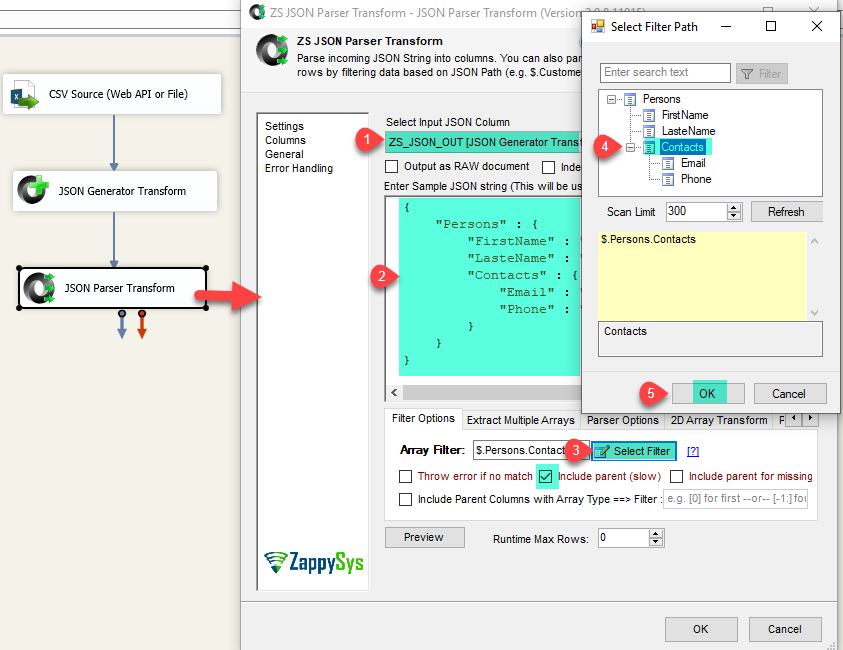
Use Select Filter to browse the sample JSON as a tree and pick the array you want as rows, such as $.Persons.Contacts.
- Tree view of the sample document
- Filter written for you
Turn properties into rows.
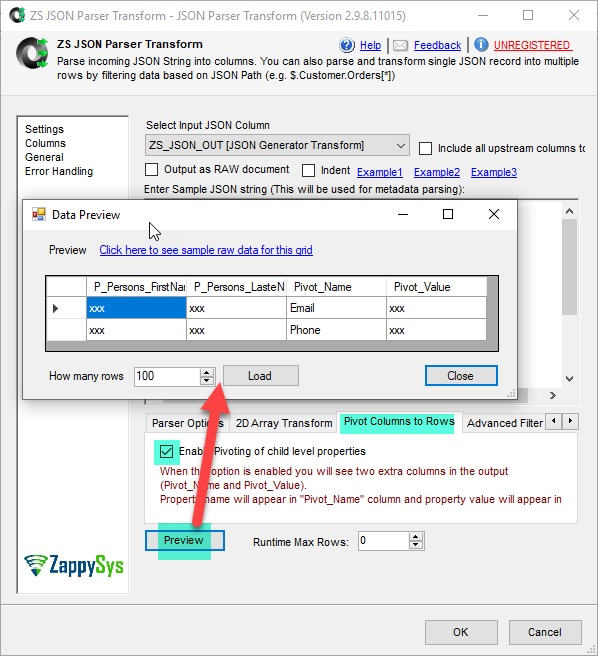
Enable pivoting of child level properties. Each property becomes a row with its name in Pivot_Name and its value in Pivot_Value.
- Useful for key/value style JSON
- Preview the pivoted output in the UI
Inside the UI
Key settings, as they appear in SSDT.
Real screens from the JSON Parser Transform product page, help file, and ZappySys articles. Step through them, or open any shot at full size.
Convert JSON into columns and rows
Parse a JSON document and save it to a CSV file or SQL Server.
Example
Pull one array out of a larger document.
From the ZappySys multiple-arrays article: the input document holds employees, books, and a location. A filter picks just the books.
-
Input JSON (excerpt)
The raw document arrives from JSON Source as one column.
{ "store": { "employees": [ ... ], "books": [ { "category": "reference", "author": "bob", ... }, { "category": "fiction", "author": "sam", ... }, { "category": "science", "author": "steve", "tag": "1bcd", ... } ], "location": { ... } } } -
Filter
Filter
$.store.books[*]Each item of the books array becomes one output row.
-
Output rows
category author title price tag reference bob hellooo1 1.95 NULL fiction sam hellooo2 1.96 NULL science steve hellooo3 11 1bcd Properties missing on a row, such as tag, come out as NULL. The article’s data viewer also shows the sections array column.
Example from Reading JSON Arrays from file / REST API (Method 1). Sample data as published by ZappySys.
Articles
Worked examples that use JSON Parser Transform.
Compatibility and requirements
Designed to stay inside your SSIS runtime.
- SQL Server 2012 through 2025, 32-bit and 64-bit
- Windows only, 64-bit OS required. SQL Server Express and Web editions do not include SSIS
- Azure Data Factory SSIS Integration Runtime
- Self-hosted: credentials and data stay in your environment (external API calls still reach that service)
- Fully functional 30-day trial of SSIS PowerPack
FAQ
Questions teams ask before they drop JSON Parser Transform on the canvas.
Where does the JSON come from?
Any upstream column, for example raw JSON stored in a database column, a response from Web API Destination or JSON Source with Output as Document, or command-line output.
How are output columns detected?
You enter a sample JSON document in the UI. The parser uses it to determine the metadata (columns).
Can I keep my other columns?
Yes. Turn on the option to include all upstream columns. By default only the parsed columns are output.
How do I read two arrays from the same document?
Send the document to a Multicast and add one JSON Parser per array, each with its own filter. See the multiple arrays guide.
What happens with empty input?
By default NULL or empty input is skipped. You can also process it as NULL, throw an error, or use a custom value.
Which SQL Server versions can I run it on?
SQL Server 2025, 2022, 2019, 2017, 2016, 2014, and 2012 (32- and 64-bit), plus Azure Data Factory with an SSIS Integration Runtime (packages must target SQL Server 2017). See Compatibility and requirements.
Where is the full property reference?
Open the JSON Parser Transform help file.
See also
Pair it with the rest of the JSON toolbox.



What customers say
Start your free trial today
Install SSIS PowerPack and drag JSON Parser Transform onto a Data Flow.
Paste sample JSON, pick a filter, and preview rows, with no coding required.
- Data Flow Transform in SSISJSON Parser Transform appears in the toolbox after you install PowerPack.
- Fully functional 30-day trialSSIS PowerPack, running in your environment.
- Live supportHelp during your trial and after purchase.
Open Help FileBrowse all SSIS PowerPack tasks
New purchases may be eligible for refund review within 30 days. See the refund policy.
Talk to an engineer before or during your trial.