SSIS Amazon DynamoDB Source
Extract large amounts of data from Amazon DynamoDB with a SQL-like query language, in SSIS.
Amazon DynamoDB Source extracts large amounts of data from Amazon DynamoDB. It supports a SQL-like query language, so you can query DynamoDB data without dealing with complex APIs. Amazon DynamoDB is a cloud-based NoSQL data storage service from Amazon AWS.
The trial includes Amazon DynamoDB Source and every other PowerPack component
- Data Flow Source in SSIS
- Runs in your environment
- Also runs in Azure Data Factory
- Fully functional 30-day trial


At a glance
What Amazon DynamoDB Source can do
Amazon DynamoDB Source can be used to extract large amount of data from Amazon DynamoDB. This component supports SQL like query language to query DynamoDB data without worrying about complex API. Amazon DynamoDB is a cloud based NoSQL data storage service from Amazon AWS
SQL-like DynamoDB queries
Query DynamoDB with familiar SQL; the query engine turns it into a native DynamoDB query.
SELECT TOP, column list andWHERE- Operators: =, !=, <, >, IN, BETWEEN, LIKE, CONTAINS, IS NULL
- No need to learn complex AWS APIs
SCAN & QUERY modes
Choose DynamoDB SCAN or QUERY mode in the WITH clause.
WITH(SCAN, LIMIT=1000)WITH(QUERY, INDEX=idxPhone)to query a secondary indexSCAN_INDEX_FORWARDandCONSISTENT_READoptions
Table or query mode
Read a whole table or a SQL query, and preview the data.
AccessMode: Table or QueryBatchSizesets records per request
Nested arrays with JSON Path
Extract data from inner arrays and sub-documents using JSON Path.
EnableJsonPathwith aFilterlike$.Users[*].UserNameIncludeParentColumnsadds parent properties to each row
Raw JSON output
Extract raw JSON documents from DynamoDB instead of columns.
OutputMode: RawDocuments outputs one DT_NTEXT document per recordIndentOutputfor readable JSON
Array flattening
Flatten array items into columns, such as Addresses.1.City and Addresses.2.City.
EnableArrayFlatteningandMaxArrayItemsToFlattenMaxLevelsToScanandExcludedProperties
Dynamic & date filters
Use SSIS variable placeholders and ISO 8601 dates in the query.
- Example:
'{{User::vMyDate,yyyy-MM-ddTHH:mm:ssZ}}' DateParseHandlingkeeps dates as string, DateTime or DateTimeOffset
SQL Server 2012–2025 & ADF
Runs in your environment on SQL Server 2012–2025 and Azure-SSIS.
- SQL Server 2025, 2022, 2019, 2017, 2016, 2014, 2012 (32/64-bit)
- Azure Data Factory (SSIS IR)
- Design packages in Visual Studio 2017, 2019, 2022, or 2026
- Windows only (64-bit OS): Windows 7–11 or Windows Server 2012–2025
Metadata & error output
Control how data types are detected and capture bad rows.
MetaDataScanMode: Auto, Strict, Guess2x and more- Error output with RedirectRow on error or truncation
See all features
- Bulk extract Amazon DynamoDB data
- SQL-like queries using a proprietary query engine, no need to learn complex AWS APIs
- Support for both SCAN and QUERY modes available in DynamoDB
- Query by secondary index with the
INDEXoption - Complete JSON support, such as extracting data from inner arrays using JSON Path
- Extract raw JSON documents from DynamoDB
- Deep array flattening into columns
- Variable placeholders and ISO 8601 date filters in the query
- Support for data preview
- Metadata scan modes to control data type and length detection
- Error output to redirect bad rows with the error reason
- Key-based, temporary token or default (IAM role) credentials on the Amazon Storage Connection Manager
- Logging modes (Normal, Medium, Detailed, Debugging) with optional timestamp prefix
Support for SQL Server 2025, 2022, 2019, 2017, 2016, 2014, 2012 (32/64-bit) and Azure Data Factory
SQL Server 2012–2025
How it works
From the toolbox to your first run.
Key steps from the Amazon DynamoDB Source page and help file, with the screens you will see in SSDT.
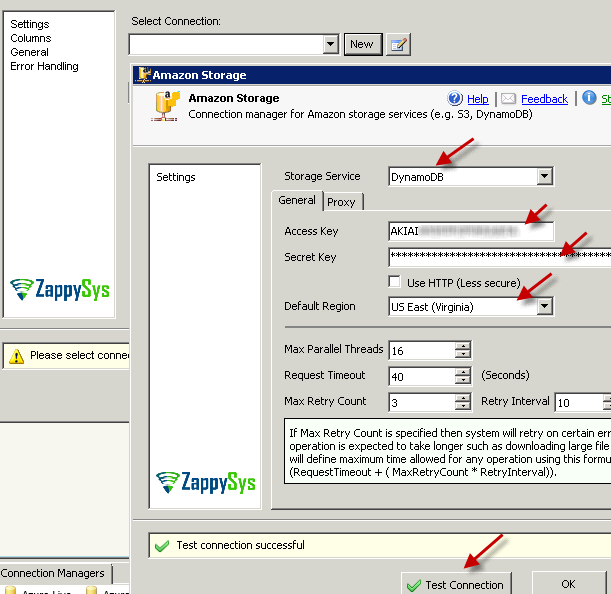
Amazon DynamoDB Source – Configure Connection
Double-click Amazon DynamoDB Source and click New next to the connection.
Select DynamoDB as the service type, enter the access key and secret key and click Test Connection.
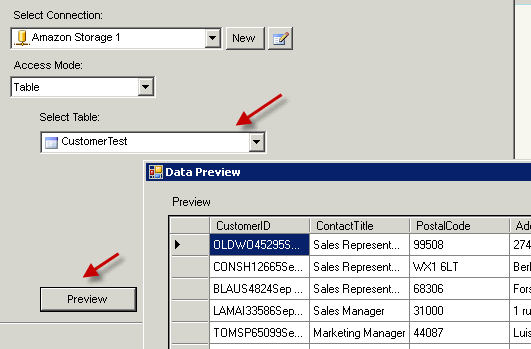
Amazon DynamoDB Source – Read from Table
Pick a table from the Tables dropdown and click Preview, or set AccessMode to Query and type a SQL statement such as SELECT TOP 2 * FROM Customer WHERE CustomerID='ALFKI'.
Add a WITH clause to choose SCAN or QUERY mode, a secondary INDEX or a LIMIT.
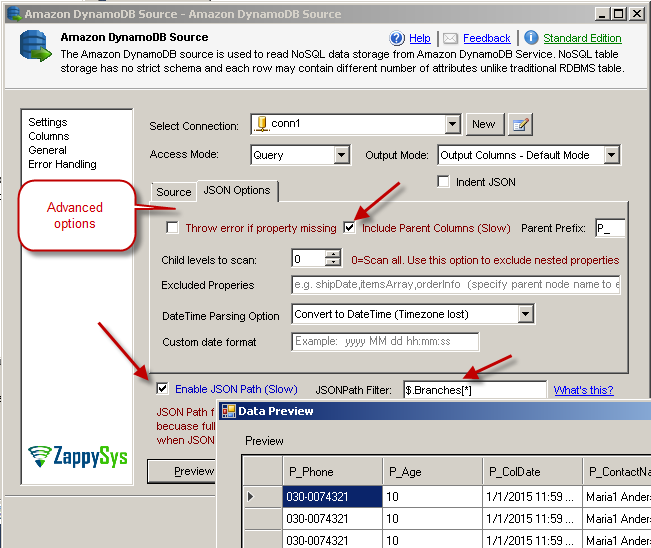
Amazon DynamoDB Source – Advanced JSON Filter Options
Turn on JSON Path to read rows from a nested array, for example $.Users[*].UserName, and use IncludeParentColumns to keep parent properties on each row.
Other options flatten arrays into columns or output raw JSON documents instead of columns.
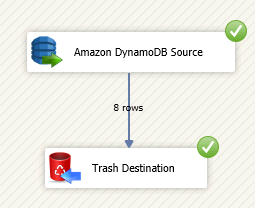
Amazon DynamoDB Source – Extract data from DynamoDB
Connect the source to a destination (the help uses Trash Destination with a Data Viewer) and run the package to see the extracted rows.
Inside the UI
Key settings, as they appear in SSDT.
Real screens from the Amazon DynamoDB Source product page. Step through them, or open any shot at full size.
Amazon DynamoDB Source – Configure Connection
Click New to create the connection: choose DynamoDB, enter the access key and secret key and test it.
Articles
Worked examples that use Amazon DynamoDB Source.
Compatibility and requirements
Designed to stay inside your SSIS runtime.
- SQL Server 2012 through 2025, 32-bit and 64-bit
- Windows only, 64-bit OS required. SQL Server Express and Web editions do not include SSIS
- Azure Data Factory SSIS Integration Runtime
- Self-hosted: credentials and data stay in your environment (external API calls still reach that service)
- Fully functional 30-day trial of SSIS PowerPack
FAQ
Questions teams ask before they drop Amazon DynamoDB Source on the canvas.
What is Amazon DynamoDB Source?
Amazon DynamoDB Source extracts large amounts of data from Amazon DynamoDB. It supports a SQL-like query language, so you can query DynamoDB data without dealing with complex APIs. Amazon DynamoDB is a cloud-based NoSQL data storage service from Amazon AWS.
What can Amazon DynamoDB Source do?
It bulk extracts DynamoDB data in Table or Query mode with data preview. Queries use a SQL-like language (TOP, column list, WHERE, WITH options) that is turned into native DynamoDB requests. It can read inner arrays with JSON Path, flatten arrays into columns, output raw JSON documents, and redirect bad rows to the error output.
How do I choose between SCAN and QUERY?
Add a WITH clause: WITH(SCAN) or WITH(SCAN, LIMIT=1000) scans the table, while WITH(QUERY) uses the hash/range key, optionally on a secondary index with INDEX=your_index_name. See How to Read / Write Amazon DynamoDB in SSIS.
Are there limits in the SQL syntax?
Yes. A WHERE clause can use AND or OR, but not both mixed in the same filter. Dates are compared as ISO 8601 strings, and you can insert an SSIS variable with a placeholder such as '{{User::vMyDate,yyyy-MM-ddTHH:mm:ssZ}}'.
Which SQL Server versions can I run it on?
SQL Server 2025, 2022, 2019, 2017, 2016, 2014, and 2012 (32- and 64-bit), plus Azure Data Factory with an SSIS Integration Runtime (packages must target SQL Server 2017). See Compatibility and requirements.




What customers say
Start your free trial today
Install SSIS PowerPack and drag Amazon DynamoDB Source onto the Data Flow.
Extract large amounts of data from Amazon DynamoDB with a SQL-like query language, in SSIS.
- Data Flow Source in SSISAmazon DynamoDB Source appears in the toolbox after you install PowerPack.
- Fully functional 30-day trialSSIS PowerPack, running in your environment.
- Live supportHelp during your trial and after purchase.
Open Help FileBrowse all SSIS PowerPack tasks
New purchases may be eligible for refund review within 30 days. See the refund policy.
Talk to an engineer before or during your trial.