SSIS Web API Destination
Send rows from your SSIS data flow to any REST or SOAP API endpoint.
POST data to any API such as a JSON REST API or an XML SOAP web service. Group rows into batch requests, add OAuth, Basic, or Windows authentication, and capture the response and failed requests as outputs, all without coding.
The trial includes Web API Destination and every other PowerPack component
- Batch multiple rows per request
- Runs in your environment
- Also runs in Azure Data Factory
- OAuth, client certificate, TLS 1.2


At a glance
What Web API Destination can do
Web API Destination posts data to any API endpoint, whether a JSON REST API or an XML SOAP web service. Advanced options make it possible to connect to virtually any API service without writing code.
POST to any API
POST data to any API endpoint without coding.
- JSON REST APIs or XML SOAP web services
- POST, PUT, DELETE, and other HTTP methods
- Direct URL or an HTTP, OAuth, or Salesforce connection
Batch / bulk mode
Group multiple input rows into a single request body.
- Body header, footer, and row separator
- Batch size per request
- One request per row by default
Authentication
Windows / Basic authentication, client certificate, and OAuth.
- Credentials through a connection manager
- Option to ignore SSL certificate errors
File upload & multipart
Upload files or send multipart/form-data.
- Raw file upload with
@c:\data\myfile.zipin the body - Multipart key/value fields and files
- Custom boundary for multipart uploads
Response output
Capture what the API returns.
- Response output includes ResponseText and StatusCode
- Parse the JSON response into rows and save to SQL Server
- Return the response as binary when needed
Error output
Redirect failed requests instead of failing the package.
- Error output for failed requests
- Optionally include the exact response body
- Continue on 404 (URL not found)
Dynamic values
Use variables and input columns anywhere in the request.
- Placeholders such as
{{User::MyVar}}in headers or body - Insert input columns into the body (e.g.
<%ZS_JSON_OUT%>) - Cookies support
Advanced options
Tune performance and security.
- GZip compression and request body compression
- Timeout, wait time between requests, and parallel requests
- SSL/TLS protocol selection (TLS 1.2 supported)
- Test UI to see the request and response
SQL Server 2012–2025 & ADF
Runs in your environment on SQL Server 2012–2025 and Azure-SSIS.
- SQL Server 2025, 2022, 2019, 2017, 2016, 2014, 2012 (32/64-bit)
- Azure Data Factory (SSIS IR)
- Design packages in Visual Studio 2017, 2019, 2022, or 2026
- Windows only (64-bit OS): Windows 7–11 or Windows Server 2012–2025
See all features
- POST data to any API endpoint without coding (read more)
- Windows / Basic authentication, client certificate, and OAuth (read more)
- File upload and REST API POST using multipart/form-data (read more)
- POST data in bulk mode (group multiple requests into a single body); see batching techniques
- Support for cookies
- Response output (includes ResponseText and StatusCode)
- Error output (redirect failed requests)
- Easy test UI (see request / response)
- Advanced options (e.g. GZip compression, timeout, SSL/TLS protocols; TLS 1.2 supported)
- Dynamic variable replacement with format specifiers anywhere in the header or request data (e.g.
{{User::MyVar}}) - Custom boundary for multipart/form-data uploads
Support for SQL Server 2025, 2022, 2019, 2017, 2016, 2014, 2012 (32/64-bit) and Azure Data Factory
SQL Server 2012–2025
Three parts to configure
Request, batching, and what comes back.
Pick a connection or a direct URL, build the body from input columns, then decide what happens with the response and with failed requests.
Build the web request.
Select an HTTP connection (or use a direct URL), set the HTTP request method, and build the body. Use Insert Variable to add an input column such as <%ZS_JSON_OUT%> from JSON Generator Transform.
- Credentials, input columns, POST body, and headers
- Content types such as JSON, XML, form, binary, or GraphQL
- Variables in headers and body
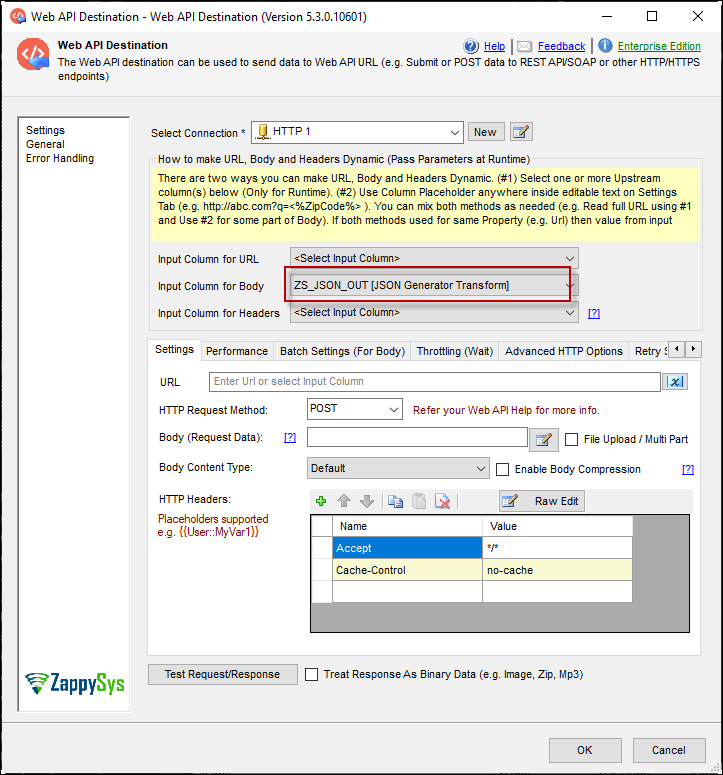
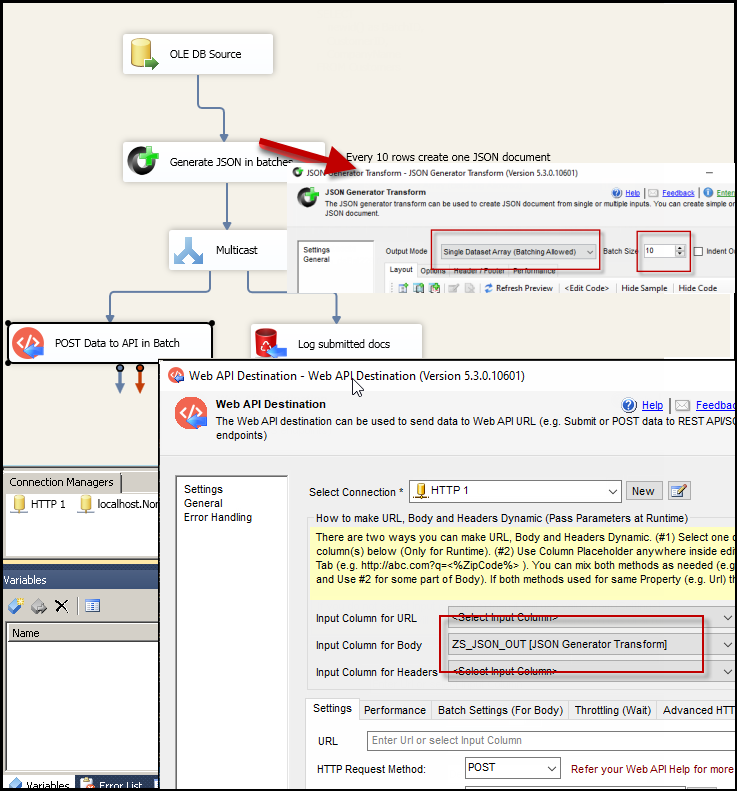
Send many rows in one request.
In Batch Settings (For Body), enable submitting multiple records in a single web request, then set the body header, footer, row separator, and batch size.
- Group JSON documents in a single request
- For APIs that accept multiple records in one call
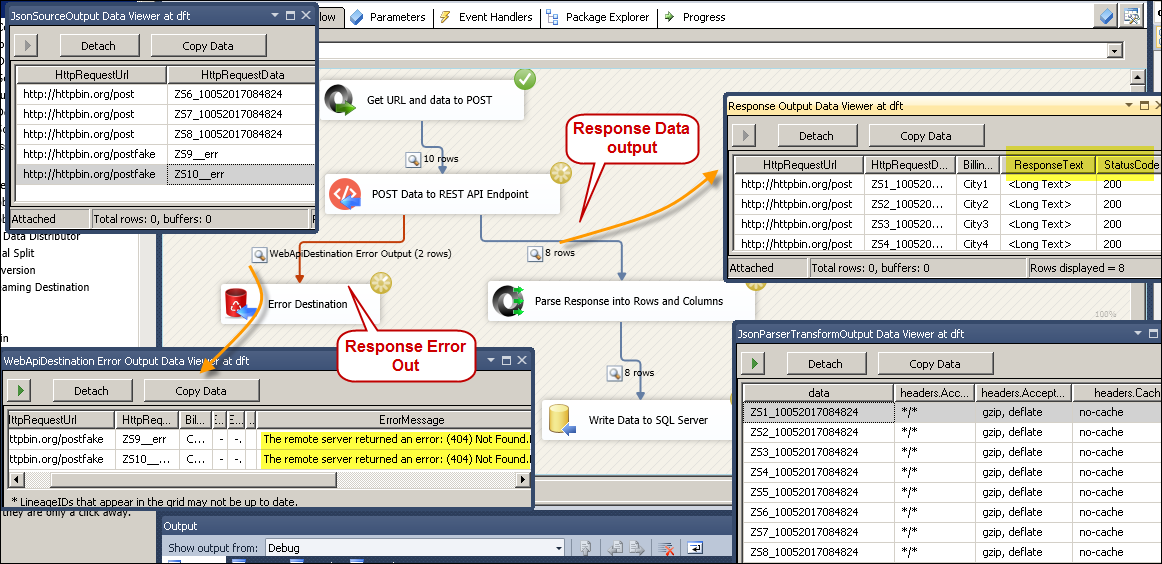
Keep the response and the failures.
Connect the response output to parse the API reply into rows and save it to SQL Server. Connect the error output to capture failed requests.
- ResponseText and StatusCode on the response output
- Failed requests on the error output
- Optionally output the exact response body on error
Inside the UI
Key settings, as they appear in SSDT.
Real screens from the Web API Destination product page and help file. Step through the request, batching, outputs, and a full run, or open any shot at full size.
POST JSON to a REST API
Create or update records by posting JSON built from SQL data.
Batch example
One request per 100 rows instead of one per row.
From the Web API Destination help file: wrap many input documents into one JSON body with a header, footer, and separator.
-
Target body
The API expects many records inside one array.
{ records : [ {...}, {...}, {...} ] } -
Enable body batching
Option
EnableBodyBatch = TrueBy default one request is sent for each input row. Enable this when the API accepts multiple records in one call.
-
Batch settings to use
Property Value BodyBatchSize 100 BodyHeader { records: [ BodyFooter ] } BodyRowSeparator , No separator is added after the last row of a batch.
Example from the Web API Destination help file (BodyHeader property). See also How to batch REST API requests in SSIS.
Articles
Worked examples that use Web API Destination.
Compatibility and requirements
Designed to stay inside your SSIS runtime.
- SQL Server 2012 through 2025, 32-bit and 64-bit
- Windows only, 64-bit OS required. SQL Server Express and Web editions do not include SSIS
- Azure Data Factory SSIS Integration Runtime
- Self-hosted: credentials and data stay in your environment (external API calls still reach that service)
- Fully functional 30-day trial of SSIS PowerPack
FAQ
Questions teams ask before they drop Web API Destination on the canvas.
Which APIs can I send data to?
Any API endpoint, such as a JSON REST API or an XML SOAP web service. The help file notes data can be in any format, such as CSV, JSON, or XML.
Does it send one request per row?
By default, yes. Turn on body batching to group multiple input rows into one request, with a header, footer, row separator, and batch size.
How do I build a JSON body from my rows?
A common pattern is CSV or database source, then JSON Generator Transform, then Web API Destination with <%ZS_JSON_OUT%> inserted into the body.
What happens when a request fails?
Failed requests can be redirected to the error output. You can also include the exact response body, which helps when the error is JSON or XML you want to parse.
Can it upload files?
Yes. It supports raw file upload and multipart/form-data with key/value fields and files, plus a custom boundary. See the file upload guide.
Which SQL Server versions can I run it on?
SQL Server 2025, 2022, 2019, 2017, 2016, 2014, and 2012 (32- and 64-bit), plus Azure Data Factory with an SSIS Integration Runtime (packages must target SQL Server 2017). See Compatibility and requirements.
Where is the full property reference?
Open the Web API Destination help file for properties and a step-by-step example. System requirements are on the installation page.





What customers say
Start your free trial today
Install SSIS PowerPack and drag Web API Destination onto a Data Flow.
Test the request in the UI before you run the package, with no coding required.
- Data Flow Destination in SSISWeb API Destination appears in the toolbox after you install PowerPack.
- Fully functional 30-day trialSSIS PowerPack, running in your environment.
- Live supportHelp during your trial and after purchase.
Open Help FileBrowse all SSIS PowerPack tasks
New purchases may be eligible for refund review within 30 days. See the refund policy.
Talk to an engineer before or during your trial.