SSIS Amazon DynamoDB Destination
Bulk insert a large number of records into Amazon DynamoDB from any data source using SSIS.
Amazon DynamoDB Destination bulk inserts a large number of records into Amazon DynamoDB from any data source using SSIS, and can also update, delete or replace items. Amazon DynamoDB is a cloud-based NoSQL data storage service from Amazon AWS.
The trial includes Amazon DynamoDB Destination and every other PowerPack component
- Data Flow Destination in SSIS
- Runs in your environment
- Also runs in Azure Data Factory
- Fully functional 30-day trial


At a glance
What Amazon DynamoDB Destination can do
Amazon DynamoDB Destination can be used to bulk insert large amount of records to Amazon DynamoDB storage from any data source using SSIS. Amazon DynamoDB is a cloud based NoSQL data storage service from Amazon AWS
Bulk write to DynamoDB
Bulk insert a large number of records into Amazon DynamoDB from any data source.
- Write data like a normal table, no need to learn complex APIs
BatchSizesets records per request
Raw JSON documents
Load raw JSON documents instead of mapping each column.
- Map the JSON to the
__DOCUMENT__column - Build nested JSON from multiple inputs with JSON Generator or Template Transform
Insert, update & delete
Choose the load operation with the Operation property.
- Insert, Reload, Update, UpdateOrInsert, Delete and Replace
- Update runs row by row: map an UpdateItem command (built with Template Transform or JSON Generator) to
__DOCUMENT__ - Delete maps the key column of the item
Parallel load & throttling
Load with multiple threads and slow down requests when needed.
ParallelThreadsfor multi-threaded loadRequestDelaywaits between requests to throttle requests per second
Isolate bad records
Retry a failed batch row by row so good records still load.
SwitchToRowByRowOnBatchFailrejects only the records causing the error
Error output
Redirect bad rows to the error output along with the exact error reason.
- RedirectRow on error or truncation
- By default the component fails on any data error
Table picker & auto-mapping
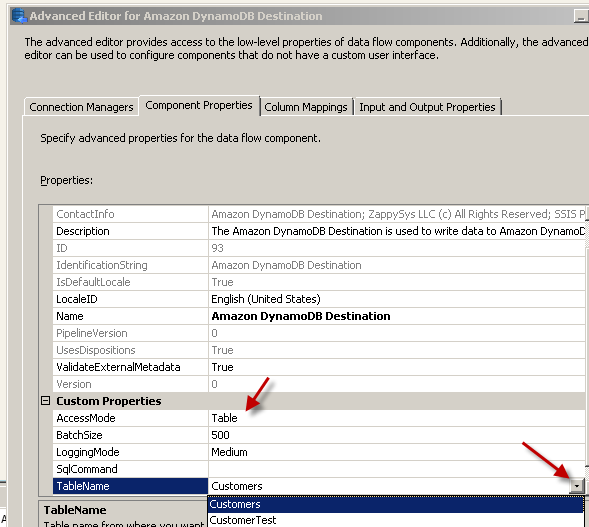
Pick the DynamoDB table from the Tables dropdown on the Component Properties tab.
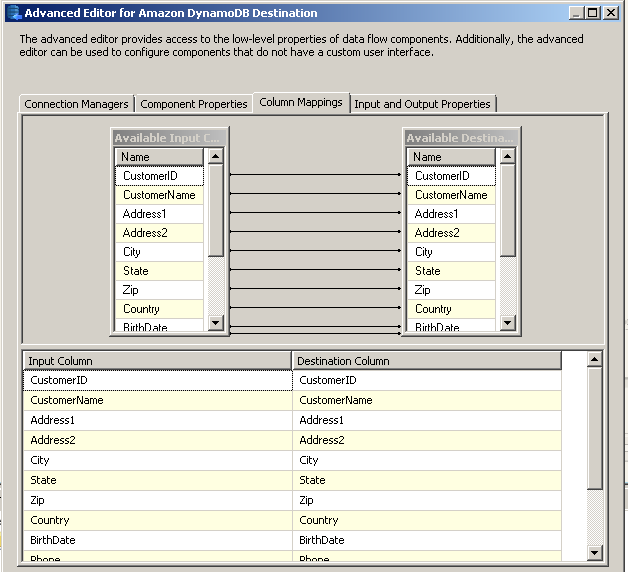
- New, empty table: all input columns are mapped automatically
- Existing table: drag columns from the source list to the target list
SQL Server 2012–2025 & ADF
Runs in your environment on SQL Server 2012–2025 and Azure-SSIS.
- SQL Server 2025, 2022, 2019, 2017, 2016, 2014, 2012 (32/64-bit)
- Azure Data Factory (SSIS IR)
- Design packages in Visual Studio 2017, 2019, 2022, or 2026
- Windows only (64-bit OS): Windows 7–11 or Windows Server 2012–2025
AWS & DynamoDB Local
Connect through the Amazon Storage Connection Manager with DynamoDB as the service type.
- Access key and secret key, temporary token or default (IAM role) credentials
- DynamoDB Local option for the free local emulator
- Proxy server settings
See all features
- Bulk insert a large number of records into Amazon DynamoDB from any data source
- Bulk insert, update and delete Amazon DynamoDB data
- Load raw JSON documents rather than mapping each column
- Insert nested JSON documents built from multiple inputs
- Operations: Insert, Reload, Update, UpdateOrInsert, Delete and Replace
- Multi-threaded parallel load
- Request delay to throttle requests per second
- Switch to row-by-row mode when a batch fails to isolate bad records
- Error output to redirect bad rows with the error reason
- Pick the target table from a dropdown; input columns are mapped automatically for a new, empty table
- Write data like a normal table, no need to learn complex APIs
- Logging modes (Normal, Medium, Detailed, Debugging) with optional timestamp prefix
Support for SQL Server 2025, 2022, 2019, 2017, 2016, 2014, 2012 (32/64-bit) and Azure Data Factory
SQL Server 2012–2025
How it works
From the toolbox to your first run.
Key steps from the Amazon DynamoDB Destination page and help file, with the screens you will see in SSDT.
Create new Amazon DynamoDB connection
Right-click the Connection Managers panel, choose New Connection and pick the ZS-AWS-STORAGE connection type.
Select DynamoDB as the service type, enter the access key and secret key (or check DynamoDB Local) and click Test Connection.
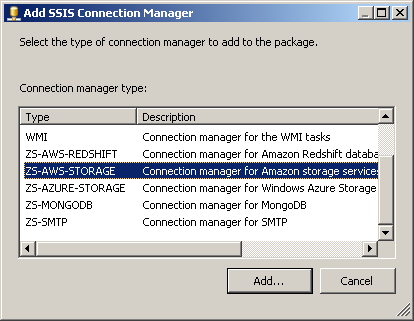
Select Amazon Storage Connection
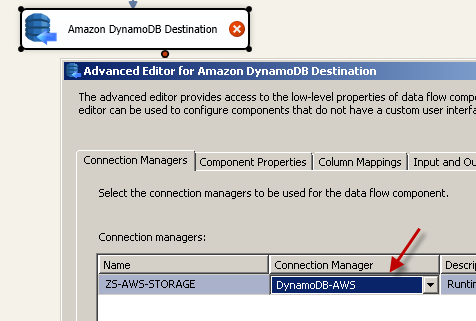
Double-click Amazon DynamoDB Destination and, on the Connection Manager tab, select the DynamoDB connection.
On Component Properties, set AccessMode=Table, pick the table from the Tables dropdown and choose the Operation (Insert by default).
Simple Mapping Mode (Map Individual Columns rather than Raw JSON document Load)
On the Mappings tab, verify the mapping. A new, empty table gets all input columns mapped automatically; for an existing table, drag columns from the source list to the target list.
To load whole documents instead, map a raw JSON string to the __DOCUMENT__ column.
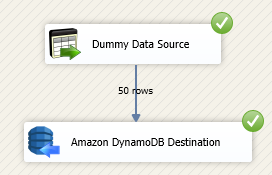
Loading data into Amazon DynamoDB in Data Flow
Run the package and check the loaded items in the DynamoDB section of the AWS Console.
Bad rows can be redirected to the error output with the exact error reason, and SwitchToRowByRowOnBatchFail retries a failed batch row by row so good records still load.
Inside the UI
Key settings, as they appear in SSDT.
Real screens from the Amazon DynamoDB Destination product page. Step through them, or open any shot at full size.
Create new Amazon DynamoDB connection
Right-click the Connection Managers panel, choose New Connection and pick ZS-AWS-STORAGE.
Articles
Worked examples that use Amazon DynamoDB Destination.
Compatibility and requirements
Designed to stay inside your SSIS runtime.
- SQL Server 2012 through 2025, 32-bit and 64-bit
- Windows only, 64-bit OS required. SQL Server Express and Web editions do not include SSIS
- Azure Data Factory SSIS Integration Runtime
- Self-hosted: credentials and data stay in your environment (external API calls still reach that service)
- Fully functional 30-day trial of SSIS PowerPack
FAQ
Questions teams ask before they drop Amazon DynamoDB Destination on the canvas.
What is Amazon DynamoDB Destination?
Amazon DynamoDB Destination bulk inserts a large number of records into Amazon DynamoDB from any data source using SSIS, and can also update, delete or replace items. Amazon DynamoDB is a cloud-based NoSQL data storage service from Amazon AWS.
What can Amazon DynamoDB Destination do?
It writes to a DynamoDB table with the Operation you choose: Insert (default), Reload, Update, UpdateOrInsert, Delete or Replace. You can map individual columns or raw JSON documents, load with multiple parallel threads, throttle with RequestDelay, and redirect bad rows to the error output.
Can it update existing DynamoDB items in bulk?
No. DynamoDB does not support bulk update, so updates run row by row: build an UpdateItem command with Template Transform or JSON Generator Transform and map it to __DOCUMENT__. Insert and delete run in bulk. See How to Read / Write Amazon DynamoDB in SSIS.
What happens when one record in a batch fails?
By default the whole batch is rejected. Set SwitchToRowByRowOnBatchFail to retry that batch row by row so only the bad records fail, and attach the error output with RedirectRow to capture them with the error reason.
Which SQL Server versions can I run it on?
SQL Server 2025, 2022, 2019, 2017, 2016, 2014, and 2012 (32- and 64-bit), plus Azure Data Factory with an SSIS Integration Runtime (packages must target SQL Server 2017). See Compatibility and requirements.
See also
More from SSIS PowerPack.





What customers say
Start your free trial today
Install SSIS PowerPack and drag Amazon DynamoDB Destination onto the Data Flow.
Bulk insert a large number of records into Amazon DynamoDB from any data source using SSIS.
- Data Flow Destination in SSISAmazon DynamoDB Destination appears in the toolbox after you install PowerPack.
- Fully functional 30-day trialSSIS PowerPack, running in your environment.
- Live supportHelp during your trial and after purchase.
Open Help FileBrowse all SSIS PowerPack tasks
New purchases may be eligible for refund review within 30 days. See the refund policy.
Talk to an engineer before or during your trial.