

Video tutorial
Watch this quick video to see the integration in action. It walks you through the end-to-end setup, including:
- Installing the SSIS PowerPack
- Configuring a secure connection to Amazon Selling Partner (SP-API)
- Working with Amazon Selling Partner (SP-API) data directly inside SSIS
- Exploring advanced API Source features
Ready to dive in? Download the product to jump right in, or follow the step-by-step guide below to see how it works.
Prerequisites
Before we begin, make sure the following prerequisites are met:
- SQL Server Data Tools (SSDT) designer installed for Visual Studio.
- SQL Server Integration Services Projects 2022+ Visual Studio extension installed.
- SSIS PowerPack is installed.
Make generic REST API request in SSIS
-
Open Visual Studio and click Create a new project.
-
Select Integration Services Project. Enter a name and location for your project, then click OK.
-
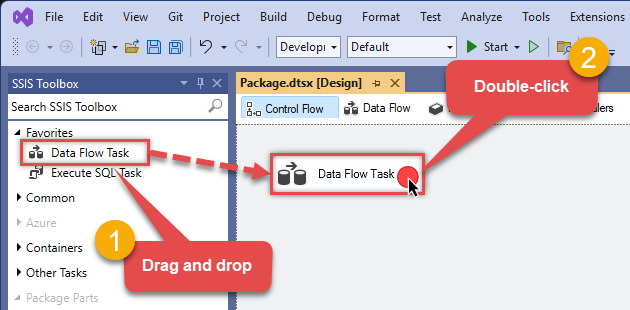
From the SSIS Toolbox, drag and drop a Data Flow Task onto the Control Flow surface, and double-click it:
-
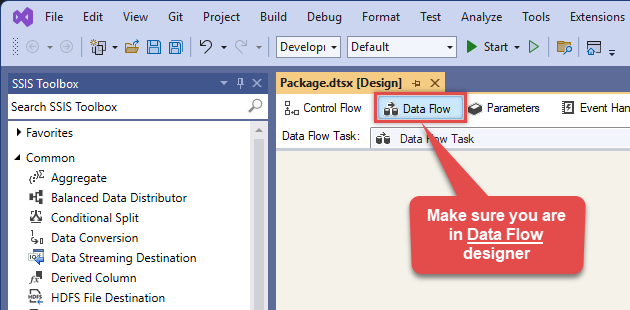
Make sure you are in the Data Flow Task designer:
-
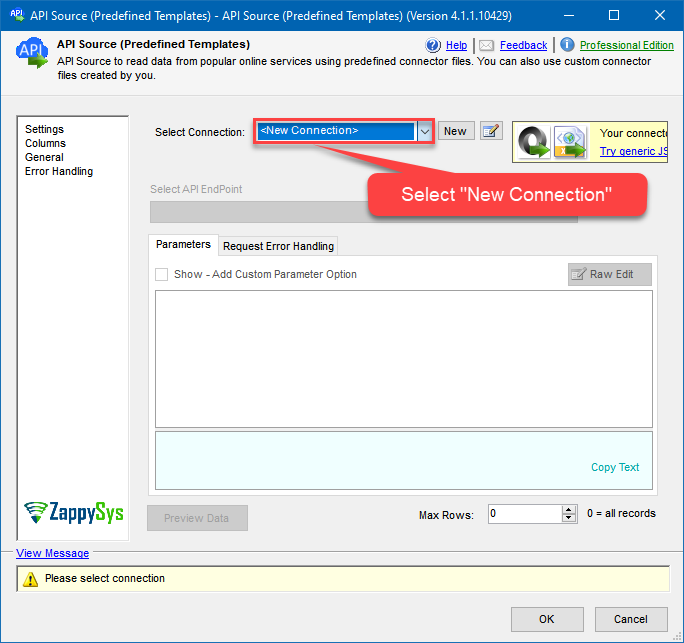
From the SSIS toolbox drag and API Source (Predefined Templates) on the data flow designer surface, and double click on it to edit it:

-
Select New Connection to create a new connection:
-
Use a preinstalled Amazon Selling Partner (SP-API) Connector from Popular Connector List or press Search Online radio button to download Amazon Selling Partner (SP-API) Connector. Once downloaded simply use it in the configuration:
Amazon Selling Partner (SP-API)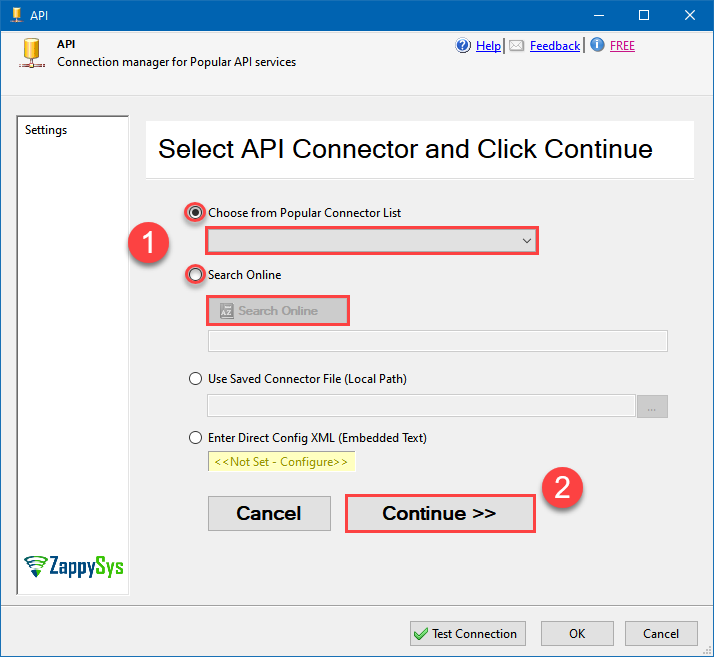
-
Select your authentication scenario below to expand connection configuration steps to:
- Configure the authentication in Amazon Selling Partner (SP-API).
- Enter those details into the API Connection Manager configuration.
Private app
Amazon Selling Partner (SP-API) authentication
Amazon Sellers can use SP-API to set up private integrations and build solutions exclusively for their Amazon store. Private app is available only to your organization and is self-authorized. A private developer builds application(s) that integrate their own company with Amazon APIs. [API reference]
Perform the following steps to authenticate calls using Amazon SP-API Private app:
- Register as an Amazon Private SP-API Developer. You may need to wait for a day or two to get approved (check approval status).
-
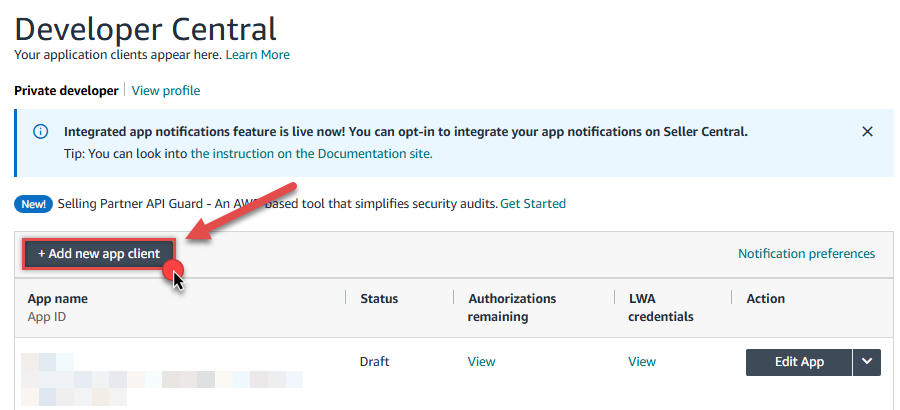
Once your developer account is approved,
login to your account, visit developer console
and click Add new app client button to create a Private app:
-
Continue by naming your application in the App name field,
choose
SP APIas API Type, and select the Roles for your app (i.e. permissions):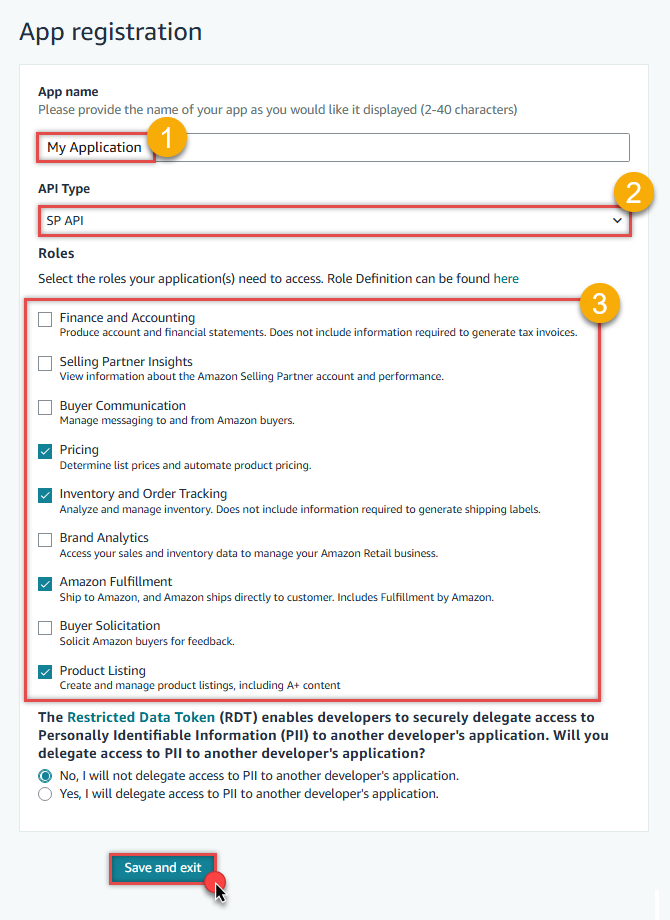
-
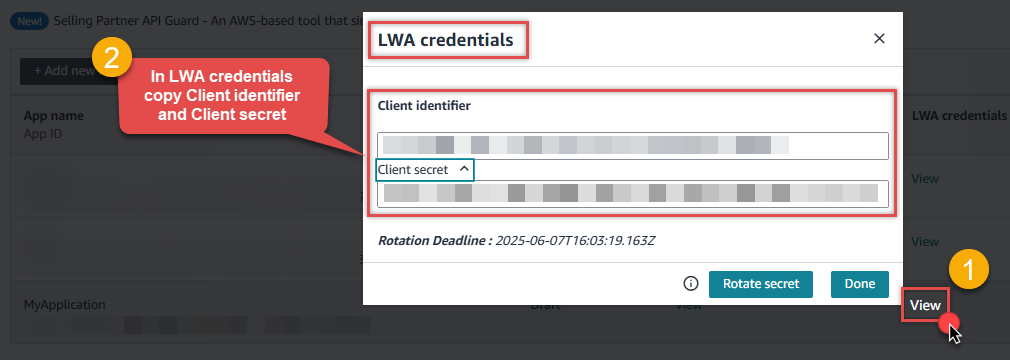
Once you do that, click View link in LWA credentials column to
copy Client identifier and Client secret (we will use them later):
-
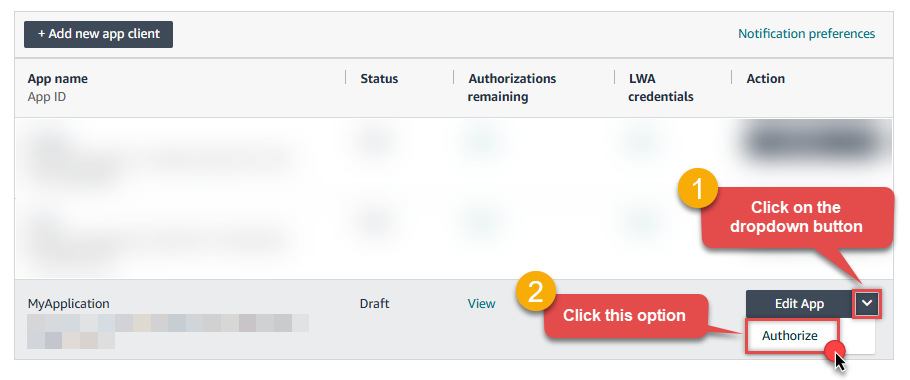
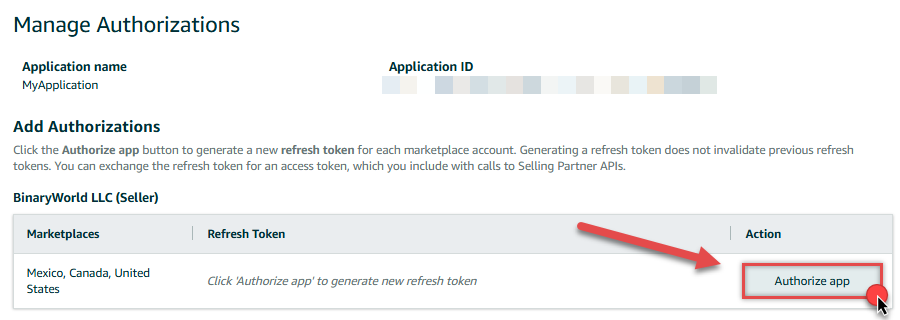
Now it's time to Authorize your app:
-
Finish authorizing it by presing Authorize app button:
-
Finally, copy the Refresh Token (we will use it in the next step):

-
Now go to SSIS package or ODBC data source and use Private app authentication configuration:
- In the ClientId field paste the Client identifier value you copied in the previous step.
- In the ClientSecret field paste the Client secret value you copied in the previous step.
- Leave the default value in the TokenUrl field.
- In the Refresh Token field paste the Refresh Token value you copied in the previous step.
- Click Test Connection to confirm the connection is working.
- Done! Now you are ready to use Amazon Selling Partner (SP-API) Connector!
API Connection Manager configuration
Just perform these simple steps to finish authentication configuration:
-
Set Authentication Type to
Private app [OAuth] - Optional step. Modify API Base URL if needed (in most cases default will work).
- Fill in all the required parameters and set optional parameters if needed.
- Press Generate Token button to generate the tokens.
- Finally, hit OK button:
Amazon Selling Partner (SP-API)Private app [OAuth]https://sellingpartnerapi-na.amazon.comRequired Parameters ClientId Fill-in the parameter... ClientSecret Fill-in the parameter... TokenUrl Fill-in the parameter... Optional Parameters TokenUIMode OnlyRefreshToken AuthUrl (Do not Use for Private app - Self Authorization) https://sellercentral.amazon.com/apps/authorize/consent?application_id=[YOUR-APPLICATION-ID]&version=beta OrdersApiVersion v0 SellerApiVersion v1 ShippingApiVersion v1 ServicesApiVersion v1 FbaApiVersion v1 SalesApiVersion v1 ReportsApiVersion 2021-06-30 ProductsFeesApiVersion v0 ProductPricingApiVersion v0 CatalogItemsApiVersion 2022-04-01 VendorOrdersApiVersion v1 RetryMode RetryWhenStatusCodeMatch RetryStatusCodeList 429 RetryCountMax 5 RetryMultiplyWaitTime True 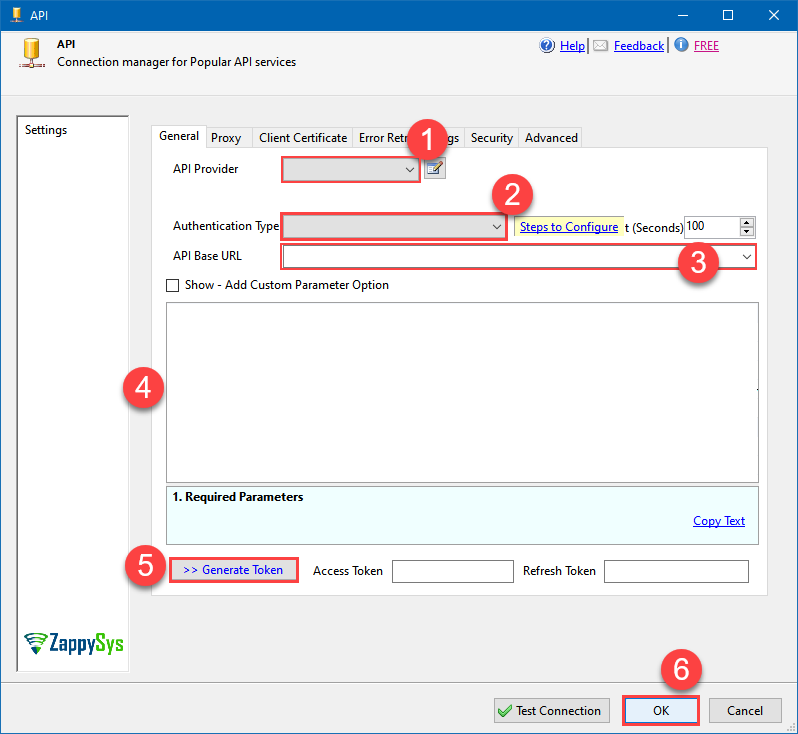 Find full details in the Amazon Selling Partner (SP-API) Connector authentication reference.
 -
Select Generic Table (Bulk Read / Write) table from the dropdown and hit Preview Data:
 API Source - Amazon Selling Partner (SP-API)Read and write Amazon Selling Partner (SP-API) data effortlessly. Integrate, manage, and automate listings, orders, payments, and reports — almost no coding required.Amazon Selling Partner (SP-API)Generic Table (Bulk Read / Write)
Required Parameters HTTP - Url or File Path Fill-in the parameter... HTTP - Request Method Fill-in the parameter... Optional Parameters HTTP - Request Body HTTP - Is MultiPart Body (Pass File data/Mixed Key/value) False HTTP - Request Format (Content-Type) ApplicationJson HTTP - Headers (e.g. hdr1:aaa || hdr2:bbb) Accept: */* || Cache-Control: no-cache Parser - Response Format (Default=Json) Default Parser - Filter (e.g. $.rows[*] ) Parser - Include Parent Columns True Parser - Parent Column Prefix P_ Parser - Include Parent When Child Null False Parser - Encoding Parser - CharacterSet Download - Enable reading binary data False Download - File overwrite mode AlwaysOverwrite Download - Save file path Download - Enable raw output mode as single row False Download - Raw output data RowTemplate {Status:'Downloaded'} Download - Request Timeout (Milliseconds) 0 General - Enable Custom Search/Replace False General - SearchFor (e.g. (\d)-(\d)--regex) General - ReplaceWith (e.g. $1-***) General - File Compression Type None General - Date Format General - Enable Big Number Handling False General - Wait time (Ms) - Helps to slow down pagination (Use for throttling) 0 JSON/XML - ExcludedProperties (e.g. meta,info) JSON/XML - Flatten Small Array (Not preferred for more than 10 items) False JSON/XML - Max Array Items To Flatten 10 JSON/XML - Array Transform Type None JSON/XML - Array Transform Column Name Filter JSON/XML - Array Transform Row Value Filter JSON/XML - Array Transform Enable Custom Columns False JSON/XML - Enable Pivot Transform False JSON/XML - Array Transform Custom Columns JSON/XML - Pivot Path Replace With JSON/XML - Enable Pivot Path Search Replace False JSON/XML - Pivot Path Search For JSON/XML - Include Pivot Path False JSON/XML - Throw Error When No Match for Filter False Pagination - Mode ByResponseAttribute Pagination - Attribute Name (e.g. page) Pagination - Increment By (e.g. 100) 1 Pagination - Expression for Next URL (e.g. $.nextUrl) Pagination - Wait time after each request (milliseconds) 0 Pagination - Max Rows Expr Pagination - Max Pages Expr Pagination - Max Rows DataPath Expr Pagination - Max Pages 0 Pagination - End Rules Pagination - Next URL Suffix Pagination - Next URL End Indicator Pagination - Stop Indicator Expr Pagination - Current Page Pagination - End Strategy Type DetectBasedOnRecordCount Pagination - Stop based on this Response StatusCode Pagination - When EndStrategy Condition Equals True Pagination - Max Response Bytes Pagination - Min Response Bytes Pagination - Error String Match Pagination - Enable Page Token in Body False Pagination - Placeholders (e.g. {page}) Pagination - Has Different NextPage Info False Pagination - First Page Body Part Pagination - Next Page Body Part Csv - Column Delimiter , Csv - Has Header Row True Csv - Throw error when column count mismatch False Csv - Throw error when no record found False Csv - Allow comments (i.e. line starts with # treat as comment and skip line) False Csv - Comment Character # Csv - Skip rows 0 Csv - Ignore Blank Lines True Csv - Skip Empty Records False Csv - Skip Header Comment Rows 0 Csv - Trim Headers False Csv - Trim Fields False Csv - Ignore Quotes False Csv - Treat Any Blank Value As Null False Xml - ElementsToTreatAsArray 
-
That's it! We are done! Just in a few clicks we configured the call to Amazon Selling Partner (SP-API) using Amazon Selling Partner (SP-API) Connector.
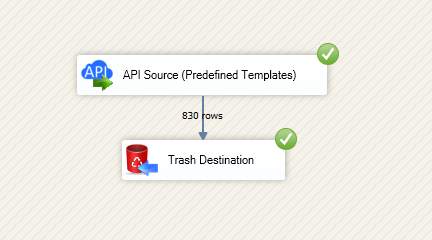
You can load the source data into your desired destination using the Upsert Destination , which supports SQL Server, PostgreSQL, and Amazon Redshift. We also offer other destinations such as CSV , Excel , Azure Table , Salesforce , and more . You can check out our SSIS PowerPack Tasks and components for more options. (*loaded in Trash Destination)
Amazon Selling Partner (SP-API) Connector actions
Need another use case? Pick the next Amazon Selling Partner (SP-API) action in SSIS below.
- Download Report File to Local Disk
- Get FBA Inventory Summaries (Fulfilled By Amazon)
- Get Market Place Participations
- Get Order (Single)
- Get Order Items (For Single Order)
- Get Orders
- Get Orders Items (For All Orders **Slow**)
- Get Report Data - Comma Separated File (CSV)
- Get Report Data - JSON File
- Get Report Data - Tab Separated File (TSV)
- Get Report Data - XML File
- Get Report Filters
- Get Report Options
- Get Report Types
- Get Vendor PurchaseOrder Items
- Get Vendor PurchaseOrders
- Search Catalog Items
- Make Generic REST API Request (Bulk Write)
Conclusion
You now know how to make generic REST API request in SSIS without writing complex code. Amazon Selling Partner (SP-API) SSIS Connector handled pagination and authentication automatically.
Ready to get started? Download the trial or ping us via chat if you need help: