Introduction
 In our previous post, we explored how to read and write MongoDB data using the ZappySys MongoDB Source and Destination SSIS connectors. In this article, you will learn how to connect MariaDB to MongoDB using ZappySys SSIS PowerPack and transfer data between both systems.
We will demonstrate a practical ETL pattern using ZappySys ODBC/JDBC connectivity to extract data from MariaDB and load it into MongoDB within SSIS.
Prerequisites
Before you begin, make sure you have the following:
- First, you will need to have SSIS installed
- Secondly, make sure to have SSDT
- Thirdly, access credentials for both MariaDB and MongoDB
- Finally, do not forget to install ZappySys SSIS PowerPack and ZappySys ODBC PowerPack
Steps
Configure MariaDB Connection Using ODBC (JDBC Bridge)
Since MariaDB connectivity is handled via JDBC, we will use the ZappySys JDBC Bridge Driver to expose it as an ODBC data source.
- Visit the official MariaDB website.
- Download the latest MariaDB JDBC driver.
- Save the
.jarfile locally, for example: D:\Zappysys\drivers\mariadb-java-client-3.5.7.jar - Download and install ZappySys ODBC PowerPack if not already installed.
- Open ODBC Data Sources (64-bit).
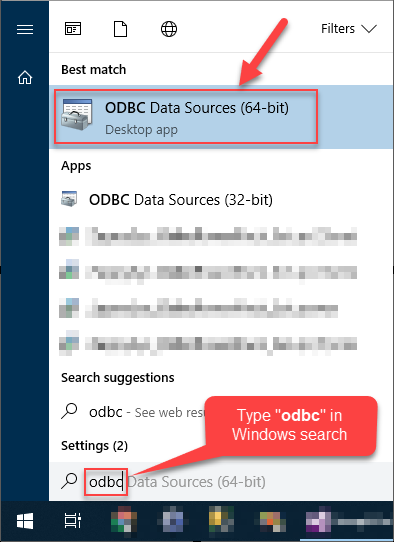
Open ODBC Data Sources
- Create a User data source (User DSN) based on ZappySys JDBC Bridge Driver:
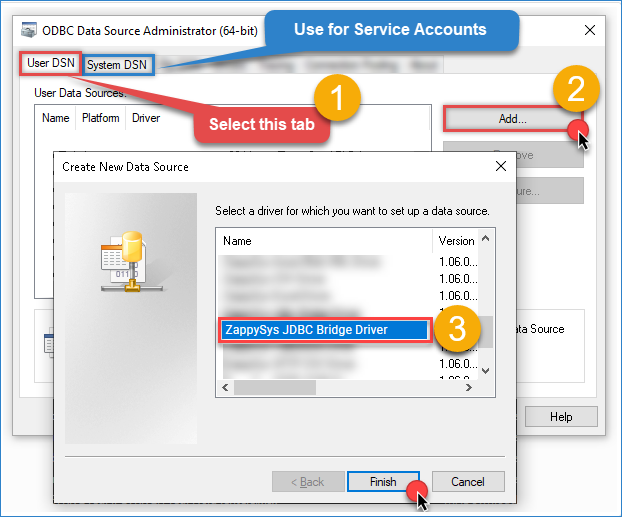
Create a User data source
- Configure the JDBC Connection. Fill in the connection details
- Connection String
jdbc:mariadb://{host-name}:{port}/{database-name}
- JDBC Driver File
D:\Zappysys\drivers\mariadb-java-client-3.5.7.jar
- Username
root
- Password
********
- Connection Parameters
[]
- Connection String
- Click Test Connection. If configured correctly, you should see a success message.
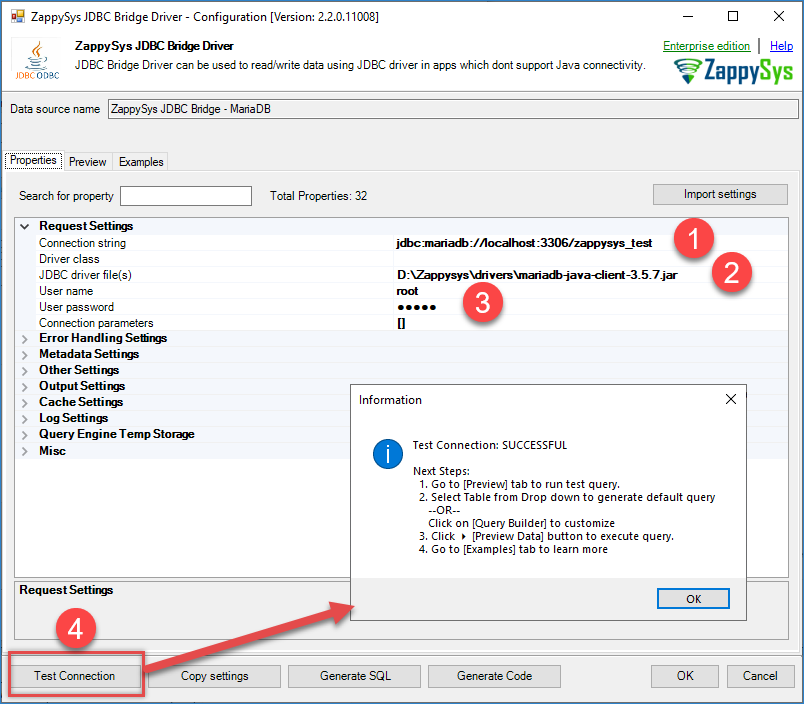
Zappysys JDBC – MariaDB
- You can also use the Preview tab to select the table and execute SQL queries. For advanced SQL examples, refer to the JDBC Bridge documentation.
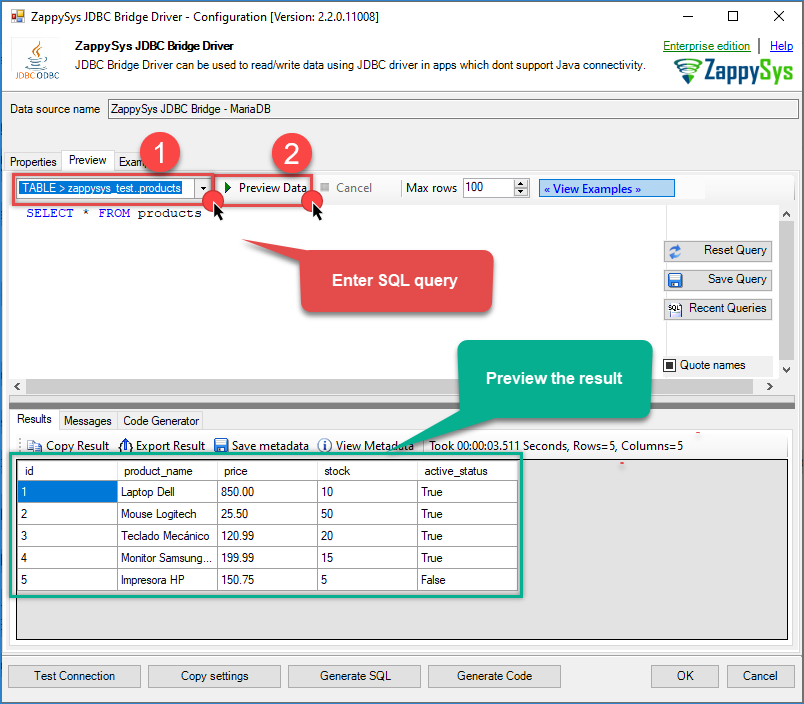
Zappysys JDBC – MariaDB preview result
Connect MariaDB to SSIS
- Open Visual Studio.
- Create a New Project.
- Select Integration Services Project.
- Provide a project name and location, then click OK.
- Drag and drop a Data Flow Task from the SSIS Toolbox onto the Control Flow surface.
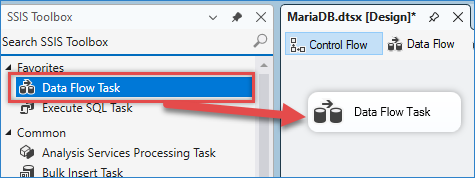
Drag and drop Data flow.
- Double-click the task to open the Data Flow Designer.
- Drag and drop an ODBC Source component into the Data Flow.
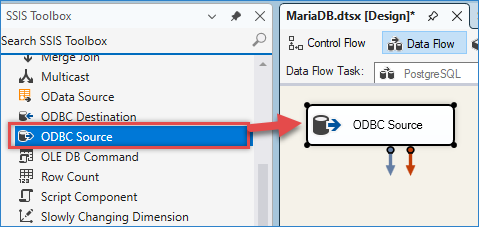
Drag and drop the ODBC source.
- Double-click the component to configure it.
- Click New… to create a new ODBC Connection Manager.
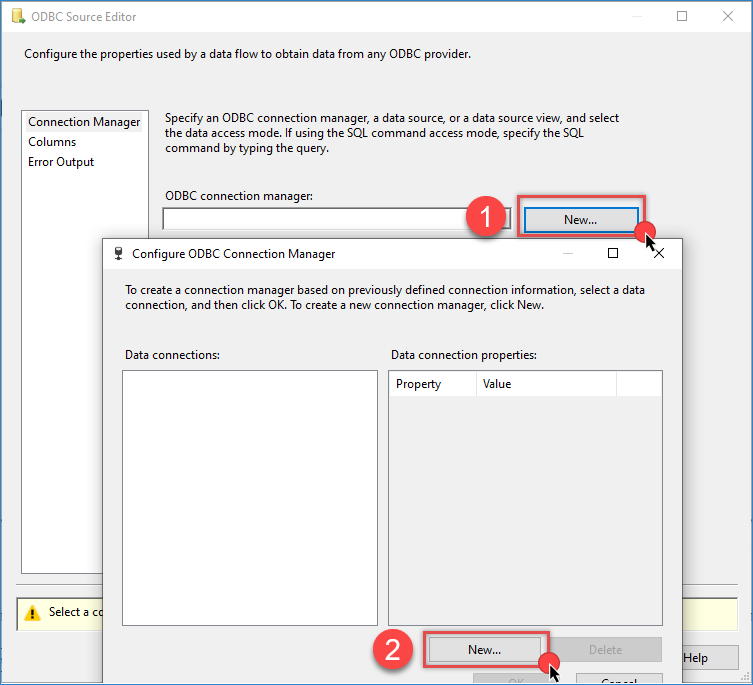
Creating an ODBC Connection Manager in SSIS
- Select the MariaDB ODBC DSN you created earlier.
- Click Test Connection and click OK to save the configuration.
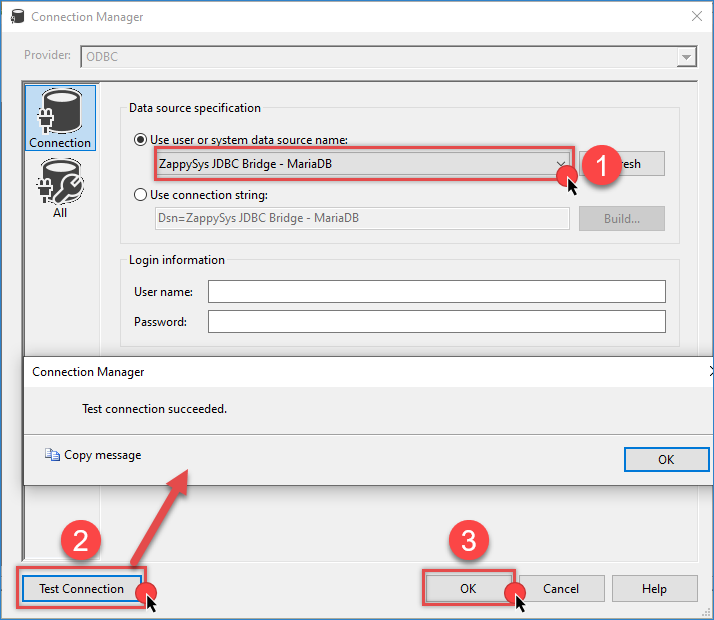
Creating an ODBC Connection Manager in SSIS from JDBC
- Choose Data Access Mode: Table name or SQL command.
- Select the desired table or enter a custom query.
- Click Preview to validate the data, and click OK to save the configuration.
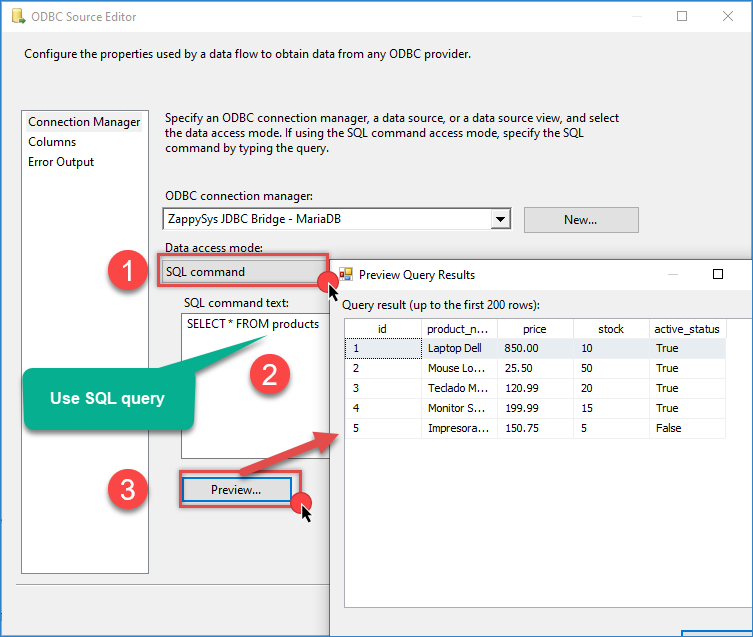
Preview an ODBC Connection Manager in SSIS from JDBC
Configure MongoDB Destination
- In the Connection Manager pane, click New Connection.
- Select ZS-MONGODB.
- Configure the connection:
- Host
- Username
- Password
- Database
- Use the other tabs for more configuration if needed
- Click Test Connection and Click OK.
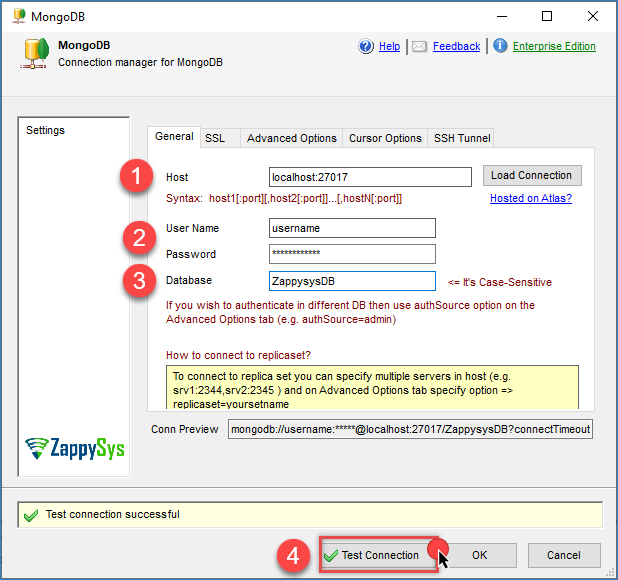
MongoDB connection configuration
- Drag and drop the MongoDB Destination component.
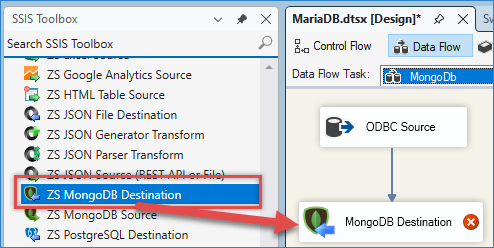
Drag and drop the MongoDB destination
- Connect it to the ODBC Source and double-click to configure it.
- Select the MongoDB connection.
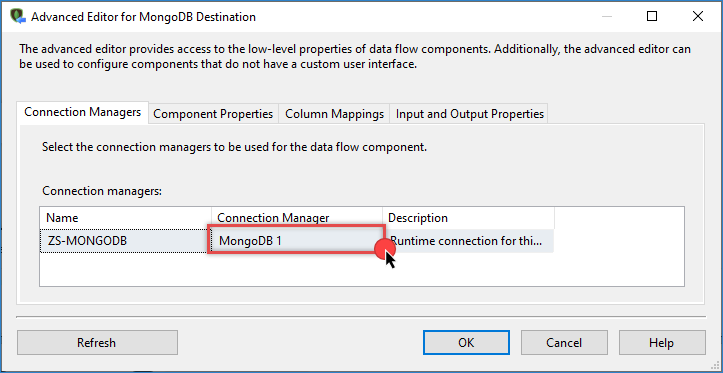
MongoDB Destination – Select connection
- Go to the Properties tab and choose the operation and the target table.
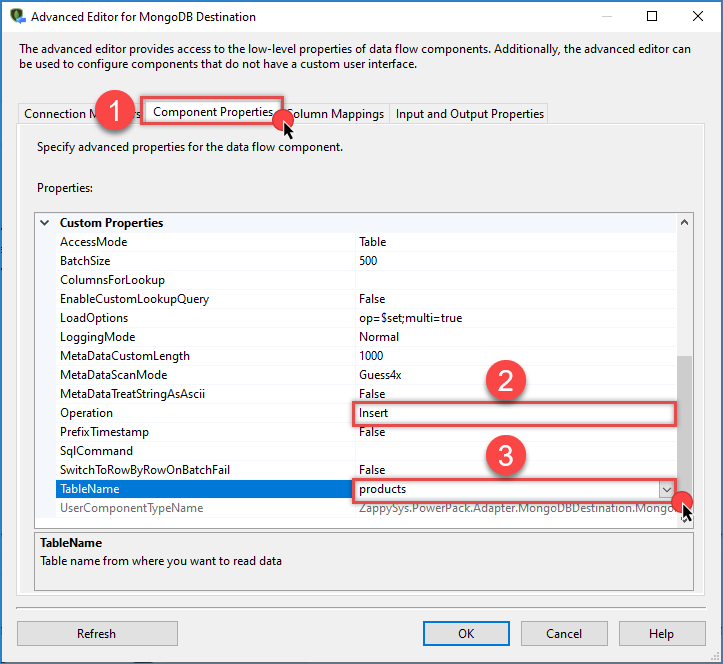
MongoDB Destination – Properties configuration
- Go to the Column Mappings tab and map source columns to destination columns.
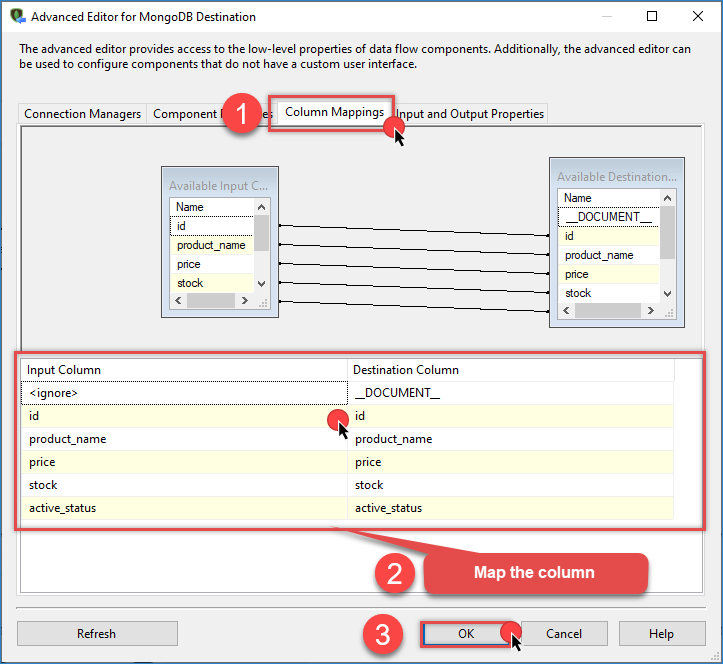
MongoDB Destination – Map the columns.
- Click OK to save the configuration.
- Run the SSIS package. If everything is configured correctly, the data will be transferred from MariaDB to MongoDB.
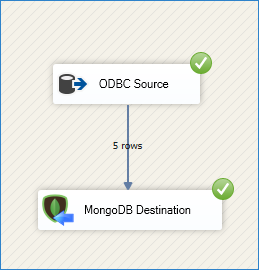
MongoDB Destination – Final Result
Conclusion
With ZappySys SSIS PowerPack and ODBC PowerPack, connecting MariaDB to MongoDB becomes straightforward and reliable.
By configuring the ODBC/JDBC bridge for MariaDB and using the native MongoDB destination in SSIS, you can build a robust ETL pipeline between the two databases.
Explore the full capabilities of the ZappySys SSIS PowerPack and ZappySys ODBC PowerPack to optimize your data integration tasks.
Need Help?
If you encounter any issues, our support team is here to help:
- Live Chat — Use the chat widget (bottom-right corner of this page)
- Email — support@zappysys.com
- Support Center — Support | ZappySys