ODBC PowerPack
Query REST APIs, JSON & XML with High-Performance ODBC Drivers
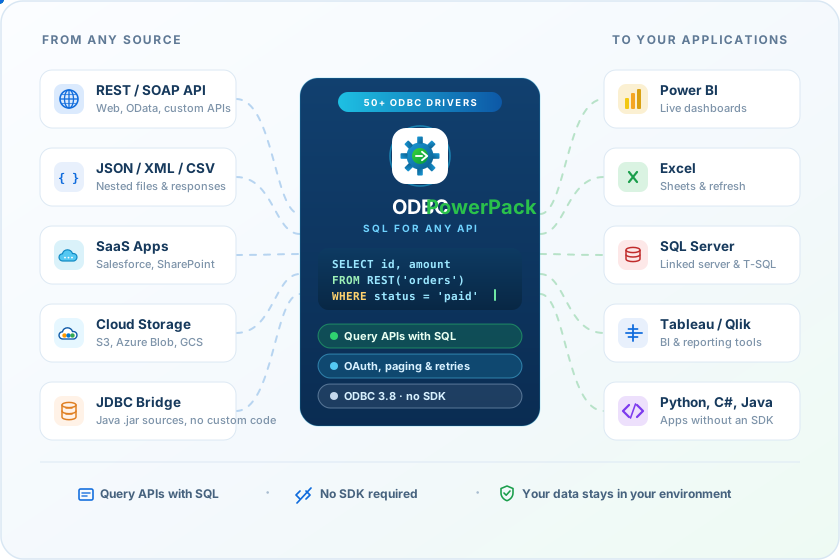
Connect APIs, cloud storage, files, and business data using familiar SQL. Install drivers on each machine — or once on Data Gateway, so every client app connects without a local ODBC install.
- 30-day money-back guarantee
- Runs in your environment
- Get full support from trial to purchase and beyond
- 15+ ODBC drivers
- SQL for any API
- Data Gateway — one install















What is included
One ODBC pack for the API workloads teams query every day.
Choose a workload to see the drivers and capabilities included across the PowerPack editions.
Turn REST and SOAP into tables you can SELECT from.
Use familiar SQL — WHERE, GROUP BY, JOIN, window functions — against JSON, XML, and CSV APIs with OAuth, pagination, and retries built in.
 JSON Files / REST API Driver
 XML Files / SOAP API Driver
 CSV Files / REST API Driver
 OAuth 1.0 / 2.0, JWT, Basic, NTLM
 API pagination & retry options
 SQL query editor with live preview
Read large files from disk or object storage.
Query local JSON/XML/CSV or pull the same formats from Amazon S3, Azure Blob, and FTP/SFTP without custom download scripts.
 Amazon S3 Drivers (JSON / XML / CSV)
 Azure Blob Drivers (JSON / XML / CSV)
 FTP / SFTP Drivers (JSON / XML / CSV)
 Excel Driver
- Streaming mode for very large files
- GZip / Zip compression support
Connect Salesforce and 50+ SaaS APIs faster.
Use the Salesforce Driver or the Enterprise API Driver with pre-configured connectors — then SELECT, INSERT, UPDATE, and DELETE with the enhanced query builder.
 Salesforce ODBC Driver
 API Driver (pre-configured connectors)
 SharePoint, HubSpot, ServiceNow, and more
- Virtual tables & custom SQL
 User-defined Base64 helpers
- Window functions (ROW_NUMBER, RANK…)
Install once. Let every client app connect.
Data Gateway runs on any server you choose. Power BI, Excel, SQL Server, Java, Linux, and Mac clients connect to it — no ODBC driver on every laptop, and credentials stay on the gateway host.
 ZappySys Data Gateway Service
 No ODBC install on every machine
- Credentials stay on the gateway host
- SQL Server Linked Server / OPENQUERY
 JDBC, Linux, and Mac clients over TDS
- Configure on any Windows server or VM
How it works
From API endpoint to BI report in three clear steps.
Watch a short intro, then install a DSN, write SQL, and connect the tools your team already uses.
-
Install the drivers
Add ZappySys ODBC drivers to Windows and create a DSN — or install once on a Data Gateway server for every client app.
-
Write SQL & preview
Configure auth and pagination, then test SELECT statements with live preview in the query editor.
-
Connect your tools
Point Power BI, Tableau, Excel, SQL Server, or your app at the same DSN — or at Data Gateway, with no local driver on the client.

Explore the drivers
Find the right ODBC driver in seconds.
Search by name, jump to a category, or filter by driver, service, or connector — then open the product page for setup details.
All Drivers
Data Gateway
Turn REST APIs into SQL Server Endpoints with Data Gateway.
Configure Data Gateway on any server you control. Power BI, Excel, SQL Server, Java, Linux, and Mac talk to that one service. Drivers and credentials stay on the gateway host — not on every laptop.
No sprawl
No ODBC on every machine
Stop pushing drivers to every analyst laptop. Clients connect to the gateway. They never need a local ZappySys install.
Your estate
Configure it on any server
Run Data Gateway on-premises or on a Windows VM you already manage. One central host. Many users. You pick the machine.
Security win
All apps connect. Keys stay put.
Client apps use a SQL Server–compatible driver. API keys, OAuth tokens, and DSNs never leave the gateway host.
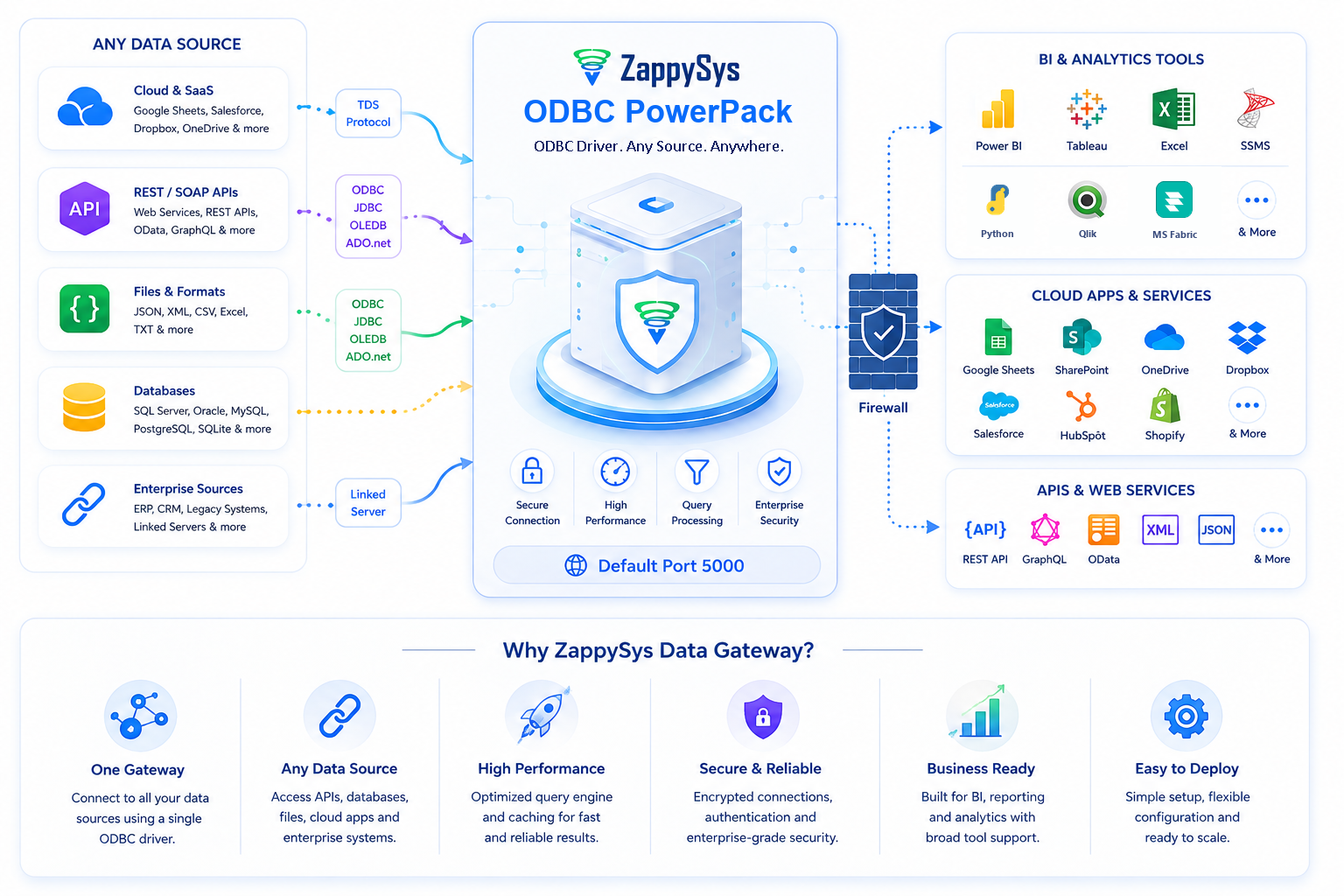
- No ODBC install on every analyst machine
- Host on any Windows server or cloud VM you control
- All client apps connect to one gateway service
- Credentials and DSNs stay on the host — a security win
- Call REST APIs from T-SQL with OPENQUERY / Linked Server
- Reach Java, Linux, and Mac clients over TDS
Why teams choose ZappySys
Flexible SQL drivers when pre-built schemas fall short.
Keep working in Power BI, Tableau, Excel, or T-SQL — with drivers that handle OAuth, paging, files, and APIs without locking you into a fixed schema.
Familiar SQL, not SDKs
Query APIs and files with SELECT, JOIN, GROUP BY, and window functions. Preview results in the built-in query editor before you wire up BI or ETL.
Runs in your environment
Drivers install on your machines. Data flows directly between your tools and the APIs or files you connect — it does not transit ZappySys servers.
Data Gateway — install once
Configure it on any server. Every client app connects to that one service. No ODBC on every laptop, and credentials stay off the desktop — a security win.
Support that ships with the trial
Phone, email, chat, and web meetings during evaluation and with an active license. Rapid release cycle with ongoing driver updates.
Compare editions, read online help, or see which drivers ship in Standard, Professional, and Enterprise.
Query patterns
Start with the job — not a wall of driver names.
These are the SQL flows teams assemble in Power BI, Excel, SQL Server, and code with the same DSN model.
REST API → Power BI
 JSON Driver → SQL → Power BI
OAuth, paging, nested JSON, and live preview — then load the same query into Power BI or Tableau.
Salesforce → Excel / SQL
 Salesforce Driver → SELECT
Query Salesforce objects with SQL, then refresh Excel, Access, or a SQL Server linked table.
S3, Azure, or SFTP files
 Cloud driver → JSON/CSV
Query files in object storage or over secure FTP without a custom download script.
One gateway for every client
 Data Gateway → all apps
Install on any server. Power BI, Excel, SQL Server, JDBC, Linux, and Mac connect to it — no ODBC on every machine, credentials stay on the host.
Integration scenarios
Built for BI, ETL, SQL, and code — anywhere ODBC is supported.
If your tool speaks ODBC, ZappySys drivers should work even when a specific guide is not listed yet.
 BI & reporting
ETL & databases
- Informatica
- SQL Server
- SSIS
- Talend
- Pentaho
- Oracle OBIEE
Programming
- C#
- Java
- Python
- PowerShell
- PHP
- T-SQL
Technical validation
Built for Windows estates — and a checkable data path.
Windows, .NET, and Java
ODBC drivers require .NET Framework 4.x. JDBC Bridge needs a Java 8+ JRE or JDK. Data Gateway unlocks SQL Server and cross-platform clients.
- Windows 11
- Windows 10
- Windows 8
- Windows 7
- Windows Server 2022
- 2019
- 2016
- 2012 R2
- 2008
- .NET Framework 4.x
- Java 8+ (JDBC Bridge)
Runtime and security facts
- Drivers execute inside your Windows process.
- Business data does not transit ZappySys servers.
- Credentials stay in your DSN / connection string.
- No ZappySys cloud account is required to query APIs or files.
- Data Gateway keeps drivers and credentials on one host instead of every laptop.
Don’t just take our word for it
Trusted by data teams.
Recognized by the industry.
Useful tools, clear documentation, and responsive support — validated by customer stories, independent ratings, and awards year after year.
“I submitted a support request and had someone logged in and fixing things within 2 hours.”
Barry Wilson
“The REST source is very powerful — the only thing I found I could use after trying components from major vendors.”
Jes Kirkup · KTC
“Whenever we run into an obstacle, ZappySys has a solution for us. We are so glad that we chose ZappySys PowerPack.”
Kevin Chen · Berricle
Transparent pricing
Choose edition, term, and installation type.
Pick a term and the Windows edition on the machine where you install. Individual drivers are also available.
Annual is pay-as-you-go. Perpetual is a one-time key that never expires.
Annual subscription
Full commercial license for one year. Support, upgrades, and new releases are included.
- Pay as you go, renew each year
- Must renew before expiration to keep using the software
- Credit card or PayPal for subscription purchases
Perpetual license – Lifetime key
One-time purchase. The license key does not expire. First-year support and upgrades are included.
- Keep using the version you bought after year one
- Optional support renewal after the first year
- Wire transfer and check are available for perpetual orders
License by the Windows edition on the machine where you install — not by the tool you connect from (Power BI, Excel, SQL Server, and so on).
Desktop OS
Single user only. If that is the OS on the machine where you install, purchase the Desktop OS license.
- Windows 11, Windows 10, Windows 8, Windows 7
- One person using the machine, locally or via RDP
- Typical for Power BI Desktop, Excel, or a developer PC
Server OS
Shared or multi-user machines. If that is the OS on the machine where you install, purchase the Server OS license.
- Windows Server 2025, 2022, 2019, 2016, 2012
- Multi-user or shared server scenarios
- Typical for SQL Server, Data Gateway, or a shared VM
Licensed per machine. Not sure? Talk to an engineer
Standard
Core API & file drivers
$849/ year / desktop OS
First-year support & upgrades included
- JSON, XML, and CSV ODBC drivers
- REST / SOAP / file connectivity
- Premium support and upgrades included
Professional
Cloud storage, Salesforce, Excel
$1,049/ year / desktop OS
First-year support & upgrades included
- Everything in Standard
- Salesforce, Excel, FTP/SFTP drivers
- Amazon S3 & Azure Blob drivers
- Premium support and upgrades included
Full toolbox
Enterprise
API Driver, JDBC Bridge, Data Gateway
$1,249/ year / desktop OS
First-year support & upgrades included
- All drivers and services
- API Driver with 50+ connectors
- JDBC Bridge & Data Gateway
- Premium support and upgrades included
Per-machine licensing. First-year support and upgrades are included with perpetual licenses; annual plans include active support and upgrades. Single-driver licenses and Data Gateway CALs are available on the purchase page. Refund may be available within 30 days — see the refund policy.
See the full feature-by-feature comparison, call +1-800-444-5602, or talk to an engineer.
FAQ
Frequently asked questions
Don’t see your question? Ask an integration engineer — usually answered in under 2 hours during US business hours.
Product fit
What is ODBC PowerPack?
ODBC PowerPack is a suite of high-performance ODBC 3.8 drivers that let you query REST APIs, JSON, XML, CSV, Salesforce, cloud storage, and more using familiar SQL — from BI tools, ETL platforms, SQL Server, and programming languages.
How is this different from SSIS PowerPack?
ODBC PowerPack is for querying APIs and files via ODBC from BI tools, apps, and SQL Server linked servers. SSIS PowerPack is for drag-and-drop ETL inside SQL Server Integration Services. Choose ODBC PowerPack when your primary tools are Power BI, Tableau, Excel, Informatica, or code — not SSIS packages.
Can I call the drivers from C#, Python, Java, or PowerShell?
Yes. Any language or tool that speaks ODBC can use a ZappySys DSN or connection string. Java apps typically connect through Data Gateway with a SQL Server JDBC driver, or through the JDBC Bridge driver. See the product page examples and online help for sample queries.
Technical
Why use Data Gateway instead of installing ODBC on every machine?
Install ODBC PowerPack and Data Gateway on any Windows server you control. Client apps — Power BI, Excel, SQL Server, Java, Linux, Mac — connect to that one service with a SQL Server–compatible driver. They do not need ZappySys ODBC locally. Drivers, DSNs, and credentials stay on the gateway host, which is a security and operations win for IT teams.
When do I need Data Gateway or extra CALs?
Use Data Gateway when you want a central install, SQL Server Linked Server / OPENQUERY, JDBC, or non-Windows clients. By default one device can connect; additional Client Access Licenses (CALs) are needed when multiple devices connect to the same gateway. Learn more in the Data Gateway documentation.
Does my data pass through ZappySys servers?
No. Drivers run inside your environment. Data flows directly between your tools and the APIs, files, or services you configure. ZappySys does not process, store, or route your business data through ZappySys servers. With Data Gateway, credentials and DSNs stay on the gateway host instead of every client machine.
Which authentication methods are supported?
Drivers support Basic, Windows/NTLM/Kerberos, static and dynamic tokens, JWT, HMAC signatures, SOAP WSS, OAuth 1.0, and OAuth 2.0 — covering common SaaS providers such as Google, Salesforce, Office 365, and many others.
Do the drivers handle large files and API pagination?
Yes. JSON, XML, and CSV drivers include streaming options for large files (including GZip), plus retry and pagination settings for REST APIs. The query editor lets you preview SQL before you wire the same DSN into Power BI, Tableau, Excel, or SQL Server.
Trial & pricing
How long is the free trial?
The trial is fully functional for 30 days and does not require a credit card. Download from the ODBC PowerPack download page to evaluate drivers against your real endpoints and tools.
How is ODBC PowerPack licensed?
Licensing is per machine. Choose a Desktop OS or Server OS license depending on where you install. Annual subscription and perpetual options are available for Standard, Professional, and Enterprise editions, and selected drivers can be purchased individually.
What is the difference between Desktop and Server licenses?
Desktop licenses are for single-user Windows client OS installs (Windows 11/10/8/7). Server licenses are required for Windows Server operating systems and multi-user server scenarios. See the purchase page for current pricing.
Is there a money-back guarantee?
Refunds may be available for new subscription or perpetual license purchases when requested within 30 days of the original purchase date. Please review the ZappySys Refund Policy for full eligibility details.
Start with your own DSN
Put ODBC PowerPack through a real 30-day evaluation.
Install a driver this week, prove one hard API or file source, and use support while it is included. No credit card. Data stays in your environment.