
Introduction

DocuWare is a powerful document management platform that provides REST APIs for accessing documents, metadata, and workflows. This guide demonstrates how to connect to DocuWare using the ZappySys ODBC JSON driver, enabling seamless data integration through standard ODBC.
Whether you are using DocuWare Cloud or an on-premises deployment, you will learn how to configure secure authentication and create ODBC data sources without writing any custom code. ZappySys handles all the technical complexity, allowing you to focus on querying and analyzing your document data.
Prerequisites
- Windows operating system with ODBC Data Source Administrator available
- Active DocuWare account with appropriate API permissions.
- Finally, do not forget to install ZappySys ODBC PowerPack.
Steps
Get the DocuWare API Documentation
Download the DocuWare API Postman collection to review available endpoints and understand the API response structure. This helps you create appropriate SQL queries using the ODBC driver. For additional guidance, see our article on ZappySys ODBC JSON driver documentation.
Creating a new ODBC DSN using ZappySys JSON Driver
- Search for ODBC in the Windows Start menu and open the ODBC Data Source Administrator.
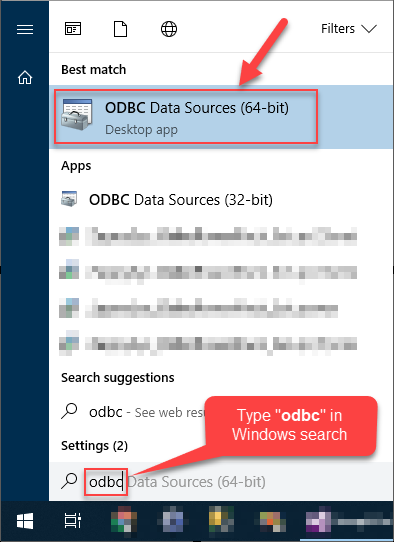
- In the User DSN or System DSN tab, click Add to create a new data source.
- In the ODBC Data Source Setup window, select the ZappySys JSON Driver and click Continue.

Set the connection to DocuWare
- Set the API Base URL to the Docuware API endpoint:
https://your-docuware-server/DocuWare/Platform/FileCabinets - Select HTTP as the connection type, then click it to configure it.
- Enter your credentials, your username, and your password.
- Click OK to save the connection.
- Then test the connection.
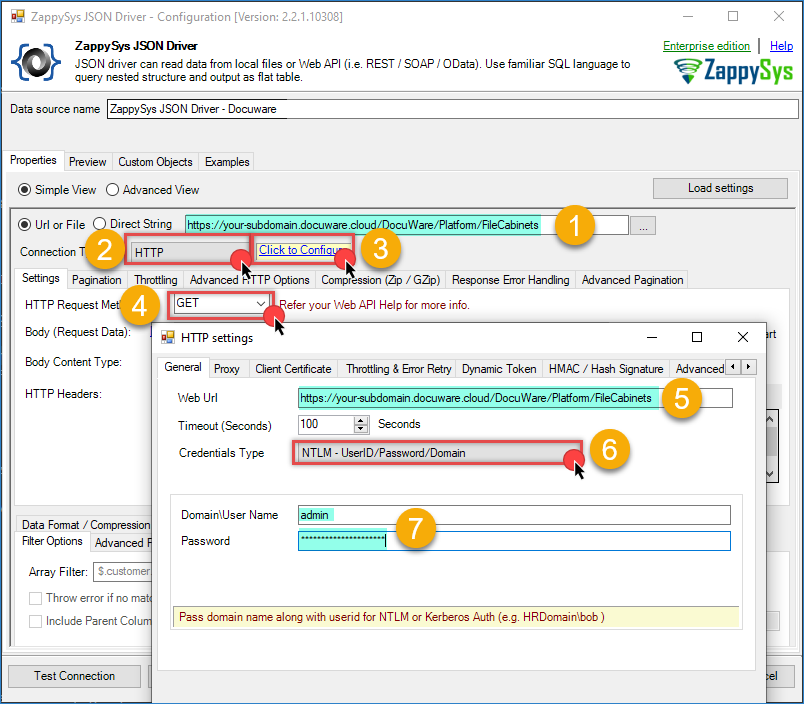
Docuware – JSON ODBC driver
- An alternative is using the OAuth connection. Select OAuth as the authentication method.
- Set the OAuth Version to OAuth 2.0.
- Set Grant Type to Password Grant.
- Enter Client ID:
docuware.public.client - Enter your DocuWare credentials (username and password).
- Enter the Token URL:
1https://your-docuware-server/DocuWare/Platform/Account/Logon - Enter the Scope:
docuware.platforms - Click OK to save the connection.
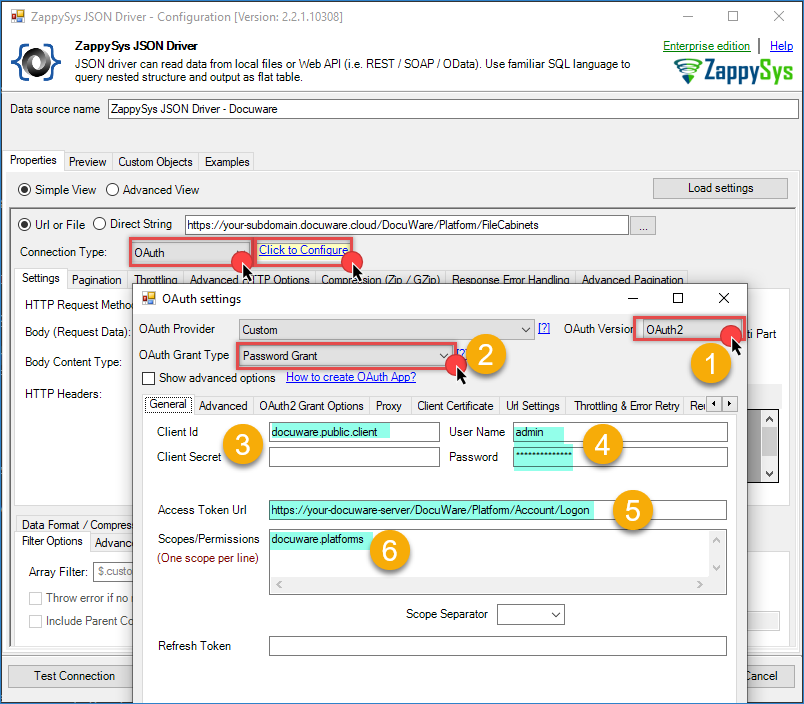
Docuware – JSON ODBC driver OAuth
Conclusion
You now have a powerful ODBC connection to DocuWare using the ZappySys ODBC JSON driver. This approach gives you the flexibility to query document data using standard SQL from any application that supports ODBC.
Explore the full capabilities of the ZappySys ODBC PowerPack to optimize your data integration tasks. By applying this pattern, you can extend your solution to include additional data sources and create unified reporting across multiple cloud-based APIs.
Need Help?
If you have questions or encounter any issues:
- Live Chat Support — Use the chat widget on this page for immediate assistance
- Email Support — support@zappysys.com
- ZappySys Documentation — Visit https://zappysys.com/docs/ for detailed guides
- DocuWare Support Portal — Visit https://www.docuware.com/en/support