Introduction
 Bluebeam Studio is a cloud collaboration platform that construction and design teams use to run drawing reviews, markups, and document handoffs through Bluebeam Revu. Many organizations need Bluebeam Studio data in Power BI to monitor Session activity, Project status, and review turnaround.
Using the ZappySys ODBC Driver for REST APIs, you can query Bluebeam Studio API data with SQL and load it into Power BI without writing custom connector code. This tutorial shows how to create a Bluebeam ODBC DSN, configure OAuth2 authentication, preview data, connect Power BI, and run practical SQL queries.
Prerequisites
Before we perform the steps listed in this article, make sure the prerequisites are met:- Basic knowledge of SSIS package development using Microsoft SQL Server Integration Services.
- Make sure the SSIS designer is installed.
- Download and install ZappySys SSIS PowerPack.
Steps
Get Bluebeam API credentials
- Sign in to the Bluebeam Developer Portal with your BBID credentials. Note that a Studio Prime subscription is required to use an integration built on the Studio API.
- Register a new App and note the region it is registered under (US, DE, AU, UK, or SE), since this determines the base URL you will use later.
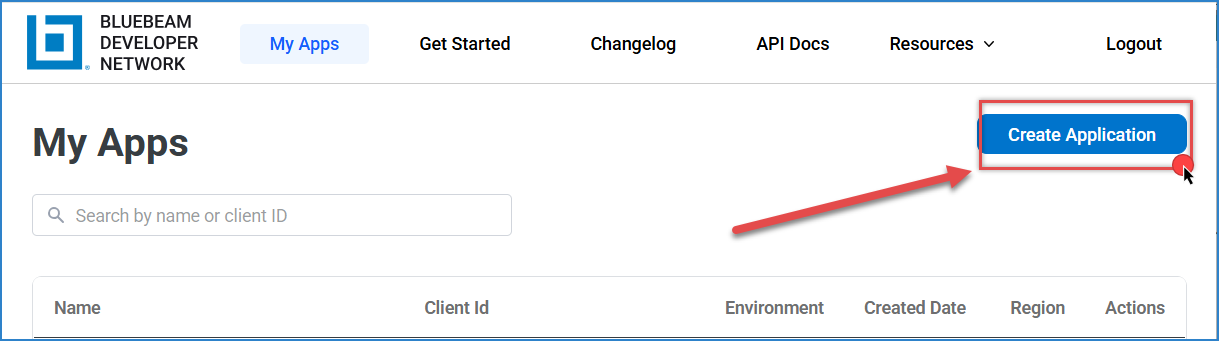
Bluebeam – Create an Application
- Open the App details page and generate your Client ID and Client Secret — store both values securely.
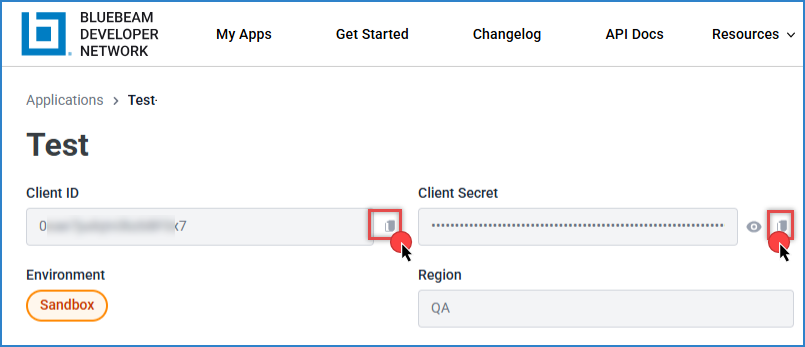
Bluebeam – Generate client ID and secret
Create a new ODBC DSN using ZappySys JSON Driver
- Search for ODBC in the Windows Start menu and open ODBC Data Source Administrator.
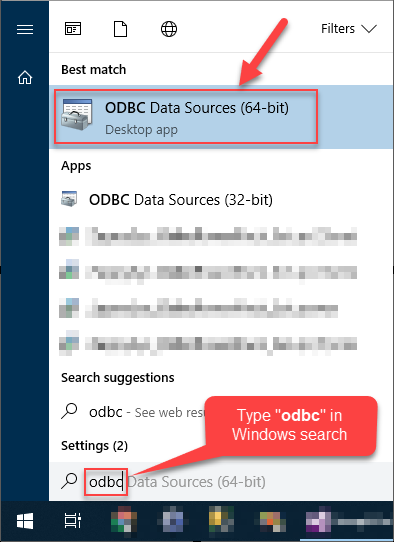
- In User DSN or System DSN, click Add.
- Select ZappySys JSON Driver, then click Continue.

Configure Bluebeam API connection
- Enter a Bluebeam Studio endpoint URL using your region’s base URL, in this format:
https://api.bluebeam.com/publicapi/v1/sessions - In Connection Type, select OAUTH and click Configure.
- Set Credential Type to OAuth2 Authorization Code Grant (Custom).
- Enter your Client ID and Client Secret.
- Set the Authorization URL to https://api.bluebeam.com/oauth2/authorize and the Access Token URL to https://api.bluebeam.com/oauth2/token using your region’s host.
- Set Scope to:
123full_userjobsoffline_access - Click Generate Token to complete the one-time browser login with your BBID.
- Click OK to save OAuth authentication settings.
- Set HTTP Request Method to GET.
- Open the HTTP Headers tab and add:
- Content-Type: application/json
- client_id: your Bluebeam Client ID
The
client_idheader is required on Studio endpoints alongside the Bearer token; the OAuth connection only supplies the Bearer token automatically. - Set the JSON Path Filter based on the response shape; example: $.Sessions[*]
- Click Test Connection, then click OK to save the DSN.
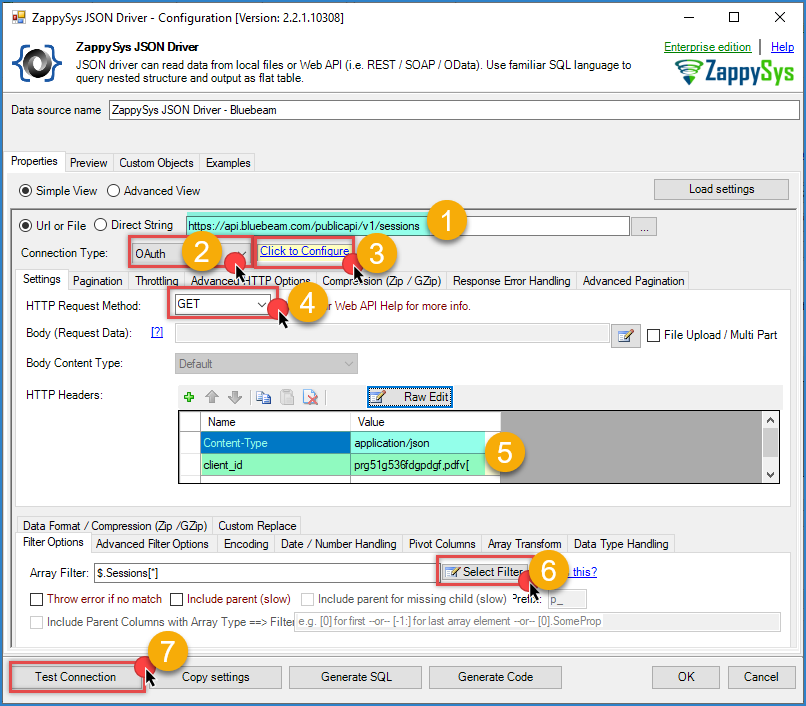
Bluebeam – ODBC JSON Driver configuration
Preview Bluebeam data in ODBC Driver
- Open the Preview tab in the DSN configuration window.
- Generate a query and click Preview Data.
- Confirm rows are returned. If not, recheck the region base URL, credentials, scope, and JSON Path Filter.
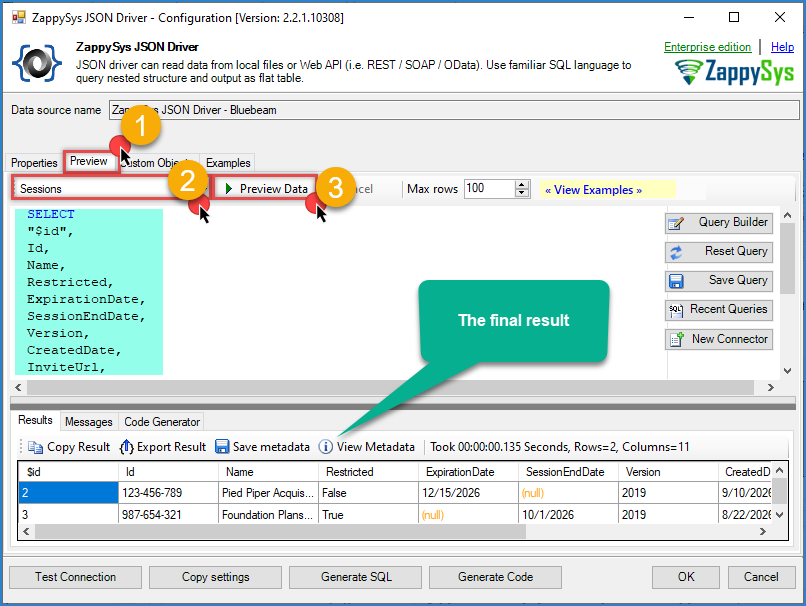
Bluebeam – ODBC JSON Driver result
Connect Power BI to Bluebeam via ODBC
- Open Power BI Desktop.
- Go to Home > Get Data > More….
- Search for ODBC and click Connect.
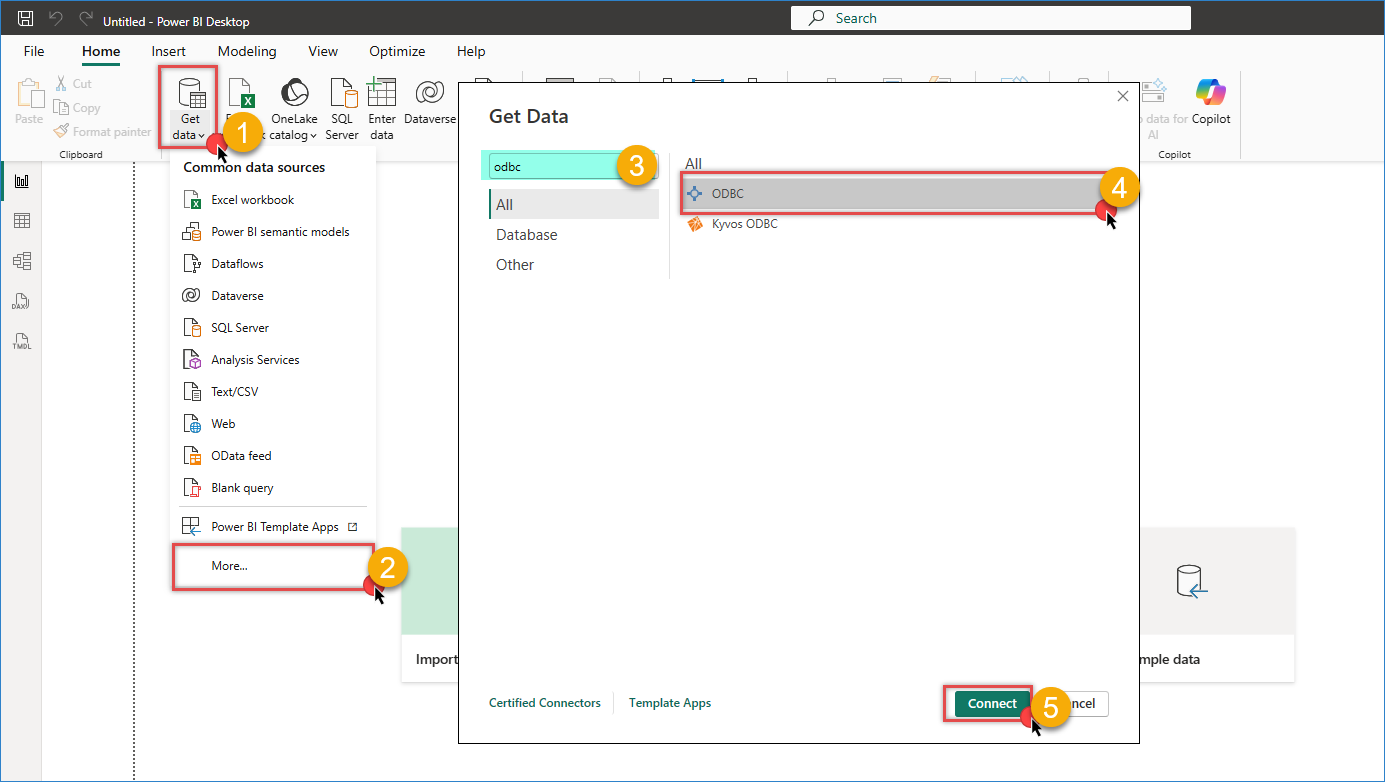
Power BI – Get data from ODBC connection
- Select your Bluebeam DSN from the data source list.
- Optionally enter a custom SQL query in Advanced options.
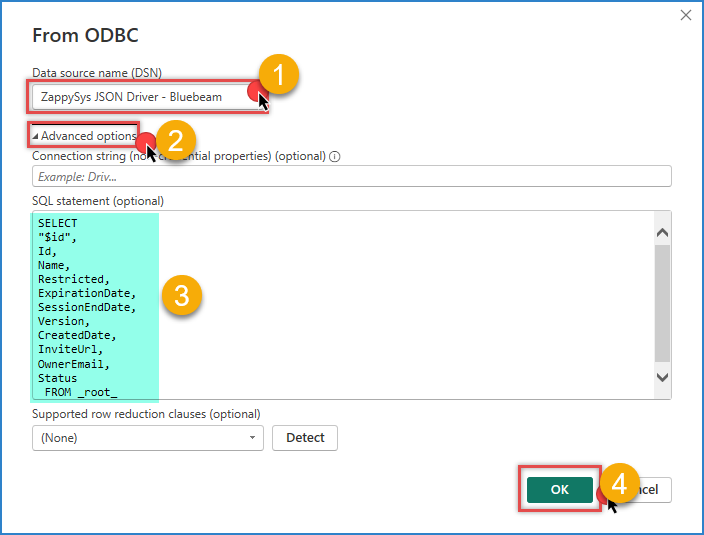
Bluebeam – Power BI query example
- Click OK, review the preview, and click Load
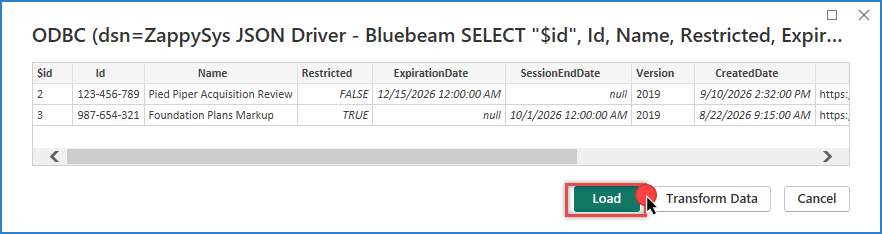
Bluebeam – Power BI query result
Query Bluebeam Data with SQL
Use custom SQL queries in the ODBC driver or Power BI to shape data before loading.
Example 1: List Studio Sessions
|
1 2 3 4 5 6 7 8 |
SELECT Id, Name, Restricted, Notification, CreatedBy, SessionEndDate FROM _root_ |
Example 2: Filter Active Sessions
|
1 2 3 4 5 6 7 8 |
SELECT Id, Name, CreatedDate, SessionEndDate FROM _root_ WHERE SessionEndDate IS NULL ORDER BY SessionEndDate ASC |
Example 3: Sessions Summary by Creator
|
1 2 3 4 5 6 |
SELECT CreatedDate, COUNT(*) AS SessionCount FROM _root_ GROUP BY CreatedDate ORDER BY SessionCount DESC |
Conclusion
Connecting Bluebeam Studio to Power BI using the ZappySys ODBC Driver gives you a fast, SQL-friendly way to build reporting on Sessions, Projects, and Jobs data. You can centralize collaboration activity, model it in Power BI, and publish dashboards without building a custom OAuth integration, since the offline_access scope keeps the driver authenticated between refreshes.
Explore the full capabilities of the ZappySys ODBC Drivers to integrate Bluebeam Studio and other APIs into your reporting workflow.
Need Help?
If you encounter any issues, our support team is here to help:
- Live Chat: Open the chat widget (bottom right of this page)
- Email: support@zappysys.com
- Support Center: Support | ZappySys