
Introduction
 Monday.com is a flexible work operating system that helps teams manage projects, workflows, and operations. Its GraphQL API allows you to access boards, items, groups, users, and activity data programmatically. In this tutorial, you will learn how to connect monday.com using Zappysys ODBC Driver for REST APIs and query data using standard SQL.
By configuring an ODBC DSN for monday.com, you can pull data into Excel, Power BI, Tableau, SQL Server, Python, and other ODBC-compatible applications without writing custom API integration code.
Prerequisites
- Windows operating system (32-bit or 64-bit).
- A monday.com account with API access permissions.
- An ODBC-compatible client tool (Excel, Power BI, Tableau, Python, SQL Server, etc.).
- Finally, install the ZappySys ODBC Driver.
Steps
Generate monday.com API Token
- Sign in to your monday.com account.
- Open your profile menu and go to Admin (or Developers, based on your plan).
- Navigate to Connection and click Personal API token settings.
- Create a new API token (personal or app).
- Copy the token and store it securely.
-
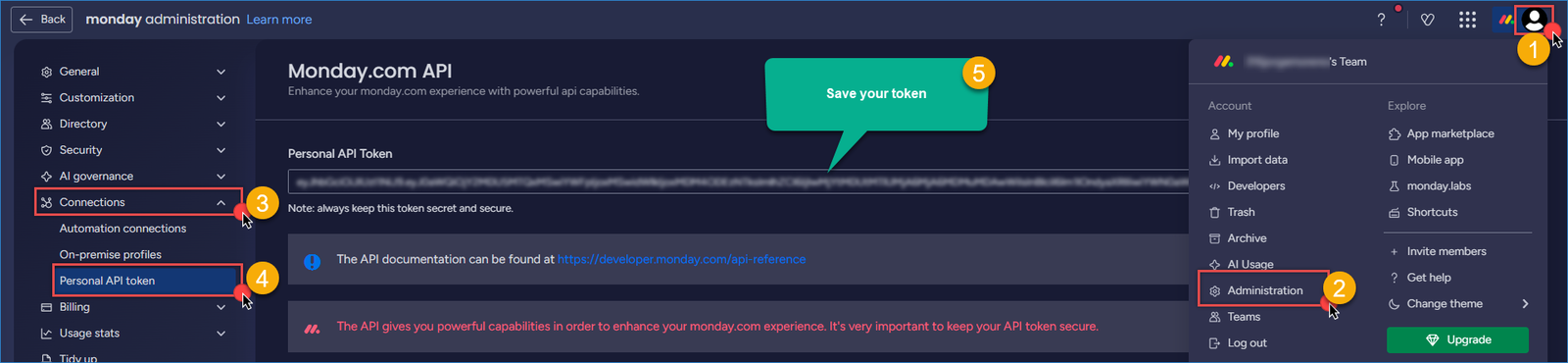
Monday – create token
Creating a new ODBC DSN using ZappySys JSON Driver
- Search for ODBC in the Windows Start menu and open the ODBC Data Source Administrator.
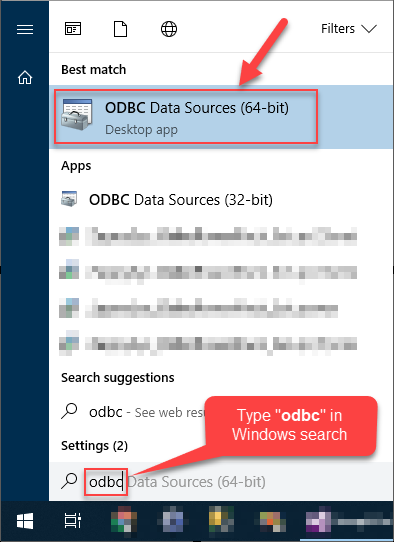
- In the User DSN or System DSN tab, click Add to create a new data source.
- In the ODBC Data Source Setup window, select the ZappySys JSON Driver and click Continue.

Configure the Connection and API Settings
- Set the following connection details:
- Base URL:
1https://api.monday.com/v2 - HTTP Method: POST
- Body Content Type: JSON (Application/JSON)
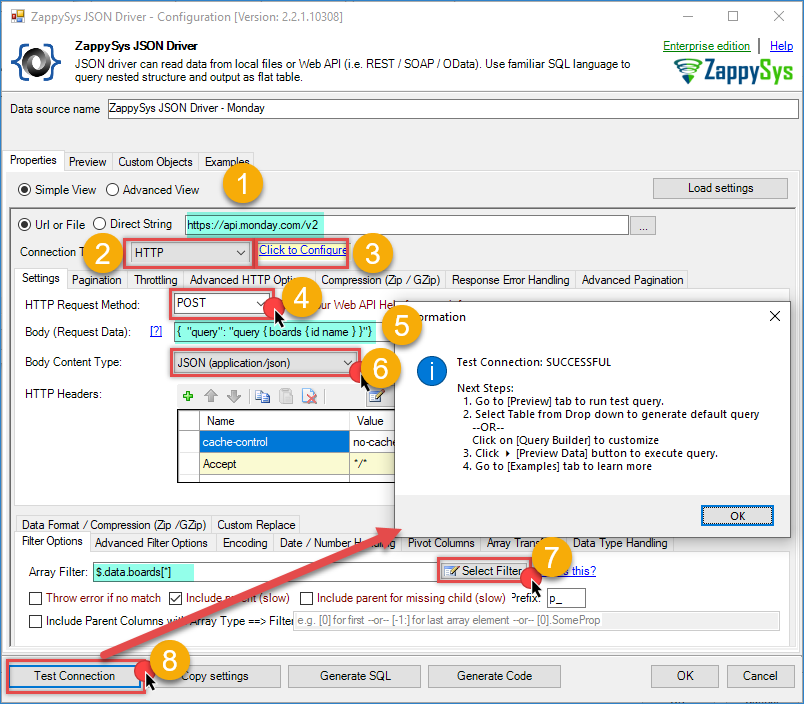
Monday – ODBC JSON driver
- Base URL:
- Open HTTP settings and configure token authentication:
- Authentication Type: Static Token / API Key
- API Key: Paste your monday.com token
- Header Name:
Authorization - OAuth Scheme:
none(send raw token in header)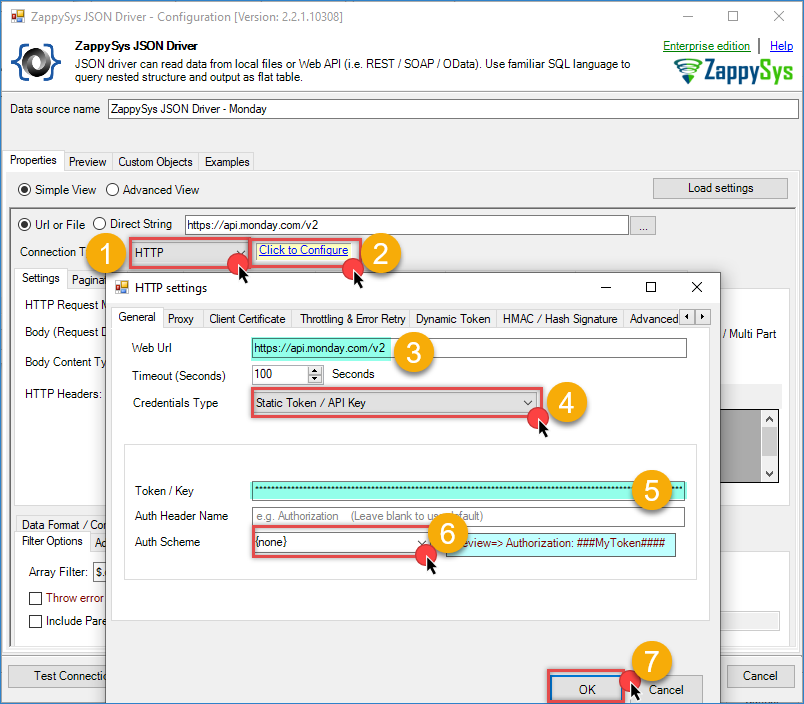
Monday – ODBC HTTP Connection
- Set Body Content Type to JSON (application/json).
- Use this request body to fetch board metadata:
123{"query": "query { boards { id name } }"} - Set Array Filter / JSON Path to:
1$.data.boards[*] - Click Test Connection to verify connectivity, then click OK to save the DSN.
Step 3: Preview Monday.com Data in ODBC Driver
- Go to the Preview tab.
- Select a table and then click Preview Data to confirm that board rows are returned.
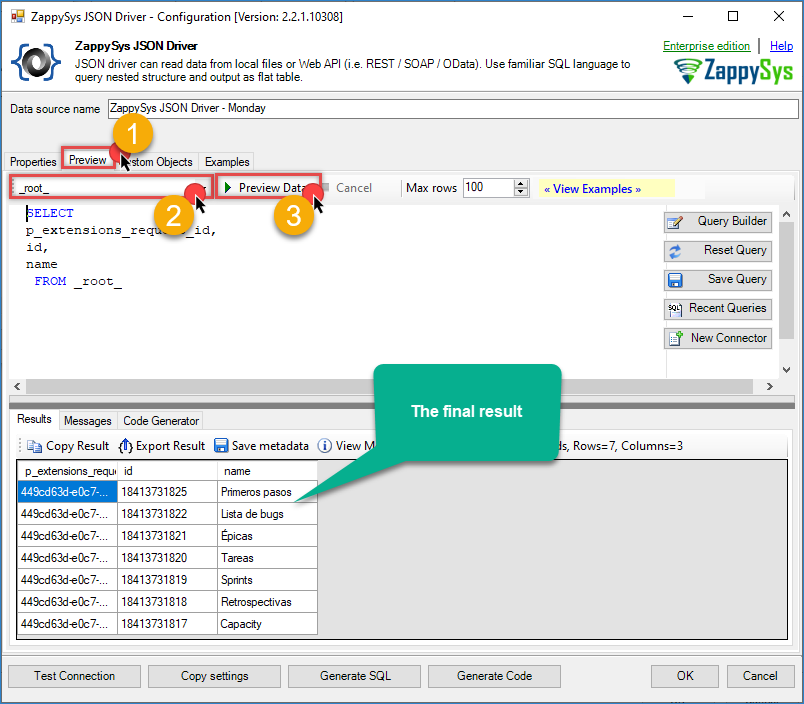
Monday – ODBC Final Result
Conclusion
You now have a working ODBC connection to monday.com using Zappysys REST/JSON driver and token-based authentication. This setup lets you access monday.com data through SQL from your preferred analytics and ETL tools without building custom API scripts.
Explore the full capabilities of the ZappySys ODBC Drivers to optimise your data access and integration strategy. You can extend this solution to include periodic data synchronisation, real-time dashboards, and advanced transformations using your preferred analytics platform.
Need Help?
If you encounter any issues, our support team is here to help:
- Live Chat — Use the chat widget (bottom-right corner of this page)
- Email — support@zappysys.com
- Support Center — Visit the ZappySys Support Portal