Introduction
Many times, you need to search and replace content in files (single or multiple) using SSIS. If you are not a C# or VB.NET programmer, you may find yourself at a dead end, struggling to figure out how to achieve this in SSIS. If you have this need, then you can use the Advanced File System Task.
Search and replace in files using Simple text search
In this option, you can specify the ext you want to search afor nd tthe ext you want to replace it with. You can check the ignore text if you don’t want a case-sensitive search/replace.
Extended text search (special characters allowed)
For extended search mode, you may use any of the following in your search/replace string
-
- \n – for line feed
- \r – for return character
- \0 – for null character
- \t – for tab character
- \v – for vertical tab character
Example:
Search: “Hello\r\nWorld”
Replace: “Hello World”
Regular expression search/replace
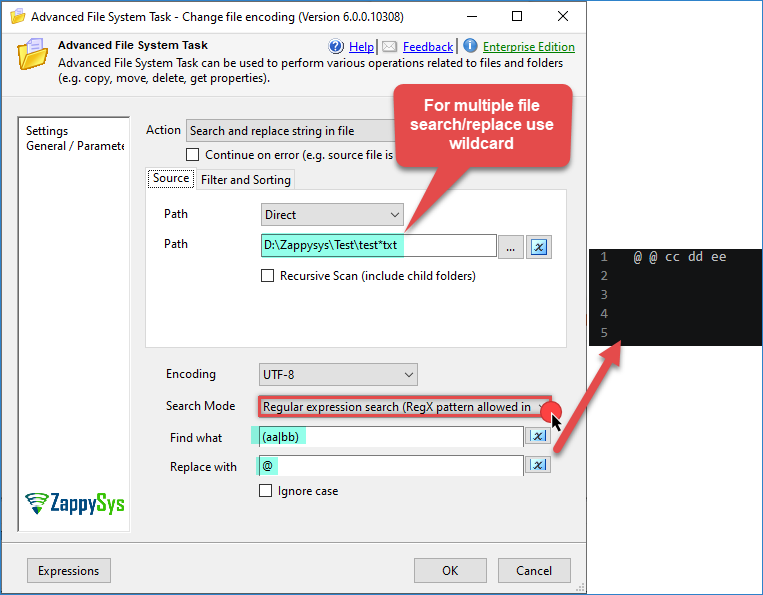
Search and Replace File Content in SSIS (Find substring, Search for special character)
Advanced File System Task
If you want to perform other operations, here is a list of features supported by the Advanced File System Task.
- File operations for single or multiple files using wildcard(e.g. copy, move, rename, delete, write to file, get properties)
- Folder operations such as delete folder and create folder
- Support for bulk rename (e.g. by specifying {%name%}.{%ext%}.old as new name will rename all selected files to *.old)
- Search and Replace in files (Regular expression search supported)
- Change file encoding
- Get file properties as a data table, which you can loop easily (Using ForEach Loop – ADO Enumerator)
- Option to continue on error (e.g., copy file only when source file found)
- Auto-create the missing target directory
- Use placeholders anywhere in the path, making it easy to timestamp folders or files (e.g. c:\Archive\{{System::StartTime,yyyMMdd}})
- Regular Expression based Include Pattern (e.g. ^(file\d\d).(\w+)$ will include file01.exe,file22.csv …)
- Regular Expression-based Exclude Pattern (e.g. (.exe|.msi) will exclude files with extension exe or msi)
- Sort based on specific property (e.g. Order Size DESC – extract top 10 files by size)
- Advanced SQL-like filter support (e.g. Size> 1024 AND AgeInDays > 10 AND Extension IN(‘.txt’,’.csv’) will include files greater than 1024 bytes and extension is txt or csv)
- Support for Regular Expression based Include Pattern (e.g. ^(Customer\d\d).(\w+)$ )
- Support for SQL Server 2005, 2008, 2012, 2014, 2016 (32-bit and 64-bit)
Download FREE SSIS Components
Conclusion
Search and replace across many files can be tricky, but with the Advanced File System Task, it can be a few clicks. Click here to download.