Format Date – SSIS YYYYMMDD from date
Often, you need to create file paths with a timestamp using an SSIS Expression. You can use SSIS Expressions
Below is a simple expression that will produce a file path with the current timestamp
|
1 2 3 4 |
"C:\\Folder\\MyFile_" + (DT_STR, 4, 1252) DATEPART("yyyy" , GETDATE()) + RIGHT("0" + (DT_STR, 2, 1252) DATEPART("mm" , GETDATE()), 2) + RIGHT("0" + (DT_STR, 2, 1252) DATEPART("dd" , GETDATE()), 2) + ".json" |
Sample Output
C:\Folder\MyFile_20151231.json
Convert Date – SSIS YYYYMMDD to Date
|
1 2 3 4 5 6 7 8 9 |
--// For Control Flow //--- (DT_DATE)(SUBSTRING(@[yourDateAsStr],1,4) + "-" + SUBSTRING(@[yourDateAsStr],5,2) + "-" + SUBSTRING(@[yourDateAsStr],7,2)) --// For Data Flow //-- (DT_DATE)(SUBSTRING([field],1,4) + "-" + SUBSTRING([field],5,2) + "-" + SUBSTRING([field],7,2)) |
Set the SSIS Expression to format the property with a datetime
Below is an example of how to set the property expression
|
1 2 3 4 5 |
"C:\\Folder\\MyFile_" + (DT_STR, 4, 1252) DATEPART("yyyy", GETDATE()) + RIGHT("0" + (DT_STR, 2, 1252) DATEPART("mm", GETDATE()), 2) + RIGHT("0" + (DT_STR, 2, 1252) DATEPART("dd", GETDATE()), 2) + ".json" |
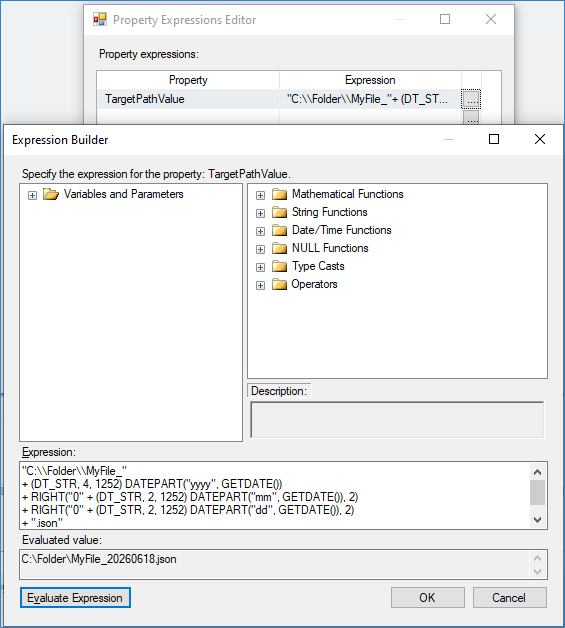
SSIS YYYYMMDD date format – Use datetime in file path
Variable Placeholder Approach to format datetime in SSIS
Using Variable Placeholders in SSIS PowerPack Tasks
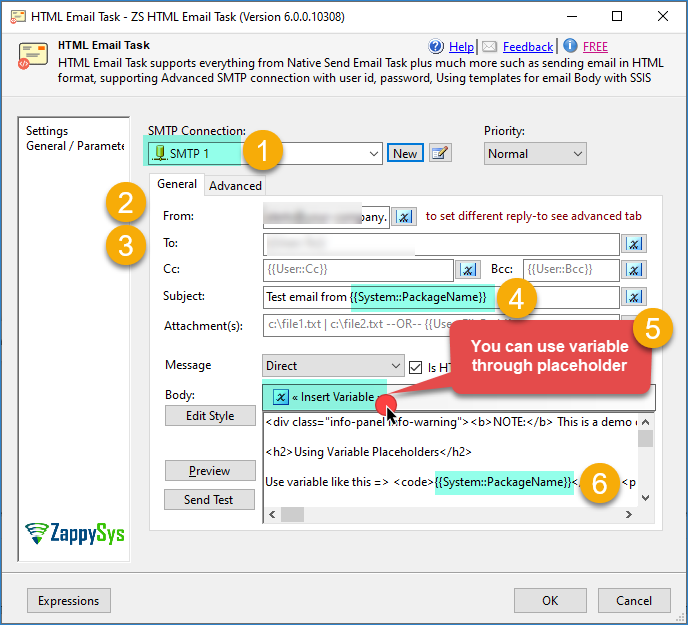
SSIS Send HTML Email Task – Using Variable Placeholders (Recordset Resultset in Body)