
Introduction
 Tripletex is a cloud-based accounting and enterprise resource planning (ERP) platform designed for small to medium-sized businesses in Norway and other Scandinavian countries. It provides comprehensive financial management, invoicing, project accounting, and inventory management capabilities through a robust REST API.
Integrating Tripletex with ODBC enables seamless data access between your accounting system and any ODBC-compatible application, including Excel, Power BI, Tableau, custom applications, and databases. ZappySys Tripletex ODBC Driver simplifies this integration by providing a native ODBC interface that handles Tripletex authentication, API communication, and data querying without requiring custom code.
This tutorial walks you through the complete process of installing the ODBC driver, configuring a data source, and querying Tripletex data from any ODBC-compatible application.
Prerequisites
- Windows or macOS operating system with admin access for driver installation.
- Tripletex account with API access enabled.
- An ODBC-compatible application (Excel, Power BI, Tableau, database tool, etc.).
- Finally, install the ZappySys ODBC Driver.
Step-by-Step Guide
Generate your Tripletex API credentials
- Create or log in to your Tripletex account using your administrator credentials.
- Navigate to the Settings section by clicking on your user profile icon in the top-right corner of the screen.
- Select API Access from the dropdown menu.
- Click the Generate New Token button to generate a new API token.
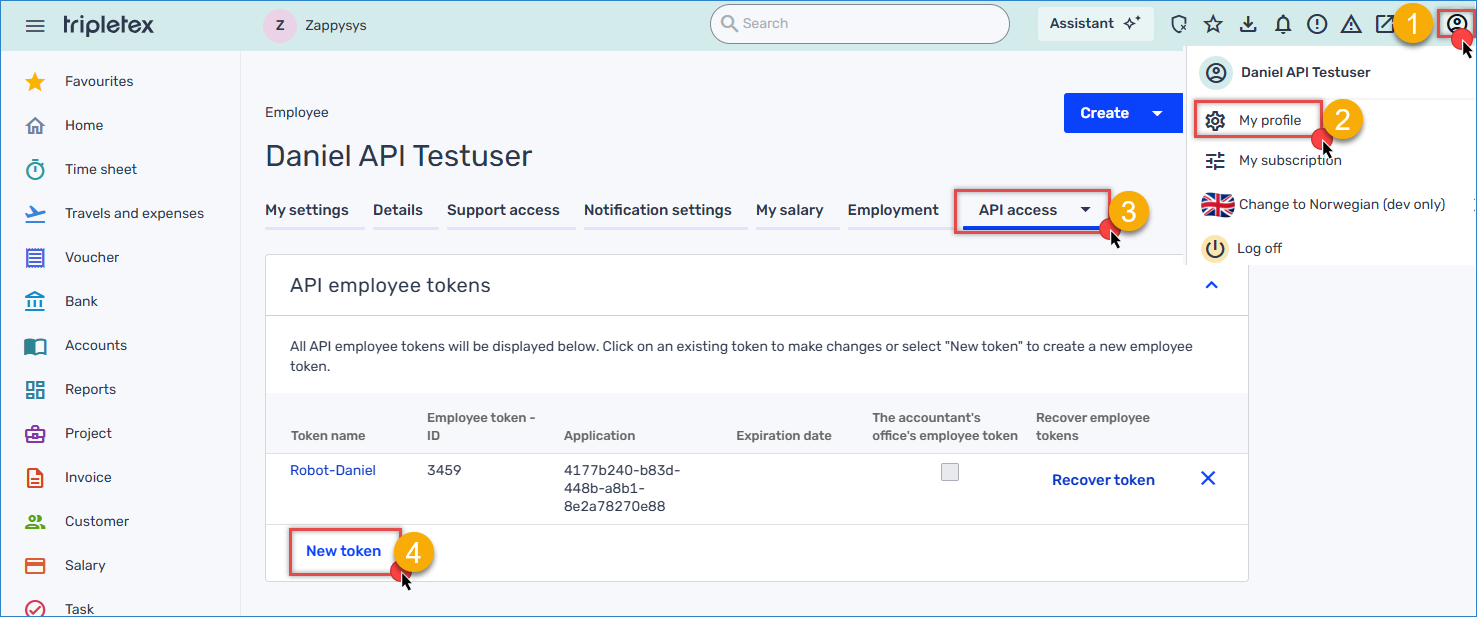
Tripletex – Generate Token
- Provide a descriptive name for your token.
- Set the appropriate permissions scope. For this tutorial, select Read and Write access to ensure the integration can both retrieve and push data.
- Click Generate Token, then immediately copy the Consumer Token and Employee Token values. Store them securely in a password manager or Azure Key Vault, as Tripletex will not display them again.
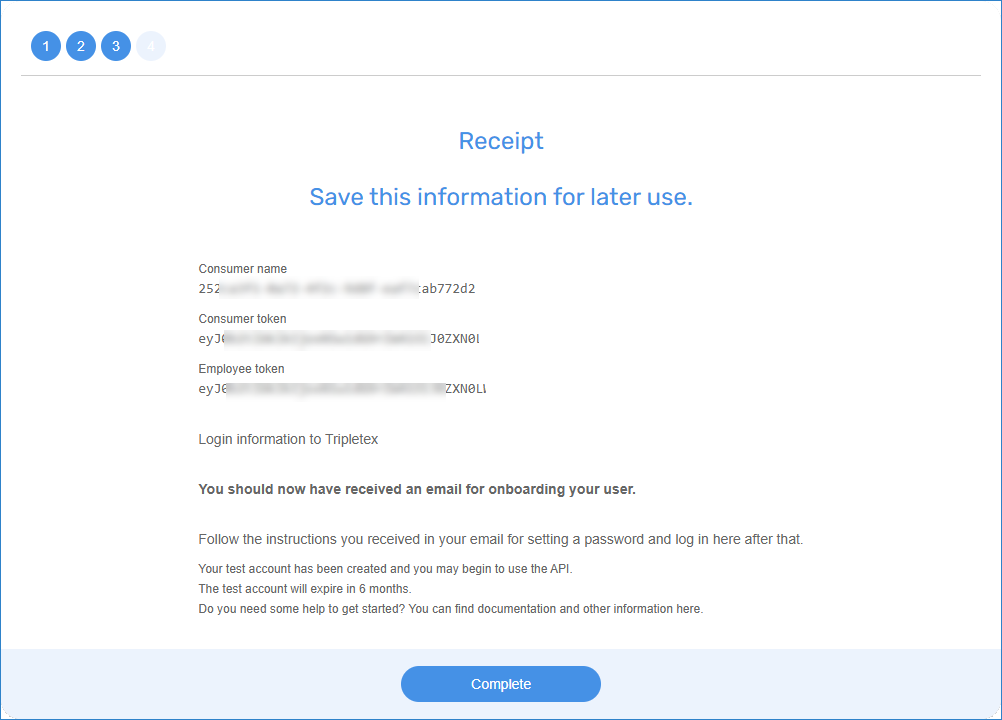
Tripletex – Getting Tokens
Creating a new ODBC DSN using ZappySys JSON Driver
- Search for ODBC in the Windows Start menu and open the ODBC Data Source Administrator.
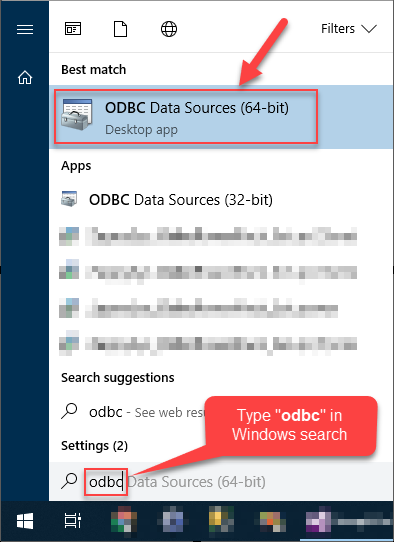
- In the User DSN or System DSN tab, click Add to create a new data source.
- In the ODBC Data Source Setup window, select the ZappySys JSON Driver and click Continue.

Configure the Connection and API Settings
- In the Base URL field, from the API documentation, enter the URL:
1https://api-test.tripletex.tech/v2/currency - Select HTTP as the connection type, then click it to configure it.
- Select Dynamic Token as the Authentication Type.
- In the Header Name, enter Authorization.
- In the OAuth Scheme, use Basic.
- Go to the Dynamic Token tab.
- Enter the following URL with the consumer and employee token:
1https://api-test.tripletex.tech/v2/token/session/:create?consumerToken={ConsumerToken}&employeeToken={EmployeeToken}&expirationDate=2026-04-28 - Set up the HTTP Request Method to PUT.
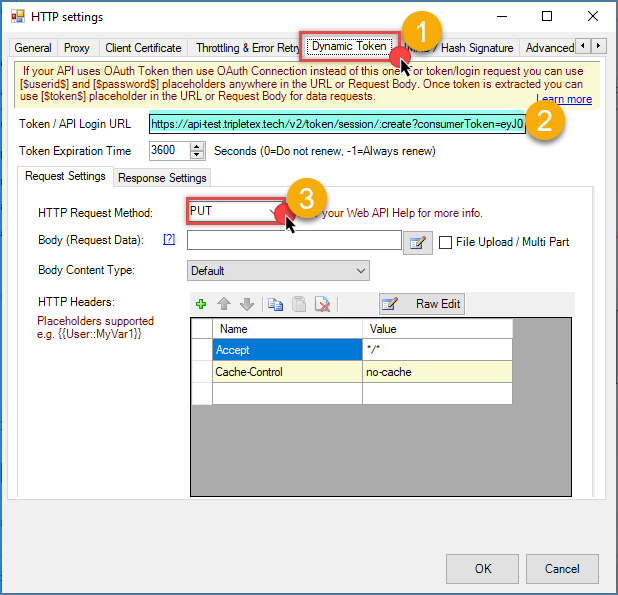
Tripletex – ODBC dynamic token
- Go to the Response Settings tab
- Select Expression Type as JSON and use this JSONPath to get the Session Token: $.value.token
- In Token Function, use the following function. The Authorization header must contain the Company ID( Enter your Tripletex company ID or use 0 if unknown) and Session Token in Base64-encoded format: <<0:[$token$],FUN_BASE64ENC>>
- Click OK to save the connection configuration.
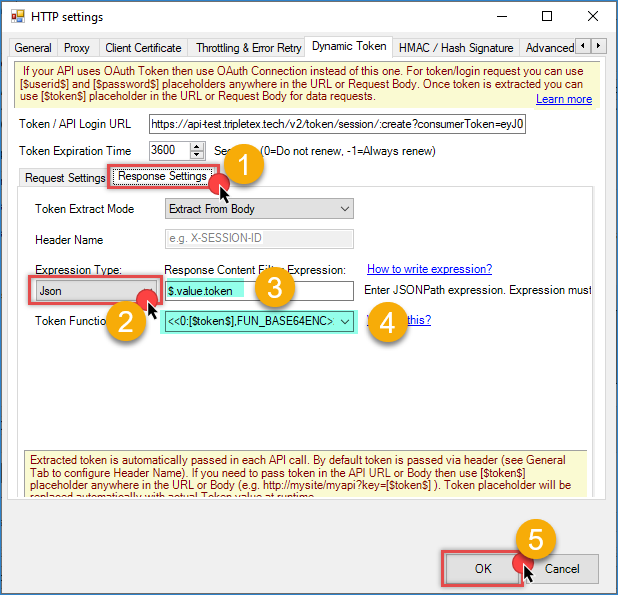
Tripletex – ODBC save Session Token
- In the Request Method, use GET
- You can use the Array filter to get the object you need. We will use $.value[*].
- Test the connection to check everything is working fine
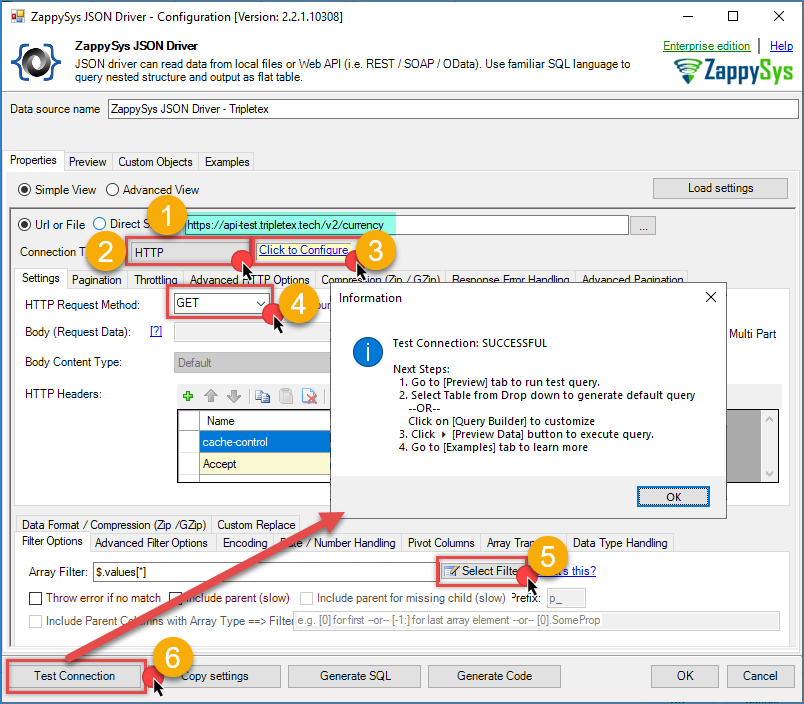
Tripletex – ODBC JSON Driver configuration
Preview the data
- Once your ODBC DSN is configured, go to the preview tab.
- Select the table you want to use.
- Press the Preview data button to see the result.
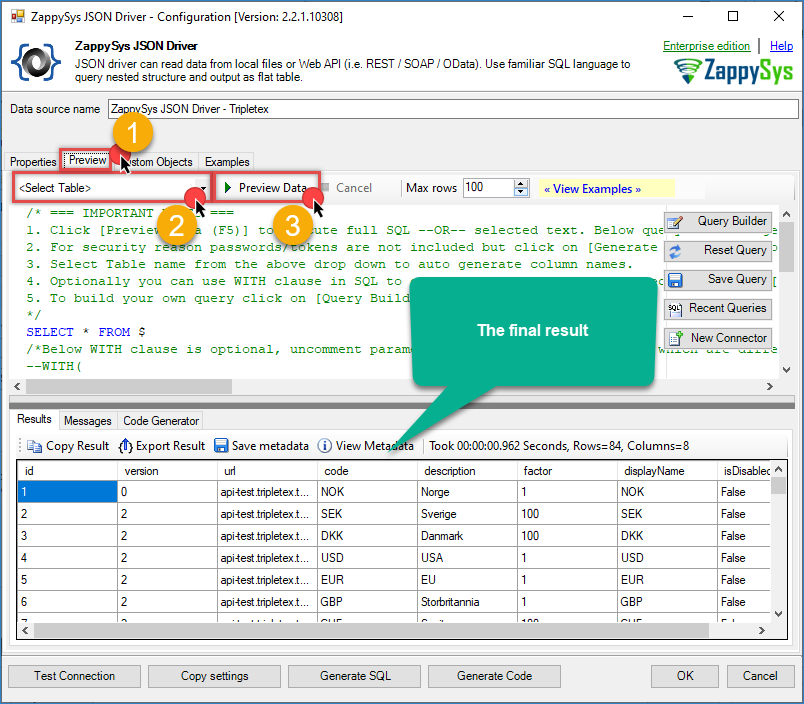
Tripletex – ODBC JSON Driver Final Result
Conclusion
You have successfully configured ODBC connectivity to Tripletex, enabling seamless data access from Excel, Power BI, Tableau, custom applications, and any other ODBC-compatible tool. This integration allows you to analyze financial data, create dashboards, and automate reporting without building custom APIs or ETL pipelines.
The ZappySys Tripletex ODBC Driver provides a simple, standardized interface for accessing your accounting data, making it easy to integrate Tripletex with your existing business intelligence and analytics tools. By following this tutorial, you have established a foundation for advanced data analysis, forecasting, and business intelligence workflows.
Explore the full capabilities of the ZappySys ODBC Drivers to optimize your data access and integration strategy. You can extend this solution to include periodic data synchronization, real-time dashboards, and advanced transformations using your preferred analytics platform.
Need Help?
If you encounter any issues, our support team is here to help:
- Live Chat — Use the chat widget (bottom-right corner of this page)
- Email — support@zappysys.com
- Support Center — Visit the ZappySys Support Portal