
Video tutorial
Watch this quick video to see the integration in action. It walks you through the end-to-end setup, including:
- Installing the SSIS PowerPack
- Configuring a secure connection to OData
- Working with OData data directly inside SSIS
- Exploring advanced API Source features
Ready to dive in? Download the product to jump right in, or follow the step-by-step guide below to see how it works.
Prerequisites
Before we begin, make sure the following prerequisites are met:
- SQL Server Data Tools (SSDT) designer installed for Visual Studio.
- SQL Server Integration Services Projects 2022+ Visual Studio extension installed.
- SSIS PowerPack is installed.
Generic read data in SSIS
-
Open Visual Studio and click Create a new project.
-
Select Integration Services Project. Enter a name and location for your project, then click OK.
-
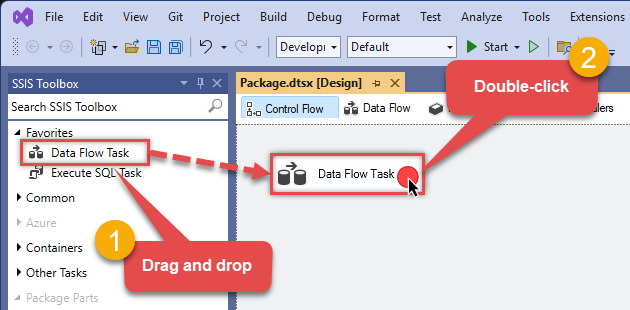
From the SSIS Toolbox, drag and drop a Data Flow Task onto the Control Flow surface, and double-click it:
-
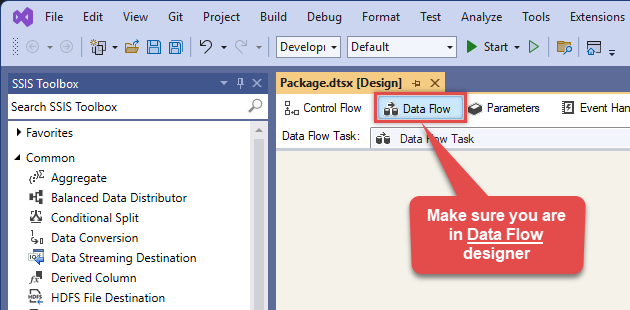
Make sure you are in the Data Flow Task designer:
-
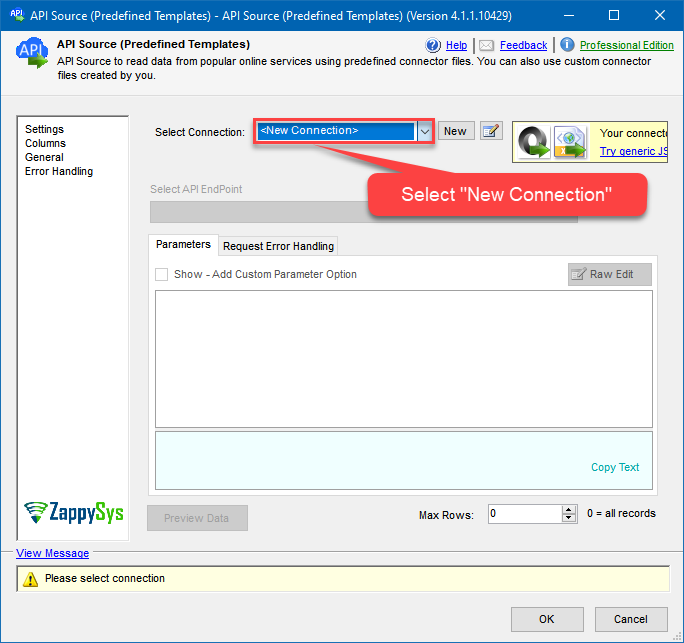
From the SSIS toolbox drag and API Source (Predefined Templates) on the data flow designer surface, and double click on it to edit it:

-
Select New Connection to create a new connection:
-
Use a preinstalled OData Connector from Popular Connector List or press Search Online radio button to download OData Connector. Once downloaded simply use it in the configuration:
OData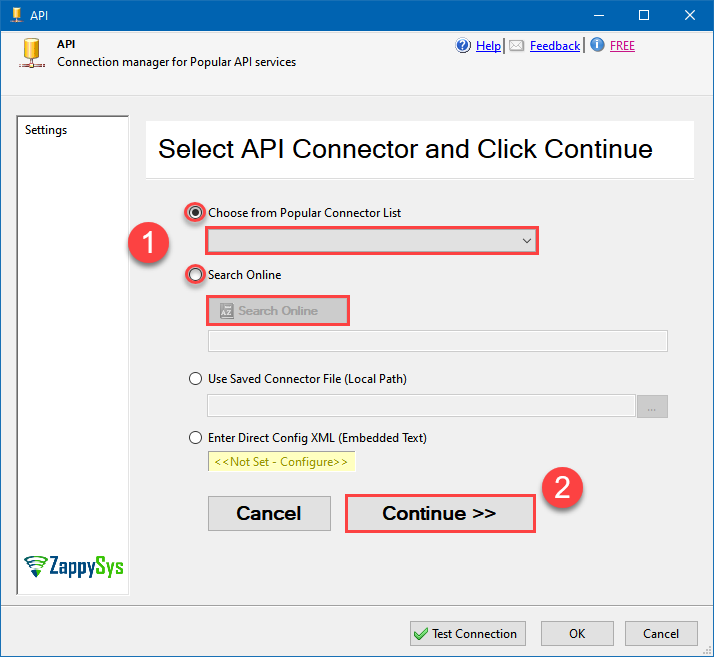
-
Select your authentication scenario below to expand connection configuration steps to:
- Configure the authentication in OData.
- Enter those details into the API Connection Manager configuration.
No Authentication
OData authentication
No instructions available.
API Connection Manager configuration
Just perform these simple steps to finish authentication configuration:
-
Set Authentication Type to
No Authentication [Http] - Optional step. Modify API Base URL if needed (in most cases default will work).
- Fill in all the required parameters and set optional parameters if needed.
- Finally, hit OK button:
ODataNo Authentication [Http]https://services.odata.org/V3/Northwind/Northwind.svcOptional Parameters RetryMode RetryWhenStatusCodeMatch RetryStatusCodeList 429 RetryCountMax 5 RetryMultiplyWaitTime True IgnoreSSLCertificateErrors SslVersion 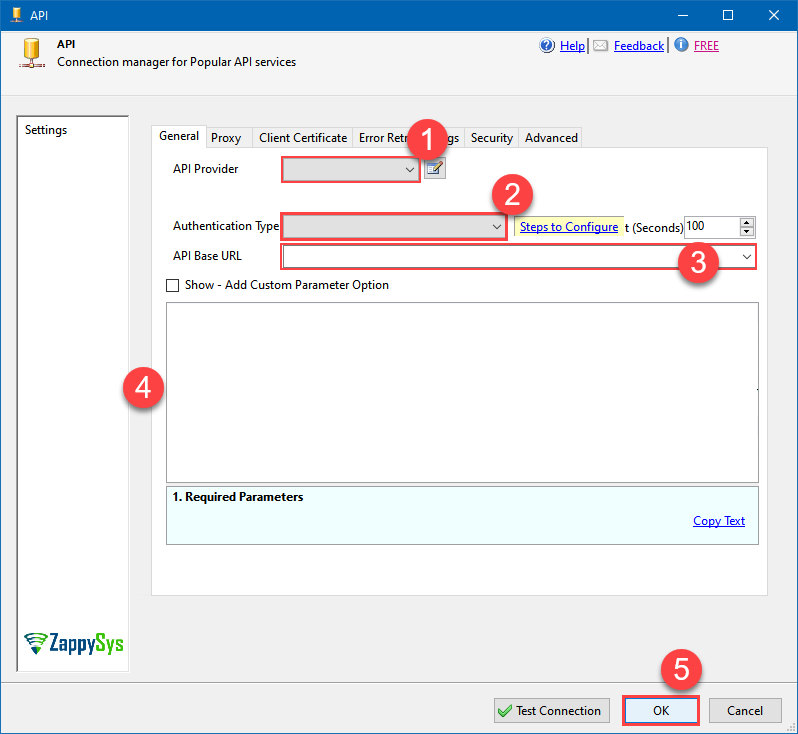 Find full details in the OData Connector authentication reference.
Windows Authentication
OData authentication
No instructions available.
API Connection Manager configuration
Just perform these simple steps to finish authentication configuration:
-
Set Authentication Type to
Windows Authentication [Http] - Optional step. Modify API Base URL if needed (in most cases default will work).
- Fill in all the required parameters and set optional parameters if needed.
- Finally, hit OK button:
ODataWindows Authentication [Http]https://services.odata.org/V3/Northwind/Northwind.svcThere are no parameters to configure.
Find full details in the OData Connector authentication reference.Basic Authentication
OData authentication
No instructions available.
API Connection Manager configuration
Just perform these simple steps to finish authentication configuration:
-
Set Authentication Type to
Basic Authentication [Http] - Optional step. Modify API Base URL if needed (in most cases default will work).
- Fill in all the required parameters and set optional parameters if needed.
- Finally, hit OK button:
ODataBasic Authentication [Http]https://services.odata.org/V3/Northwind/Northwind.svcRequired Parameters UserName Fill-in the parameter... Password Fill-in the parameter... Optional Parameters RetryMode RetryWhenStatusCodeMatch RetryStatusCodeList 429 RetryCountMax 5 RetryMultiplyWaitTime True IgnoreSSLCertificateErrors SslVersion
Find full details in the OData Connector authentication reference.NTLM Authentication
OData authentication
No instructions available.
API Connection Manager configuration
Just perform these simple steps to finish authentication configuration:
-
Set Authentication Type to
NTLM Authentication [Http] - Optional step. Modify API Base URL if needed (in most cases default will work).
- Fill in all the required parameters and set optional parameters if needed.
- Finally, hit OK button:
ODataNTLM Authentication [Http]https://services.odata.org/V3/Northwind/Northwind.svcRequired Parameters UserName (i.e. Domain\UserName) Fill-in the parameter... Password Fill-in the parameter... Optional Parameters RetryMode RetryWhenStatusCodeMatch RetryStatusCodeList 429 RetryCountMax 5 RetryMultiplyWaitTime True IgnoreSSLCertificateErrors SslVersion
Find full details in the OData Connector authentication reference.Token Authentication
OData authentication
No instructions available.
API Connection Manager configuration
Just perform these simple steps to finish authentication configuration:
-
Set Authentication Type to
Token Authentication [Http] - Optional step. Modify API Base URL if needed (in most cases default will work).
- Fill in all the required parameters and set optional parameters if needed.
- Finally, hit OK button:
ODataToken Authentication [Http]https://services.odata.org/V3/Northwind/Northwind.svcRequired Parameters Token Fill-in the parameter... Optional Parameters AuthScheme Bearer AuthHeader Authorization RetryMode RetryWhenStatusCodeMatch RetryStatusCodeList 429 RetryCountMax 5 RetryMultiplyWaitTime True IgnoreSSLCertificateErrors SslVersion
Find full details in the OData Connector authentication reference.OAuth Connection for OData API
OData authentication
No instructions available.
API Connection Manager configuration
Just perform these simple steps to finish authentication configuration:
-
Set Authentication Type to
OAuth Connection for OData API [OAuth] - Optional step. Modify API Base URL if needed (in most cases default will work).
- Fill in all the required parameters and set optional parameters if needed.
- Press Generate Token button to generate the tokens.
- Finally, hit OK button:
ODataOAuth Connection for OData API [OAuth]https://services.odata.org/V3/Northwind/Northwind.svcOptional Parameters GrantType Default OAuthVersion Default ClientId ClientSecret UserName Password Scope AuthUrl https://some-domain.com/api/auth TokenUrl https://some-domain.com/api/token ReturnUrl https://zappysys.com/oauth ExtraAttributesForTokenRequest ExtraAttributesForAuthRequest DoNotIncludeCredentialsInHeader DoNotIncludeCredentialsInBody RenewBeforeSec ExtraHeaders (e.g. x-hdr1:AAA||x-hdr2:BBB) ContentType EnableCodeVerifier RemoveAuthHeader CustomAuthHeader CustomTokenPrefix RetryMode RetryWhenStatusCodeMatch RetryStatusCodeList 429 RetryCountMax 5 RetryMultiplyWaitTime True IgnoreSSLCertificateErrors SslVersion 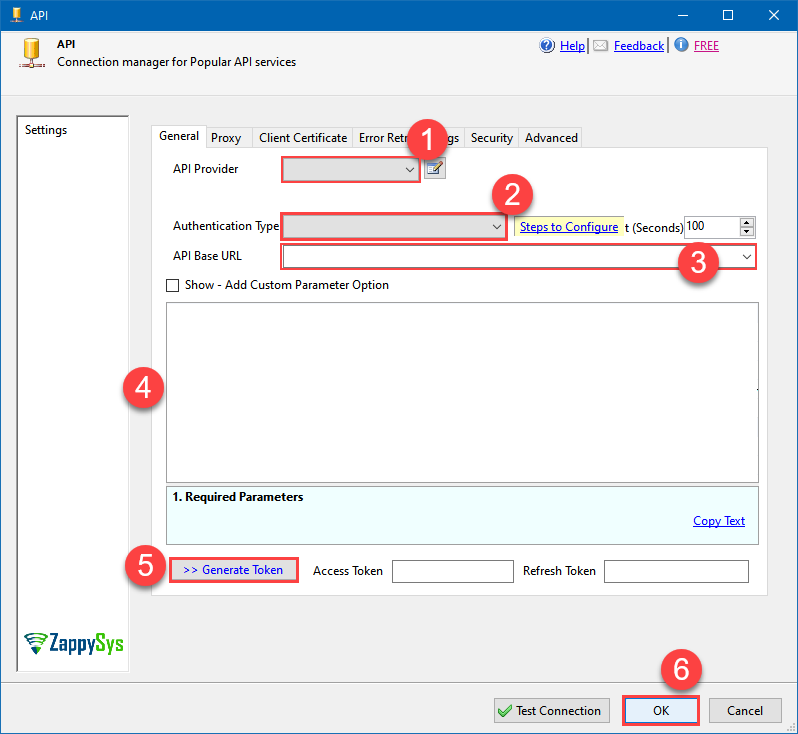 Find full details in the OData Connector authentication reference.
 -
Select Generic Read Data (JSON API) endpoint from the dropdown and hit Preview Data:
 API Source - ODataRead and write OData API data effortlessly. Query, integrate, and manage entities and feeds — almost no coding required.ODataGeneric Read Data (JSON API)
Optional Parameters TableName 
-
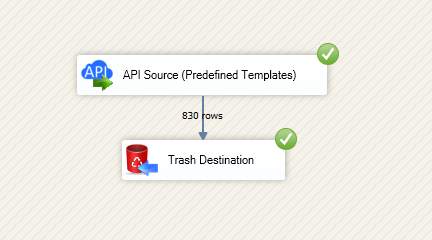
That's it! We are done! Just in a few clicks we configured the call to OData using OData Connector.
You can load the source data into your desired destination using the Upsert Destination , which supports SQL Server, PostgreSQL, and Amazon Redshift. We also offer other destinations such as CSV , Excel , Azure Table , Salesforce , and more . You can check out our SSIS PowerPack Tasks and components for more options. (*loaded in Trash Destination)
OData Connector actions
Need another use case? Pick the next OData action in SSIS below.
- Generic Read Data (XML API)
- List Columns
- List Tables
- List Tables (JSON API)
- List Tables (XML API)
- Read [Dynamic Endpoint]
- Make Generic REST API Request
- Make Generic REST API Request (Bulk Write)
Conclusion
You now know how to generic read data (JSON API) in SSIS without writing complex code. OData SSIS Connector handled pagination and authentication automatically.
Ready to get started? Download the trial or ping us via chat if you need help: