Introduction
In this article, you’ll learn how to connect SSIS PowerPack (ZappySys) to AliPay OpenAPI to call REST endpoints from SSIS. We’ll focus on the practical integration pattern AliPay requires: sending requests to the OpenAPI gateway with the correct parameters and a valid RSA2 signature, then parsing JSON responses in SSIS.
Prerequisites
Before we perform the steps listed in this article, you will need to make sure the following prerequisites are met:- SSIS designer installed. Sometimes it is referred to as BIDS or SSDT (download it from the Microsoft site).
- Basic knowledge of SSIS package development using Microsoft SQL Server Integration Services.
- Make sure ZappySys SSIS PowerPack is installed (download it, if you haven't already).
- (Optional step). Read this article, if you are planning to deploy packages to a server and schedule their execution later.
AliPay OpenAPI basics (what SSIS must send)
AliPay OpenAPI calls typically go through a single gateway endpoint:
- Sandbox gateway:
1https://openapi-sandbox.dl.alipaydev.com/gateway.do
A request is built from:
- Standard parameters (for example:
app_id,method,charset,sign_type,timestamp,version) biz_content(usually JSON)sign(a signature generated from the parameters using RSA/RSA2—AliPay recommends RSA2)
AliPay requires you to construct a “string to sign” from parameters and attach sign and sign_type to the request, then validate/verify responses using the AliPay public key.
High-level integration pattern in SSIS
Because AliPay signing is mandatory, the most reliable SSIS approach is a two-step pattern:
- Generate the signature (RSA2) for the request parameters.
- Call the AliPay gateway from ZappySys (REST API Task or REST API Source), passing the signed parameters.
ZappySys components support custom HTTP methods, headers, request bodies, and advanced options—so they work well once you have the signed payload ready.
Steps
Start in the AliPay Sandbox
AliPay strongly recommends using the sandbox for development and debugging. In the sandbox, you must:
- An AliPay Developer Account
- An AliPay App ID
- Use the sandbox gateway URL
- RSA2 Private Key (generated in AliPay developer console)
- AliPay Public Key (for verification)
- Access to the AliPay Sandbox environment (recommended for testing)
Decide where you will generate the RSA2 signature
You have three common options:
- Option A (Recommended): SSIS Script Task (C#) to generate signature
Use a Script Task before the ZappySys call to build parameters and computesign. - Option B: Use an AliPay SDK in a small helper app
Run it via Execute Process Task to output signed parameters (JSON/text), then pass them to ZappySys. - Option C: Use a signing microservice
SSIS calls your internal service to getsign, then calls AliPay.
AliPay’s documentation emphasizes the signature process and verification using the AliPay public key.
Example: What a signed AliPay request looks like
AliPay’s gateway model is “parameters + signature.” Conceptually, your final request includes:
app_idmethod(the API name you’re calling)charset(oftenutf-8)sign_type(recommendedRSA2)timestampversionbiz_content(JSON)sign(computed over the canonicalized parameter string)
AliPay documents that sign and sign_type are appended after creating the string to be signed, and verification uses the AliPay public key.
Configure the ZappySys REST API Task (Control Flow)
Use this when operating (e.g., creating a payment, refunding, or querying).
- Drag ZappySys REST API Web Service Task into Control Flow.
- Set the task:
- Method: POST (commonly used with AliPay gateway)
- URL:
1https://openapi-sandbox.dl.alipaydev.com/gateway.do - Headers: use
1Content-Type: application/x-www-form-urlencoded - Body: form-encoded parameters; use this format: key1=value1&key2=value2…
1app_id=YOUR_APP_ID&method=alipay.trade.query&charset=utf-8&sign_type=RSA2×tamp=2026-02-20 10:00:00&version=1.0&biz_content={"out_trade_no":"202602200001"}&sign=GENERATED_SIGNATURE
- Click Test Request/Response to confirm you get a valid JSON response.
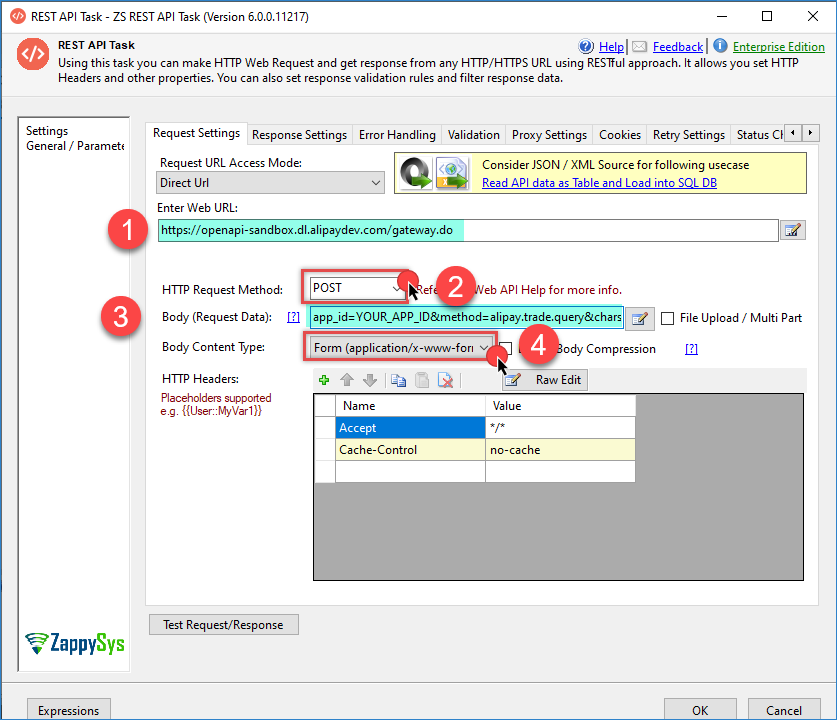
Alipay REST API
Troubleshooting common AliPay + SSIS issues
- invalid-signature / missing-signature: most often caused by parameter ordering, incorrect URL-encoding, wrong key pair, or using sandbox keys against production (or vice versa).
- Wrong gateway: sandbox and production are fully isolated—ensure your
app_id,keys, and gateway host match the environment. - Encoding issues: confirm UTF-8 everywhere and ensure parameters are encoded exactly once before submission.
- Parsing JSON: use ZappySys JSON Source preview and JSONPath filters to flatten nested objects.
Security best practices
- Store private keys securely (SSIS variables protected, encrypted config, or secret vaults).
- Do not hardcode secrets in packages.
- Use a sandbox for development, then switch to production only after full validation.
Conclusion
Download SSIS PowerPack today and see for yourself how easy it is to connect SSIS PowerPack (ZappySys) to AliPay is absolutely achievable once you treat AliPay’s OpenAPI as a signed gateway integration. The key is generating a correct RSA2 signature for every request, then using ZappySys REST components to send the parameters and parse responses.
Still need help?
If the issue persists, please get in touch with our support team:
- Live Chat: Open the chat widget (bottom right of this page)
- Email: support@zappysys.com
- Support Center: Support | ZappySys