
Video tutorial
Watch this quick video to see the integration in action. It walks you through the end-to-end setup, including:
- Installing the SSIS PowerPack
- Configuring a secure connection to Nativo
- Working with Nativo data directly inside SSIS
- Exploring advanced API Source features
Ready to dive in? Download the product to jump right in, or follow the step-by-step guide below to see how it works.
Prerequisites
Before we begin, make sure the following prerequisites are met:
- SQL Server Data Tools (SSDT) designer installed for Visual Studio.
- SQL Server Integration Services Projects 2022+ Visual Studio extension installed.
- SSIS PowerPack is installed.
Make generic REST API request in SSIS
-
Open Visual Studio and click Create a new project.
-
Select Integration Services Project. Enter a name and location for your project, then click OK.
-
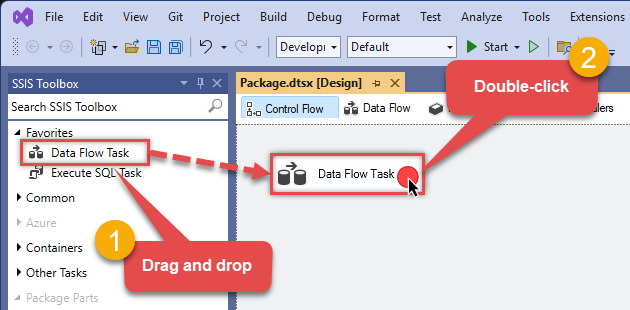
From the SSIS Toolbox, drag and drop a Data Flow Task onto the Control Flow surface, and double-click it:
-
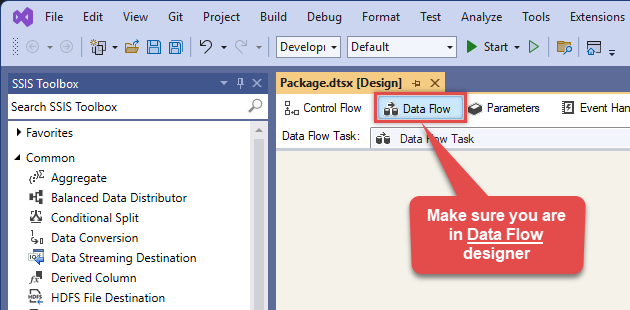
Make sure you are in the Data Flow Task designer:
-
Read the data from the source, using any desired source component. You can even make an API call using the ZappySys JSON/XML/API Source and read data from there. In this example, we will use an OLE DB Source component to read real-time data from a SQL Server database.
-
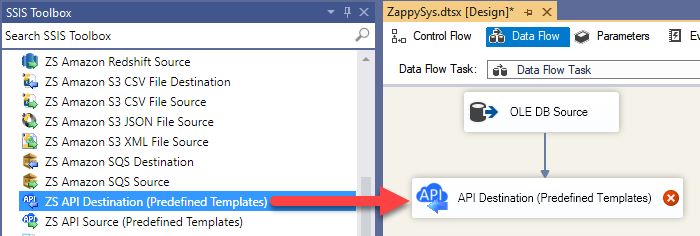
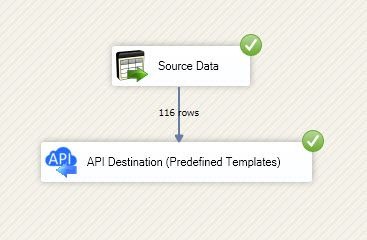
From the SSIS Toolbox drag and drop API Destination (Predefined Templates) on the Data Flow Designer surface and connect source component with it, and double click to edit it.
-
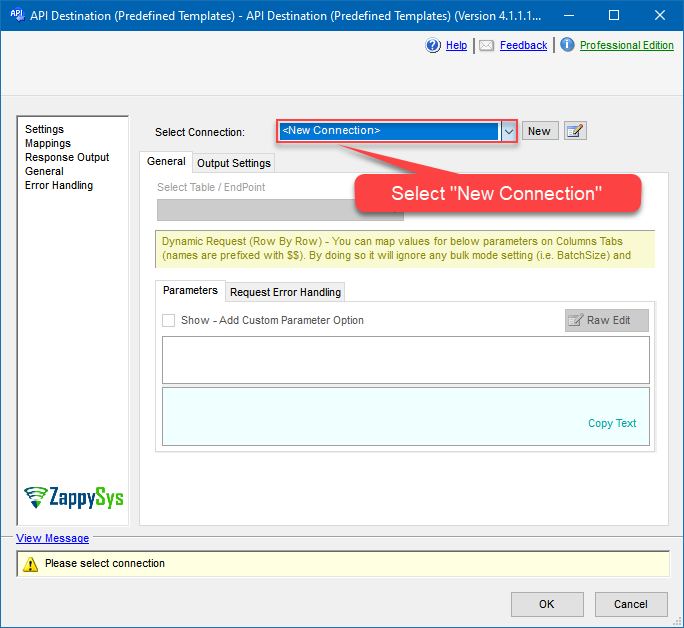
Select New Connection to create a new connection:
API Destination - NativoRead and write Nativo advertising data effortlessly. Integrate, manage, and automate campaigns and performance — almost no coding required.
-
To configure the Nativo connector, choose one of the following methods:
- Choose from Popular Connector List: Select a pre-installed service directly from the dropdown menu.
- Search Online: Use this to find and download a new connector file to your computer.
- Use Saved/Downloaded File: Once the file is downloaded, browse your local drive to load it into the configuration.
After that, just click Continue >>:
Nativo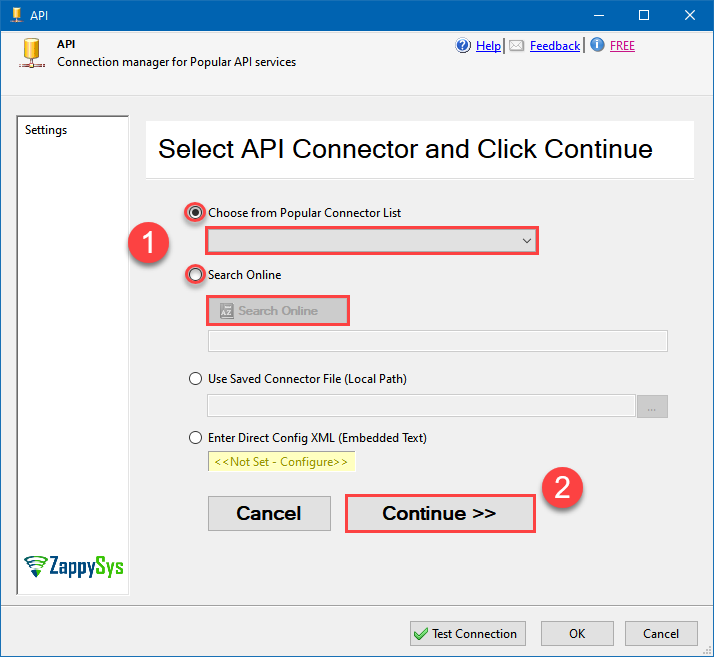
-
Proceed with selecting the desired Authentication Type. Then select API Base URL (in most cases default one is the right one). Finally, fill in all the required parameters and set optional parameters if needed. You may press a link Steps to Configure which will help set certain parameters. More info is available in Authentication section.
Http
Nativo authentication
Please refer to external API reference
API Connection Manager configuration
Just perform these simple steps to finish authentication configuration:
-
Set Authentication Type to
Http [Http] - Optional step. Modify API Base URL if needed (in most cases default will work).
- Fill in all the required parameters and set optional parameters if needed.
- Finally, hit OK button:
NativoHttp [Http]https://api.nativo.com/v2Optional Parameters Api Key Api Secret RetryMode RetryWhenStatusCodeMatch RetryStatusCodeList 429 RetryCountMax 5 RetryMultiplyWaitTime True 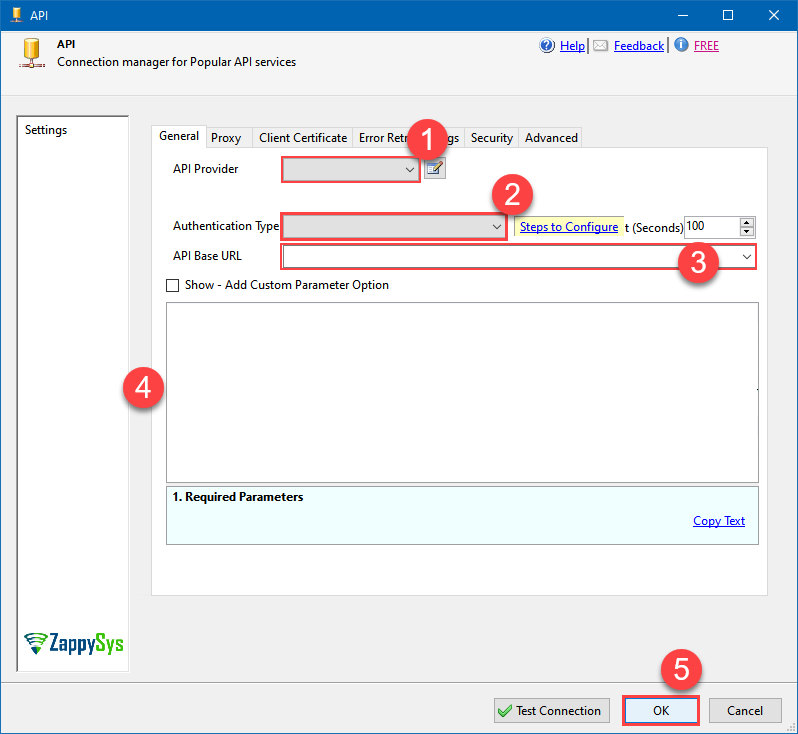 Find full details in the Nativo Connector authentication reference.
 -
Set Authentication Type to
-
Select Generic Table (Bulk Read / Write) table from the dropdown, then select Insert, Update as operation, and hit Preview Data:
 API Destination - NativoRead and write Nativo advertising data effortlessly. Integrate, manage, and automate campaigns and performance — almost no coding required.NativoGeneric Table (Bulk Read / Write)Insert, Update
Required Parameters Url Fill-in the parameter... Request Method Fill-in the parameter... Optional Parameters IsMultiPart False Filter Request Format (Content-Type) Default Body {$rows$} JsonOutputFormat Multicontent DoNotOutputNullProperty False Batch Size (Default=1) 1 Meta Detection Order StaticDynamicVirtual Input Columns - For Mapping (e.g. MyCol1:string(10); MyCol2:int32 ...) - Use bool, int32, int64, datetime, decimal, double Output Columns (e.g. MyCol1:string(10); MyCol2:int32 ...) - Use bool, int32, int64, datetime, decimal, double Request Format Default Response Format Default Headers Accept: */* || Cache-Control: no-cache Csv - Column Delimiter , Csv - Row Delimiter {NEWLINE} Csv - Quote Around Value True Csv - Always Quote regardless type False Encoding CharacterSet Writer DateTime Format Csv - Has Header Row True Xml - ElementsToTreatAsArray Layout Map <?xml version="1.0" encoding="utf-8"?> <!-- Example#1: Output all columns --> <settings> <dataset id="root" main="True" readfrominput="True" /> <map src="*" /> </settings> <!-- Example#2: Records under array <?xml version="1.0" encoding="utf-8"?> <settings singledataset="True"> <dataset id="root" main="True" readfrominput="True" /> <map name="MyArray" dataset="root" maptype="DocArray"> <map src="OrderID" name="OrderID" /> <map src="OrderDate" name="OrderDate" /> </map> </settings> --> <!-- Example#3: Records under nested section <?xml version="1.0" encoding="utf-8"?> <settings> <dataset id="dsRoot" main="True" readfrominput="True" /> <map name="NestedSection"> <map src="OrderID" name="OrderID_MyLabel" /> <map src="OrderDate" name="OrderDate_MyLabel" /> </map> </settings> --> 
-
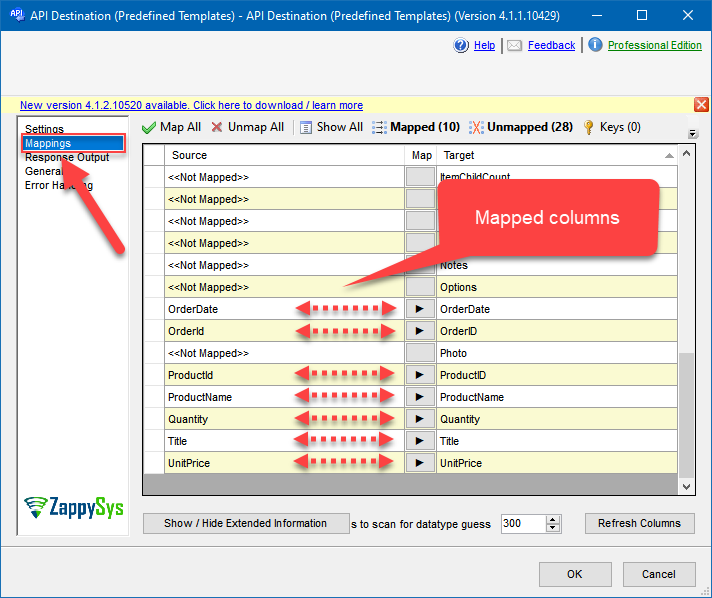
Finally, map the desired columns:
API Destination - NativoRead and write Nativo advertising data effortlessly. Integrate, manage, and automate campaigns and performance — almost no coding required.
-
That's it; we successfully configured the POST API Call. In a few clicks we configured the Nativo API call using ZappySys Nativo Connector
Nativo Connector actions
Need another use case? Pick the next Nativo action in SSIS below.
- Read Advertisers Data
- Read Auction Campaign Data
- Read Campaign Data
- Read Demand Campaign Data
- Read DirectCampaign Data
- Read Inventory Campaign Data
- Read Managed Campaign Data
- Read Metrics
- Read Performance Campaign Data (Depriciated)
- Read Preferred Campaign Data
- Make Generic REST API Request
Conclusion
You now know how to make generic REST API request (bulk write) in SSIS without writing complex code. Nativo SSIS Connector handled pagination and authentication automatically.
Ready to get started? Download the trial or ping us via chat if you need help: