
Create data source using Salesforce ODBC Driver
Video instructions
Watch this quick walkthrough to see how to configure your Salesforce ODBC data source, or scroll down for the step-by-step written guide.
Step-by-step instructions
-
Download and install ODBC PowerPack (if you haven't already).
-
Search for
odbcand open the ODBC Data Sources (64-bit):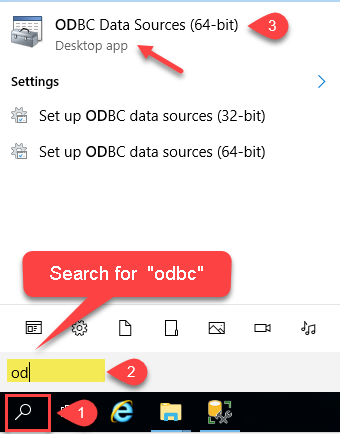
-
Create a User data source (User DSN) based on the ZappySys Salesforce Driver driver:
ZappySys Salesforce Driver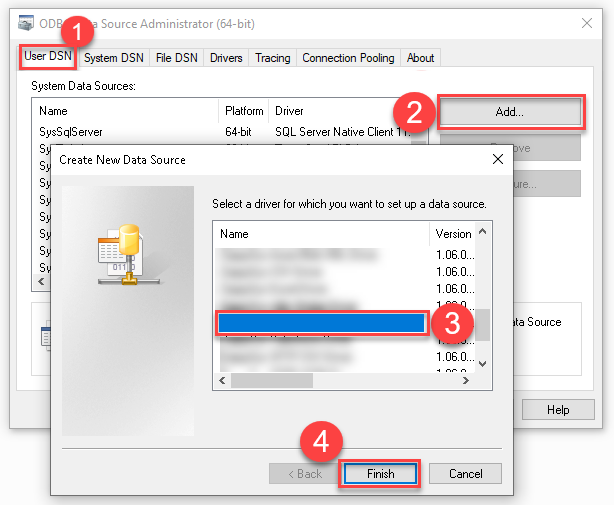
- Create and use a User DSN if the client application runs under a User Account. This is the ideal option at design time (e.g., when developing in Visual Studio). Use it for both types of applications (64-bit and 32-bit).
- Create and use a System DSN if the client application runs under a System Account (e.g., as a Windows Service). This is usually the required option in a production environment. If your Windows Service is a 32-bit application, you must use the 32-bit ODBC Data Source Administrator to configure this
-
When the Configuration window appears give your data source a name if you haven't done that already, then select "Salesforce" from the list of Popular Connectors. If "Salesforce" is not present in the list, then click "Search Online" and download it. Then set the path to the location where you downloaded it. Finally, click Continue >> to proceed with configuring the DSN:
SalesforceDSNSalesforce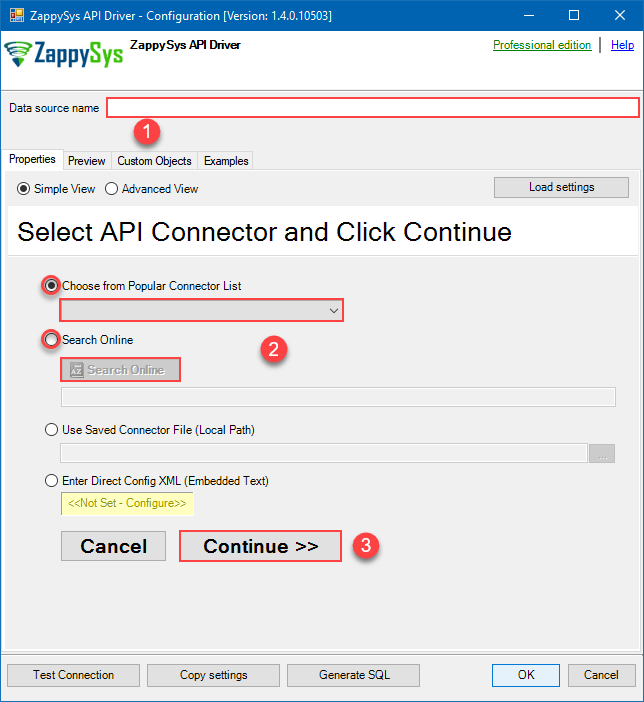
-
Select your authentication scenario below to expand connection configuration steps to:
- Configure the authentication in Salesforce.
- Enter those details into the ZappySys API Driver data source configuration.
-
Then go to Preview tab to start building a SQL query.
-
Once you do that, proceed by opening Query Builder:
 ZappySys API Driver - SalesforceRead and write Salesforce data effortlessly. Query, sync, and manage objects and records with SOQL for analytics, reporting, and data pipelines — almost no coding required.SalesforceDSN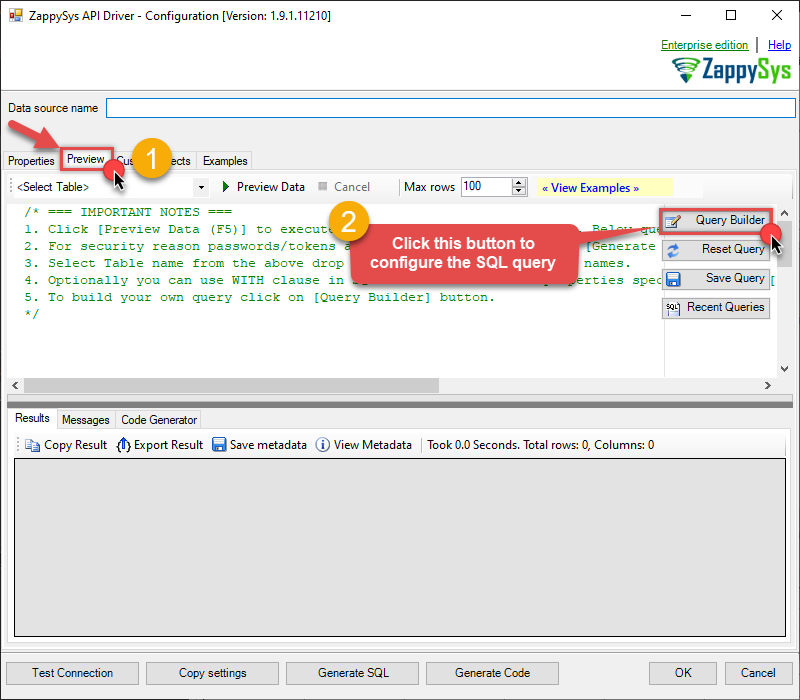
-
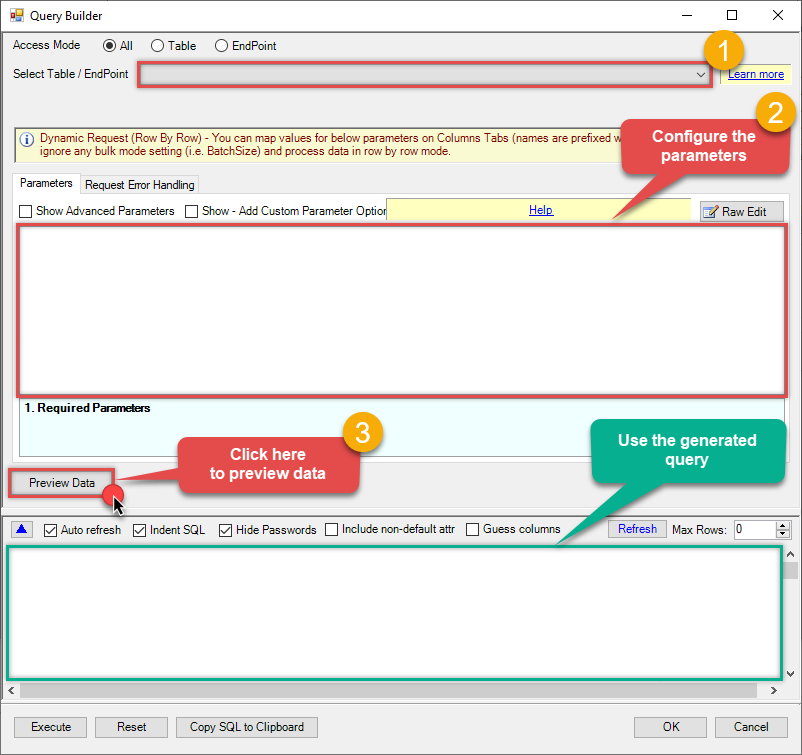
Then simply select the Make Generic REST API Request (Bulk Write) endpoint (action).
-
Continue by configuring the Required parameters. You can also set optional parameters too.
-
Move on by hitting Preview Data button to preview the results.
-
If you see the results you need, simply copy the generated query:
-
Click OK to use built SQL query and close the Query Builder.
-
Now hit Preview Data button to preview the data using the generated SQL query. If you are satisfied with the result, use this query in MS Access:
ZappySys API Driver - SalesforceRead and write Salesforce data effortlessly. Query, sync, and manage objects and records with SOQL for analytics, reporting, and data pipelines — almost no coding required.SalesforceDSNSELECT * FROM __DynamicRequest__ WITH ( "Url" = '/something/123', "RequestMethod" = 'POST' )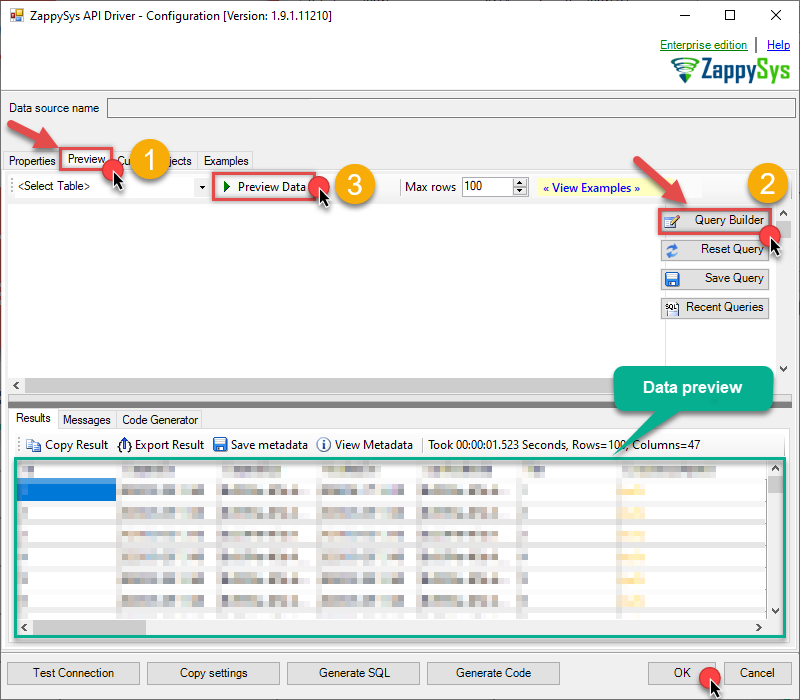 You can also access data quickly from the tables dropdown by selecting <Select table>.A
WHEREclause,LIMITkeyword will be performed on the client side, meaning that thewhole result set will be retrieved from the Salesforce API first, and only then the filtering will be applied to the data. If possible, it is recommended to use parameters in Query Builder to filter the data on the server side (in Salesforce servers).
Let's not stop here and explore SQL query examples, including how to use them in Stored Procedures and Views (virtual tables) in the next steps.
Salesforce SQL query examples
Use these SQL queries in your MS Access data source:
Make generic rest api request
SELECT * FROM __DynamicRequest__
WITH
(
    "Url" = '/something/123',
    "RequestMethod" = 'POST'
)
generic_request_bulk_write endpoint belongs to
__DynamicRequest__
table(s), and can therefore be used via those table(s).
Create SQL view in ODBC data source
ZappySys API Drivers support flexible Query language so you can override Default Properties you configured on Data Source such as URL, Body. This way you don't have to create multiple Data Sources if you like to read data from multiple EndPoints. However not every application support supplying custom SQL to driver so you can only select Table from list returned from driver.
If you're dealing with Microsoft Access and need to import data from an SQL query, it's important to note that Access doesn't allow direct import of SQL queries. Instead, you can create custom objects (Virtual Tables) to handle the import process.
Many applications like MS Access, Informatica Designer wont give you option to specify custom SQL when you import Objects. In such case Virtual Table is very useful. You can create many Virtual Tables on the same Data Source (e.g. If you have 50 URLs with slight variations you can create virtual tables with just URL as Parameter setting.
-
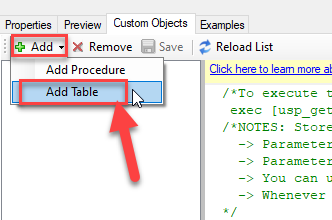
Go to Custom Objects Tab and Click on Add button and Select Add Table:
-
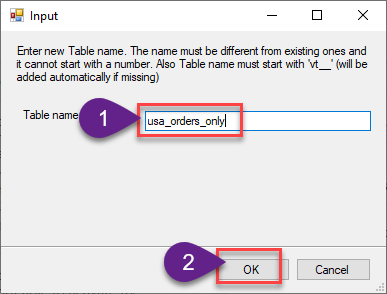
Enter the desired Table name and click on OK:
-
And it will open the New Query Window Click on Cancel to close that window and go to Custom Objects Tab.
-
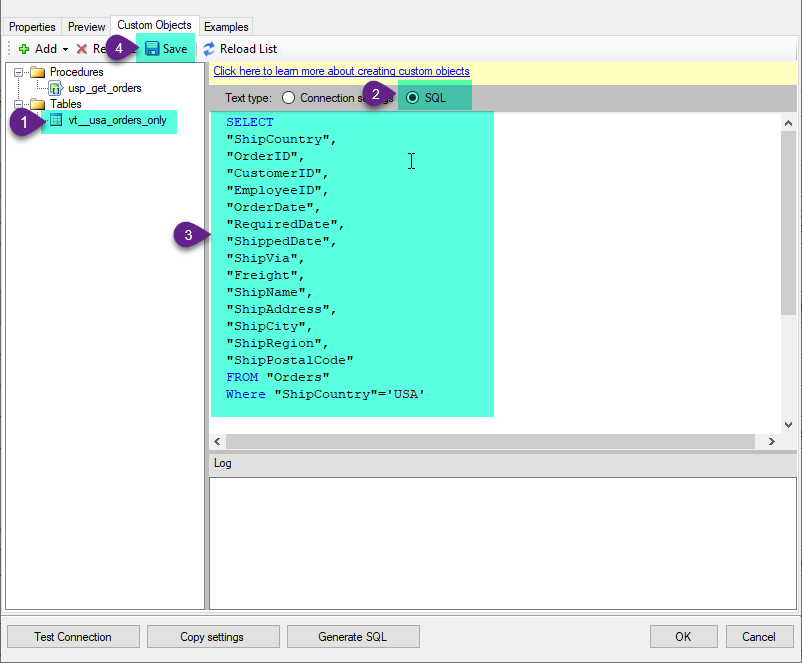
Select the created table, Select Text Type AS SQL and write the your desired SQL Query and Save it and it will create the custom table in the ZappySys Driver:
Here is an example SQL query for ZappySys Driver. You can insert Placeholders also. Read more about placeholders here
SELECT
  "ShipCountry",
  "OrderID",
  "CustomerID",
  "EmployeeID",
  "OrderDate",
  "RequiredDate",
  "ShippedDate",
  "ShipVia",
  "Freight",
  "ShipName",
  "ShipAddress",
  "ShipCity",
  "ShipRegion",
  "ShipPostalCode"
FROM "Orders"
Where "ShipCountry"='USA'
-
That's it now go to Preview Tab and Execute your custom virtual table query. In this example it will extract the orders for the USA Shipping Country only:
SELECT * FROM "vt__usa_orders_only"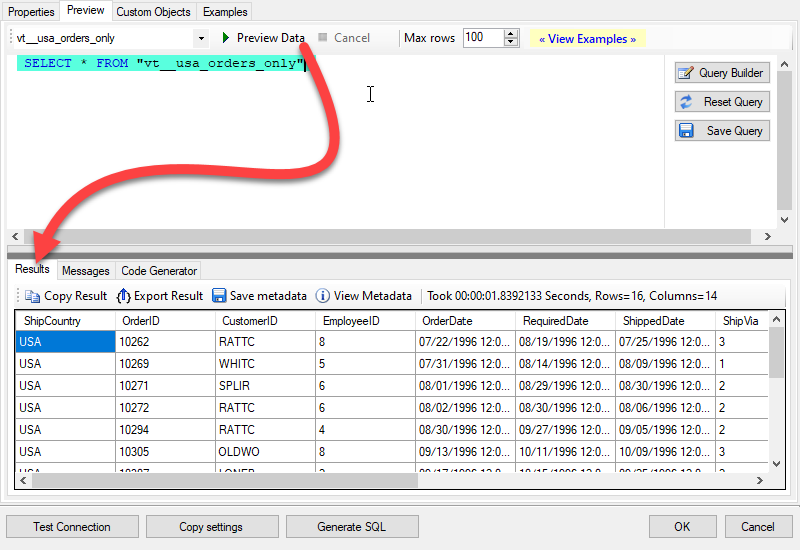
Make generic REST API request in MS Access via SQL view
-
First of all, open MS Access and create a new MS Access database.
-
In the next step, start loading ODBC data source we created:
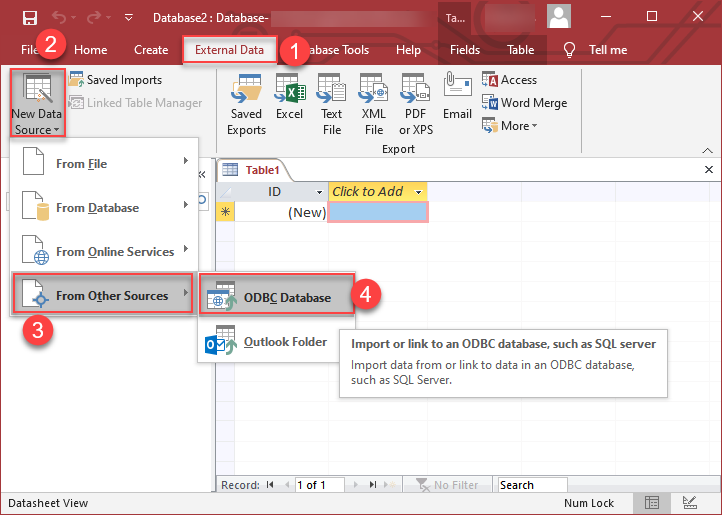
-
Then click next until data source selection window appears. Select the data source we created in one of the previous steps and hit OK:
SalesforceDSN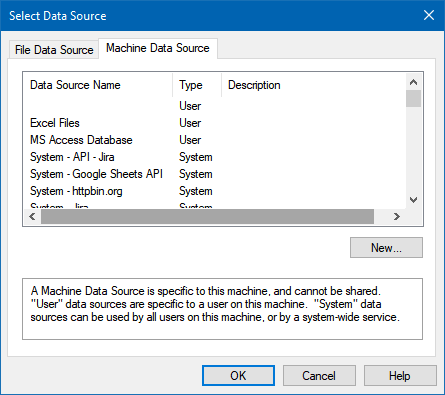
-
Continue with tables and views selection. You can extract multiple tables or views:
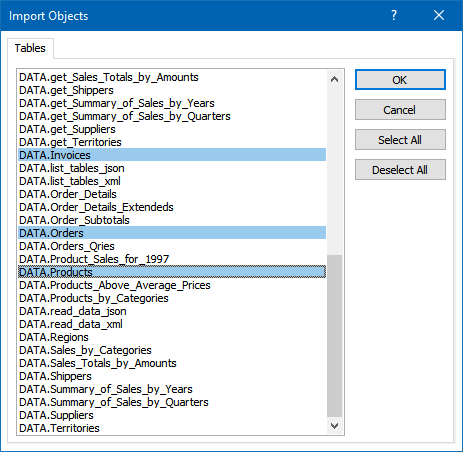
-
Finally, wait while data is being loaded and once done you should see a similar view:
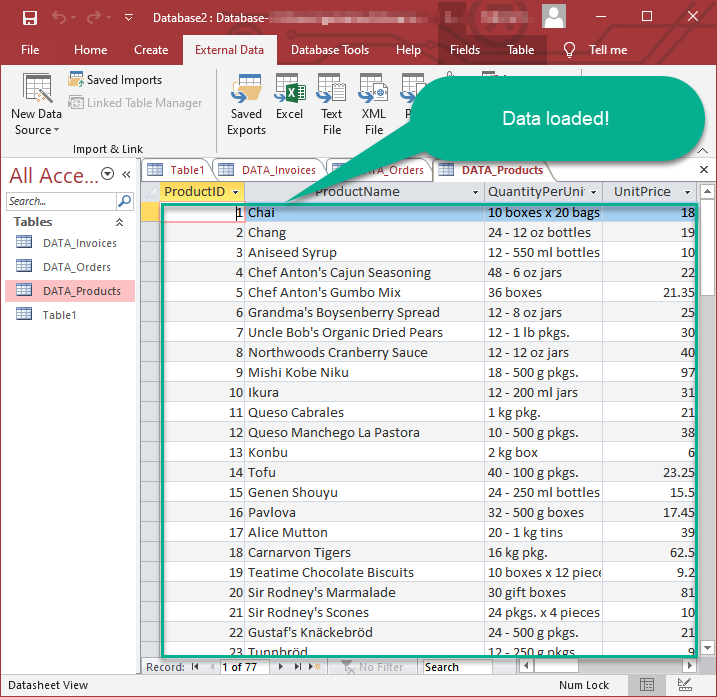
Advanced topics
Creating SQL stored procedures
You can create procedures to encapsulate custom logic and then only pass handful parameters rather than long SQL to execute your API call.
Steps to create Custom Stored Procedure in ZappySys Driver. You can insert Placeholders anywhere inside Procedure Body. Read more about placeholders here
-
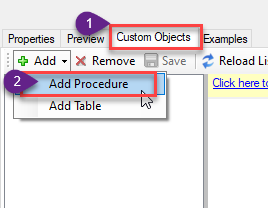
Go to Custom Objects Tab and Click on Add button and Select Add Procedure:
-
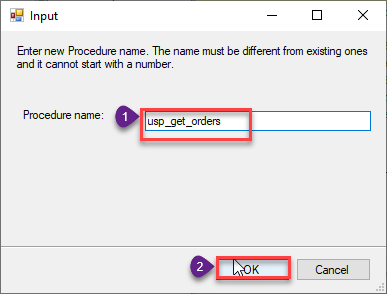
Enter the desired Procedure name and click on OK:
-
Select the created Stored Procedure and write the your desired stored procedure and Save it and it will create the custom stored procedure in the ZappySys Driver. Here is an example stored procedure for ZappySys Driver. You can insert Placeholders anywhere inside Procedure Body. Read more about placeholders here
CREATE PROCEDURE [usp_get_orders]
    @fromdate = '<<yyyy-MM-dd,FUN_TODAY>>'
 AS
    SELECT * FROM Orders where OrderDate >= '<@fromdate>';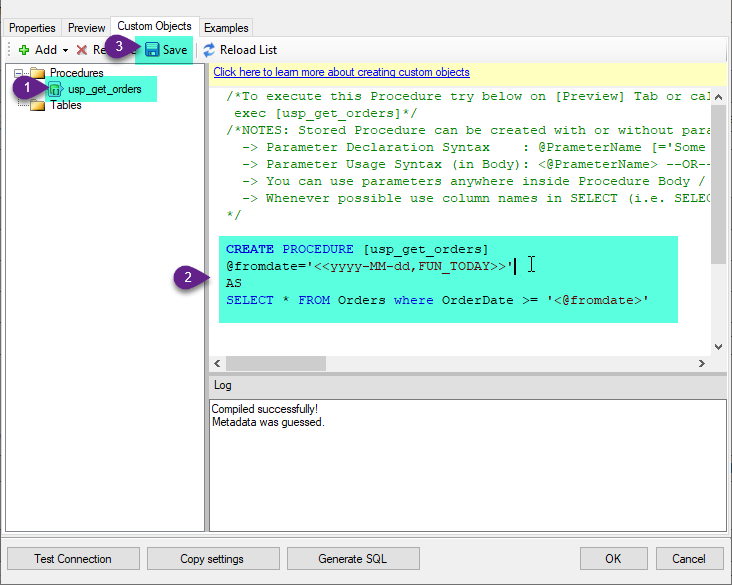
-
That's it now go to Preview Tab and Execute your Stored Procedure using Exec Command. In this example it will extract the orders from the date 1996-01-01:
Exec usp_get_orders '1996-01-01';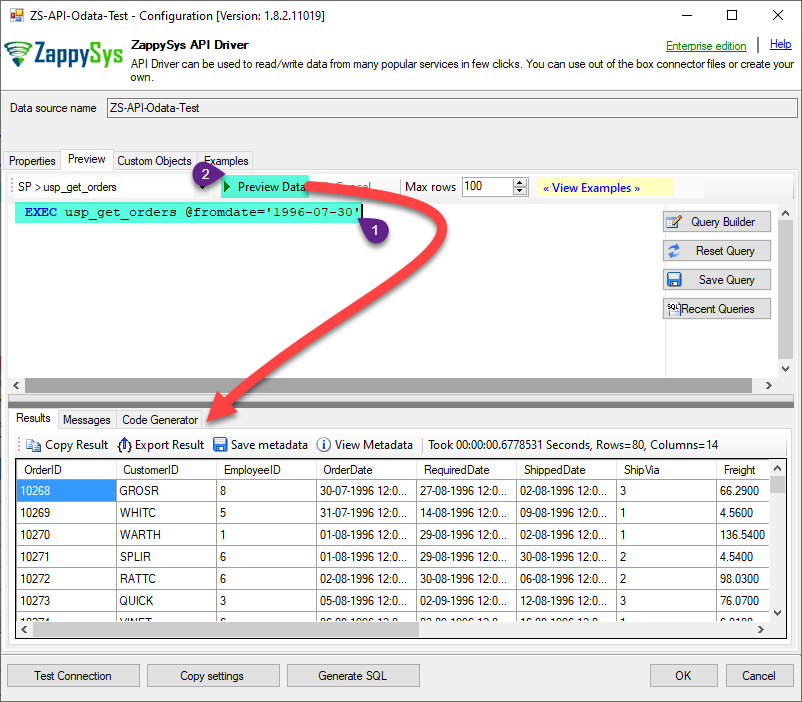
Salesforce Connector actions
Need another use case? Pick the next Salesforce action in MS Access below.
Conclusion
You now know how to make generic REST API request (bulk write) in MS Access without writing complex code. Salesforce ODBC Driver handled pagination and authentication automatically.
Ready to get started? Download the trial or ping us via chat if you need help: