

Introduction
You can connect to your FastSpring data from Java via the high-performance FastSpring ODBC Driver. We'll walk you through the entire setup.
Let's not waste time and get started!
Create data source in ZappySys Data Gateway
In this section we will create a data source for FastSpring in the Data Gateway. Let's follow these steps to accomplish that:
-
Download and install ODBC PowerPack (if you haven't already).
-
Search for
gatewayin the Windows Start Menu and open ZappySys Data Gateway Configuration: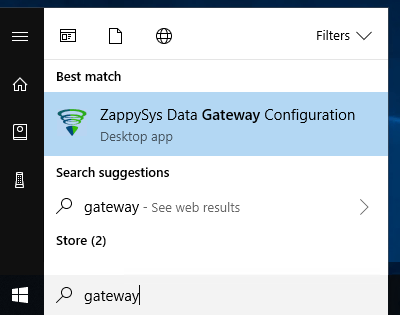
-
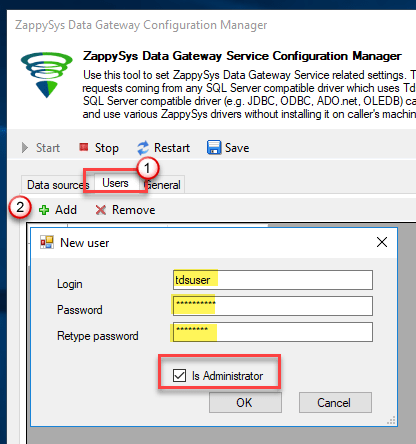
Go to the Users tab and follow these steps to add a Data Gateway user:
- Click the Add button
-
In the Login field enter a username, e.g.,
john - Then enter a Password
- Check the Is Administrator checkbox
- Click OK to save
-
Now we are ready to add a data source:
- Click the Add button
- Give the Data source a name (have it handy for later)
- Then select Native - ZappySys API Driver
- Finally, click OK
FastspringDSNZappySys API Driver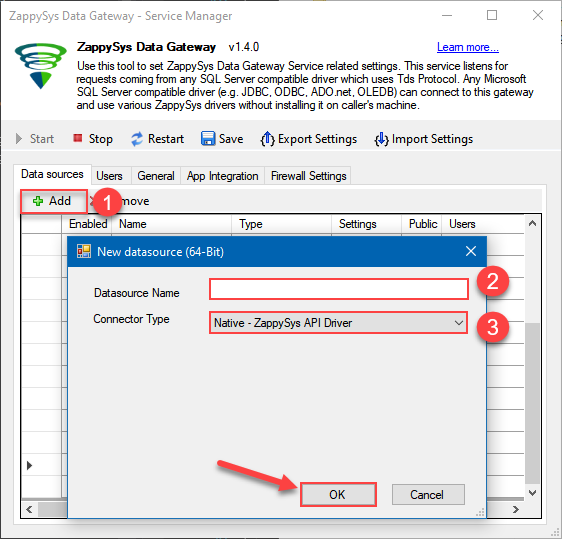
-
When the Configuration window appears give your data source a name if you haven't done that already, then select "FastSpring" from the list of Popular Connectors. If "FastSpring" is not present in the list, then click "Search Online" and download it. Then set the path to the location where you downloaded it. Finally, click Continue >> to proceed with configuring the DSN:
FastspringDSNFastSpring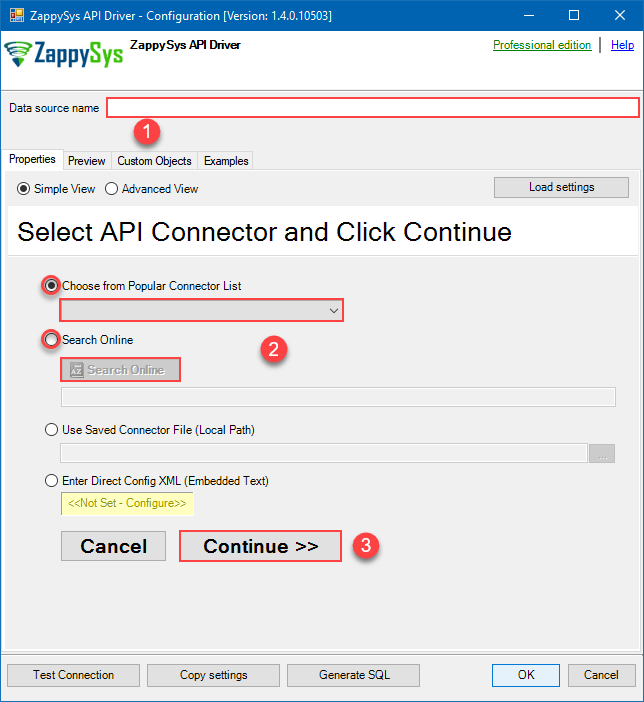
-
Select your authentication scenario below to expand connection configuration steps to:
- Configure the authentication in FastSpring.
- Enter those details into the ZappySys API Driver data source configuration.
API Credentials
FastSpring authentication
Here is how to obtain FastSpring API credentials:
- In the FastSpring portal, navigate to Developer Tools > APIs > API Credentials.
-
Click Create, FastSpring will automatically generate your Username and Password.
Copy them, we will need them in the next step:
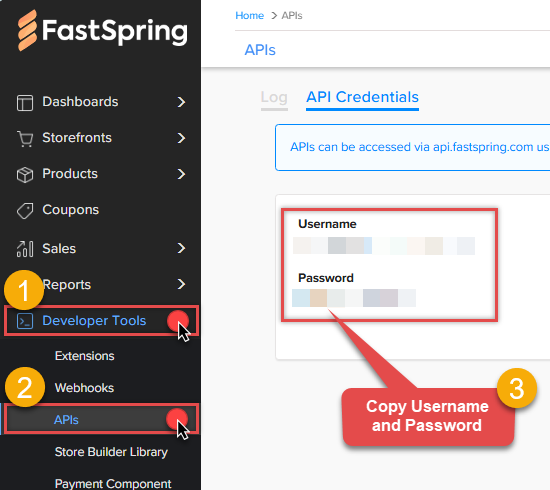 WARNING: Securely store the credentials for future reference.
 -
Now go to SSIS package or ODBC data source and use this token in API Credentials authentication configuration:
- In the UserName field paste the Username value you copied in the previous step.
- In the Password field paste the Password value you copied in the previous step.
- Click Test Connection to confirm the connection is working.
- Done! Now you are ready to use FastSpring Connector!
API Connection Manager configuration
Just perform these simple steps to finish authentication configuration:
-
Set Authentication Type to
API Credentials [Http] - Optional step. Modify API Base URL if needed (in most cases default will work).
- Fill in all the required parameters and set optional parameters if needed.
- Finally, hit OK button:
FastspringDSNFastSpringAPI Credentials [Http]https://api.fastspring.comRequired Parameters UserName Fill-in the parameter... Password Fill-in the parameter... Optional Parameters RetryMode RetryWhenStatusCodeMatch RetryStatusCodeList 429 RetryCountMax 5 RetryMultiplyWaitTime True Your Webstore URL (Only used by get_products_visibility endpoint) https://YOUR-STORE.onfastspring.com 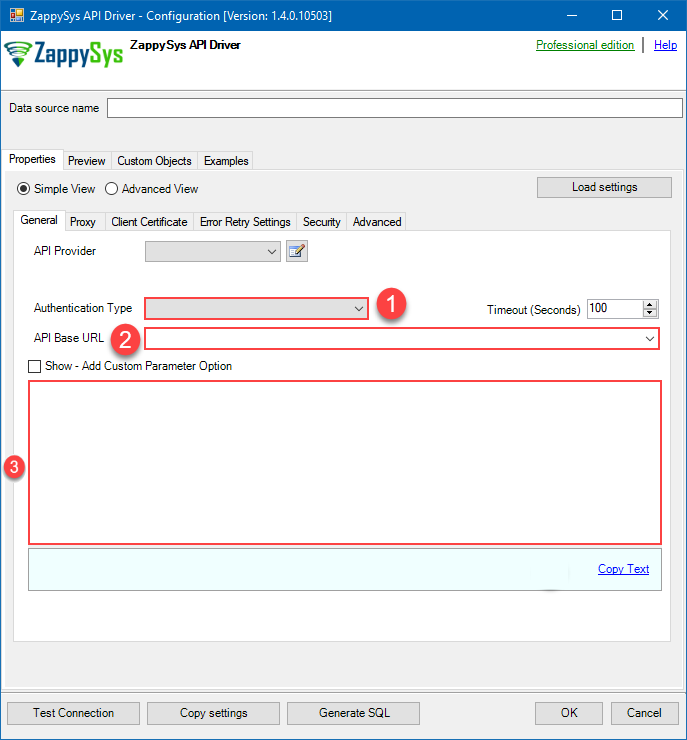 Find full details in the FastSpring Connector authentication reference.
 -
Once the data source connection has been configured, it's time to configure the SQL query. Select the Preview tab and then click Query Builder button to configure the SQL query:
 ZappySys API Driver - FastSpringRead and write FastSpring data effortlessly. Integrate, manage, and automate orders, subscriptions, quotes, products, and accounts — almost no coding required.FastspringDSN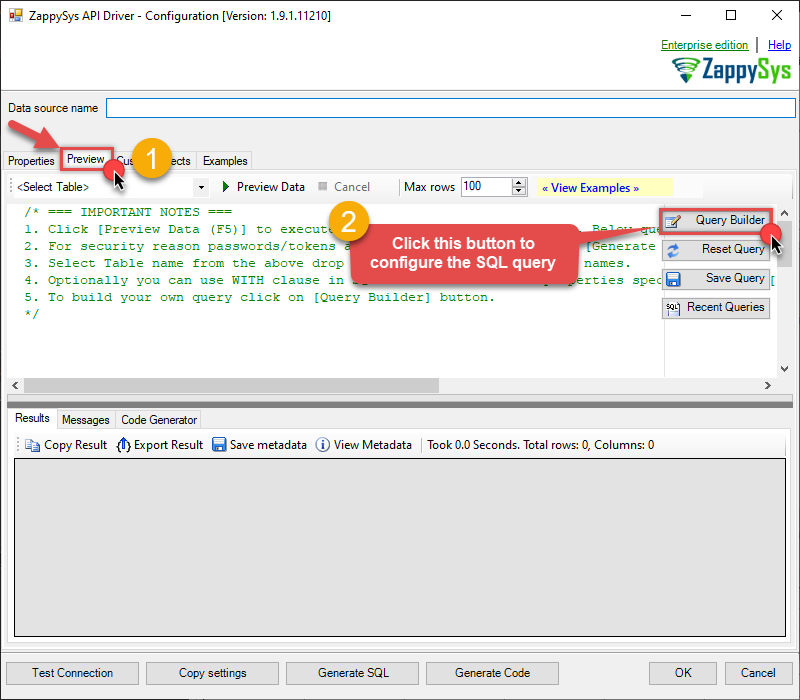
-
Start by selecting the Table or Endpoint you are interested in and then configure the parameters. This will generate a query that we will use in Java to retrieve data from FastSpring. Hit OK button to use this query in the next step.
SELECT * FROM Orders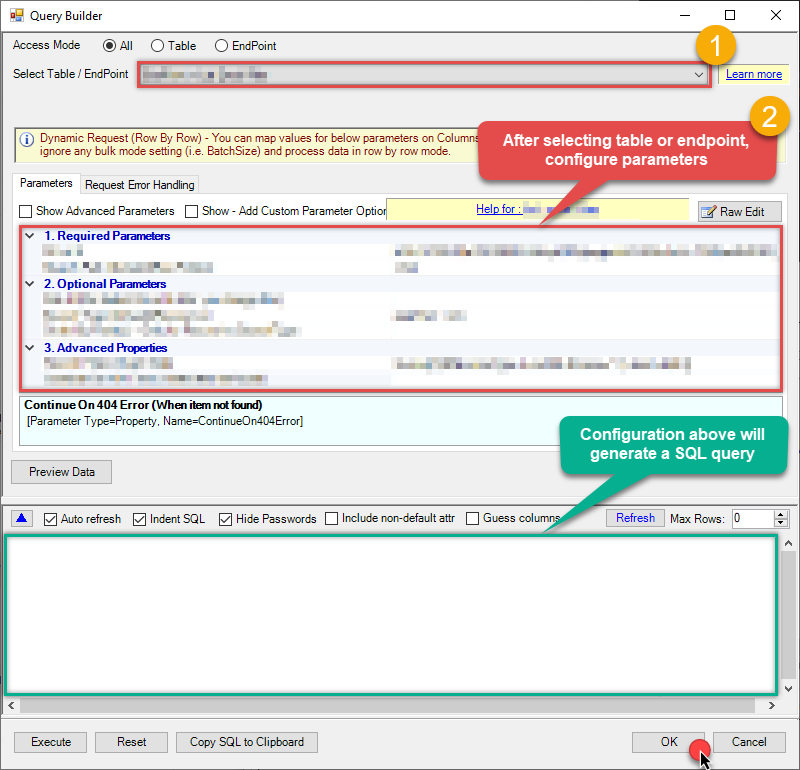 Some parameters configured in this window will be passed to the FastSpring API, e.g. filtering parameters. It means that filtering will be done on the server side (instead of the client side), enabling you to get only the meaningful data
much faster . -
Now hit Preview Data button to preview the data using the generated SQL query. If you are satisfied with the result, use this query in Java:
ZappySys API Driver - FastSpringRead and write FastSpring data effortlessly. Integrate, manage, and automate orders, subscriptions, quotes, products, and accounts — almost no coding required.FastspringDSNSELECT * FROM Orders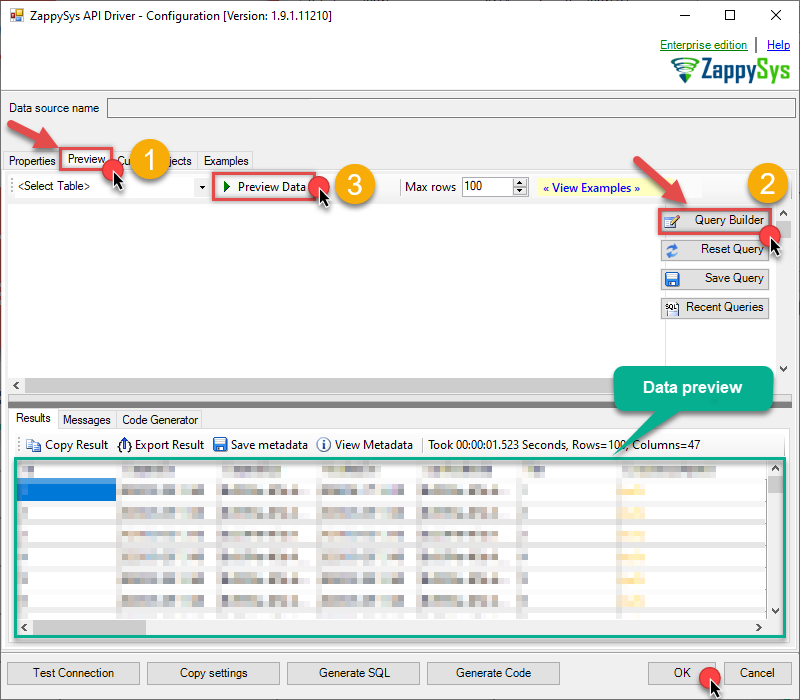 You can also access data quickly from the tables dropdown by selecting <Select table>.A
WHEREclause,LIMITkeyword will be performed on the client side, meaning that thewhole result set will be retrieved from the FastSpring API first, and only then the filtering will be applied to the data. If possible, it is recommended to use parameters in Query Builder to filter the data on the server side (in FastSpring servers). -
Click OK to finish creating the data source.
-
Once done, go to the Network Settings tab and Add a firewall rule for inbound traffic:
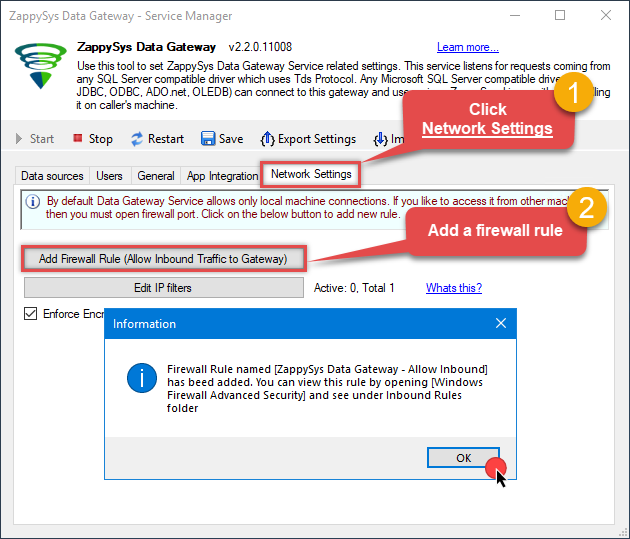
- This will initially allow all inbound traffic.
- Click Edit IP filters to restrict access to specific IP addresses or ranges.
-
Crucial Step: After creating or modifying the data source, you must:
- Click the Save button to persist your changes.
- Hit Yes when prompted to restart the Data Gateway service.
This ensures all changes are properly applied:
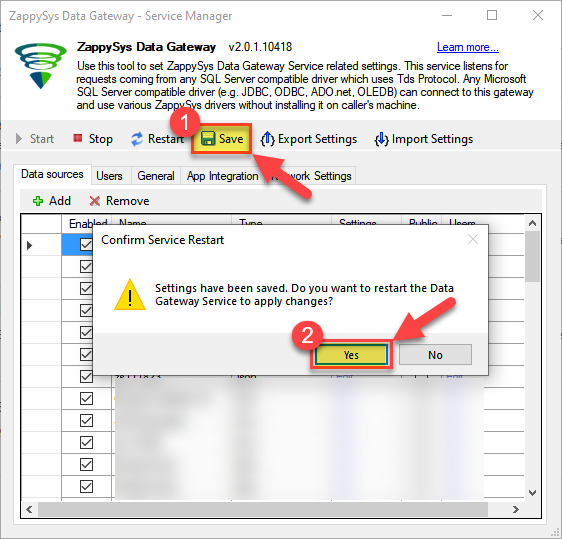 Skipping this step may cause the new settings to fail, preventing you from connecting to the data source.
Read data in Java from the DSN
-
Java code to get the data:
"jdbc:sqlserver://localhost:5000;databasename=FastspringDSN;user=john;password=test"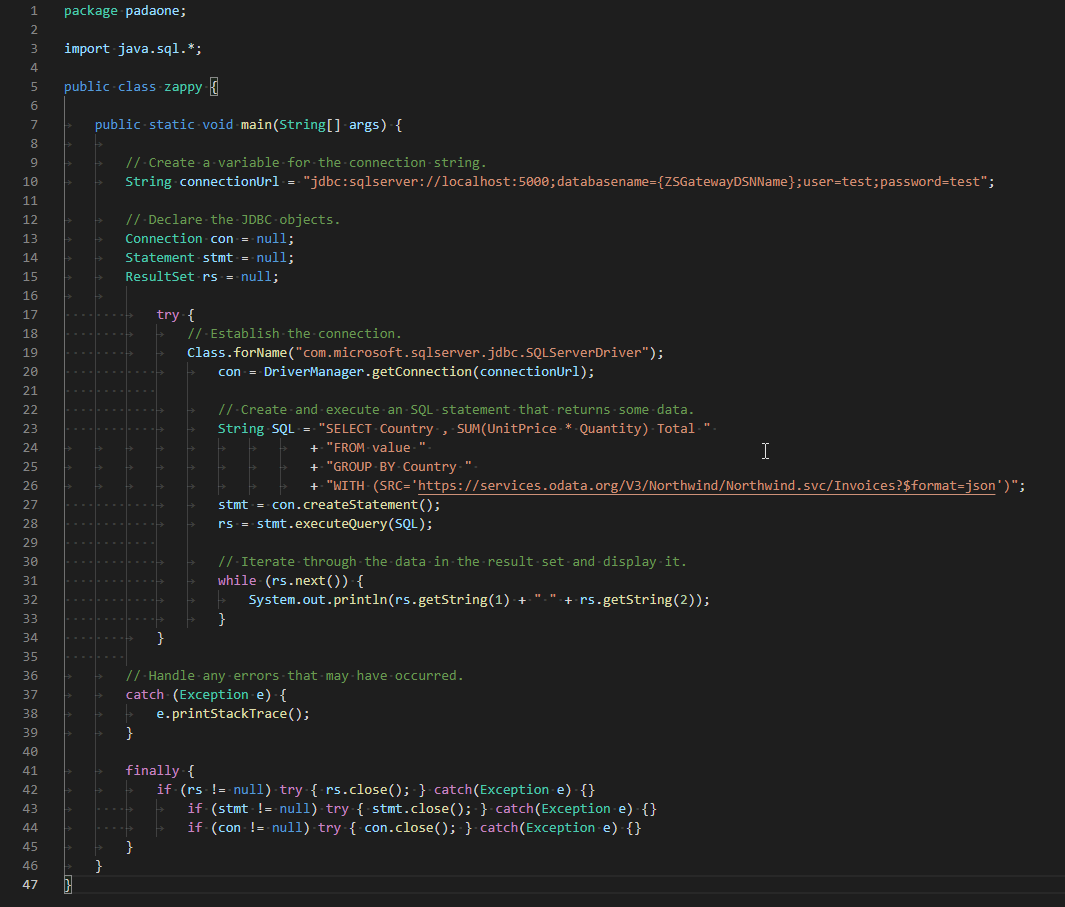
-
When you run the code it will make the API call and read the data:
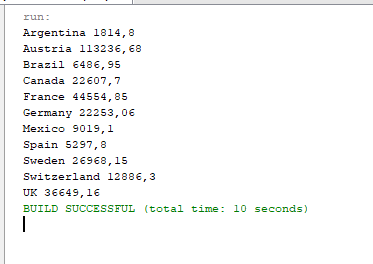
-
Here is Java program's code in text format:
//Step-1: Install ZappySys ODBC PowerPack and Configure Data Gateway

//Step-2:Assuming the Microsoft SQL Server JDBC Driver is in below folder
//C:\Program Files\Microsoft Jdbc Driver 6.0 for SQL Server\sqljdbc_6.0\enu\auth\x64
package padaone;

import java.sql.*;

public class zappy {

    public static void main(String[] args) {

        // Create a variable for the connection string.
        String connectionUrl = "jdbc:sqlserver://localhost:5000;databasename=FastspringDSN;user=test;password=test";

        // Declare the JDBC objects.
        Connection con = null;
        Statement stmt = null;
        ResultSet rs = null;

            try {
                // Establish the connection.
                Class.forName("com.microsoft.sqlserver.jdbc.SQLServerDriver");
                con = DriverManager.getConnection(connectionUrl);

                // Create and execute an SQL statement that returns some data.
                String SQL = "SELECT Country , SUM(UnitPrice * Quantity) Total "
                           + "FROM value "
                           + "GROUP BY Country "
                           + "WITH (SRC='https://services.odata.org/V3/Northwind/Northwind.svc/Invoices?$format=json')";
                stmt = con.createStatement();
                rs = stmt.executeQuery(SQL);

                // Iterate through the data in the result set and display it.
                while (rs.next()) {
                    System.out.println(rs.getString(1) + " " + rs.getString(2));
                }
            }

        // Handle any errors that may have occurred.
        catch (Exception e) {
            e.printStackTrace();
        }

        finally {
            if (rs != null) try { rs.close(); } catch (Exception e) {}
            if (stmt != null) try { stmt.close(); } catch (Exception e) {}
            if (con != null) try { con.close(); } catch (Exception e) {}
        }
    }
}
FastSpring Connector actions
Got a specific use case in mind? We've mapped out exactly how to perform a variety of essential FastSpring operations directly in Java, so you don't have to figure out the setup from scratch. Check out the step-by-step guides below:
- Get Product IDs
- Get Products
- Get Products Publish Status
- Get Product
- Create Product
- Update Product
- Get Product Prices
- Get Order Items
- Get Order Items by OrderId
- Get Orders
- Get Order by Id
- Get Accounts
- Get Account Orders (For all accounts)
- Get Account Charges
- Get Account Orders (For a single account)
- Get Account Charges by Id
- Get Account By Id
- Get Subscriptions Ids
- Get Subscriptions
- Get Subscription By Id
- Get Quote By Id
- Get Quotes
- Get Subscription Report
- Get Revenue Report
- Make Generic REST API Request
- Make Generic REST API Request (Bulk Write)
Conclusion
In this guide, we demonstrated how to connect to FastSpring using Java and integrate your data — all without writing complex code.
Ready to get started? Download ODBC PowerPack now or ping us via chat if you still need help: