How to integrate JSON using Java


Learn how to quickly and efficiently connect JSON with Java for smooth data access.
Read and write JSON data effortlessly. Extract, filter, and sync JSON from URLs, strings, and local files for analytics, reporting, and data pipelines — almost no coding required. You can do it all using the high-performance JSON ODBC Driver for Java (often referred to as the JSON Connector). How is this possible? You will connect to the ZappySys Data Gateway, which acts as a seamless bridge between the ODBC and JDBC layers. We'll walk you through the entire setup.
Ready to dive in? Download the product to jump right in, or follow the step-by-step guide below to see how it works.
Create data source in ZappySys Data Gateway
In this section we will create a data source for JSON in the Data Gateway. Let's follow these steps to accomplish that:
-
Download and install ODBC PowerPack (if you haven't already).
-
Search for
gatewayin the Windows Start Menu and open ZappySys Data Gateway Configuration: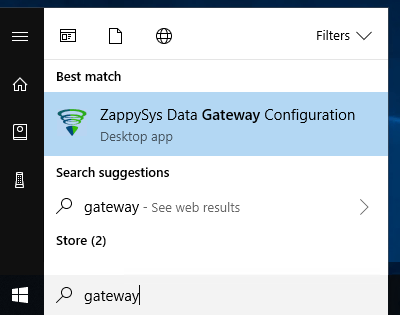
-
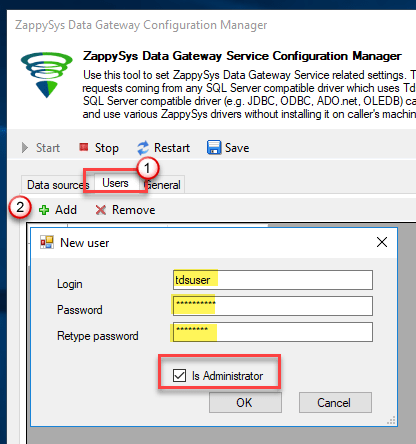
Go to the Users tab and follow these steps to add a Data Gateway user:
- Click the Add button
-
In the Login field enter a username, e.g.,
john - Then enter a Password
- Check the Is Administrator checkbox
- Click OK to save
-
Now we are ready to add a data source:
- Click the Add button
- Give the Data source a name (have it handy for later)
- Then select Native - ZappySys JSON Driver
- Finally, click OK
JsonDSNZappySys JSON Driver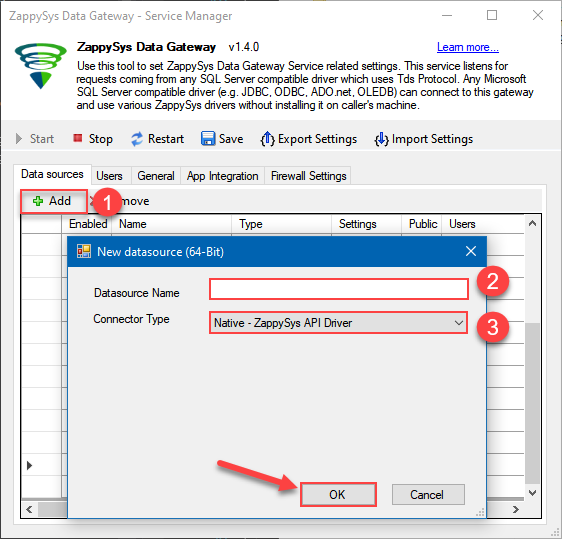
-
Select Url or File and paste the following Url for this example OR you can load existing connection string as per this article.
NOTE: Here for demo, We are using odata API, but you need to refer your own API documentation and based on that you need to use your own API URL and need to configure connection based on API Authentication type
-
Now enter JSONPath expression in Array Filter textbox to extract only specific part of JSON file as below ($.value[*] will get content of value attribute from JSON document. Value attribute is array of JSON documents so we have to use [*] to indicate we want all records of that array)
NOTE: Here, We are using our desired filter, but you need to select your desired filter based on your requirement.
Click on Test Connection button to view whether the Test Connection is SUCCESSFUL or Not.$.value[*]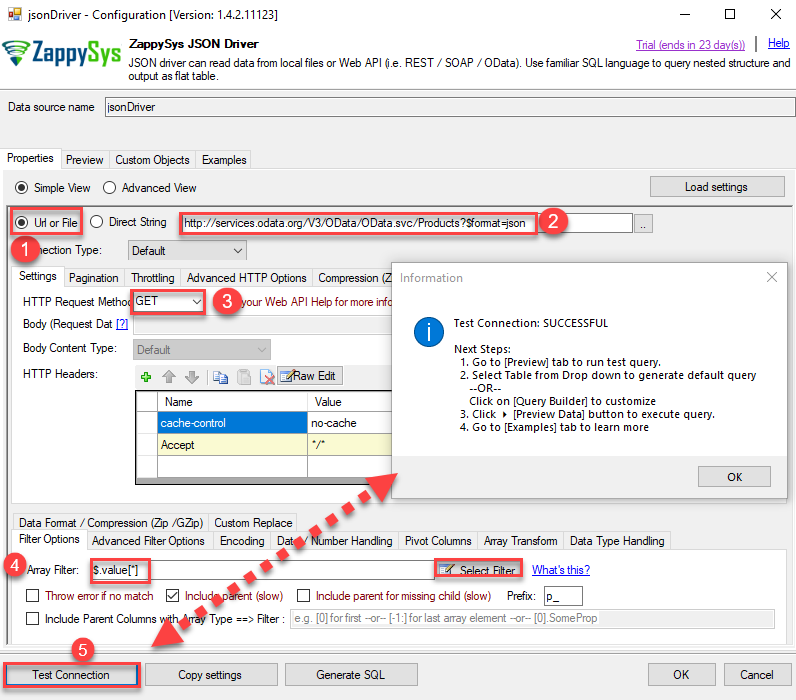
-
Once you configured a data source, you can preview data. Hit Preview tab, and use similar settings to preview data:
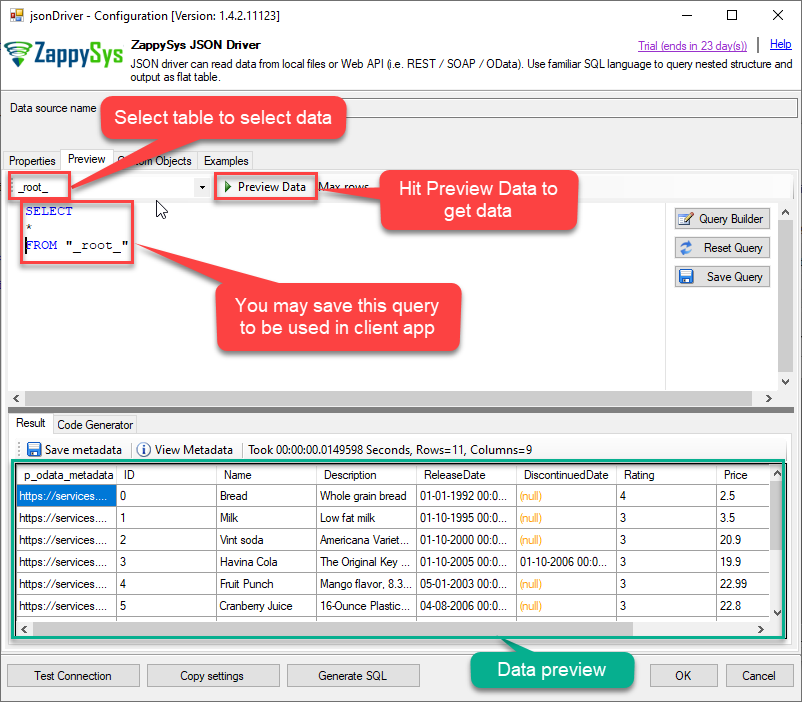
-
Click OK to finish creating the data source
-
That's it; we are done. In a few clicks we configured the call to JSON API using ZappySys JSON Connector.
-
Once done, go to the Network Settings tab and Add a firewall rule for inbound traffic:
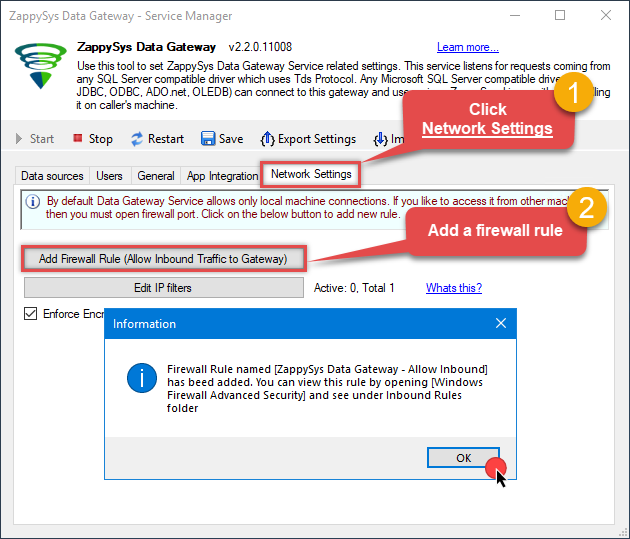
- This will initially allow all inbound traffic.
- Click Edit IP filters to restrict access to specific IP addresses or ranges.
-
Crucial Step: After creating or modifying the data source, you must:
- Click the Save button to persist your changes.
- Hit Yes when prompted to restart the Data Gateway service.
This ensures all changes are properly applied:
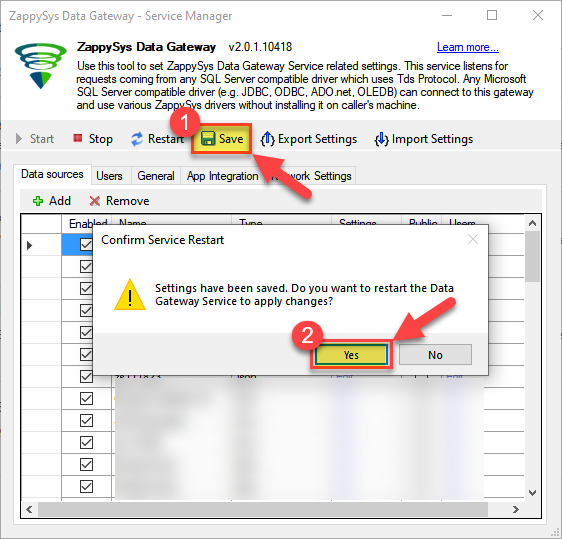 Skipping this step may cause the new settings to fail, preventing you from connecting to the data source.
Read data in Java from the DSN
-
Java code to get the data:
"jdbc:sqlserver://localhost:5000;databasename=JsonDSN;user=john;password=test"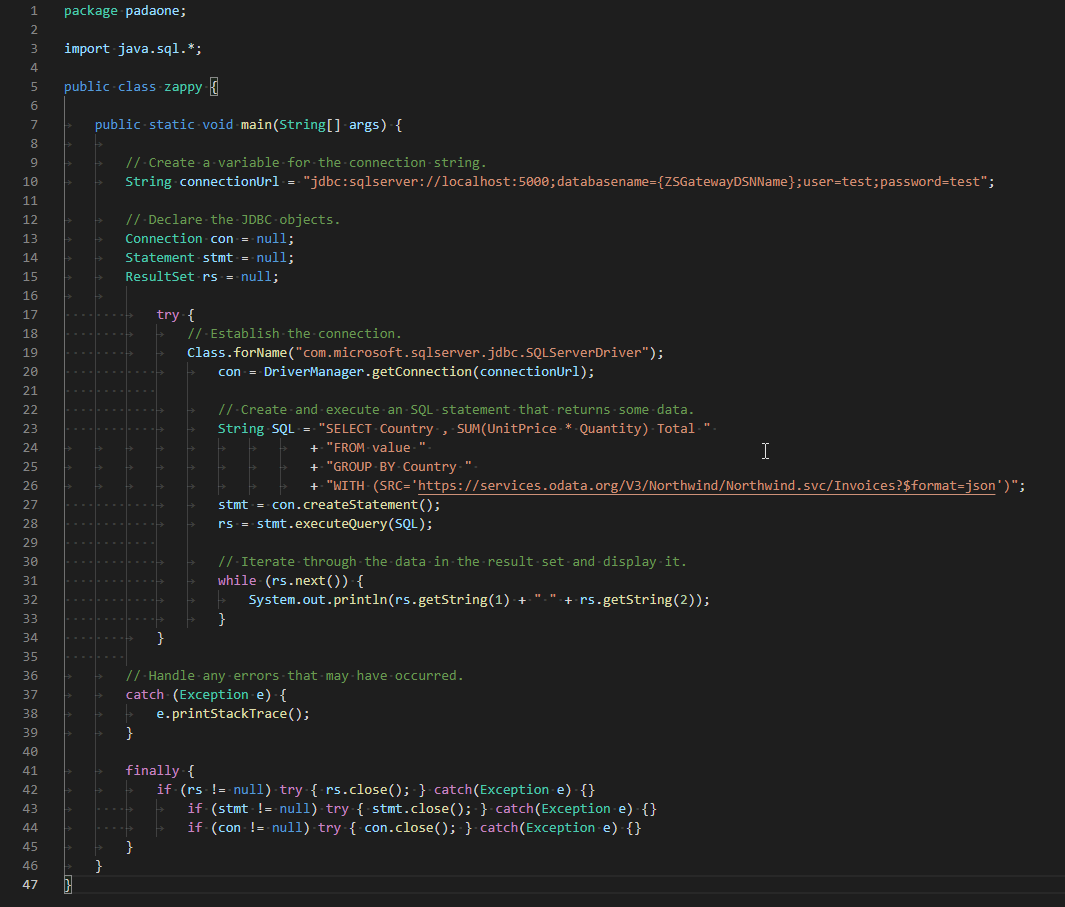
-
When you run the code it will make the API call and read the data:
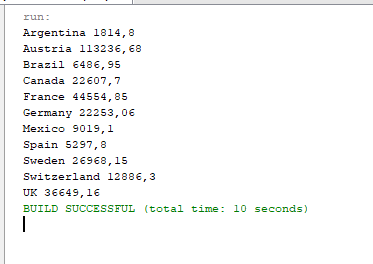
-
Here is Java program's code in text format:
//Step-1: Install ZappySys ODBC PowerPack and Configure Data Gateway

//Step-2:Assuming the Microsoft SQL Server JDBC Driver is in below folder
//C:\Program Files\Microsoft Jdbc Driver 6.0 for SQL Server\sqljdbc_6.0\enu\auth\x64
package padaone;

import java.sql.*;

public class zappy {

    public static void main(String[] args) {

        // Create a variable for the connection string.
        String connectionUrl = "jdbc:sqlserver://localhost:5000;databasename=JsonDSN;user=test;password=test";

        // Declare the JDBC objects.
        Connection con = null;
        Statement stmt = null;
        ResultSet rs = null;

            try {
                // Establish the connection.
                Class.forName("com.microsoft.sqlserver.jdbc.SQLServerDriver");
                con = DriverManager.getConnection(connectionUrl);

                // Create and execute an SQL statement that returns some data.
                String SQL = "SELECT Country , SUM(UnitPrice * Quantity) Total "
                           + "FROM value "
                           + "GROUP BY Country "
                           + "WITH (SRC='https://services.odata.org/V3/Northwind/Northwind.svc/Invoices?$format=json')";
                stmt = con.createStatement();
                rs = stmt.executeQuery(SQL);

                // Iterate through the data in the result set and display it.
                while (rs.next()) {
                    System.out.println(rs.getString(1) + " " + rs.getString(2));
                }
            }

        // Handle any errors that may have occurred.
        catch (Exception e) {
            e.printStackTrace();
        }

        finally {
            if (rs != null) try { rs.close(); } catch (Exception e) {}
            if (stmt != null) try { stmt.close(); } catch (Exception e) {}
            if (con != null) try { con.close(); } catch (Exception e) {}
        }
    }
}
Configuring pagination in the JSON Driver
ZappySys JSON Driver equips users with powerful tools for seamless data extraction and management from REST APIs, leveraging advanced pagination methods for enhanced efficiency. These options are designed to handle various types of pagination structures commonly used in APIs. Below are the detailed descriptions of these options:
Page-based Pagination: This method works by retrieving data in fixed-size pages from the Rest API. It allows you to specify the page size and navigate through the results by requesting different page numbers, ensuring that you can access all the data in a structured manner.
Offset-based Pagination: With this approach, you can extract data by specifying the starting point or offset from which to begin retrieving data. It allows you to define the number of records to skip and fetch subsequent data accordingly, providing precise control over the data extraction process.
Cursor-based Pagination: This technique involves using a cursor or a marker that points to a specific position in the dataset. It enables you to retrieve data starting from the position indicated by the cursor and proceed to subsequent segments, ensuring that you capture all the relevant information without missing any records.
Token-based Pagination: In this method, a token serves as a unique identifier for a specific data segment. It allows you to access the next set of data by using the token provided in the response from the previous request. This ensures that you can systematically retrieve all the data segments without duplication or omission.
Utilizing these comprehensive pagination features in the ZappySys JSON Driver facilitates efficient data management and extraction from REST APIs, optimizing the integration and analysis of extensive datasets.
For more detailed steps, please refer to this link: How to do REST API Pagination in SSIS / ODBC Drivers
Authentication
ZappySys offers various authentication methods to securely access data from various sources. These authentication methods include OAuth, Basic Authentication, Token-based Authentication, and more, allowing users to connect to a wide range of data sources securely.
ZappySys Authentication is a robust system that facilitates secure access to data from a diverse range of sources. It includes a variety of authentication methods tailored to meet the specific requirements of different data platforms and services. These authentication methods may involve:
OAuth: ZappySys supports OAuth for authentication, which allows users to grant limited access to their data without revealing their credentials. It's commonly used for applications that require access to user account information.
Basic Authentication: This method involves sending a username and password with every request. ZappySys allows users to securely access data using this traditional authentication approach.
Token-based Authentication: ZappySys enables users to utilize tokens for authentication. This method involves exchanging a unique token with each request to authenticate the user's identity without revealing sensitive information.
By implementing these authentication methods, ZappySys ensures the secure and reliable retrieval of data from various sources, providing users with the necessary tools to access and integrate data securely and efficiently. For more comprehensive details on the authentication process, please refer to the official ZappySys documentation or reach out to their support team for further assistance.
For more details, please refer to this link: ZappySys Connections
Conclusion
In this article we showed you how to connect to JSON in Java and integrate data without writing complex code — all of this was powered by JSON ODBC Driver.
Download ODBC PowerPack now or ping us via chat if you have any questions or are looking for a specific feature (you can also reach out to us by submitting a ticket):