

Endpoint Upload File
Name
upload_file
Description
Upload a file to the specified path [API reference]
Parameters
| Parameter | Required | Options | ||||||||||
|---|---|---|---|---|---|---|---|---|---|---|---|---|
|
Name:
Label: Drive Id / Shared Folder Specify a drive |
YES | |||||||||||
|
Name:
Label: Disk File Path (e.g. c:\somefolder\file.xlsx) Specify a disk file path |
YES | |||||||||||
|
Name:
Label: Target File Path / Id (e.g. file.xlsx -OR- myfolder/file.xlsx -OR- 0Zxxxx1234) Specify Target file path or exising file Id (for Overwrite scenario) |
YES |
|
||||||||||
|
Name:
Label: Conflict Behavior (What to do if file exists) |
YES |
|
||||||||||
|
Name:
Label: Default Group or User Id (additional Scopes needed to list - If fails enter manually) To list all users and groups from your organizations you need additional scopes. See connection UI - Choose User.Read.All and Group.Read.All Scopes and regenerate token. You can manually type value too if you know Group or User Id. Format is /users/{id} OR /groups/{id} |
|
|||||||||||
|
Name:
Label: Use Source File Created/Modified DateTime rather than Uploaded Time Set this property if you like to set file creation/modified date as original file. By default its set to uploaded date/time. This may not be desired if file was actually created on different date than uploaded. If you do not set then current date/time used (Upload time). |
|
Output Columns
| Label | Data Type (SSIS) | Data Type (SQL) | Length | Description |
|---|---|---|---|---|
| id |
DT_WSTR
|
nvarchar(500)
|
500 | |
| name |
DT_WSTR
|
nvarchar(150)
|
150 | |
| size |
DT_I8
|
bigint
|
||
| createdDateTime |
DT_DBTIMESTAMP
|
datetime
|
||
| lastModifiedDateTime |
DT_DBTIMESTAMP
|
datetime
|
||
| webUrl |
DT_WSTR
|
nvarchar(1500)
|
1500 | |
| webUrlPath |
DT_WSTR
|
nvarchar(1500)
|
1500 | |
| createdBy_user_id |
DT_WSTR
|
nvarchar(200)
|
200 | |
| createdBy_user_email |
DT_WSTR
|
nvarchar(150)
|
150 | |
| createdBy_user_displayName |
DT_WSTR
|
nvarchar(100)
|
100 | |
| createdBy_application_id |
DT_WSTR
|
nvarchar(200)
|
200 | |
| createdBy_application_displayName |
DT_WSTR
|
nvarchar(100)
|
100 | |
| lastModifiedBy_user_id |
DT_WSTR
|
nvarchar(200)
|
200 | |
| lastModifiedBy_user_email |
DT_WSTR
|
nvarchar(150)
|
150 | |
| lastModifiedBy_user_displayName |
DT_WSTR
|
nvarchar(150)
|
150 | |
| lastModifiedBy_application_id |
DT_WSTR
|
nvarchar(200)
|
200 | |
| lastModifiedBy_application_displayName |
DT_WSTR
|
nvarchar(150)
|
150 | |
| parentReference_id |
DT_WSTR
|
nvarchar(200)
|
200 | |
| parentReference_driveId |
DT_WSTR
|
nvarchar(400)
|
400 | |
| parentReference_driveType |
DT_WSTR
|
nvarchar(100)
|
100 | |
| parentReference_name |
DT_WSTR
|
nvarchar(200)
|
200 | This is only returned when calling lookup or /children call (e.g. /items/root:/[folder-name] OR /items/[item-id] ) |
| parentReference_siteId |
DT_WSTR
|
nvarchar(200)
|
200 | |
| parentReference_path |
DT_WSTR
|
nvarchar(1000)
|
1000 | This is only returned when calling lookup or /children call (e.g. /items/root:/[folder-name] OR /items/[item-id] ) |
| fileSystemInfo_createdDateTime |
DT_DBTIMESTAMP
|
datetime
|
||
| fileSystemInfo_lastModifiedDateTime |
DT_DBTIMESTAMP
|
datetime
|
||
| folder_childCount |
DT_I8
|
bigint
|
||
| file_mimeType |
DT_WSTR
|
nvarchar(300)
|
300 | |
| file_quickXorHash |
DT_WSTR
|
nvarchar(200)
|
200 | |
| file_sha1Hash |
DT_WSTR
|
nvarchar(200)
|
200 | |
| file_sha256Hash |
DT_WSTR
|
nvarchar(200)
|
200 | |
| shared_scope |
DT_WSTR
|
nvarchar(100)
|
100 | |
| remoteItem_parentReference_id |
DT_WSTR
|
nvarchar(200)
|
200 | |
| remoteItem_parentReference_driveId |
DT_WSTR
|
nvarchar(400)
|
400 | |
| remoteItem_parentReference_driveType |
DT_WSTR
|
nvarchar(100)
|
100 | |
| remoteItem_parentReference_name |
DT_WSTR
|
nvarchar(200)
|
200 | |
| remoteItem_parentReference_siteId |
DT_WSTR
|
nvarchar(200)
|
200 | |
| remoteItem_parentReference_path |
DT_WSTR
|
nvarchar(1000)
|
1000 | |
| remoteItem_shared_scope |
DT_WSTR
|
nvarchar(100)
|
100 | |
| remoteItem_shared_sharedDateTime |
DT_DBTIMESTAMP
|
datetime
|
||
| remoteItem_sharedBy_user_id |
DT_WSTR
|
nvarchar(200)
|
200 | |
| remoteItem_sharedBy_user_email |
DT_WSTR
|
nvarchar(150)
|
150 | |
| remoteItem_sharedBy_user_displayName |
DT_WSTR
|
nvarchar(150)
|
150 | |
| remoteItem_sharepointIds_listId |
DT_WSTR
|
nvarchar(200)
|
200 | |
| remoteItem_sharepointIds_listItemId |
DT_WSTR
|
nvarchar(200)
|
200 | |
| remoteItem_sharepointIds_listItemUniqueId |
DT_WSTR
|
nvarchar(200)
|
200 | |
| remoteItem_sharepointIds_siteId |
DT_WSTR
|
nvarchar(200)
|
200 | |
| remoteItem_sharepointIds_siteUrl |
DT_WSTR
|
nvarchar(200)
|
200 | |
| remoteItem_sharepointIds_tenantId |
DT_WSTR
|
nvarchar(200)
|
200 | |
| remoteItem_sharepointIds_webId |
DT_WSTR
|
nvarchar(200)
|
200 | |
| id_path |
DT_WSTR
|
nvarchar(500)
|
500 | |
| folder_path |
DT_WSTR
|
nvarchar(500)
|
500 |
Input Columns
| Label | Data Type (SSIS) | Data Type (SQL) | Length | Description | |||||||||||||||||||||||||||||||||||||||||||||||||||||||||||||||||||||||||||||||||||||||||||||||
|---|---|---|---|---|---|---|---|---|---|---|---|---|---|---|---|---|---|---|---|---|---|---|---|---|---|---|---|---|---|---|---|---|---|---|---|---|---|---|---|---|---|---|---|---|---|---|---|---|---|---|---|---|---|---|---|---|---|---|---|---|---|---|---|---|---|---|---|---|---|---|---|---|---|---|---|---|---|---|---|---|---|---|---|---|---|---|---|---|---|---|---|---|---|---|---|---|---|---|---|
| There are no Static columns defined for this endpoint. This endpoint detects columns dynamically at runtime. | |||||||||||||||||||||||||||||||||||||||||||||||||||||||||||||||||||||||||||||||||||||||||||||||||||
Examples
SSIS
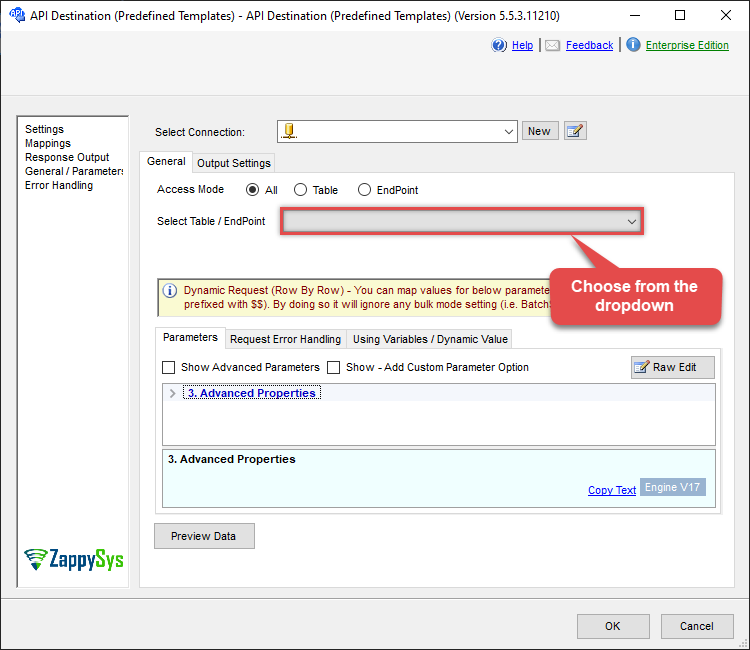
Use OneDrive Connector in API Source or in API Destination SSIS Data Flow components to read or write data.
API Source

| Required Parameters | |
|---|---|
| Drive Id / Shared Folder | Fill-in the parameter... |
| Disk File Path (e.g. c:\somefolder\file.xlsx) | Fill-in the parameter... |
| Target File Path / Id (e.g. file.xlsx -OR- myfolder/file.xlsx -OR- 0Zxxxx1234) | Fill-in the parameter... |
| Conflict Behavior (What to do if file exists) | Fill-in the parameter... |
| Optional Parameters | |
| Default Group or User Id (additional Scopes needed to list - If fails enter manually) | |
| Use Source File Created/Modified DateTime rather than Uploaded Time | |

API Destination
| Required Parameters | |
|---|---|
| Drive Id / Shared Folder | Fill-in the parameter... |
| Disk File Path (e.g. c:\somefolder\file.xlsx) | Fill-in the parameter... |
| Target File Path / Id (e.g. file.xlsx -OR- myfolder/file.xlsx -OR- 0Zxxxx1234) | Fill-in the parameter... |
| Conflict Behavior (What to do if file exists) | Fill-in the parameter... |
| Optional Parameters | |
| Default Group or User Id (additional Scopes needed to list - If fails enter manually) | |
| Use Source File Created/Modified DateTime rather than Uploaded Time | |
ODBC application
Use these SQL queries in your ODBC application data source:
Upload a file
<p>Uploads a file. Supply the local file path and target drive or folder in the <code>WITH</code> clause.</p>
SELECT * FROM upload_file
WITH (
      DriveId='me'
   --OR-- Use Shared Drive Id or other User's Drive Id
   --,DriveId='b!GtLN726LE0eXXXXXXXXXXXX'

     ,SourceFilePath='C:\My files\Employees\List.xls'
	 ,TargetFilePath='List.xlsx'	 --Upload on Root (Create -or- Overwrite if ConflictBehavior = 'replace')

   --,TargetFilePath='myfolder/List.xlsx' --Upload under some folder

   --OR-- use Target File Id
   --,TargetFilePath='01SUOJPKGJXIXXGXACFVDK3QH5JYARFOMB' --Overwrite Exising File Id

   --,ConflictBehavior = 'replace' -- fail, rename, replace (If File Exists Default=fail)
   --,UseSourceFileTimeStamp = 'true' --By default uploaded file set Current Date/Time for Creation/Modified date
     )
--DriveId can be retrieved by selecting from 'list_drives' endpoint.
Upload a file (overwrite if exists)
<p>Uploads a file; if a file already exists at the target path it is overwritten instead of raising an error.</p>
SELECT * FROM upload_file
WITH (

      DriveId='me'
   --OR-- Use Shared Drive Id or other User's Drive Id
   --,DriveId='b!GtLN726LE0eXXXXXXXXXXXX'

     ,SourceFilePath='C:\My files\Employees\List.xls'
	 ,TargetFilePath='List.xlsx'	 --Upload on Root (Create -or- Overwrite if ConflictBehavior = 'replace')

   --,TargetFilePath='myfolder/List.xlsx' --Upload under some folder

   --OR-- use Target File Id
   --,TargetFilePath='01SUOJPKGJXIXXGXACFVDK3QH5JYARFOMB' --Overwrite Exising File Id

     ,ConflictBehavior = 'replace' -- fail, rename, replace (If File Exists Default=fail)
   --,UseSourceFileTimeStamp = 'true' --By default uploaded file set Current Date/Time for Creation/Modified date
     )
--DriveId can be retrieved by selecting from 'list_drives' endpoint.
Upload a file with original timestamp
<p>Uploads a file and preserves the original creation/modified date. Set <code>UseSourceFileTimeStamp</code> to use the source file timestamp instead of the upload time.</p>
SELECT * FROM upload_file
WITH (

      DriveId='me'
   --OR-- Use Shared Drive Id or other User's Drive Id
   --,DriveId='b!GtLN726LE0eXXXXXXXXXXXX'

     ,SourceFilePath='C:\My files\Employees\List.xls'

	 ,TargetFilePath='Uploads/Employees/List.xls'

     ,ConflictBehavior = 'replace' -- fail, rename, replace (If File Exists Default=fail)
     ,UseSourceFileTimeStamp = 'true' --By default uploaded file set Current Date/Time for Creation/Modified date
     )
--DriveId can be retrieved by selecting from 'list_drives' endpoint.
SQL Server
Use these SQL queries in SQL Server after you create a data source in Data Gateway:
Upload a file
<p>Uploads a file. Supply the local file path and target drive or folder in the <code>WITH</code> clause.</p>
DECLARE @MyQuery NVARCHAR(MAX) = 'SELECT * FROM upload_file
WITH (
      DriveId=''me''
   --OR-- Use Shared Drive Id or other User''s Drive Id
   --,DriveId=''b!GtLN726LE0eXXXXXXXXXXXX''

     ,SourceFilePath=''C:\My files\Employees\List.xls''
	 ,TargetFilePath=''List.xlsx''	 --Upload on Root (Create -or- Overwrite if ConflictBehavior = ''replace'')

   --,TargetFilePath=''myfolder/List.xlsx'' --Upload under some folder

   --OR-- use Target File Id
   --,TargetFilePath=''01SUOJPKGJXIXXGXACFVDK3QH5JYARFOMB'' --Overwrite Exising File Id

   --,ConflictBehavior = ''replace'' -- fail, rename, replace (If File Exists Default=fail)
   --,UseSourceFileTimeStamp = ''true'' --By default uploaded file set Current Date/Time for Creation/Modified date
     )
--DriveId can be retrieved by selecting from ''list_drives'' endpoint.';

EXEC (@MyQuery) AT [LS_TO_ONEDRIVE_IN_GATEWAY];
Upload a file (overwrite if exists)
<p>Uploads a file; if a file already exists at the target path it is overwritten instead of raising an error.</p>
DECLARE @MyQuery NVARCHAR(MAX) = 'SELECT * FROM upload_file
WITH (

      DriveId=''me''
   --OR-- Use Shared Drive Id or other User''s Drive Id
   --,DriveId=''b!GtLN726LE0eXXXXXXXXXXXX''

     ,SourceFilePath=''C:\My files\Employees\List.xls''
	 ,TargetFilePath=''List.xlsx''	 --Upload on Root (Create -or- Overwrite if ConflictBehavior = ''replace'')

   --,TargetFilePath=''myfolder/List.xlsx'' --Upload under some folder

   --OR-- use Target File Id
   --,TargetFilePath=''01SUOJPKGJXIXXGXACFVDK3QH5JYARFOMB'' --Overwrite Exising File Id

     ,ConflictBehavior = ''replace'' -- fail, rename, replace (If File Exists Default=fail)
   --,UseSourceFileTimeStamp = ''true'' --By default uploaded file set Current Date/Time for Creation/Modified date
     )
--DriveId can be retrieved by selecting from ''list_drives'' endpoint.';

EXEC (@MyQuery) AT [LS_TO_ONEDRIVE_IN_GATEWAY];
Upload a file with original timestamp
<p>Uploads a file and preserves the original creation/modified date. Set <code>UseSourceFileTimeStamp</code> to use the source file timestamp instead of the upload time.</p>
DECLARE @MyQuery NVARCHAR(MAX) = 'SELECT * FROM upload_file
WITH (

      DriveId=''me''
   --OR-- Use Shared Drive Id or other User''s Drive Id
   --,DriveId=''b!GtLN726LE0eXXXXXXXXXXXX''

     ,SourceFilePath=''C:\My files\Employees\List.xls''

	 ,TargetFilePath=''Uploads/Employees/List.xls''

     ,ConflictBehavior = ''replace'' -- fail, rename, replace (If File Exists Default=fail)
     ,UseSourceFileTimeStamp = ''true'' --By default uploaded file set Current Date/Time for Creation/Modified date
     )
--DriveId can be retrieved by selecting from ''list_drives'' endpoint.';

EXEC (@MyQuery) AT [LS_TO_ONEDRIVE_IN_GATEWAY];