

Authentication User Credentials
Description
Use delegated access (User Credentials) whenever you want to let a signed-in user work with their own resources or resources they can access. Whether it's an admin setting up policies for their entire organization or a user deleting an email in their inbox, all scenarios involving user actions should use delegated access. [API reference]
Instructions
Follow these simple steps below to create Microsoft Entra ID application with delegated access:
automation@my-company.com).
When you use a personal account which is tied to a specific employee profile and that employee leaves the company,
the token may become invalid and any automated processes using that token will start to fail.
- Navigate to the Azure Portal and log in using your credentials.
- Access Microsoft Entra ID.
-
Register a new application by going to App registrations and clicking on New registration button:
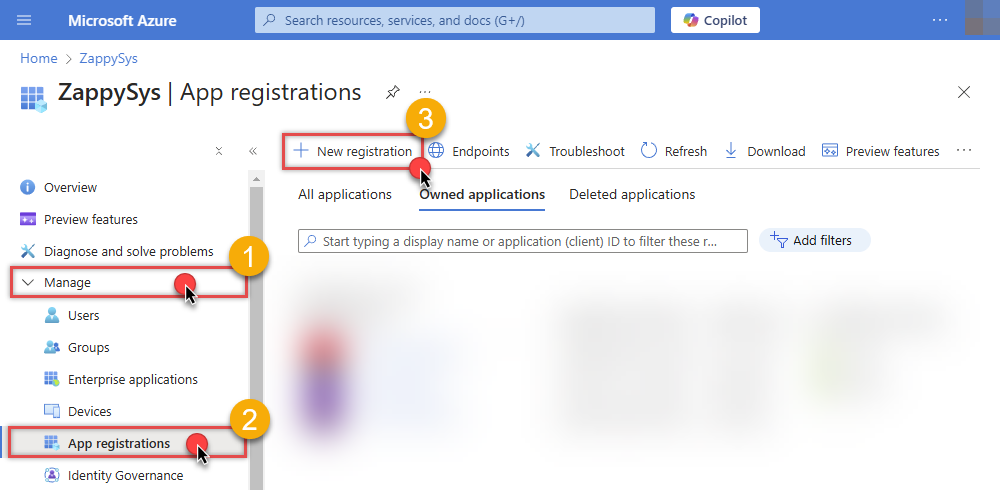 INFO: Find more information on how to register an application in Graph API reference.
 -
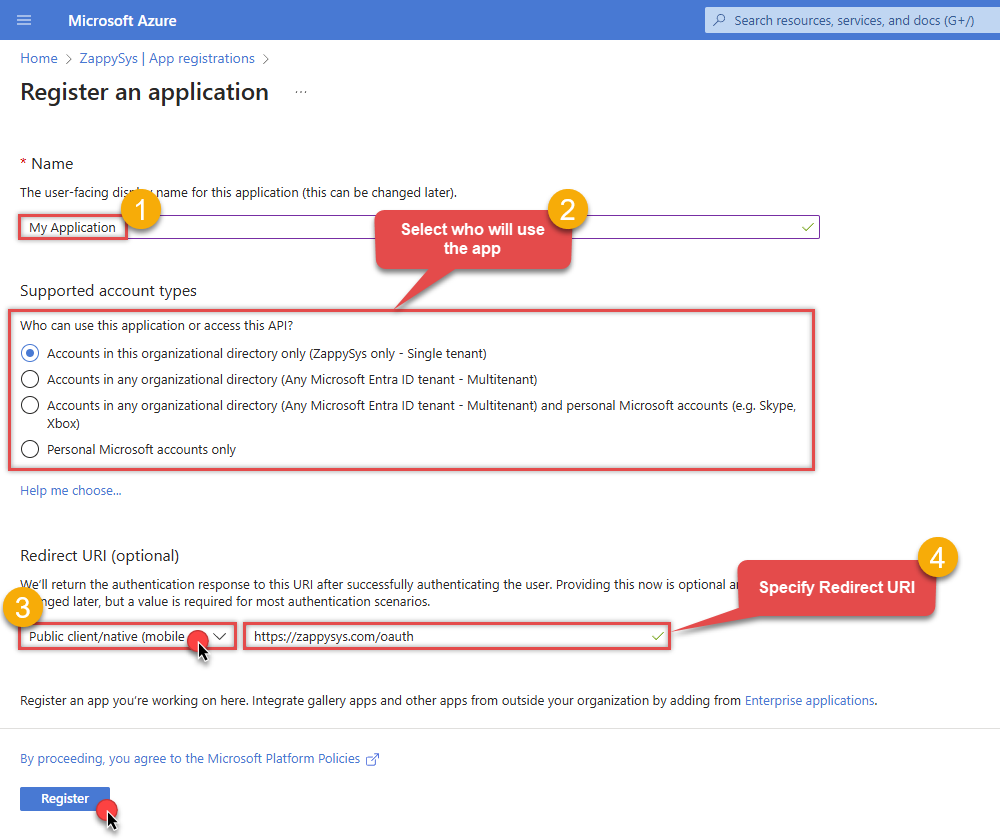
When configuration window opens, configure these fields:
-
Supported account type
- Use
Accounts in this organizational directory only, if you need access to data in your organization only.
- Use
-
Redirect URI:
- Set the type to
Public client/native (mobile & desktop). - Use
https://zappysys.com/oauthas the URL.
- Set the type to
-
Supported account type
-
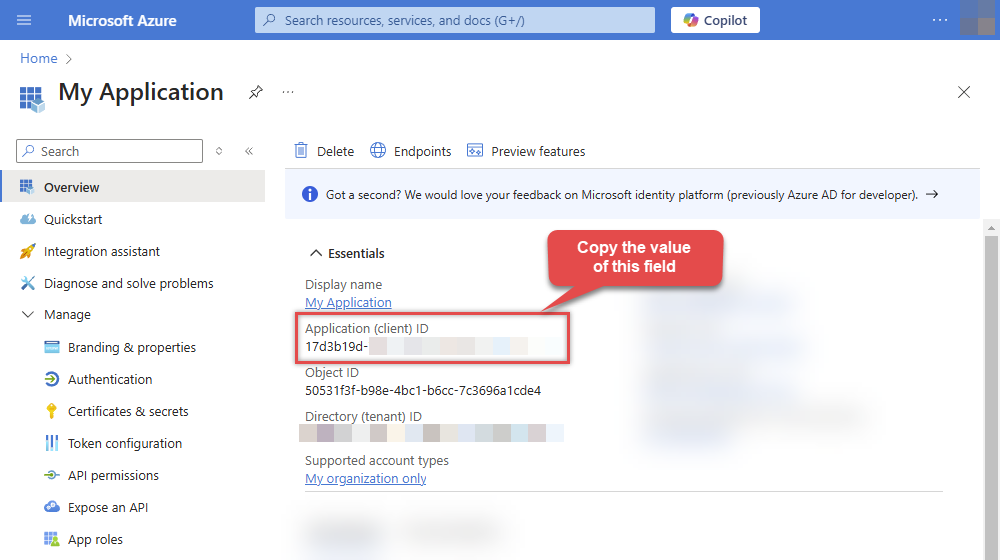
After registering the app, copy the Application (client) ID for later:
-
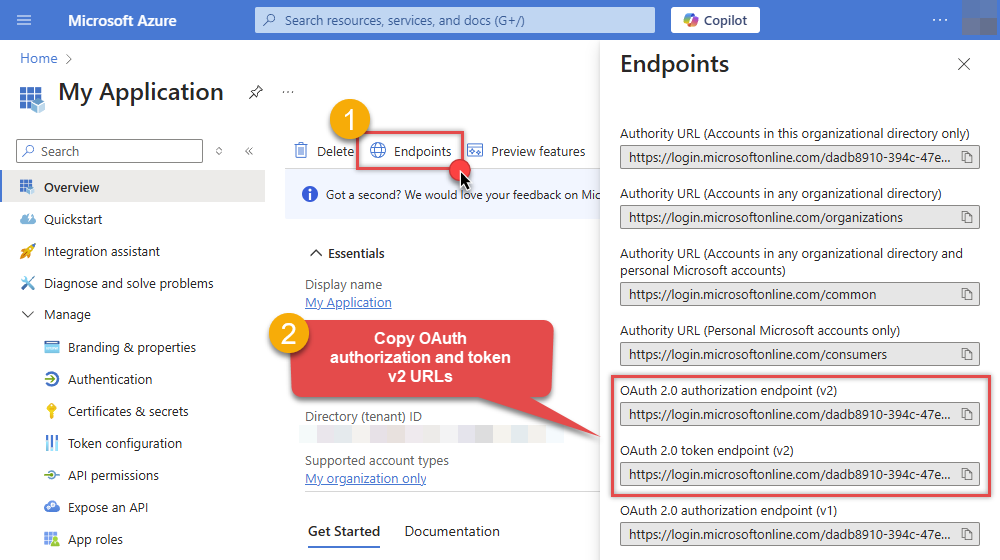
Then copy OAuth authorization endpoint (v2) & OAuth token endpoint (v2) URLs to use later in the configuration:
-
Now go to SSIS package or ODBC data source and use the copied values in User Credentials authentication configuration:
- In the Authorization URL field paste the OAuth authorization endpoint (v2) URL value you copied in the previous step.
- In the Token URL field paste the OAuth token endpoint (v2) URL value you copied in the previous step.
- In the Client ID field paste the Application (client) ID value you copied in the previous step.
-
In the Permissions (Scope) field use the default or pick labeled permissions. [System] covers sign-in and refresh token. [User] is the signed-in user’s mailbox (use
Mail.ReadBasicorMail.Readfor read-only). [Shared] adds shared or delegated mail folders. [Tenant] entries (User.ReadBasic.All,User.Read.All,Group.Read.All) are broad directory permissions that usually need an administrator to approve the app. The default includesUser.ReadBasic.Allfor the Default User Id drop down; addUser.Read.Allonly if you need full user profiles (not required for listing users).-
offline_access,openid,profile,email -
User.Read,Mail.ReadBasic,Mail.Read,Mail.ReadWrite,Mail.Send -
Mail.Read.Shared,Mail.ReadBasic.Shared,Mail.ReadWrite.Shared,Mail.Send.Shared -
User.ReadBasic.All,Group.Read.All(often admin consent; user drop down / group lookups) -
User.Read.All(optional — full user profiles; broader than needed for user drop down)
Admin consent note:- Token generation can still ask for admin approval, even when delegated scopes are listed in API permissions.
- A Global Administrator can allow user consent for selected low-impact delegated permissions.
- Broad mail or directory scopes such as
Mail.ReadWrite,User.ReadBasic.All,User.Read.All, andGroup.Read.Allmay still require admin consent.
-
- Press Generate Token button to generate Access and Refresh Tokens.
-
Choose Default User Id from the drop down menu after token generation. This calls
GET /usersand requiresUser.ReadBasic.Allin your token (included in the default scope list). Regenerate the token if you add or remove this scope later. Keepmefor your own mailbox, or pick another user when accessing a shared or delegated mailbox. You can also type a user id or email manually if listing fails. - Click Test Connection to confirm the connection is working.
- Done! Now you are ready to use the API Connector!
Parameters
| Parameter | Required | Default value | Options | ||||||||||||||||||||||||||||||||||
|---|---|---|---|---|---|---|---|---|---|---|---|---|---|---|---|---|---|---|---|---|---|---|---|---|---|---|---|---|---|---|---|---|---|---|---|---|---|
|
Name:
Label: Authorization URL |
YES |
|
|||||||||||||||||||||||||||||||||||
|
Name:
Label: Token URL |
YES |
|
|||||||||||||||||||||||||||||||||||
|
Name:
Label: Application (client) ID |
YES | ||||||||||||||||||||||||||||||||||||
|
Name:
Label: Permissions (Scope) Microsoft Graph delegated scopes for Outlook/Mail. [System] = sign-in and refresh token (offline_access). [User] = signed-in user mailbox and profile (lower impact for read-only: Mail.ReadBasic or Mail.Read). [Shared] = same plus shared or delegated folders (work or school accounts). [Tenant] = directory-wide (.All) permissions that Microsoft documents as typically requiring admin consent: User.ReadBasic.All, User.Read.All, Group.Read.All. Default includes User.ReadBasic.All for the Default User Id drop down (GET /users). Add User.Read.All only when you need full user profiles (broader; more likely to need admin consent). Remove User.ReadBasic.All and Group.Read.All from the default if you only access your own mailbox (User Id = me). Exact consent still depends on tenant user-consent settings. See permissions reference. |
YES |
offline_access~email~Mail.Read~Mail.Read.Shared~Mail.ReadBasic~Mail.ReadBasic.Shared~openid~profile~User.Read~User.ReadBasic.All~Group.Read.All~Mail.ReadWrite~Mail.ReadWrite.Shared~Mail.Send~Mail.Send.Shared
|
|
||||||||||||||||||||||||||||||||||
|
Name:
Label: Return URL |
YES |
https://zappysys.com/oauth
|
|
||||||||||||||||||||||||||||||||||
|
Name:
Label: Client Secret |
|||||||||||||||||||||||||||||||||||||
|
Name:
Label: Refresh Token File Path If you cant fit long refresh token in ConnectionString from your program then use this. Supply three properties in json format (i.e. save this in file { "access_token": "YOUR_ACCESS_TOKEN", "refresh_token": "YOUR_REFRESH_TOKEN", "expires_in": 3600 } ) |
|||||||||||||||||||||||||||||||||||||
|
Name:
Label: Login Prompt Option Choose this if you want to force login prompt or permission prompt. |
|
||||||||||||||||||||||||||||||||||||
|
Name:
Label: Default User Id (Select after clicking **Generate Token**) The Microsoft Mail user ID GUID or email address for the account to read messages from. (Examples: '4ff54a77-9c09-4274-958f-83bdc0a53900' or 'first.last@domain.com'). To populate this drop down (GET /users), User Credentials need User.ReadBasic.All delegated scope (in the default list; regenerate token after adding). Add User.Read.All only if you need full user profiles. Application Credentials need User.Read.All application permission with admin consent in Azure Portal. You can also type a user id or email manually if listing fails. |
me
|
||||||||||||||||||||||||||||||||||||
|
Name:
Label: RetryMode |
RetryWhenStatusCodeMatch
|
|
|||||||||||||||||||||||||||||||||||
|
Name:
Label: RetryStatusCodeList |
429|503
|
||||||||||||||||||||||||||||||||||||
|
Name:
Label: RetryCountMax |
5
|
||||||||||||||||||||||||||||||||||||
|
Name:
Label: RetryMultiplyWaitTime |
True
|