

Endpoint Make Generic REST API Request
Name
generic_request
Description
This is generic endpoint. Use this endpoint when some actions are not implemented by connector. Just enter partial URL (Required), Body, Method, Header etc. Most parameters are optional except URL.
Related Tables
Generic Table (Bulk Read / Write)
Parameters
| Parameter | Required | Options | ||||||||||||||||||||||||||
|---|---|---|---|---|---|---|---|---|---|---|---|---|---|---|---|---|---|---|---|---|---|---|---|---|---|---|---|---|
|
Name:
Label: HTTP - Url or File Path API URL goes here. You can enter full URL or Partial URL relative to Base URL. If it is full URL then domain name must be part of ServiceURL or part of TrustedDomains |
YES | |||||||||||||||||||||||||||
|
Name:
Label: HTTP - Request Body HTTP request body payload. Set for POST, PUT, PATCH, or other methods that send data in the body. |
||||||||||||||||||||||||||||
|
Name:
Label: HTTP - Headers (e.g. hdr1:aaa || hdr2:bbb) Headers for Request. To enter multiple headers use double pipe or new line after each {header-name}:{value} pair |
||||||||||||||||||||||||||||
|
Name:
Label: Parser - Filter (e.g. $.rows[*] ) Enter filter to extract array from response. Example: $.rows[*] --OR-- $.customers[*].orders[*]. Check your response document and find out hierarchy you like to extract |
|
|||||||||||||||||||||||||||
|
Name:
Label: Download - Enable reading binary data Treat the response as binary instead of text. Enable for file downloads or APIs that return images, PDFs, or other binary content. |
||||||||||||||||||||||||||||
|
Name:
Label: Download - File overwrite mode Controls whether an existing file at ResponseDataFile is overwritten, skipped, or appended. Change when saving downloads and the target file may already exist. |
||||||||||||||||||||||||||||
|
Name:
Label: Download - Save file path Local file path to save the response body. Use with SaveContentAsBinary for single-file downloads rather than parsing rows. |
||||||||||||||||||||||||||||
|
Name:
Label: Download - Enable raw output mode as single row Return the raw response as a single output row without parsing. Useful for mixed-format APIs or when you need the full text in one column. |
||||||||||||||||||||||||||||
|
Name:
Label: Download - Raw output data RowTemplate JSON template for the single row when raw output mode is enabled. Example: {Status:'Downloaded'} adds a status column alongside raw response fields. |
||||||||||||||||||||||||||||
|
Name:
Label: Download - Request Timeout (Milliseconds) Maximum time in milliseconds for the entire HTTP request to complete. Increase for large downloads (e.g. 3600000 for 1 hour); use 0 for the system default. |
Output Columns
| Label | Data Type (SSIS) | Data Type (SQL) | Length | Description | |||||||||||||||||||||||||||||||||||||||||||||||||||||||||||||||||||||||||||||||||||||||||||||||
|---|---|---|---|---|---|---|---|---|---|---|---|---|---|---|---|---|---|---|---|---|---|---|---|---|---|---|---|---|---|---|---|---|---|---|---|---|---|---|---|---|---|---|---|---|---|---|---|---|---|---|---|---|---|---|---|---|---|---|---|---|---|---|---|---|---|---|---|---|---|---|---|---|---|---|---|---|---|---|---|---|---|---|---|---|---|---|---|---|---|---|---|---|---|---|---|---|---|---|---|
| There are no Static columns defined for this endpoint. This endpoint detects columns dynamically at runtime. | |||||||||||||||||||||||||||||||||||||||||||||||||||||||||||||||||||||||||||||||||||||||||||||||||||
Input Columns
| Label | Data Type (SSIS) | Data Type (SQL) | Length | Description | |||||||||||||||||||||||||||||||||||||||||||||||||||||||||||||||||||||||||||||||||||||||||||||||
|---|---|---|---|---|---|---|---|---|---|---|---|---|---|---|---|---|---|---|---|---|---|---|---|---|---|---|---|---|---|---|---|---|---|---|---|---|---|---|---|---|---|---|---|---|---|---|---|---|---|---|---|---|---|---|---|---|---|---|---|---|---|---|---|---|---|---|---|---|---|---|---|---|---|---|---|---|---|---|---|---|---|---|---|---|---|---|---|---|---|---|---|---|---|---|---|---|---|---|---|
| There are no Static columns defined for this endpoint. This endpoint detects columns dynamically at runtime. | |||||||||||||||||||||||||||||||||||||||||||||||||||||||||||||||||||||||||||||||||||||||||||||||||||
Examples
SSIS
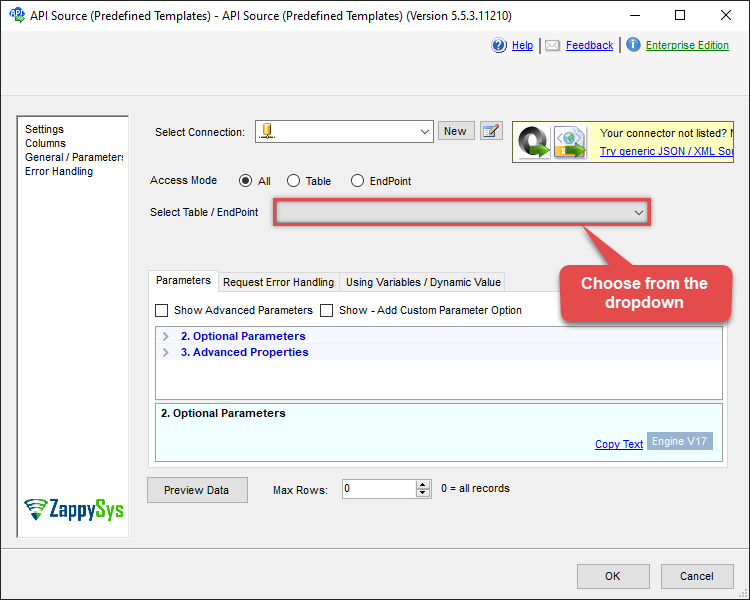
Use Mailchimp Connector in API Source or in API Destination SSIS Data Flow components to read or write data.
API Source
This Endpoint belongs to the Generic Table (Bulk Read / Write) table, therefore it is better to use it, instead of accessing the endpoint directly:

| Required Parameters | |
|---|---|
| HTTP - Url or File Path | Fill-in the parameter... |
| HTTP - Request Method | Fill-in the parameter... |
| Optional Parameters | |
| HTTP - Request Body | |
| HTTP - Is MultiPart Body (Pass File data/Mixed Key/value) | False |
| HTTP - Request Format (Content-Type) | ApplicationJson |
| HTTP - Headers (e.g. hdr1:aaa || hdr2:bbb) | Accept: */* || Cache-Control: no-cache |
| Parser - Response Format (Default=Json) | Default |
| Parser - Filter (e.g. $.rows[*] ) | |
| Parser - Include Parent Columns | True |
| Parser - Parent Column Prefix | P_ |
| Parser - Include Parent When Child Null | False |
| Parser - Encoding | |
| Parser - CharacterSet | |
| Download - Enable reading binary data | False |
| Download - File overwrite mode | AlwaysOverwrite |
| Download - Save file path | |
| Download - Enable raw output mode as single row | False |
| Download - Raw output data RowTemplate | {Status:'Downloaded'} |
| Download - Request Timeout (Milliseconds) | 0 |
| General - Enable Custom Search/Replace | False |
| General - SearchFor (e.g. (\d)-(\d)--regex) | |
| General - ReplaceWith (e.g. $1-***) | |
| General - File Compression Type | None |
| General - Date Format | |
| General - Enable Big Number Handling | False |
| General - Wait time (Ms) - Helps to slow down pagination (Use for throttling) | 0 |
| JSON/XML - ExcludedProperties (e.g. meta,info) | |
| JSON/XML - Flatten Small Array (Not preferred for more than 10 items) | False |
| JSON/XML - Max Array Items To Flatten | 10 |
| JSON/XML - Array Transform Type | None |
| JSON/XML - Array Transform Column Name Filter | |
| JSON/XML - Array Transform Row Value Filter | |
| JSON/XML - Array Transform Enable Custom Columns | False |
| JSON/XML - Enable Pivot Transform | False |
| JSON/XML - Array Transform Custom Columns | |
| JSON/XML - Pivot Path Replace With | |
| JSON/XML - Enable Pivot Path Search Replace | False |
| JSON/XML - Pivot Path Search For | |
| JSON/XML - Include Pivot Path | False |
| JSON/XML - Throw Error When No Match for Filter | False |
| Pagination - Mode | ByResponseAttribute |
| Pagination - Attribute Name (e.g. page) | |
| Pagination - Increment By (e.g. 100) | 1 |
| Pagination - Expression for Next URL (e.g. $.nextUrl) | |
| Pagination - Wait time after each request (milliseconds) | 0 |
| Pagination - Max Rows Expr | |
| Pagination - Max Pages Expr | |
| Pagination - Max Rows DataPath Expr | |
| Pagination - Max Pages | 0 |
| Pagination - End Rules | |
| Pagination - Next URL Suffix | |
| Pagination - Next URL End Indicator | |
| Pagination - Stop Indicator Expr | |
| Pagination - Current Page | |
| Pagination - End Strategy Type | DetectBasedOnRecordCount |
| Pagination - Stop based on this Response StatusCode | |
| Pagination - When EndStrategy Condition Equals | True |
| Pagination - Max Response Bytes | |
| Pagination - Min Response Bytes | |
| Pagination - Error String Match | |
| Pagination - Enable Page Token in Body | False |
| Pagination - Placeholders (e.g. {page}) | |
| Pagination - Has Different NextPage Info | False |
| Pagination - First Page Body Part | |
| Pagination - Next Page Body Part | |
| Csv - Column Delimiter | , |
| Csv - Has Header Row | True |
| Csv - Throw error when column count mismatch | False |
| Csv - Throw error when no record found | False |
| Csv - Allow comments (i.e. line starts with # treat as comment and skip line) | False |
| Csv - Comment Character | # |
| Csv - Skip rows | 0 |
| Csv - Ignore Blank Lines | True |
| Csv - Skip Empty Records | False |
| Csv - Skip Header Comment Rows | 0 |
| Csv - Trim Headers | False |
| Csv - Trim Fields | False |
| Csv - Ignore Quotes | False |
| Csv - Treat Any Blank Value As Null | False |
| Xml - ElementsToTreatAsArray | |
API Destination
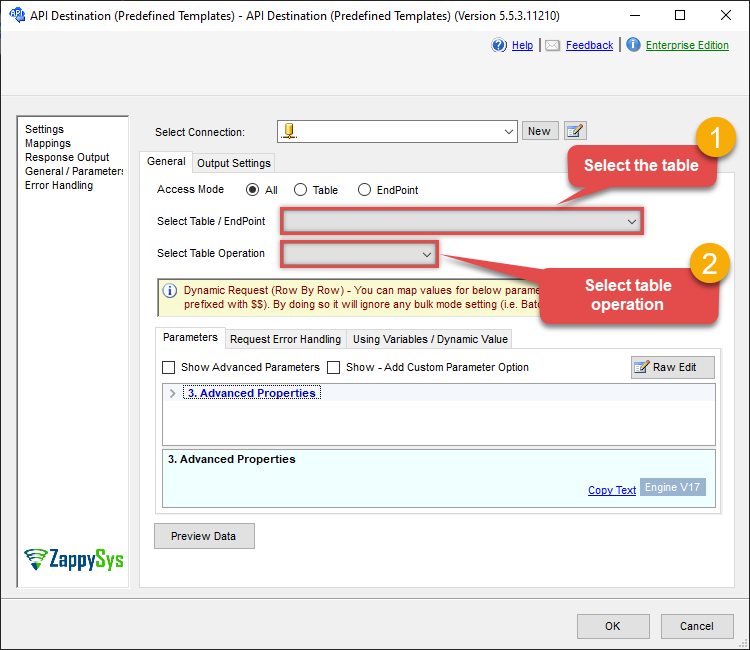
This Endpoint belongs to the Generic Table (Bulk Read / Write) table, therefore it is better to use it, instead of accessing the endpoint directly. Use this table and table-operation pair to make generic rest api request:
| Required Parameters | |
|---|---|
| HTTP - Url or File Path | Fill-in the parameter... |
| HTTP - Request Method | Fill-in the parameter... |
| Optional Parameters | |
| HTTP - Request Body | |
| HTTP - Is MultiPart Body (Pass File data/Mixed Key/value) | False |
| HTTP - Request Format (Content-Type) | ApplicationJson |
| HTTP - Headers (e.g. hdr1:aaa || hdr2:bbb) | Accept: */* || Cache-Control: no-cache |
| Parser - Response Format (Default=Json) | Default |
| Parser - Filter (e.g. $.rows[*] ) | |
| Parser - Include Parent Columns | True |
| Parser - Parent Column Prefix | P_ |
| Parser - Include Parent When Child Null | False |
| Parser - Encoding | |
| Parser - CharacterSet | |
| Download - Enable reading binary data | False |
| Download - File overwrite mode | AlwaysOverwrite |
| Download - Save file path | |
| Download - Enable raw output mode as single row | False |
| Download - Raw output data RowTemplate | {Status:'Downloaded'} |
| Download - Request Timeout (Milliseconds) | 0 |
| General - Enable Custom Search/Replace | False |
| General - SearchFor (e.g. (\d)-(\d)--regex) | |
| General - ReplaceWith (e.g. $1-***) | |
| General - File Compression Type | None |
| General - Date Format | |
| General - Enable Big Number Handling | False |
| General - Wait time (Ms) - Helps to slow down pagination (Use for throttling) | 0 |
| JSON/XML - ExcludedProperties (e.g. meta,info) | |
| JSON/XML - Flatten Small Array (Not preferred for more than 10 items) | False |
| JSON/XML - Max Array Items To Flatten | 10 |
| JSON/XML - Array Transform Type | None |
| JSON/XML - Array Transform Column Name Filter | |
| JSON/XML - Array Transform Row Value Filter | |
| JSON/XML - Array Transform Enable Custom Columns | False |
| JSON/XML - Enable Pivot Transform | False |
| JSON/XML - Array Transform Custom Columns | |
| JSON/XML - Pivot Path Replace With | |
| JSON/XML - Enable Pivot Path Search Replace | False |
| JSON/XML - Pivot Path Search For | |
| JSON/XML - Include Pivot Path | False |
| JSON/XML - Throw Error When No Match for Filter | False |
| Pagination - Mode | ByResponseAttribute |
| Pagination - Attribute Name (e.g. page) | |
| Pagination - Increment By (e.g. 100) | 1 |
| Pagination - Expression for Next URL (e.g. $.nextUrl) | |
| Pagination - Wait time after each request (milliseconds) | 0 |
| Pagination - Max Rows Expr | |
| Pagination - Max Pages Expr | |
| Pagination - Max Rows DataPath Expr | |
| Pagination - Max Pages | 0 |
| Pagination - End Rules | |
| Pagination - Next URL Suffix | |
| Pagination - Next URL End Indicator | |
| Pagination - Stop Indicator Expr | |
| Pagination - Current Page | |
| Pagination - End Strategy Type | DetectBasedOnRecordCount |
| Pagination - Stop based on this Response StatusCode | |
| Pagination - When EndStrategy Condition Equals | True |
| Pagination - Max Response Bytes | |
| Pagination - Min Response Bytes | |
| Pagination - Error String Match | |
| Pagination - Enable Page Token in Body | False |
| Pagination - Placeholders (e.g. {page}) | |
| Pagination - Has Different NextPage Info | False |
| Pagination - First Page Body Part | |
| Pagination - Next Page Body Part | |
| Csv - Column Delimiter | , |
| Csv - Has Header Row | True |
| Csv - Throw error when column count mismatch | False |
| Csv - Throw error when no record found | False |
| Csv - Allow comments (i.e. line starts with # treat as comment and skip line) | False |
| Csv - Comment Character | # |
| Csv - Skip rows | 0 |
| Csv - Ignore Blank Lines | True |
| Csv - Skip Empty Records | False |
| Csv - Skip Header Comment Rows | 0 |
| Csv - Trim Headers | False |
| Csv - Trim Fields | False |
| Csv - Ignore Quotes | False |
| Csv - Treat Any Blank Value As Null | False |
| Xml - ElementsToTreatAsArray | |
ODBC application
Use these SQL queries in your ODBC application data source:
Get __DynamicRequest__
SELECT * FROM __DynamicRequest__
generic_request endpoint belongs to
__DynamicRequest__
table(s), and can therefore be used via those table(s).
SQL Server
Use these SQL queries in SQL Server after you create a data source in Data Gateway:
Get __DynamicRequest__
DECLARE @MyQuery NVARCHAR(MAX) = 'SELECT * FROM __DynamicRequest__';

EXEC (@MyQuery) AT [LS_TO_MAILCHIMP_IN_GATEWAY];
generic_request endpoint belongs to
__DynamicRequest__
table(s), and can therefore be used via those table(s).