

Endpoint Upload Attachment
Name
upload_attachment
Description
Upload a file as an attachment to a ServiceNow record. Requires table name and sys_id in headers. [API reference]
Parameters
| Parameter | Required | Options |
|---|---|---|
|
Name:
Label: Table Name (e.g. incident) ServiceNow table to attach file to (e.g. incident) |
YES | |
|
Name:
Label: Parent Table Row Id (i.e. table_sys_id) Sys ID of the record to attach file to (parent row) |
YES | |
|
Name:
Label: File Name Name of the file to upload (as it will appear in ServiceNow). |
YES | |
|
Name:
Label: Source File Path (e.g. c:\uploads\file.pdf) Specify a disk file path to upload (e.g. C:\MyParentFolder\Subfolder\file.txt) |
YES |
Output Columns
| Label | Data Type (SSIS) | Data Type (SQL) | Length | Description |
|---|---|---|---|---|
| sys_id |
DT_WSTR
|
nvarchar(32)
|
32 | |
| table_sys_id |
DT_WSTR
|
nvarchar(32)
|
32 | |
| file_name |
DT_WSTR
|
nvarchar(512)
|
512 | |
| content_type |
DT_WSTR
|
nvarchar(255)
|
255 | |
| hash |
DT_WSTR
|
nvarchar(64)
|
64 | |
| state |
DT_WSTR
|
nvarchar(50)
|
50 | |
| size_bytes |
DT_I8
|
bigint
|
||
| size_compressed |
DT_I8
|
bigint
|
||
| chunk_size_bytes |
DT_I8
|
bigint
|
||
| image_width |
DT_I4
|
int
|
||
| image_height |
DT_I4
|
int
|
||
| average_image_color |
DT_WSTR
|
nvarchar(16)
|
16 | |
| compressed |
DT_BOOL
|
bit
|
||
| table_name |
DT_WSTR
|
nvarchar(80)
|
80 | |
| sys_created_by |
DT_WSTR
|
nvarchar(128)
|
128 | |
| sys_updated_by |
DT_WSTR
|
nvarchar(128)
|
128 | |
| sys_tags |
DT_WSTR
|
nvarchar(1024)
|
1024 | |
| sys_created_on |
DT_DBTIMESTAMP
|
datetime
|
||
| sys_updated_on |
DT_DBTIMESTAMP
|
datetime
|
||
| sys_mod_count |
DT_I4
|
int
|
Input Columns
| Label | Data Type (SSIS) | Data Type (SQL) | Length | Description | |||||||||||||||||||||||||||||||||||||||||||||||||||||||||||||||||||||||||||||||||||||||||||||||
|---|---|---|---|---|---|---|---|---|---|---|---|---|---|---|---|---|---|---|---|---|---|---|---|---|---|---|---|---|---|---|---|---|---|---|---|---|---|---|---|---|---|---|---|---|---|---|---|---|---|---|---|---|---|---|---|---|---|---|---|---|---|---|---|---|---|---|---|---|---|---|---|---|---|---|---|---|---|---|---|---|---|---|---|---|---|---|---|---|---|---|---|---|---|---|---|---|---|---|---|
| There are no Static columns defined for this endpoint. This endpoint detects columns dynamically at runtime. | |||||||||||||||||||||||||||||||||||||||||||||||||||||||||||||||||||||||||||||||||||||||||||||||||||
Examples
SSIS
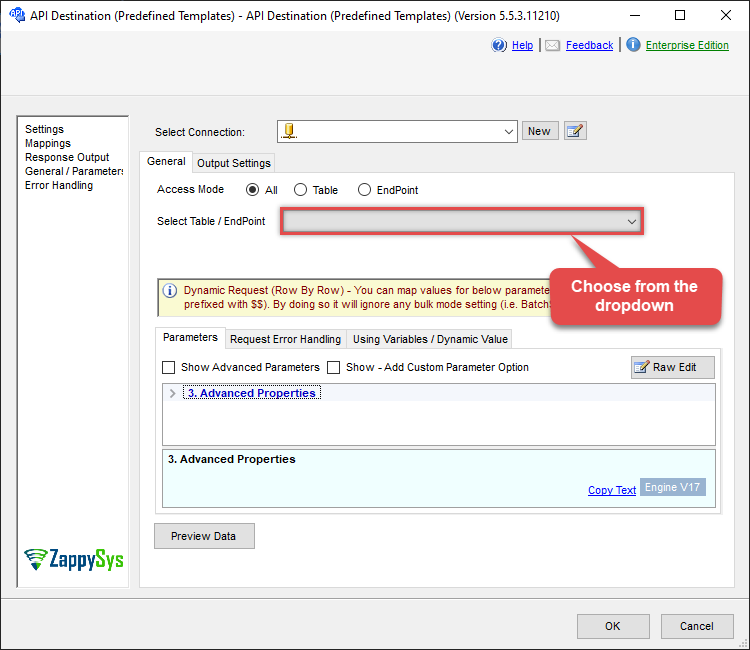
Use ServiceNow Connector in API Source or in API Destination SSIS Data Flow components to read or write data.
API Source

| Required Parameters | |
|---|---|
| Table Name (e.g. incident) | Fill-in the parameter... |
| Parent Table Row Id (i.e. table_sys_id) | Fill-in the parameter... |
| File Name | Fill-in the parameter... |
| Source File Path (e.g. c:\uploads\file.pdf) | Fill-in the parameter... |
| IsMultiPart | Fill-in the parameter... |
| Optional Parameters | |
| AddMultiPartPostamble | True |

API Destination
| Required Parameters | |
|---|---|
| Table Name (e.g. incident) | Fill-in the parameter... |
| Parent Table Row Id (i.e. table_sys_id) | Fill-in the parameter... |
| File Name | Fill-in the parameter... |
| Source File Path (e.g. c:\uploads\file.pdf) | Fill-in the parameter... |
| IsMultiPart | Fill-in the parameter... |
| Optional Parameters | |
| AddMultiPartPostamble | True |
ODBC application
Use these SQL queries in your ODBC application data source:
Upload an attachment
<p>Upload a file and attach it to a specific record. <strong>ParentSysId</strong> refers to the parent record's <code>sys_id</code> (table_sys_id) where the attachment will be linked. Provide the target <code>TableName</code>, the <code>ParentSysId</code>, the desired <code>FileName</code> as it appears in ServiceNow, and the local <code>SourceFilePath</code>.</p>
-- Upload and attach local file to a 'incident' record
SELECT * FROM upload_attachment
WITH(
  TableName='incident',
  --below is sys_id from 'incident' table where you like to attach uploaded file
  ParentSysId='62304320731823002728660c4cf6a7e8',
  FileName='dump_saved.png',
  SourceFilePath='c:\temp\dump_saved.png'
)
SQL Server
Use these SQL queries in SQL Server after you create a data source in Data Gateway:
Upload an attachment
<p>Upload a file and attach it to a specific record. <strong>ParentSysId</strong> refers to the parent record's <code>sys_id</code> (table_sys_id) where the attachment will be linked. Provide the target <code>TableName</code>, the <code>ParentSysId</code>, the desired <code>FileName</code> as it appears in ServiceNow, and the local <code>SourceFilePath</code>.</p>
DECLARE @MyQuery NVARCHAR(MAX) = '-- Upload and attach local file to a ''incident'' record
SELECT * FROM upload_attachment
WITH(
  TableName=''incident'',
  --below is sys_id from ''incident'' table where you like to attach uploaded file
  ParentSysId=''62304320731823002728660c4cf6a7e8'',
  FileName=''dump_saved.png'',
  SourceFilePath=''c:\temp\dump_saved.png''
)';

EXEC (@MyQuery) AT [LS_TO_SERVICENOW_IN_GATEWAY];