

Endpoint Get Record Labels (Tags)
Name
get_record_labels
Description
Returns UI labels (tags) applied to a specific record using the ServiceNow label framework.
Parameters
| Parameter | Required | Options | ||||||||||||||||||||||||||||||
|---|---|---|---|---|---|---|---|---|---|---|---|---|---|---|---|---|---|---|---|---|---|---|---|---|---|---|---|---|---|---|---|---|
|
Name:
Label: Parent Table Name Name of the parent table (for example: incident, problem, change_request). |
YES | |||||||||||||||||||||||||||||||
|
Name:
Label: Table (***DO NOT CHANGE***) |
||||||||||||||||||||||||||||||||
|
Name:
Label: ShowDisplayValue |
||||||||||||||||||||||||||||||||
|
Name:
Label: Parent Record Sys_ID Sys_ID of the parent record for which labels (tags) should be retrieved. |
||||||||||||||||||||||||||||||||
|
Name:
Label: Additional Filter (Optional) Optional encoded query to further filter label entries (for example by date or creator). |
|
Output Columns
| Label | Data Type (SSIS) | Data Type (SQL) | Length | Description |
|---|---|---|---|---|
| sys_id |
DT_WSTR
|
nvarchar(32)
|
32 | |
| [$parent.Pivot_Name$] |
DT_WSTR
|
nvarchar(2000)
|
2000 | |
| [$parent.Pivot_Name$]_diaplay_value |
DT_WSTR
|
nvarchar(2000)
|
2000 |
Input Columns
| Label | Data Type (SSIS) | Data Type (SQL) | Length | Description | |||||||||||||||||||||||||||||||||||||||||||||||||||||||||||||||||||||||||||||||||||||||||||||||
|---|---|---|---|---|---|---|---|---|---|---|---|---|---|---|---|---|---|---|---|---|---|---|---|---|---|---|---|---|---|---|---|---|---|---|---|---|---|---|---|---|---|---|---|---|---|---|---|---|---|---|---|---|---|---|---|---|---|---|---|---|---|---|---|---|---|---|---|---|---|---|---|---|---|---|---|---|---|---|---|---|---|---|---|---|---|---|---|---|---|---|---|---|---|---|---|---|---|---|---|
| There are no Static columns defined for this endpoint. This endpoint detects columns dynamically at runtime. | |||||||||||||||||||||||||||||||||||||||||||||||||||||||||||||||||||||||||||||||||||||||||||||||||||
Examples
SSIS
Use ServiceNow Connector in API Source or in API Destination SSIS Data Flow components to read or write data.
API Source

| Required Parameters | |
|---|---|
| Parent Table Name | Fill-in the parameter... |
| Optional Parameters | |
| Table (***DO NOT CHANGE***) | label_entry |
| ShowDisplayValue | true |
| Parent Record Sys_ID | |
| Additional Filter (Optional) | |

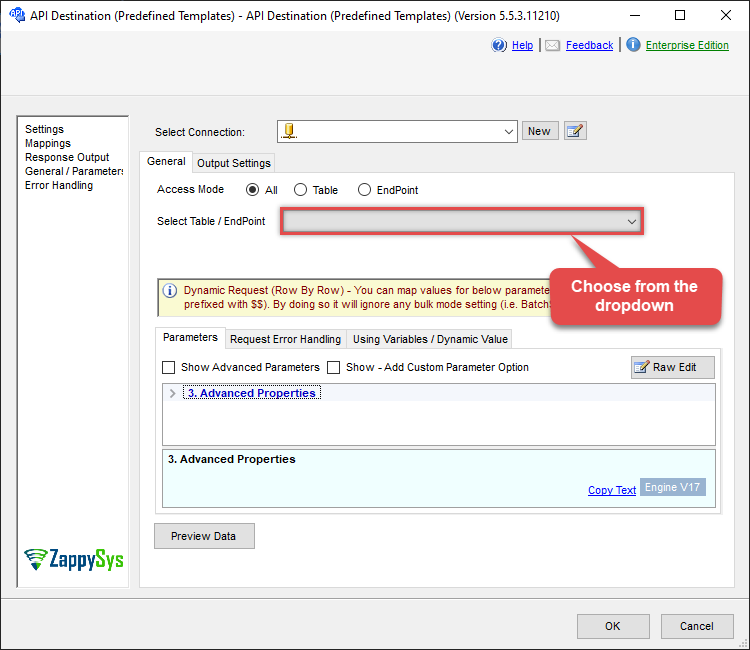
API Destination
| Required Parameters | |
|---|---|
| Parent Table Name | Fill-in the parameter... |
| Optional Parameters | |
| Table (***DO NOT CHANGE***) | label_entry |
| ShowDisplayValue | true |
| Parent Record Sys_ID | |
| Additional Filter (Optional) | |
ODBC application
Use these SQL queries in your ODBC application data source:
Read record labels (tags)
<p>This example demonstrates how to retrieve and filter <strong>UI labels (tags)</strong> applied to a specific record in ServiceNow using the <code>get_record_labels</code> endpoint.</p> <p>The endpoint queries the <code>label_entry</code> table and scopes results using:</p> <ul> <li><code>ParentTableName</code> – the name of the parent table (for example <code>incident</code> or <code>problem</code>)</li> <li><code>ParentSysId</code> – the <code>sys_id</code> of the parent record</li> </ul> <p>Additional filtering is applied using the <code>Query</code> parameter. Filtering must use <strong>real database fields</strong> such as <code>label.name</code>. Runtime-only fields like <code>label.display_value</code> exist only in the API response and <strong>cannot</strong> be used in query conditions; such filters will be ignored by the ServiceNow query engine.</p> <p>The API response includes human-readable label values because <code>sysparm_display_value=true</code> is always applied by this endpoint.</p>
-- 1. Get ALL labels (tags) for a specific Problem record
SELECT *
FROM get_record_labels
WITH(
	ParentTableName='problem',
	ParentSysId='62304320731823002728660c4cf6a7e8'
)

-- 2. Check whether the record has a specific label
SELECT *
FROM get_record_labels
WITH(
	ParentTableName='problem',
	ParentSysId='62304320731823002728660c4cf6a7e8',
	Query='label.name=trial'
)

-- 3. Get labels where the name starts with a prefix (e.g. odbc*)
SELECT *
FROM get_record_labels
WITH(
	ParentTableName='problem',
	ParentSysId='62304320731823002728660c4cf6a7e8',
	Query='label.nameSTARTSWITHodbc'
)

-- 4. Get labels where the name contains a keyword
SELECT *
FROM get_record_labels
WITH(
	ParentTableName='problem',
	ParentSysId='62304320731823002728660c4cf6a7e8',
	Query='label.nameLIKEpower'
)

-- 5. Get labels added by a specific user
SELECT *
FROM get_record_labels
WITH(
	ParentTableName='problem',
	ParentSysId='62304320731823002728660c4cf6a7e8',
	Query='sys_created_by=admin'
)

-- 6. Get labels added in the last 7 days
SELECT *
FROM get_record_labels
WITH(
	ParentTableName='problem',
	ParentSysId='62304320731823002728660c4cf6a7e8',
	Query='sys_created_on>=<<today-7d,FUN_TO_DATETIME>>'
)

-- 7. Combine multiple filters and order by most recent label
SELECT *
FROM get_record_labels
WITH(
	ParentTableName='problem',
	ParentSysId='62304320731823002728660c4cf6a7e8',
	Query='label.nameLIKEtrial^sys_created_by=admin^ORDERBYDESCsys_created_on'
)
SQL Server
Use these SQL queries in SQL Server after you create a data source in Data Gateway:
Read record labels (tags)
<p>This example demonstrates how to retrieve and filter <strong>UI labels (tags)</strong> applied to a specific record in ServiceNow using the <code>get_record_labels</code> endpoint.</p> <p>The endpoint queries the <code>label_entry</code> table and scopes results using:</p> <ul> <li><code>ParentTableName</code> – the name of the parent table (for example <code>incident</code> or <code>problem</code>)</li> <li><code>ParentSysId</code> – the <code>sys_id</code> of the parent record</li> </ul> <p>Additional filtering is applied using the <code>Query</code> parameter. Filtering must use <strong>real database fields</strong> such as <code>label.name</code>. Runtime-only fields like <code>label.display_value</code> exist only in the API response and <strong>cannot</strong> be used in query conditions; such filters will be ignored by the ServiceNow query engine.</p> <p>The API response includes human-readable label values because <code>sysparm_display_value=true</code> is always applied by this endpoint.</p>
DECLARE @MyQuery NVARCHAR(MAX) = '-- 1. Get ALL labels (tags) for a specific Problem record
SELECT *
FROM get_record_labels
WITH(
	ParentTableName=''problem'',
	ParentSysId=''62304320731823002728660c4cf6a7e8''
)

-- 2. Check whether the record has a specific label
SELECT *
FROM get_record_labels
WITH(
	ParentTableName=''problem'',
	ParentSysId=''62304320731823002728660c4cf6a7e8'',
	Query=''label.name=trial''
)

-- 3. Get labels where the name starts with a prefix (e.g. odbc*)
SELECT *
FROM get_record_labels
WITH(
	ParentTableName=''problem'',
	ParentSysId=''62304320731823002728660c4cf6a7e8'',
	Query=''label.nameSTARTSWITHodbc''
)

-- 4. Get labels where the name contains a keyword
SELECT *
FROM get_record_labels
WITH(
	ParentTableName=''problem'',
	ParentSysId=''62304320731823002728660c4cf6a7e8'',
	Query=''label.nameLIKEpower''
)

-- 5. Get labels added by a specific user
SELECT *
FROM get_record_labels
WITH(
	ParentTableName=''problem'',
	ParentSysId=''62304320731823002728660c4cf6a7e8'',
	Query=''sys_created_by=admin''
)

-- 6. Get labels added in the last 7 days
SELECT *
FROM get_record_labels
WITH(
	ParentTableName=''problem'',
	ParentSysId=''62304320731823002728660c4cf6a7e8'',
	Query=''sys_created_on>=<<today-7d,FUN_TO_DATETIME>>''
)

-- 7. Combine multiple filters and order by most recent label
SELECT *
FROM get_record_labels
WITH(
	ParentTableName=''problem'',
	ParentSysId=''62304320731823002728660c4cf6a7e8'',
	Query=''label.nameLIKEtrial^sys_created_by=admin^ORDERBYDESCsys_created_on''
)';

EXEC (@MyQuery) AT [LS_TO_SERVICENOW_IN_GATEWAY];