

Endpoint Download Table Attachments (Multiple - Using Query)
Name
download_attachments
Description
Download all attachments for a specified table, or table and its row sys_id or specific attachment sys_id. When files are saved they are given a unique name using the pattern {table_sys_id}_{attachment_sys_id}_{attachment-file_name} so files with the same filename from different parent records will not overwrite each other in the download folder. [API reference]
Parameters
| Parameter | Required | Options | ||||||||||||||||||||||||||
|---|---|---|---|---|---|---|---|---|---|---|---|---|---|---|---|---|---|---|---|---|---|---|---|---|---|---|---|---|
|
Name:
Label: SaveFolder Specify a disk folder path to save file(s) to (e.g. c:\temp) |
YES | |||||||||||||||||||||||||||
|
Name:
Label: Page Size (Default=2000, Max=10000) Max can be 10000 but it may decrease performance if you fetching less than 10K rows in some requests. |
YES | |||||||||||||||||||||||||||
|
Name:
Label: Output Mode |
|
|||||||||||||||||||||||||||
|
Name:
Label: TableName (for attachments) Table name for which you like to list attachment. If you supply sys_id of attachment then no need to supply this |
||||||||||||||||||||||||||||
|
Name:
Label: ParentSysId Parent Table Row 'sys_id' for which you like to get attachments |
||||||||||||||||||||||||||||
|
Name:
Label: Fields to include in response (Keep blank to get all fields -OR- Enter comma separated list) Comma-separated field names you want to return in the response. E.g. sys_id,name,label,sys_name,sys_updated_on. Using this setting reduces the response size and speed up the processing. |
||||||||||||||||||||||||||||
|
Name:
Label: Attachment Filter / Order By Server-side filter for sys_attachment (file name, size, type, date, parent record, etc.) |
|
|||||||||||||||||||||||||||
|
Name:
Label: OverwriteFile |
|
|||||||||||||||||||||||||||
|
Name:
Label: PagingOffset |
||||||||||||||||||||||||||||
|
Name:
Label: SysId Row 'sys_id' |
Output Columns
| Label | Data Type (SSIS) | Data Type (SQL) | Length | Description |
|---|---|---|---|---|
| table_sys_id |
DT_STR
|
varchar(32)
|
32 | Parent Row Id (e.g. Incident, Problem) |
| sys_id |
DT_STR
|
varchar(32)
|
32 | Attachment Id |
| table_name |
DT_STR
|
varchar(255)
|
255 | |
| file_name |
DT_WSTR
|
nvarchar(255)
|
255 | |
| size_bytes |
DT_I8
|
bigint
|
File size in bytes from sys_attachment table | |
| content_type |
DT_WSTR
|
nvarchar(255)
|
255 | MIME type of the file (e.g. image/png, application/pdf) from sys_attachment table |
| hash |
DT_WSTR
|
nvarchar(64)
|
64 | File hash for integrity verification from sys_attachment table |
| sys_created_on |
DT_DBTIMESTAMP
|
datetime
|
When the attachment was created from sys_attachment table | |
| sys_created_by |
DT_WSTR
|
nvarchar(128)
|
128 | User who created the attachment from sys_attachment table |
| saved_file_size |
DT_I8
|
bigint
|
||
| status_code |
DT_I4
|
int
|
||
| error_message |
DT_STR
|
varchar(4000)
|
4000 | |
| save_folder |
DT_WSTR
|
nvarchar(255)
|
255 | |
| data_bytes |
DT_IMAGE
|
varbinary(0)
|
Input Columns
| Label | Data Type (SSIS) | Data Type (SQL) | Length | Description | |||||||||||||||||||||||||||||||||||||||||||||||||||||||||||||||||||||||||||||||||||||||||||||||
|---|---|---|---|---|---|---|---|---|---|---|---|---|---|---|---|---|---|---|---|---|---|---|---|---|---|---|---|---|---|---|---|---|---|---|---|---|---|---|---|---|---|---|---|---|---|---|---|---|---|---|---|---|---|---|---|---|---|---|---|---|---|---|---|---|---|---|---|---|---|---|---|---|---|---|---|---|---|---|---|---|---|---|---|---|---|---|---|---|---|---|---|---|---|---|---|---|---|---|---|
| There are no Static columns defined for this endpoint. This endpoint detects columns dynamically at runtime. | |||||||||||||||||||||||||||||||||||||||||||||||||||||||||||||||||||||||||||||||||||||||||||||||||||
Examples
SSIS
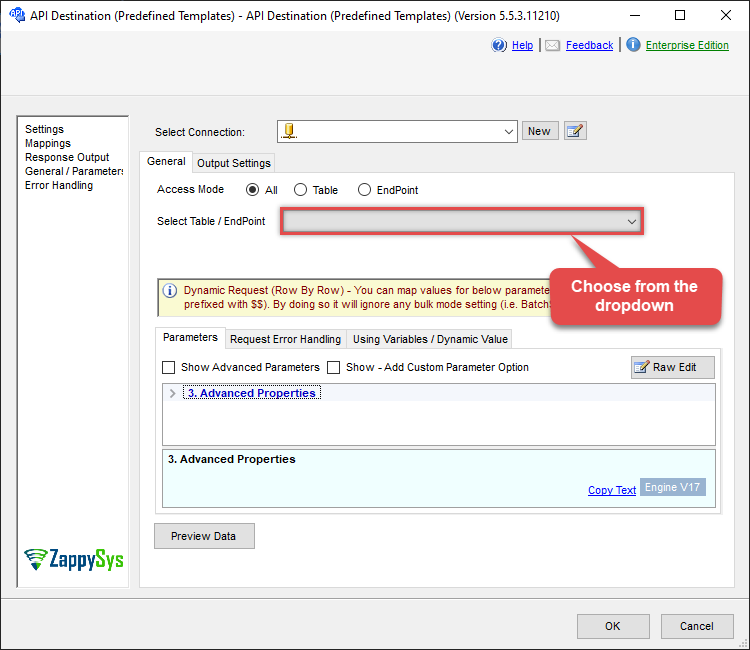
Use ServiceNow Connector in API Source or in API Destination SSIS Data Flow components to read or write data.
API Source

| Required Parameters | |
|---|---|
| SaveFolder | Fill-in the parameter... |
| Optional Parameters | |
| Output Mode | True |
| TableName (for attachments) | |
| ParentSysId | |
| Fields to include in response (Keep blank to get all fields -OR- Enter comma separated list) | |
| Attachment Filter / Order By | |
| OverwriteFile | True |
| ContinueOn404Error | True |

API Destination
| Required Parameters | |
|---|---|
| SaveFolder | Fill-in the parameter... |
| Optional Parameters | |
| Output Mode | True |
| TableName (for attachments) | |
| ParentSysId | |
| Fields to include in response (Keep blank to get all fields -OR- Enter comma separated list) | |
| Attachment Filter / Order By | |
| OverwriteFile | True |
| ContinueOn404Error | True |
ODBC application
Use these SQL queries in your ODBC application data source:
Download attachments
<p>This example set demonstrates how to use the <code>download_attachments</code> endpoint. This endpoint downloads attachment files directly from the ServiceNow <code>sys_attachment</code> table based on server-side filters. It retrieves and saves files to a specified folder, allowing fast filtering on attachment-level attributes. For parent-level filtering (slower per-parent processing), use the <code>Download Table Attachments By Parent Row Search</code> endpoint instead.</p> <p>Use the <code>Query</code> parameter for server-side filters on the <code>sys_attachment</code> table (examples: <code>file_nameENDSWITH.png</code>, <code>content_typeSTARTSWITHimage/</code>, <code>size_bytes>1048576</code>, or date placeholders like <code><<today-2d,FUN_TO_DATETIME>></code>). Specify <code>SaveFolder</code> for the download directory and <code>OverwriteFile</code> to control file overwriting (True to always overwrite, False to fail if the file exists). You can also specify a <code>ParentSysId</code> to limit to a single parent record or use <code>SysId</code> for a specific attachment. Replace sample sys_id and table names with values from your instance.</p> <p>Note: downloaded files are saved using a unique filename pattern <code>{table_sys_id}_{attachment_sys_id}_{attachment-file_name}</code>. This prevents overwriting when multiple parent records contain attachments with the same filename and you save them into the same download directory.</p>
-- Download all attachments for the parent table 'problem' to c:\temp (always overwrite existing files)
SELECT * FROM download_attachments WITH(TableName='problem', SaveFolder='c:\temp', OverwriteFile='True')

-- Download attachments where file name ends with .png or .zip to c:\temp (fail if file exists)
SELECT * FROM download_attachments WITH(TableName='problem', Query='file_nameENDSWITH.png^ORfile_nameENDSWITH.zip', SaveFolder='c:\temp', OverwriteFile='False')

-- Download all attachments for a specific parent record (by parent sys_id) to c:\temp
SELECT * FROM download_attachments WITH(TableName='problem', ParentSysId='62304320731823002728660c4cf6a7e8', SaveFolder='c:\temp', OverwriteFile='True')

-- Download a single attachment by exact attachment sys_id to c:\temp
SELECT * FROM download_attachments WITH(SysId='4b2d41168396b21032ddb9f6feaad38f', SaveFolder='c:\temp', OverwriteFile='True')

-- Download attachments uploaded in the last 2 days to c:\temp
SELECT * FROM download_attachments WITH(TableName='problem', Query='sys_created_on>=<<today-2d,FUN_TO_DATETIME>>', SaveFolder='c:\temp', OverwriteFile='True')

-- Download only image attachments larger than 1 MB to c:\temp
SELECT * FROM download_attachments WITH(TableName='problem', Query='content_typeSTARTSWITHimage/^size_bytes>1048576', SaveFolder='c:\temp', OverwriteFile='False')
SQL Server
Use these SQL queries in SQL Server after you create a data source in Data Gateway:
Download attachments
<p>This example set demonstrates how to use the <code>download_attachments</code> endpoint. This endpoint downloads attachment files directly from the ServiceNow <code>sys_attachment</code> table based on server-side filters. It retrieves and saves files to a specified folder, allowing fast filtering on attachment-level attributes. For parent-level filtering (slower per-parent processing), use the <code>Download Table Attachments By Parent Row Search</code> endpoint instead.</p> <p>Use the <code>Query</code> parameter for server-side filters on the <code>sys_attachment</code> table (examples: <code>file_nameENDSWITH.png</code>, <code>content_typeSTARTSWITHimage/</code>, <code>size_bytes>1048576</code>, or date placeholders like <code><<today-2d,FUN_TO_DATETIME>></code>). Specify <code>SaveFolder</code> for the download directory and <code>OverwriteFile</code> to control file overwriting (True to always overwrite, False to fail if the file exists). You can also specify a <code>ParentSysId</code> to limit to a single parent record or use <code>SysId</code> for a specific attachment. Replace sample sys_id and table names with values from your instance.</p> <p>Note: downloaded files are saved using a unique filename pattern <code>{table_sys_id}_{attachment_sys_id}_{attachment-file_name}</code>. This prevents overwriting when multiple parent records contain attachments with the same filename and you save them into the same download directory.</p>
DECLARE @MyQuery NVARCHAR(MAX) = '-- Download all attachments for the parent table ''problem'' to c:\temp (always overwrite existing files)
SELECT * FROM download_attachments WITH(TableName=''problem'', SaveFolder=''c:\temp'', OverwriteFile=''True'')

-- Download attachments where file name ends with .png or .zip to c:\temp (fail if file exists)
SELECT * FROM download_attachments WITH(TableName=''problem'', Query=''file_nameENDSWITH.png^ORfile_nameENDSWITH.zip'', SaveFolder=''c:\temp'', OverwriteFile=''False'')

-- Download all attachments for a specific parent record (by parent sys_id) to c:\temp
SELECT * FROM download_attachments WITH(TableName=''problem'', ParentSysId=''62304320731823002728660c4cf6a7e8'', SaveFolder=''c:\temp'', OverwriteFile=''True'')

-- Download a single attachment by exact attachment sys_id to c:\temp
SELECT * FROM download_attachments WITH(SysId=''4b2d41168396b21032ddb9f6feaad38f'', SaveFolder=''c:\temp'', OverwriteFile=''True'')

-- Download attachments uploaded in the last 2 days to c:\temp
SELECT * FROM download_attachments WITH(TableName=''problem'', Query=''sys_created_on>=<<today-2d,FUN_TO_DATETIME>>'', SaveFolder=''c:\temp'', OverwriteFile=''True'')

-- Download only image attachments larger than 1 MB to c:\temp
SELECT * FROM download_attachments WITH(TableName=''problem'', Query=''content_typeSTARTSWITHimage/^size_bytes>1048576'', SaveFolder=''c:\temp'', OverwriteFile=''False'')';

EXEC (@MyQuery) AT [LS_TO_SERVICENOW_IN_GATEWAY];