

Endpoint Download Table Attachment (Single - Using Id)
Name
download_attachment
Description
Parameters
| Parameter | Required | Options |
|---|---|---|
|
Name:
Label: SysId (i.e. Attachment Id) Attachment Id (i.e. 'sys_id') you like to download |
YES |
Output Columns
| Label | Data Type (SSIS) | Data Type (SQL) | Length | Description |
|---|---|---|---|---|
| http_status |
DT_I4
|
int
|
||
| sys_id |
DT_STR
|
varchar(32)
|
32 | |
| size_bytes |
DT_I4
|
int
|
||
| file_name |
DT_WSTR
|
nvarchar(4000)
|
4000 | |
| table_sys_id |
DT_STR
|
varchar(32)
|
32 | |
| content_type |
DT_WSTR
|
nvarchar(4000)
|
4000 |
Input Columns
| Label | Data Type (SSIS) | Data Type (SQL) | Length | Description | |||||||||||||||||||||||||||||||||||||||||||||||||||||||||||||||||||||||||||||||||||||||||||||||
|---|---|---|---|---|---|---|---|---|---|---|---|---|---|---|---|---|---|---|---|---|---|---|---|---|---|---|---|---|---|---|---|---|---|---|---|---|---|---|---|---|---|---|---|---|---|---|---|---|---|---|---|---|---|---|---|---|---|---|---|---|---|---|---|---|---|---|---|---|---|---|---|---|---|---|---|---|---|---|---|---|---|---|---|---|---|---|---|---|---|---|---|---|---|---|---|---|---|---|---|
| There are no Static columns defined for this endpoint. This endpoint detects columns dynamically at runtime. | |||||||||||||||||||||||||||||||||||||||||||||||||||||||||||||||||||||||||||||||||||||||||||||||||||
Examples
SSIS
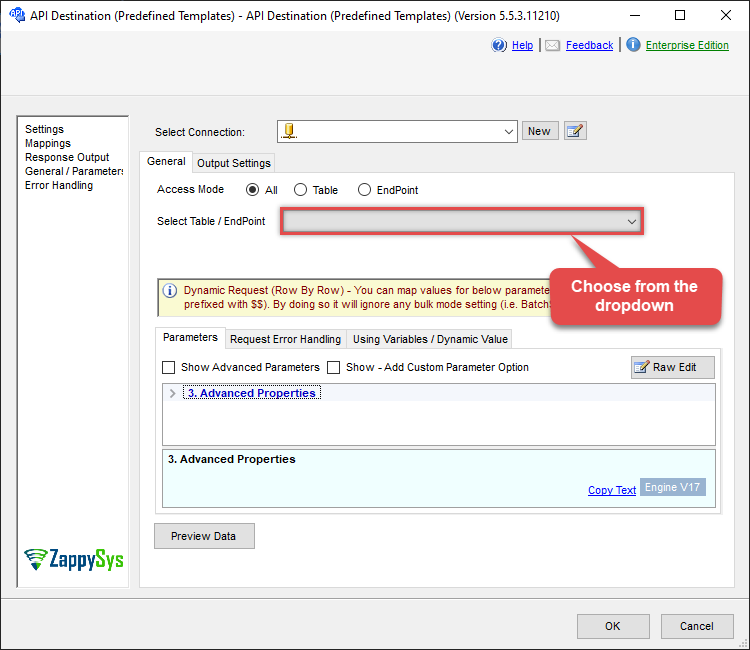
Use ServiceNow Connector in API Source or in API Destination SSIS Data Flow components to read or write data.
API Source

| Required Parameters | |
|---|---|
| SysId (i.e. Attachment Id) | Fill-in the parameter... |
| FileOverwriteMode | Fill-in the parameter... |
| Target File Path (e.g. c:\somefolder\file.xlsx) | Fill-in the parameter... |
| Optional Parameters | |
| SaveContentAsBinary | True |
| TreatResponseAsMultiPart | True |
| ContinueOn404Error | True |
| EnableRawOutputModeSingleRow | True |
| RawOutputDataRowTemplate | {"Status":"Done"} |

API Destination
| Required Parameters | |
|---|---|
| SysId (i.e. Attachment Id) | Fill-in the parameter... |
| FileOverwriteMode | Fill-in the parameter... |
| Target File Path (e.g. c:\somefolder\file.xlsx) | Fill-in the parameter... |
| Optional Parameters | |
| SaveContentAsBinary | True |
| TreatResponseAsMultiPart | True |
| ContinueOn404Error | True |
| EnableRawOutputModeSingleRow | True |
| RawOutputDataRowTemplate | {"Status":"Done"} |
ODBC application
Use these SQL queries in your ODBC application data source:
Download an attachment by ID
<p>This example demonstrates how to use the <code>download_attachment</code> endpoint to download a single attachment file by its exact <code>sys_id</code>. Unlike bulk download endpoints, this allows you to specify a custom <code>TargetFilePath</code> for precise control over the saved file name and location. It does not support filters, as it targets one specific attachment.</p> <p>Specify the attachment's <code>SysId</code>, the full <code>TargetFilePath</code> (e.g., <code>c:\temp\myfile.png</code>), and <code>FileOverwriteMode</code> to control behavior if the file exists (0 or 'AlwaysOverwrite' to overwrite, 1 or 'FailIfExists' to fail, 2 or 'SkipIfExists' to skip). Replace the sample sys_id with a valid attachment ID from your instance.</p>
-- Download a single attachment by sys_id to a custom file path (always overwrite if exists)
SELECT * FROM download_attachment
WITH(
    SysId='4b2d41168396b21032ddb9f6feaad38f',
    TargetFilePath='c:\temp\dump_saved.png',

	--Set overwrite mode : 0=AlwaysOverwrite, 1=FailIfExists, 2=SkipIfExists
    FileOverwriteMode=0
)

-- Download another attachment with a different name (fail if file exists)
SELECT * FROM download_attachment
WITH(
    SysId='another_attachment_sys_id_here',
    TargetFilePath='c:\downloads\report.pdf',
    FileOverwriteMode='FailIfExists'
)

-- Download using numeric value for skip if exists
SELECT * FROM download_attachment
WITH(
    SysId='third_attachment_sys_id_here',
    TargetFilePath='c:\files\data.xlsx',
    FileOverwriteMode=2
)
SQL Server
Use these SQL queries in SQL Server after you create a data source in Data Gateway:
Download an attachment by ID
<p>This example demonstrates how to use the <code>download_attachment</code> endpoint to download a single attachment file by its exact <code>sys_id</code>. Unlike bulk download endpoints, this allows you to specify a custom <code>TargetFilePath</code> for precise control over the saved file name and location. It does not support filters, as it targets one specific attachment.</p> <p>Specify the attachment's <code>SysId</code>, the full <code>TargetFilePath</code> (e.g., <code>c:\temp\myfile.png</code>), and <code>FileOverwriteMode</code> to control behavior if the file exists (0 or 'AlwaysOverwrite' to overwrite, 1 or 'FailIfExists' to fail, 2 or 'SkipIfExists' to skip). Replace the sample sys_id with a valid attachment ID from your instance.</p>
DECLARE @MyQuery NVARCHAR(MAX) = '-- Download a single attachment by sys_id to a custom file path (always overwrite if exists)
SELECT * FROM download_attachment
WITH(
    SysId=''4b2d41168396b21032ddb9f6feaad38f'',
    TargetFilePath=''c:\temp\dump_saved.png'',

	--Set overwrite mode : 0=AlwaysOverwrite, 1=FailIfExists, 2=SkipIfExists
    FileOverwriteMode=0
)

-- Download another attachment with a different name (fail if file exists)
SELECT * FROM download_attachment
WITH(
    SysId=''another_attachment_sys_id_here'',
    TargetFilePath=''c:\downloads\report.pdf'',
    FileOverwriteMode=''FailIfExists''
)

-- Download using numeric value for skip if exists
SELECT * FROM download_attachment
WITH(
    SysId=''third_attachment_sys_id_here'',
    TargetFilePath=''c:\files\data.xlsx'',
    FileOverwriteMode=2
)';

EXEC (@MyQuery) AT [LS_TO_SERVICENOW_IN_GATEWAY];