
Reading data in an ODBC application
In this section we will learn how to configure and use Amazon Ads Connector in the API Driver to extract data from the Amazon Ads.
Create data source using Amazon Ads ODBC Driver
Video instructions
Watch this quick walkthrough to see how to configure your Amazon Ads ODBC data source, or scroll down for the step-by-step written guide.
Step-by-step instructions
To get data from Amazon Ads using , we first need to create an ODBC data source. We will later read this data in . Perform these steps:
-
Download and install ODBC PowerPack (if you haven't already).
-
Search for
odbcand open the ODBC Data Sources (64-bit):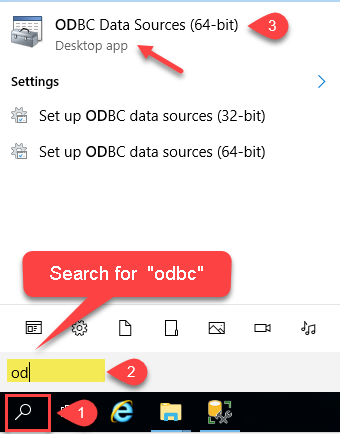
-
Create a User data source (User DSN) based on the ZappySys API Driver driver:
ZappySys API Driver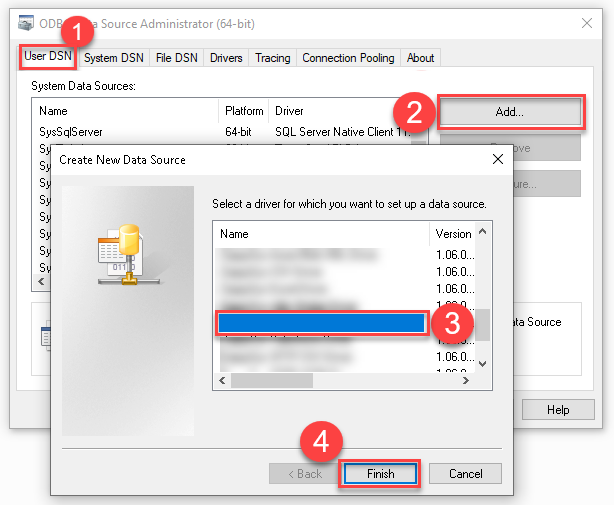
- Create and use a User DSN if the client application runs under a User Account. This is the ideal option at design time (e.g., when developing in Visual Studio). Use it for both types of applications (64-bit and 32-bit).
- Create and use a System DSN if the client application runs under a System Account (e.g., as a Windows Service). This is usually the required option in a production environment. If your Windows Service is a 32-bit application, you must use the 32-bit ODBC Data Source Administrator to configure this
-
When the Configuration window appears give your data source a name if you haven't done that already, then select "Amazon Ads" from the list of Popular Connectors. If "Amazon Ads" is not present in the list, then click "Search Online" and download it. Then set the path to the location where you downloaded it. Finally, click Continue >> to proceed with configuring the DSN:
AmazonAdsDSNAmazon Ads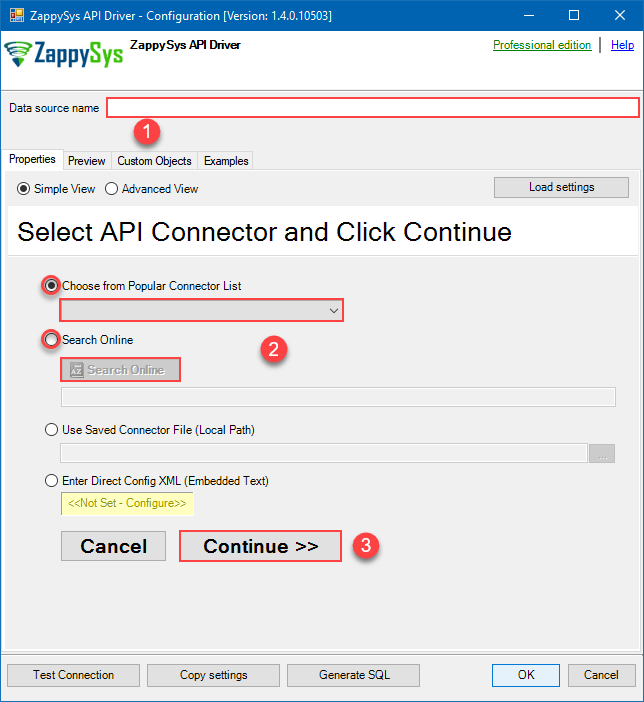
-
Select your authentication scenario below to expand connection configuration steps to:
- Configure the authentication in Amazon Ads.
- Enter those details into the ZappySys API Driver data source configuration.
OAuth Authentication
Amazon Ads authentication
Amazon OAuth Security Profile has be created in Amazon Developer portal. [API reference]
Firstly, login into Amazon Developer portal in https://developer.amazon.com.
Then click Sign in.
If you don't have an account, press Create your Amazon Developer account button to create one.
-
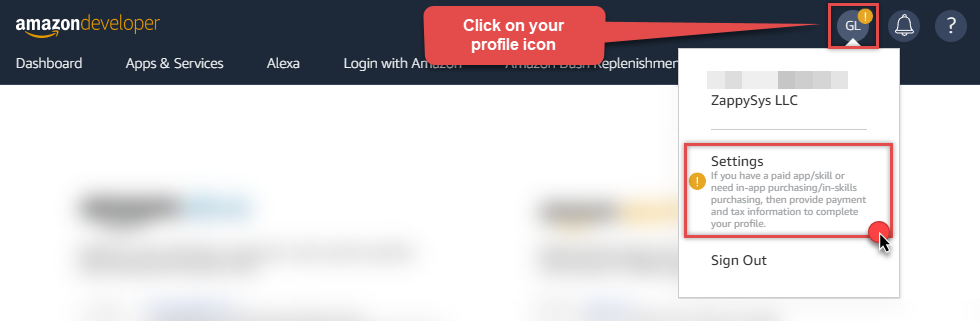
Once logged in, click on your profile icon on the right-top of the window and hit Settings:
-
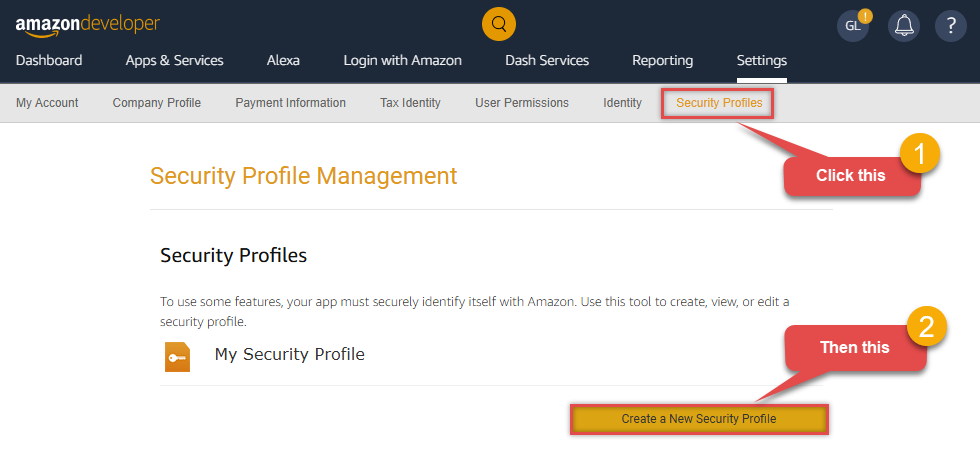
Then click Security Profiles and proceed with creating a new Security Profile:
-
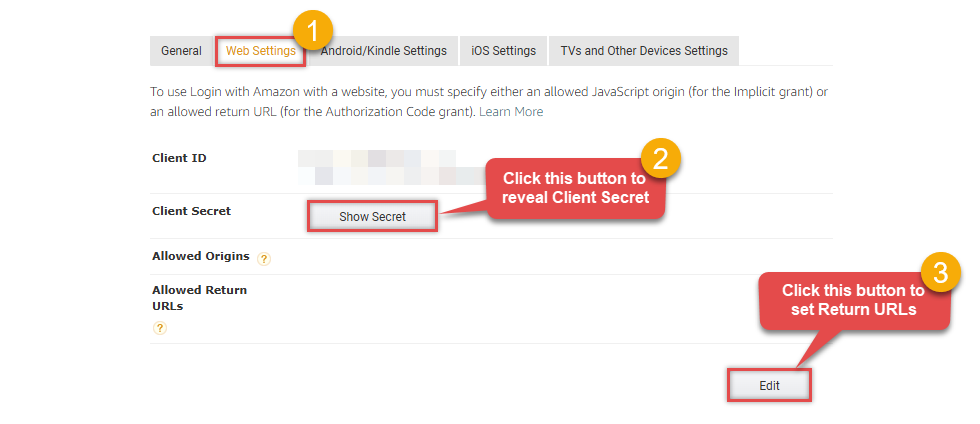
After that, click Web Settings subtab, then hit Show Secret button to reveal the Client Secret (you will need it later), and click Edit to add a Redirect URL:
-
Continue by setting Allowed Return URLs (you can have your own or use
https://zappysys.com/oauth):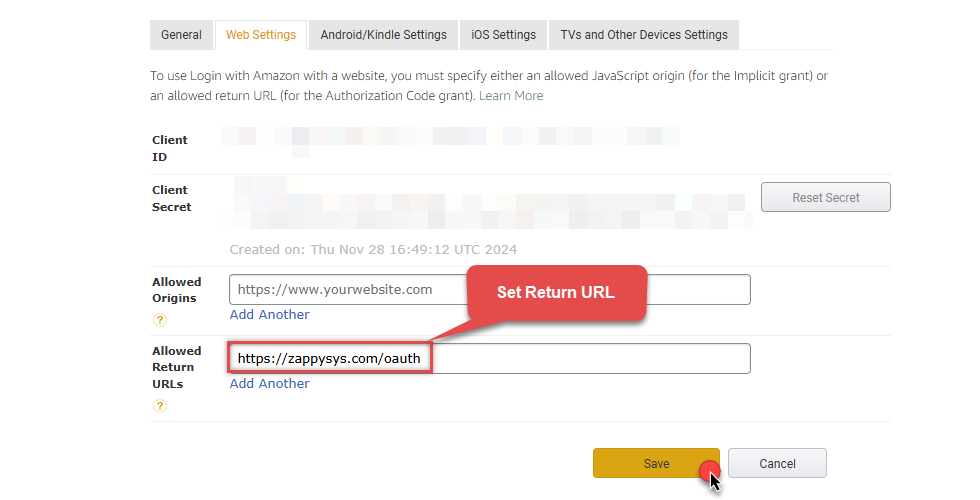
-
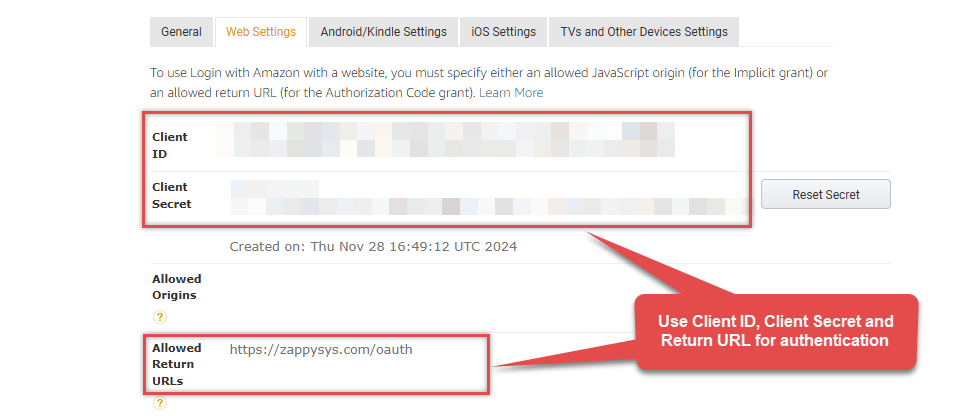
Done! Now you can use Client ID, Client Secret, and Redirect URL when configuring OAuth Authentication parameters:
API Connection Manager configuration
Just perform these simple steps to finish authentication configuration:
-
Set Authentication Type to
OAuth Authentication [OAuth] - Optional step. Modify API Base URL if needed (in most cases default will work).
- Fill in all the required parameters and set optional parameters if needed.
- Press Generate Token button to generate the tokens.
- Finally, hit OK button:
AmazonAdsDSNAmazon AdsOAuth Authentication [OAuth]https://advertising-api.amazon.com/v2Required Parameters ClientId Fill-in the parameter... ClientSecret Fill-in the parameter... AuthorizationUrl Fill-in the parameter... ReturnUrl Fill-in the parameter... Scope Fill-in the parameter... Profile (click 'Generate Token' before this) Fill-in the parameter... Optional Parameters RetryMode RetryWhenStatusCodeMatch RetryStatusCodeList 429 RetryCountMax 5 RetryMultiplyWaitTime True 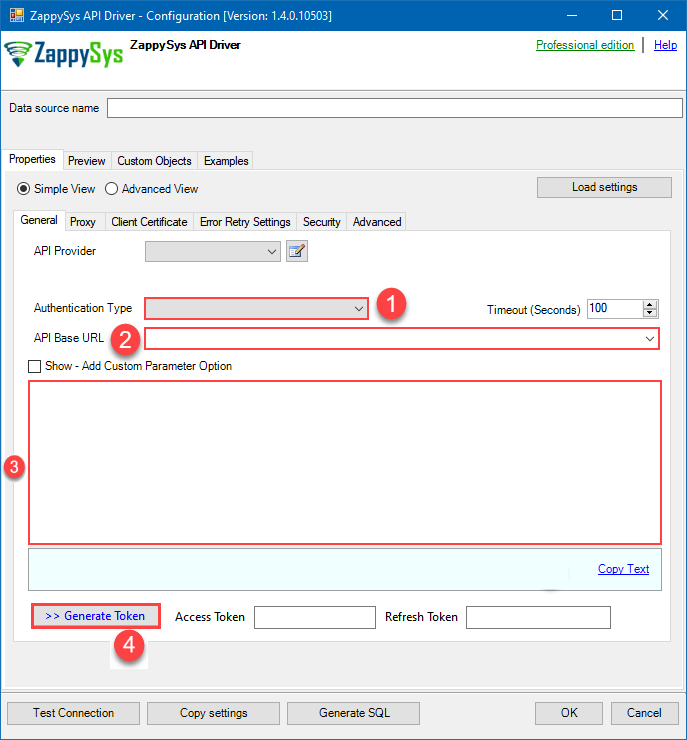 Find full details in the Amazon Ads Connector authentication reference.
 -
Once the data source connection has been configured, it's time to configure the SQL query. Select the Preview tab and then click Query Builder button to configure the SQL query:
 ZappySys API Driver - Amazon AdsRead and write Amazon Ads data effortlessly. Integrate, manage, and automate campaigns, ad groups, and performance metrics — almost no coding required.AmazonAdsDSN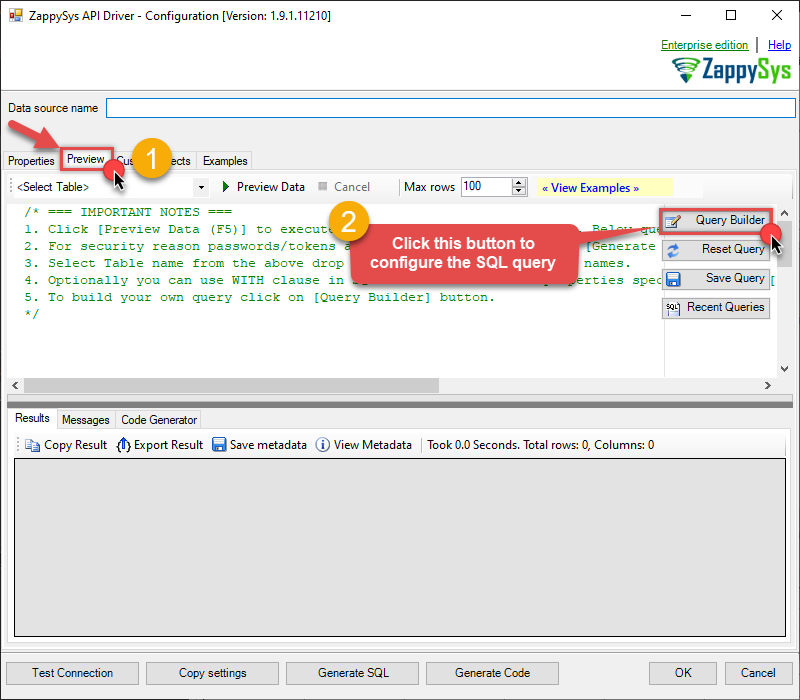
-
Start by selecting the Table or Endpoint you are interested in and then configure the parameters. This will generate a query that we will use in to retrieve data from Amazon Ads. Hit OK button to use this query in the next step.
SELECT * FROM Profiles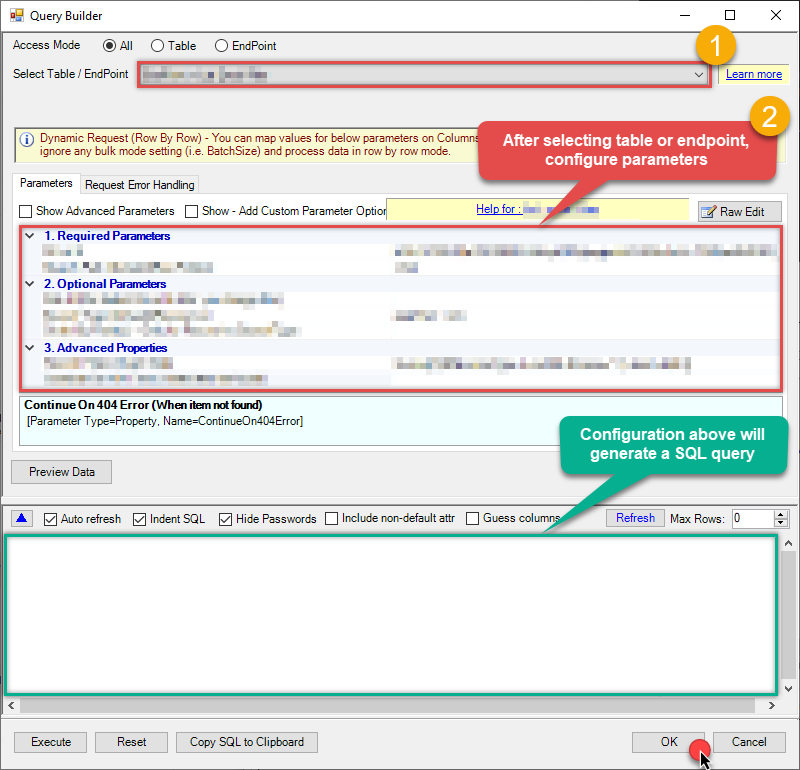 Some parameters configured in this window will be passed to the Amazon Ads API, e.g. filtering parameters. It means that filtering will be done on the server side (instead of the client side), enabling you to get only the meaningful data
much faster . -
Now hit Preview Data button to preview the data using the generated SQL query. If you are satisfied with the result, use this query in :
ZappySys API Driver - Amazon AdsRead and write Amazon Ads data effortlessly. Integrate, manage, and automate campaigns, ad groups, and performance metrics — almost no coding required.AmazonAdsDSNSELECT * FROM Profiles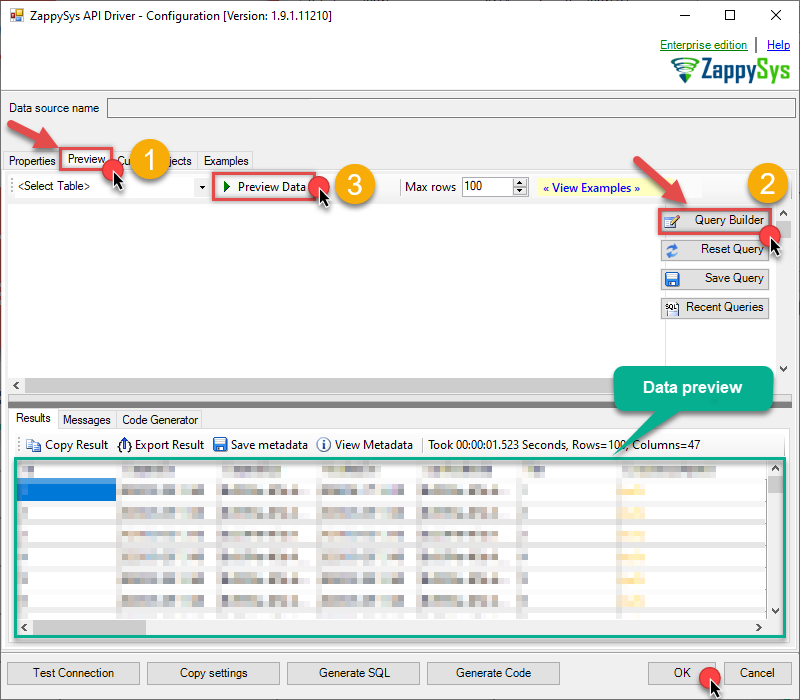 You can also access data quickly from the tables dropdown by selecting <Select table>.A
WHEREclause,LIMITkeyword will be performed on the client side, meaning that thewhole result set will be retrieved from the Amazon Ads API first, and only then the filtering will be applied to the data. If possible, it is recommended to use parameters in Query Builder to filter the data on the server side (in Amazon Ads servers). -
Click OK to finish creating the data source.
Reading Amazon Ads data from client application
- Firstly, to get data from ODBC data source based on ZappySys ODBC driver, in your client application, you would need to connect to ODBC source and then from the list select the data source.
-
Finally, to read the data just read tables/views in your app or enter a SQL statement to extract data, e.g.:
SELECT * FROM Profiles
Amazon Ads Connector Examples
The ZappySys API Driver is a user-friendly interface designed to facilitate the seamless integration of various applications with the Amazon Ads API. With its intuitive design and robust functionality, the ZappySys API Driver simplifies the process of configuring specific API endpoints to efficiently read or write data from Amazon Ads.
Click here to find more Amazon Ads Connector examples designed for seamless integration with the ZappySys API ODBC Driver under ODBC Data Source (36/64) or ZappySys Data Gateway, enhancing your ability to connect and interact with Prebuilt Connectors effectively.
Consume Data inside your App / Programming Language
Once you know how to load data from Amazon Ads Connector, you can click on one of the below links to learn the steps how to consume data inside your App / Programming Language from Amazon Ads Connector.ODBC inside ETL / Reporting / BI Tools
- Power BI
- Tableau
- Excel
- Informatica PowerCenter
- QlikView
- SQL Server / Linked Server
- SSRS (SQL Server Reporting Services)
ODBC inside Programming Languages
Key features of the ZappySys API Driver include:
The API ODBC driver facilitates the reading and writing of data from numerous popular online services (refer to the complete list here) using familiar SQL language without learning complexity of REST API calls. The driver allows querying nested structure and output as a flat table. You can also create your own ODBC / Data Gateway API connector file and use it with this driver.
Intuitive Configuration: The interface is designed to be user-friendly, enabling users to easily set up the specific API endpoints within Amazon Ads without requiring extensive technical expertise or programming knowledge.
Customizable Endpoint Setup: Users can conveniently configure the API endpoint settings, including the HTTP request method, endpoint URL, and any necessary parameters, to precisely target the desired data within Amazon Ads.
Data Manipulation Capabilities: The ZappySys API Driver allows for seamless data retrieval and writing, enabling users to fetch data from Amazon Ads and perform various data manipulation operations as needed, all through an intuitive and straightforward interface.
Secure Authentication Integration: The driver provides secure authentication integration, allowing users to securely connect to the Amazon Ads API by inputting the necessary authentication credentials, such as API tokens or other authentication keys.
Error Handling Support: The interface is equipped with comprehensive error handling support, ensuring that any errors or exceptions encountered during the data retrieval or writing process are efficiently managed and appropriately communicated to users for prompt resolution.
Data Visualization and Reporting: The ZappySys API Driver facilitates the seamless processing and presentation of the retrieved data from Amazon Ads, enabling users to generate comprehensive reports and visualizations for further analysis and decision-making purposes.
Overall, the ZappySys API Driver serves as a powerful tool for streamlining the integration of applications with Amazon Ads, providing users with a convenient and efficient way to access and manage data, all through a user-friendly and intuitive interface.