

Endpoint Read CSV files from folder
Name
read_csv_files_from_folder
Description
Reads the contents of every CSV file in the specified folder directly into a result set without downloading to disk.
Parameters
| Parameter | Required | Options | ||||||||||
|---|---|---|---|---|---|---|---|---|---|---|---|---|
|
Name:
Label: Folder path or ID |
||||||||||||
|
Name:
Label: Recursively scan subfolders |
|
|||||||||||
|
Name:
Label: Filter files by extensions |
|
Output Columns
| Label | Data Type (SSIS) | Data Type (SQL) | Length | Description | |||||||||||||||||||||||||||||||||||||||||||||||||||||||||||||||||||||||||||||||||||||||||||||||
|---|---|---|---|---|---|---|---|---|---|---|---|---|---|---|---|---|---|---|---|---|---|---|---|---|---|---|---|---|---|---|---|---|---|---|---|---|---|---|---|---|---|---|---|---|---|---|---|---|---|---|---|---|---|---|---|---|---|---|---|---|---|---|---|---|---|---|---|---|---|---|---|---|---|---|---|---|---|---|---|---|---|---|---|---|---|---|---|---|---|---|---|---|---|---|---|---|---|---|---|
| There are no Static columns defined for this endpoint. This endpoint detects columns dynamically at runtime. | |||||||||||||||||||||||||||||||||||||||||||||||||||||||||||||||||||||||||||||||||||||||||||||||||||
Input Columns
| Label | Data Type (SSIS) | Data Type (SQL) | Length | Description | |||||||||||||||||||||||||||||||||||||||||||||||||||||||||||||||||||||||||||||||||||||||||||||||
|---|---|---|---|---|---|---|---|---|---|---|---|---|---|---|---|---|---|---|---|---|---|---|---|---|---|---|---|---|---|---|---|---|---|---|---|---|---|---|---|---|---|---|---|---|---|---|---|---|---|---|---|---|---|---|---|---|---|---|---|---|---|---|---|---|---|---|---|---|---|---|---|---|---|---|---|---|---|---|---|---|---|---|---|---|---|---|---|---|---|---|---|---|---|---|---|---|---|---|---|
| There are no Static columns defined for this endpoint. This endpoint detects columns dynamically at runtime. | |||||||||||||||||||||||||||||||||||||||||||||||||||||||||||||||||||||||||||||||||||||||||||||||||||
Examples
SSIS
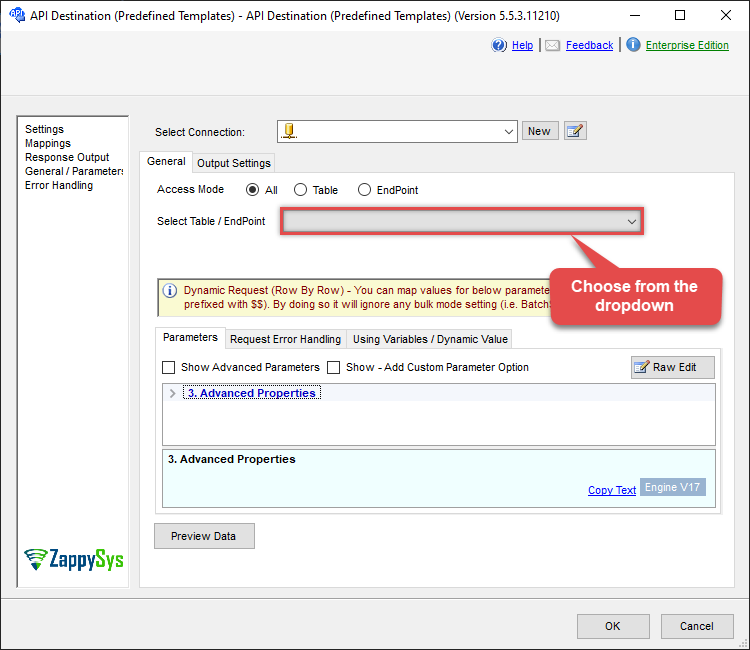
Use Dropbox Connector in API Source or in API Destination SSIS Data Flow components to read or write data.
API Source

| Optional Parameters | |
|---|---|
| Folder path or ID | |
| Recursively scan subfolders | false |
| Filter files by extensions | csv |

API Destination
| Optional Parameters | |
|---|---|
| Folder path or ID | |
| Recursively scan subfolders | false |
| Filter files by extensions | csv |
ODBC application
Use these SQL queries in your ODBC application data source:
Read multiple CSV files from a folder by ID
<p>Reads all CSV files in a folder into a single result set, using the folder ID. Each file’s rows are returned; you can identify the source file from the result columns if needed.</p>
SELECT * FROM read_csv_files_from_folder
WITH (Path='id:ZirXxxxxxxxAAAAAAAAABw')
Read multiple CSV files from a folder by path
<p>Reads all CSV files in the given folder path into one result set. Supply the folder path in <code>Path</code>. Data is read directly from the API; no local download is used.</p>
SELECT * FROM read_csv_files_from_folder
WITH (Path='/myfolder')
Read multiple CSV files by extension
<p>Reads only CSV files matching the given extension(s) from a folder. Use <code>FilterFilesByExtension</code> to limit which files are read (e.g. <code>txt</code> for .txt files).</p>
SELECT * FROM read_csv_files_from_folder
WITH (FilterFilesByExtension='txt')
Read multiple CSV files recursively
<p>Reads CSV files from the target folder and all its subfolders into one result set. Set <code>Recursive='true'</code> to include nested folders.</p>
SELECT * FROM read_csv_files_from_folder
WITH (Recursive='true')
SQL Server
Use these SQL queries in SQL Server after you create a data source in Data Gateway:
Read multiple CSV files from a folder by ID
<p>Reads all CSV files in a folder into a single result set, using the folder ID. Each file’s rows are returned; you can identify the source file from the result columns if needed.</p>
DECLARE @MyQuery NVARCHAR(MAX) = 'SELECT * FROM read_csv_files_from_folder
WITH (Path=''id:ZirXxxxxxxxAAAAAAAAABw'')';

EXEC (@MyQuery) AT [LS_TO_DROPBOX_IN_GATEWAY];
Read multiple CSV files from a folder by path
<p>Reads all CSV files in the given folder path into one result set. Supply the folder path in <code>Path</code>. Data is read directly from the API; no local download is used.</p>
DECLARE @MyQuery NVARCHAR(MAX) = 'SELECT * FROM read_csv_files_from_folder
WITH (Path=''/myfolder'')';

EXEC (@MyQuery) AT [LS_TO_DROPBOX_IN_GATEWAY];
Read multiple CSV files by extension
<p>Reads only CSV files matching the given extension(s) from a folder. Use <code>FilterFilesByExtension</code> to limit which files are read (e.g. <code>txt</code> for .txt files).</p>
DECLARE @MyQuery NVARCHAR(MAX) = 'SELECT * FROM read_csv_files_from_folder
WITH (FilterFilesByExtension=''txt'')';

EXEC (@MyQuery) AT [LS_TO_DROPBOX_IN_GATEWAY];
Read multiple CSV files recursively
<p>Reads CSV files from the target folder and all its subfolders into one result set. Set <code>Recursive='true'</code> to include nested folders.</p>
DECLARE @MyQuery NVARCHAR(MAX) = 'SELECT * FROM read_csv_files_from_folder
WITH (Recursive=''true'')';

EXEC (@MyQuery) AT [LS_TO_DROPBOX_IN_GATEWAY];