

Endpoint Get Report
Name
get_report
Description
Downloads an Amazon Ads report. [API reference]
Parameters
| Parameter | Required | Options | ||||||||||||||||||||||||||||||||||||||||||||||||||||||||||||||||||||||||||||||||||||||||
|---|---|---|---|---|---|---|---|---|---|---|---|---|---|---|---|---|---|---|---|---|---|---|---|---|---|---|---|---|---|---|---|---|---|---|---|---|---|---|---|---|---|---|---|---|---|---|---|---|---|---|---|---|---|---|---|---|---|---|---|---|---|---|---|---|---|---|---|---|---|---|---|---|---|---|---|---|---|---|---|---|---|---|---|---|---|---|---|---|---|---|
|
Name:
Label: Record Type |
YES |
|
||||||||||||||||||||||||||||||||||||||||||||||||||||||||||||||||||||||||||||||||||||||||
|
Name:
Label: Report Date (yyyyMMdd) The date for which to retrieve the report in YYYYMMDD format. Supported functions now|today|yesterday|weekstart|weekend|monthstart|monthend|yearstart|yearend and supported intervals for add/subtract are ms|s|sec|min|h|hour|y|year|d|day|m|month|y|year. Example monthstart-3d (subtract 3days from month start) |
YES |
|
||||||||||||||||||||||||||||||||||||||||||||||||||||||||||||||||||||||||||||||||||||||||
|
Name:
Label: Metrics |
YES |
|
||||||||||||||||||||||||||||||||||||||||||||||||||||||||||||||||||||||||||||||||||||||||
|
Name:
Label: State Filter |
|
|||||||||||||||||||||||||||||||||||||||||||||||||||||||||||||||||||||||||||||||||||||||||
|
Name:
Label: Campaign Type |
|
|||||||||||||||||||||||||||||||||||||||||||||||||||||||||||||||||||||||||||||||||||||||||
|
Name:
Label: Segment |
|
Output Columns
| Label | Data Type (SSIS) | Data Type (SQL) | Length | Description | |||||||||||||||||||||||||||||||||||||||||||||||||||||||||||||||||||||||||||||||||||||||||||||||
|---|---|---|---|---|---|---|---|---|---|---|---|---|---|---|---|---|---|---|---|---|---|---|---|---|---|---|---|---|---|---|---|---|---|---|---|---|---|---|---|---|---|---|---|---|---|---|---|---|---|---|---|---|---|---|---|---|---|---|---|---|---|---|---|---|---|---|---|---|---|---|---|---|---|---|---|---|---|---|---|---|---|---|---|---|---|---|---|---|---|---|---|---|---|---|---|---|---|---|---|
| There are no Static columns defined for this endpoint. This endpoint detects columns dynamically at runtime. | |||||||||||||||||||||||||||||||||||||||||||||||||||||||||||||||||||||||||||||||||||||||||||||||||||
Input Columns
| Label | Data Type (SSIS) | Data Type (SQL) | Length | Description | |||||||||||||||||||||||||||||||||||||||||||||||||||||||||||||||||||||||||||||||||||||||||||||||
|---|---|---|---|---|---|---|---|---|---|---|---|---|---|---|---|---|---|---|---|---|---|---|---|---|---|---|---|---|---|---|---|---|---|---|---|---|---|---|---|---|---|---|---|---|---|---|---|---|---|---|---|---|---|---|---|---|---|---|---|---|---|---|---|---|---|---|---|---|---|---|---|---|---|---|---|---|---|---|---|---|---|---|---|---|---|---|---|---|---|---|---|---|---|---|---|---|---|---|---|
| There are no Static columns defined for this endpoint. This endpoint detects columns dynamically at runtime. | |||||||||||||||||||||||||||||||||||||||||||||||||||||||||||||||||||||||||||||||||||||||||||||||||||
Examples
SSIS
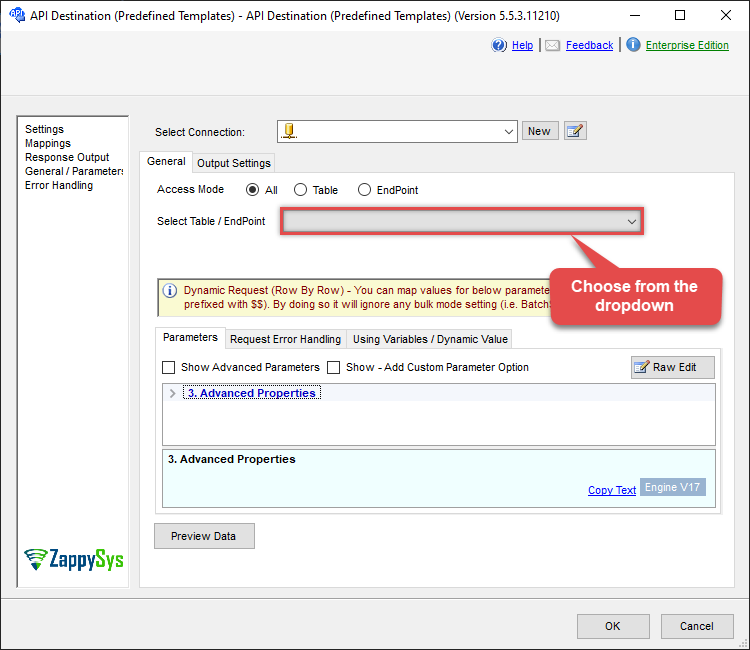
Use Amazon Ads Connector in API Source or in API Destination SSIS Data Flow components to read or write data.
API Source

| Required Parameters | |
|---|---|
| Record Type | Fill-in the parameter... |
| Report Date (yyyyMMdd) | Fill-in the parameter... |
| Metrics | Fill-in the parameter... |
| Optional Parameters | |
| State Filter | |
| Campaign Type | |
| Segment | |

API Destination
| Required Parameters | |
|---|---|
| Record Type | Fill-in the parameter... |
| Report Date (yyyyMMdd) | Fill-in the parameter... |
| Metrics | Fill-in the parameter... |
| Optional Parameters | |
| State Filter | |
| Campaign Type | |
| Segment | |
ODBC application
Use these SQL queries in your ODBC application data source:
Read Sponsored Products report (legacy API)
<p>Request and read a Sponsored Products performance report. Choose the report type (e.g. keywords), report date, and the metrics you want.</p>
SELECT * FROM get_report
WITH(
  RecordType='keywords',
  ReportDate='<<today-1d,FUN_TO_DATE>>',
  Metrics='impressions,clicks,cost'
)
SQL Server
Use these SQL queries in SQL Server after you create a data source in Data Gateway:
Read Sponsored Products report (legacy API)
<p>Request and read a Sponsored Products performance report. Choose the report type (e.g. keywords), report date, and the metrics you want.</p>
DECLARE @MyQuery NVARCHAR(MAX) = 'SELECT * FROM get_report
WITH(
  RecordType=''keywords'',
  ReportDate=''<<today-1d,FUN_TO_DATE>>'',
  Metrics=''impressions,clicks,cost''
)';

EXEC (@MyQuery) AT [LS_TO_AMAZON_ADS_IN_GATEWAY];