

Endpoint Make Generic REST API Request (Bulk Write)
Name
generic_request_bulk_write
Description
This is a generic endpoint for bulk write purpose. Use this endpoint when some actions are not implemented by connector. Just enter partial URL (Required), Body, Method, Header etc. Most parameters are optional except URL.
Related Tables
Generic Table (Bulk Read / Write)
Parameters
| Parameter | Required | Options | ||||||
|---|---|---|---|---|---|---|---|---|
|
Name:
Label: Url API URL goes here. You can enter full URL or Partial URL relative to Base URL. If it is full URL then domain name must be part of ServiceURL or part of TrustedDomains |
YES | |||||||
|
Name:
Label: Filter Enter filter to extract array from response. Example: $.rows[*] --OR-- $.customers[*].orders[*]. Check your response document and find out hierarchy you like to extract |
||||||||
|
Name:
Label: Headers Headers for Request. To enter multiple headers use double pipe (||) or new line after each {header-name}:{value} pair |
||||||||
|
Name:
Label: SpreadSheetId Enter unique spreadsheet Id. To obtain sheet Id. Open spreadsheet in browser and check URL. You will example value like 1BxiMVs0XRA5nFMdKvBdBZjgmUUqptlbs74OgvE2upms that is your sheet id. |
|
Output Columns
| Label | Data Type (SSIS) | Data Type (SQL) | Length | Description | |||||||||||||||||||||||||||||||||||||||||||||||||||||||||||||||||||||||||||||||||||||||||||||||
|---|---|---|---|---|---|---|---|---|---|---|---|---|---|---|---|---|---|---|---|---|---|---|---|---|---|---|---|---|---|---|---|---|---|---|---|---|---|---|---|---|---|---|---|---|---|---|---|---|---|---|---|---|---|---|---|---|---|---|---|---|---|---|---|---|---|---|---|---|---|---|---|---|---|---|---|---|---|---|---|---|---|---|---|---|---|---|---|---|---|---|---|---|---|---|---|---|---|---|---|
| There are no Static columns defined for this endpoint. This endpoint detects columns dynamically at runtime. | |||||||||||||||||||||||||||||||||||||||||||||||||||||||||||||||||||||||||||||||||||||||||||||||||||
Input Columns
| Label | Data Type (SSIS) | Data Type (SQL) | Length | Description | |||||||||||||||||||||||||||||||||||||||||||||||||||||||||||||||||||||||||||||||||||||||||||||||
|---|---|---|---|---|---|---|---|---|---|---|---|---|---|---|---|---|---|---|---|---|---|---|---|---|---|---|---|---|---|---|---|---|---|---|---|---|---|---|---|---|---|---|---|---|---|---|---|---|---|---|---|---|---|---|---|---|---|---|---|---|---|---|---|---|---|---|---|---|---|---|---|---|---|---|---|---|---|---|---|---|---|---|---|---|---|---|---|---|---|---|---|---|---|---|---|---|---|---|---|
| There are no Static columns defined for this endpoint. This endpoint detects columns dynamically at runtime. | |||||||||||||||||||||||||||||||||||||||||||||||||||||||||||||||||||||||||||||||||||||||||||||||||||
Examples
SSIS
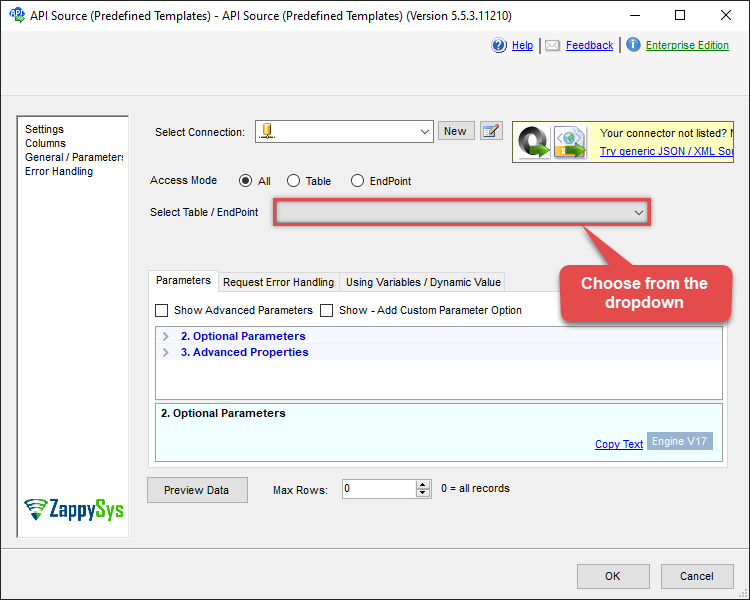
Use Google Sheets Connector in API Source or in API Destination SSIS Data Flow components to read or write data.
API Source

| Required Parameters | |
|---|---|
| Url | Fill-in the parameter... |
| Request Method | Fill-in the parameter... |
| Optional Parameters | |
| IsMultiPart | False |
| Filter | |
| Request Format (Content-Type) | Default |
| Body | {$rows$} |
| JsonOutputFormat | Multicontent |
| DoNotOutputNullProperty | False |
| Batch Size (Default=1) | 1 |
| Meta Detection Order | StaticDynamicVirtual |
| Input Columns - For Mapping (e.g. MyCol1:string(10); MyCol2:int32 ...) - Use bool, int32, int64, datetime, decimal, double | |
| Output Columns (e.g. MyCol1:string(10); MyCol2:int32 ...) - Use bool, int32, int64, datetime, decimal, double | |
| Request Format | Default |
| Response Format | Default |
| Headers | Accept: */* || Cache-Control: no-cache |
| Csv - Column Delimiter | , |
| Csv - Row Delimiter | {NEWLINE} |
| Csv - Quote Around Value | True |
| Csv - Always Quote regardless type | False |
| Encoding | |
| CharacterSet | |
| Writer DateTime Format | |
| Csv - Has Header Row | True |
| Xml - ElementsToTreatAsArray | |
| Layout Map | <?xml version="1.0" encoding="utf-8"?> <!-- Example#1: Output all columns --> <settings> <dataset id="root" main="True" readfrominput="True" /> <map src="*" /> </settings> <!-- Example#2: Records under array <?xml version="1.0" encoding="utf-8"?> <settings singledataset="True"> <dataset id="root" main="True" readfrominput="True" /> <map name="MyArray" dataset="root" maptype="DocArray"> <map src="OrderID" name="OrderID" /> <map src="OrderDate" name="OrderDate" /> </map> </settings> --> <!-- Example#3: Records under nested section <?xml version="1.0" encoding="utf-8"?> <settings> <dataset id="dsRoot" main="True" readfrominput="True" /> <map name="NestedSection"> <map src="OrderID" name="OrderID_MyLabel" /> <map src="OrderDate" name="OrderDate_MyLabel" /> </map> </settings> --> |
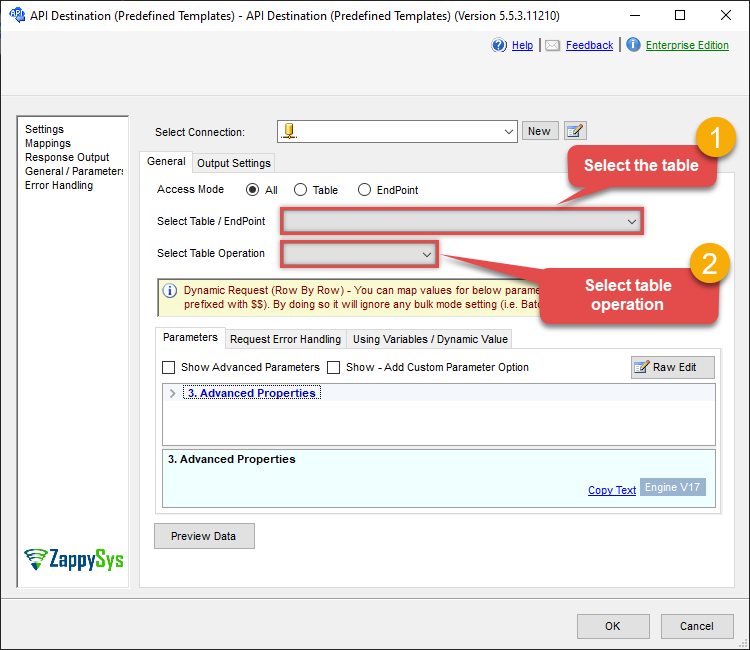
API Destination
This Endpoint belongs to the Generic Table (Bulk Read / Write) table, therefore it is better to use it, instead of accessing the endpoint directly. Use this table and table-operation pair to make generic rest api request:
| Required Parameters | |
|---|---|
| Url | Fill-in the parameter... |
| Request Method | Fill-in the parameter... |
| Optional Parameters | |
| IsMultiPart | False |
| Filter | |
| Request Format (Content-Type) | Default |
| Body | {$rows$} |
| JsonOutputFormat | Multicontent |
| DoNotOutputNullProperty | False |
| Batch Size (Default=1) | 1 |
| Meta Detection Order | StaticDynamicVirtual |
| Input Columns - For Mapping (e.g. MyCol1:string(10); MyCol2:int32 ...) - Use bool, int32, int64, datetime, decimal, double | |
| Output Columns (e.g. MyCol1:string(10); MyCol2:int32 ...) - Use bool, int32, int64, datetime, decimal, double | |
| Request Format | Default |
| Response Format | Default |
| Headers | Accept: */* || Cache-Control: no-cache |
| Csv - Column Delimiter | , |
| Csv - Row Delimiter | {NEWLINE} |
| Csv - Quote Around Value | True |
| Csv - Always Quote regardless type | False |
| Encoding | |
| CharacterSet | |
| Writer DateTime Format | |
| Csv - Has Header Row | True |
| Xml - ElementsToTreatAsArray | |
| Layout Map | <?xml version="1.0" encoding="utf-8"?> <!-- Example#1: Output all columns --> <settings> <dataset id="root" main="True" readfrominput="True" /> <map src="*" /> </settings> <!-- Example#2: Records under array <?xml version="1.0" encoding="utf-8"?> <settings singledataset="True"> <dataset id="root" main="True" readfrominput="True" /> <map name="MyArray" dataset="root" maptype="DocArray"> <map src="OrderID" name="OrderID" /> <map src="OrderDate" name="OrderDate" /> </map> </settings> --> <!-- Example#3: Records under nested section <?xml version="1.0" encoding="utf-8"?> <settings> <dataset id="dsRoot" main="True" readfrominput="True" /> <map name="NestedSection"> <map src="OrderID" name="OrderID_MyLabel" /> <map src="OrderDate" name="OrderDate_MyLabel" /> </map> </settings> --> |
ODBC application
Use these SQL queries in your ODBC application data source:
Make generic rest api request
SELECT * FROM __DynamicRequest__
WITH
(
    "Url" = '/something/123',
    "RequestMethod" = 'POST'
)
generic_request_bulk_write endpoint belongs to
__DynamicRequest__
table(s), and can therefore be used via those table(s).
SQL Server
Use these SQL queries in SQL Server after you create a data source in Data Gateway:
Make generic rest api request
DECLARE @MyQuery NVARCHAR(MAX) = 'SELECT * FROM __DynamicRequest__
WITH
(
    "Url" = ''/something/123'',
    "RequestMethod" = ''POST''
)';

EXEC (@MyQuery) AT [LS_TO_GOOGLE_SHEETS_IN_GATEWAY];
generic_request_bulk_write endpoint belongs to
__DynamicRequest__
table(s), and can therefore be used via those table(s).