

Endpoint Get Organic Search Report
Name
get_report
Description
Get Google organic search report for selected date range, dimensions and metrics (KPI) using Google Search Console API [API reference]
Parameters
| Parameter | Required | Options | ||||||||||||||||||||||||||||||||||||||||
|---|---|---|---|---|---|---|---|---|---|---|---|---|---|---|---|---|---|---|---|---|---|---|---|---|---|---|---|---|---|---|---|---|---|---|---|---|---|---|---|---|---|---|
|
Name:
Label: SiteUrl |
YES | |||||||||||||||||||||||||||||||||||||||||
|
Name:
Label: StartDate The date for which to retrieve the report in YYYY-MM-DD format. Supported functions now|today|yesterday|weekstart|weekend|monthstart|monthend|yearstart|yearend and supported intervals for add/subtract are ms|s|sec|min|h|hour|y|year|d|day|m|month|y|year. Example monthstart-3d (subtract 3days from month start) |
YES |
|
||||||||||||||||||||||||||||||||||||||||
|
Name:
Label: EndDate The date for which to retrieve the report in YYYY-MM-DD format. Supported functions now|today|yesterday|weekstart|weekend|monthstart|monthend|yearstart|yearend and supported intervals for add/subtract are ms|s|sec|min|h|hour|y|year|d|day|m|month|y|year. Example monthstart-3d (subtract 3days from month start) |
YES |
|
||||||||||||||||||||||||||||||||||||||||
|
Name:
Label: Dimensions |
YES |
|
||||||||||||||||||||||||||||||||||||||||
|
Name:
Label: DimensionFilterGroups |
|
Output Columns
| Label | Data Type (SSIS) | Data Type (SQL) | Length | Description |
|---|---|---|---|---|
| Key1 |
DT_WSTR
|
nvarchar(1000)
|
1000 | |
| Key2 |
DT_WSTR
|
nvarchar(1000)
|
1000 | |
| Key3 |
DT_WSTR
|
nvarchar(1000)
|
1000 | |
| Key4 |
DT_WSTR
|
nvarchar(1000)
|
1000 | |
| Key5 |
DT_WSTR
|
nvarchar(1000)
|
1000 | |
| Clicks |
DT_I8
|
bigint
|
||
| Impressions |
DT_I8
|
bigint
|
||
| Ctr |
DT_R8
|
float
|
||
| Position |
DT_R8
|
float
|
Input Columns
| Label | Data Type (SSIS) | Data Type (SQL) | Length | Description | |||||||||||||||||||||||||||||||||||||||||||||||||||||||||||||||||||||||||||||||||||||||||||||||
|---|---|---|---|---|---|---|---|---|---|---|---|---|---|---|---|---|---|---|---|---|---|---|---|---|---|---|---|---|---|---|---|---|---|---|---|---|---|---|---|---|---|---|---|---|---|---|---|---|---|---|---|---|---|---|---|---|---|---|---|---|---|---|---|---|---|---|---|---|---|---|---|---|---|---|---|---|---|---|---|---|---|---|---|---|---|---|---|---|---|---|---|---|---|---|---|---|---|---|---|
| There are no Static columns defined for this endpoint. This endpoint detects columns dynamically at runtime. | |||||||||||||||||||||||||||||||||||||||||||||||||||||||||||||||||||||||||||||||||||||||||||||||||||
Examples
SSIS
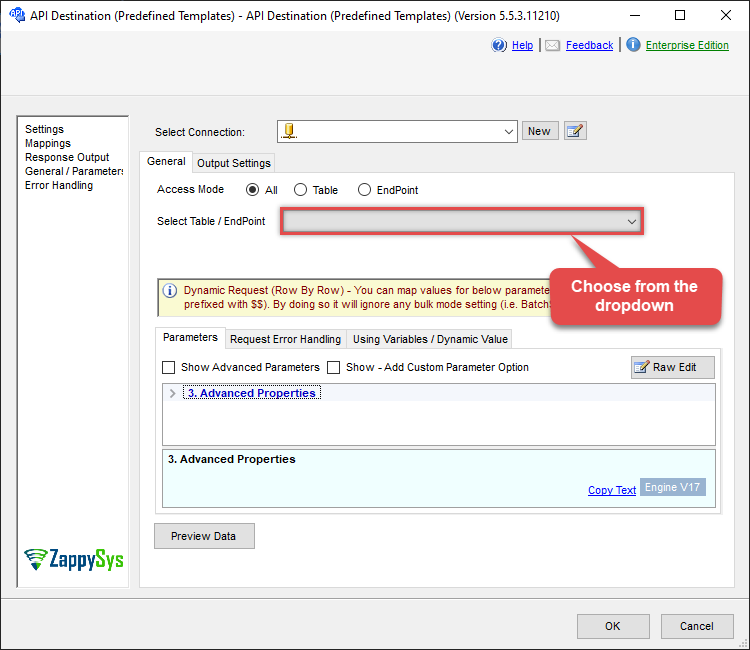
Use Google Search Console Connector in API Source or in API Destination SSIS Data Flow components to read or write data.
API Source

| Required Parameters | |
|---|---|
| SiteUrl | Fill-in the parameter... |
| StartDate | Fill-in the parameter... |
| EndDate | Fill-in the parameter... |
| Dimensions | Fill-in the parameter... |
| Optional Parameters | |
| DimensionFilterGroups | |
| PagingMode | ByPostData |
| PagingByUrlAttributeName | {%offset%} |
| PagingIncrementBy | 2000 |
| EnableArrayFlattening | True |
| PagingByUrlCurrentPage | 0 |

API Destination
| Required Parameters | |
|---|---|
| SiteUrl | Fill-in the parameter... |
| StartDate | Fill-in the parameter... |
| EndDate | Fill-in the parameter... |
| Dimensions | Fill-in the parameter... |
| Optional Parameters | |
| DimensionFilterGroups | |
| PagingMode | ByPostData |
| PagingByUrlAttributeName | {%offset%} |
| PagingIncrementBy | 2000 |
| EnableArrayFlattening | True |
| PagingByUrlCurrentPage | 0 |
ODBC application
Use these SQL queries in your ODBC application data source:
Get organic search report for pages (impressions, clicks, position, CTR)
<p>Returns the organic search report broken down by page and date: impressions, clicks, position, and CTR. Supply the site URL (e.g. <code>sc-domain:mycompany.com</code> or full URL) and date range. Use <code>Dimensions='date~page'</code> for per-page breakdown; you can use static dates or date functions (e.g. <code>monthstart</code>, <code>today</code>) for dynamic reporting.</p>
SELECT * FROM get_report
WITH(
    SiteUrl='sc-domain:mycompany.com',
    StartDate='monthstart',
    EndDate='today',
    Dimensions='date~page'
)
Get organic search report by date (impressions, clicks, position, CTR)
<p>Returns the organic search report aggregated by date (all pages). Supply site URL and date range. Use <code>Dimensions='date'</code> for daily totals. Date parameters support static values or date functions.</p>
SELECT * FROM get_report
WITH(
    SiteUrl='sc-domain:mycompany.com',
    StartDate='monthstart',
    EndDate='today',
    Dimensions='date'
)
Get organic search keywords report (impressions, clicks, position, CTR)
<p>Returns the organic search report grouped by search query (keywords). Supply site URL and date range. Use <code>Dimensions='query'</code> to see impressions, clicks, position, and CTR per keyword.</p>
SELECT * FROM get_report
WITH(
    SiteUrl='sc-domain:mycompany.com',
    StartDate='monthstart',
    EndDate='today',
    Dimensions='query'
)
Get brand search trend by date
<p>Daily brand awareness trend: filter search queries that contain your brand name to measure brand lift from campaigns. Use <code>Dimensions='date'</code> and a <code>DimensionFilterGroups</code> filter on <code>query</code> with operator <code>contains</code>. Replace <code>brand-name</code> with your brand.</p>
SELECT *
FROM get_report
WITH(
    SiteUrl='sc-domain:mycompany.com',
    StartDate='monthstart',
    EndDate='today',
    Dimensions='date',
    DimensionFilterGroups='{ "filters":[
        { "dimension":"query", "operator":"contains", "expression":"brand-name" }
    ] }'
)
Get exact brand keyword performance by date
<p>Impressions, clicks, CTR, and average position for an exact brand keyword (strong brand intent). Use <code>Dimensions='date~query'</code> and filter with <code>operator":"equals"</code> for the exact phrase. Replace <code>brand-name</code> with your keyword.</p>
SELECT *
FROM get_report
WITH(
    SiteUrl='sc-domain:mycompany.com',
    StartDate='today-30d',
    EndDate='today',
    Dimensions='date~query',
    DimensionFilterGroups='{ "filters":[
        { "dimension":"query", "operator":"equals", "expression":"brand-name" }
    ] }'
)
Get brand and product keyword searches (OR condition)
<p>Search performance for brand and product-related keywords using OR logic. Use multiple filters in <code>DimensionFilterGroups</code> (e.g. contains "brand-name shoes", contains "brand-name hats") to track product awareness from brand searches.</p>
SELECT *
FROM get_report
WITH(
    SiteUrl='sc-domain:mycompany.com',
    StartDate='today-30d',
    EndDate='today',
    Dimensions='query',
    DimensionFilterGroups='{ "filters":[
        { "dimension":"query", "operator":"contains", "expression":"brand-name shoes" },
        { "dimension":"query", "operator":"contains", "expression":"brand-name hats" }
    ] }'
)
Get brand evaluation searches (reviews, comparisons)
<p>High-intent brand evaluation searches such as reviews, ratings, or comparisons — often indicating users close to a purchase decision. Filter by multiple <code>contains</code> expressions (e.g. "brand-name reviews", "brand-name vs").</p>
SELECT *
FROM get_report
WITH(
    SiteUrl='sc-domain:mycompany.com',
    StartDate='today-60d',
    EndDate='today',
    Dimensions='query',
    DimensionFilterGroups='{ "filters":[
        { "dimension":"query", "operator":"contains", "expression":"brand-name reviews" },
        { "dimension":"query", "operator":"contains", "expression":"brand-name rating" },
        { "dimension":"query", "operator":"contains", "expression":"brand-name vs" }
    ] }'
)
Get mobile brand searches
<p>Brand-related searches on mobile devices. Use <code>Dimensions='date'</code> for daily totals and combine a query filter (contains your brand) with a device filter (<code>dimension":"device"</code>, <code>expression":"mobile"</code>). Useful for measuring mobile or app campaign impact.</p>
SELECT *
FROM get_report
WITH(
    SiteUrl='sc-domain:mycompany.com',
    StartDate='today-30d',
    EndDate='today',
    Dimensions='date',
    DimensionFilterGroups='{ "filters":[
        { "dimension":"query", "operator":"contains", "expression":"brand-name" }
    ] } , {
        "filters":[
            { "dimension":"device", "operator":"equals", "expression":"mobile" }
        ]
    }'
)
Exclude low-intent or internal searches from brand report
<p>Exclude internal or low-intent queries (e.g. login, support) so the brand report focuses on genuine discovery. Use <code>contains</code> for brand and <code>notContains</code> for terms to exclude.</p>
SELECT *
FROM get_report
WITH(
    SiteUrl='sc-domain:mycompany.com',
    StartDate='today-30d',
    EndDate='today',
    Dimensions='query',
    DimensionFilterGroups='{ "filters":[
        { "dimension":"query", "operator":"contains", "expression":"brand-name" },
        { "dimension":"query", "operator":"notContains", "expression":"login" },
        { "dimension":"query", "operator":"notContains", "expression":"support" }
    ] }'
)
Get brand searches landing on specific pages
<p>Which pages receive brand-related search traffic. Use <code>Dimensions='page~query'</code> and combine a query filter (brand) with a page filter (e.g. URL contains <code>/products/</code>) to see brand traffic per page.</p>
SELECT *
FROM get_report
WITH(
    SiteUrl='sc-domain:mycompany.com',
    StartDate='today-30d',
    EndDate='today',
    Dimensions='page~query',
    DimensionFilterGroups='{ "filters":[
        { "dimension":"query", "operator":"contains", "expression":"brand-name" }
    ] } , {
        "filters":[
            { "dimension":"page", "operator":"contains", "expression":"/products/" }
        ]
    }'
)
SQL Server
Use these SQL queries in SQL Server after you create a data source in Data Gateway:
Get organic search report for pages (impressions, clicks, position, CTR)
<p>Returns the organic search report broken down by page and date: impressions, clicks, position, and CTR. Supply the site URL (e.g. <code>sc-domain:mycompany.com</code> or full URL) and date range. Use <code>Dimensions='date~page'</code> for per-page breakdown; you can use static dates or date functions (e.g. <code>monthstart</code>, <code>today</code>) for dynamic reporting.</p>
DECLARE @MyQuery NVARCHAR(MAX) = 'SELECT * FROM get_report
WITH(
    SiteUrl=''sc-domain:mycompany.com'',
    StartDate=''monthstart'',
    EndDate=''today'',
    Dimensions=''date~page''
)';

EXEC (@MyQuery) AT [LS_TO_GOOGLE_SEARCH_CONSOLE_IN_GATEWAY];
Get organic search report by date (impressions, clicks, position, CTR)
<p>Returns the organic search report aggregated by date (all pages). Supply site URL and date range. Use <code>Dimensions='date'</code> for daily totals. Date parameters support static values or date functions.</p>
DECLARE @MyQuery NVARCHAR(MAX) = 'SELECT * FROM get_report
WITH(
    SiteUrl=''sc-domain:mycompany.com'',
    StartDate=''monthstart'',
    EndDate=''today'',
    Dimensions=''date''
)';

EXEC (@MyQuery) AT [LS_TO_GOOGLE_SEARCH_CONSOLE_IN_GATEWAY];
Get organic search keywords report (impressions, clicks, position, CTR)
<p>Returns the organic search report grouped by search query (keywords). Supply site URL and date range. Use <code>Dimensions='query'</code> to see impressions, clicks, position, and CTR per keyword.</p>
DECLARE @MyQuery NVARCHAR(MAX) = 'SELECT * FROM get_report
WITH(
    SiteUrl=''sc-domain:mycompany.com'',
    StartDate=''monthstart'',
    EndDate=''today'',
    Dimensions=''query''
)';

EXEC (@MyQuery) AT [LS_TO_GOOGLE_SEARCH_CONSOLE_IN_GATEWAY];
Get brand search trend by date
<p>Daily brand awareness trend: filter search queries that contain your brand name to measure brand lift from campaigns. Use <code>Dimensions='date'</code> and a <code>DimensionFilterGroups</code> filter on <code>query</code> with operator <code>contains</code>. Replace <code>brand-name</code> with your brand.</p>
DECLARE @MyQuery NVARCHAR(MAX) = 'SELECT *
FROM get_report
WITH(
    SiteUrl=''sc-domain:mycompany.com'',
    StartDate=''monthstart'',
    EndDate=''today'',
    Dimensions=''date'',
    DimensionFilterGroups=''{ "filters":[
        { "dimension":"query", "operator":"contains", "expression":"brand-name" }
    ] }''
)';

EXEC (@MyQuery) AT [LS_TO_GOOGLE_SEARCH_CONSOLE_IN_GATEWAY];
Get exact brand keyword performance by date
<p>Impressions, clicks, CTR, and average position for an exact brand keyword (strong brand intent). Use <code>Dimensions='date~query'</code> and filter with <code>operator":"equals"</code> for the exact phrase. Replace <code>brand-name</code> with your keyword.</p>
DECLARE @MyQuery NVARCHAR(MAX) = 'SELECT *
FROM get_report
WITH(
    SiteUrl=''sc-domain:mycompany.com'',
    StartDate=''today-30d'',
    EndDate=''today'',
    Dimensions=''date~query'',
    DimensionFilterGroups=''{ "filters":[
        { "dimension":"query", "operator":"equals", "expression":"brand-name" }
    ] }''
)';

EXEC (@MyQuery) AT [LS_TO_GOOGLE_SEARCH_CONSOLE_IN_GATEWAY];
Get brand and product keyword searches (OR condition)
<p>Search performance for brand and product-related keywords using OR logic. Use multiple filters in <code>DimensionFilterGroups</code> (e.g. contains "brand-name shoes", contains "brand-name hats") to track product awareness from brand searches.</p>
DECLARE @MyQuery NVARCHAR(MAX) = 'SELECT *
FROM get_report
WITH(
    SiteUrl=''sc-domain:mycompany.com'',
    StartDate=''today-30d'',
    EndDate=''today'',
    Dimensions=''query'',
    DimensionFilterGroups=''{ "filters":[
        { "dimension":"query", "operator":"contains", "expression":"brand-name shoes" },
        { "dimension":"query", "operator":"contains", "expression":"brand-name hats" }
    ] }''
)';

EXEC (@MyQuery) AT [LS_TO_GOOGLE_SEARCH_CONSOLE_IN_GATEWAY];
Get brand evaluation searches (reviews, comparisons)
<p>High-intent brand evaluation searches such as reviews, ratings, or comparisons — often indicating users close to a purchase decision. Filter by multiple <code>contains</code> expressions (e.g. "brand-name reviews", "brand-name vs").</p>
DECLARE @MyQuery NVARCHAR(MAX) = 'SELECT *
FROM get_report
WITH(
    SiteUrl=''sc-domain:mycompany.com'',
    StartDate=''today-60d'',
    EndDate=''today'',
    Dimensions=''query'',
    DimensionFilterGroups=''{ "filters":[
        { "dimension":"query", "operator":"contains", "expression":"brand-name reviews" },
        { "dimension":"query", "operator":"contains", "expression":"brand-name rating" },
        { "dimension":"query", "operator":"contains", "expression":"brand-name vs" }
    ] }''
)';

EXEC (@MyQuery) AT [LS_TO_GOOGLE_SEARCH_CONSOLE_IN_GATEWAY];
Get mobile brand searches
<p>Brand-related searches on mobile devices. Use <code>Dimensions='date'</code> for daily totals and combine a query filter (contains your brand) with a device filter (<code>dimension":"device"</code>, <code>expression":"mobile"</code>). Useful for measuring mobile or app campaign impact.</p>
DECLARE @MyQuery NVARCHAR(MAX) = 'SELECT *
FROM get_report
WITH(
    SiteUrl=''sc-domain:mycompany.com'',
    StartDate=''today-30d'',
    EndDate=''today'',
    Dimensions=''date'',
    DimensionFilterGroups=''{ "filters":[
        { "dimension":"query", "operator":"contains", "expression":"brand-name" }
    ] } , {
        "filters":[
            { "dimension":"device", "operator":"equals", "expression":"mobile" }
        ]
    }''
)';

EXEC (@MyQuery) AT [LS_TO_GOOGLE_SEARCH_CONSOLE_IN_GATEWAY];
Exclude low-intent or internal searches from brand report
<p>Exclude internal or low-intent queries (e.g. login, support) so the brand report focuses on genuine discovery. Use <code>contains</code> for brand and <code>notContains</code> for terms to exclude.</p>
DECLARE @MyQuery NVARCHAR(MAX) = 'SELECT *
FROM get_report
WITH(
    SiteUrl=''sc-domain:mycompany.com'',
    StartDate=''today-30d'',
    EndDate=''today'',
    Dimensions=''query'',
    DimensionFilterGroups=''{ "filters":[
        { "dimension":"query", "operator":"contains", "expression":"brand-name" },
        { "dimension":"query", "operator":"notContains", "expression":"login" },
        { "dimension":"query", "operator":"notContains", "expression":"support" }
    ] }''
)';

EXEC (@MyQuery) AT [LS_TO_GOOGLE_SEARCH_CONSOLE_IN_GATEWAY];
Get brand searches landing on specific pages
<p>Which pages receive brand-related search traffic. Use <code>Dimensions='page~query'</code> and combine a query filter (brand) with a page filter (e.g. URL contains <code>/products/</code>) to see brand traffic per page.</p>
DECLARE @MyQuery NVARCHAR(MAX) = 'SELECT *
FROM get_report
WITH(
    SiteUrl=''sc-domain:mycompany.com'',
    StartDate=''today-30d'',
    EndDate=''today'',
    Dimensions=''page~query'',
    DimensionFilterGroups=''{ "filters":[
        { "dimension":"query", "operator":"contains", "expression":"brand-name" }
    ] } , {
        "filters":[
            { "dimension":"page", "operator":"contains", "expression":"/products/" }
        ]
    }''
)';

EXEC (@MyQuery) AT [LS_TO_GOOGLE_SEARCH_CONSOLE_IN_GATEWAY];