

Authentication Application Default Credentials (ADC)
Description
No description available [API reference]
Instructions
Use Application Default Credentials when this machine is already logged in to Google Cloud (gcloud or a VM service account). Spanner JDBC is the supported client; Bridge then serves Power BI, SQL Server Linked Server via ZappySys Data Gateway, Crystal Reports, SSRS, Azure Data Factory, and other ODBC tools.
- Open the Google Cloud Console and select (or create) a project.
-
Create a project if needed:
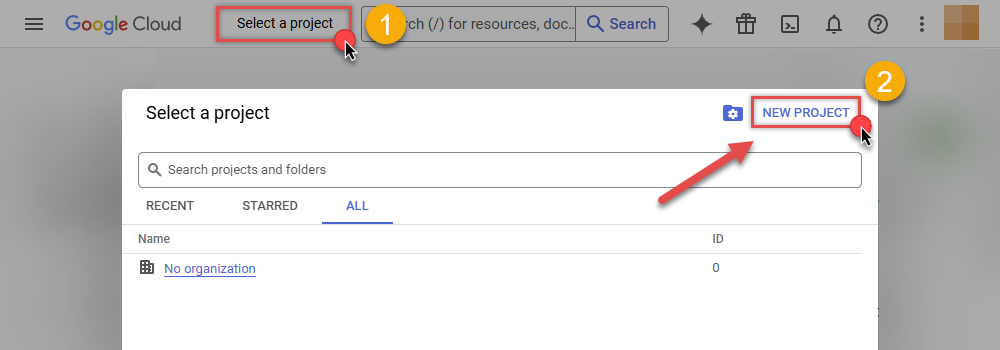
- Enable the Cloud Spanner API for that project (APIs & Services > Enable APIs).
- On this Windows machine run
gcloud auth application-default login, or attach a GCP service account to the host. - Fill Project, Instance, and Database. Leave the JSON path empty for ADC.
- Finish the wizard. Then click Test Connection on the DSN Main UI (the wizard does not run Test Connection).
- Done. You can query from C#, Python, PowerShell, and ODBC apps.
Parameters
| Parameter | Required | Default value | Options |
|---|---|---|---|
|
Name:
Label: JDBC driver file(s) Filled by the wizard after download. Separate multiple JARs with a semicolon (e.g. C:\ZappySys\Jdbc\MyConnector\driver.jar). |
YES |
C:\ZappySys\Jdbc\Google Cloud Spanner\google-cloud-spanner-jdbc-2.40.0-single-jar-with-dependencies.jar
|
|
|
Name:
Label: Project id GCP project id (e.g. MY_PROJECT). |
YES |
MY_PROJECT
|
|
|
Name:
Label: Instance id Spanner instance id (e.g. MY_INSTANCE). |
YES |
MY_INSTANCE
|
|
|
Name:
Label: Driver class Optional. Leave blank to auto-detect from the JAR unless SPI is ambiguous (e.g. com.google.cloud.spanner.jdbc.JdbcDriver). |
com.google.cloud.spanner.jdbc.JdbcDriver
|
||
|
Name:
Label: Database name Database, schema, or catalog name (e.g. MyDatabase). |
MyDatabase
|