﻿<?xml version="1.0" encoding="utf-8"?>

<!-- EngineVersion = Java version -->
<ApiConfig Name="Google Cloud Spanner"
           Slug="google-cloud-spanner-connector"
           Type="JDBC"
           Category="database"
           Id="D90A0A8C-C2D0-588C-9AC6-F047CA752900"
           Version="1"
           EngineVersion="8"
           Desc="Read and write Google Cloud Spanner with the official JDBC driver. Query instances and databases from Power BI, SQL Server Linked Server via ZappySys Data Gateway, Crystal Reports, SSRS, Azure Data Factory, and other ODBC tools -- almost no coding required."
           Logo="https://cdn.zappysys.com/api/Images/logos/google-cloud-spanner-connector.png"
           HelpLink="https://cloud.google.com/spanner/docs/use-oss-jdbc">

    <VersionHistory>
      <Change Ver="1" Date="2026-09-14" Type="New">Initial JDBC Bridge catalog version. Hands-free Maven JAR download. Auth Notes and SQL examples for ODBC apps.</Change>
    </VersionHistory>
    <Template>
        <Param Name="DriverDownloadPageLink"
               Value="https://cloud.google.com/spanner/docs/use-oss-jdbc" />
        <Param Name="MvnRepositoryDriverDownloadLink"
               Value="https://mvnrepository.com/artifact/com.google.cloud/google-cloud-spanner-jdbc" />
        <Param Name="DriverDownloadLinks"
               Hidden="True"
               Value="google-cloud-spanner-jdbc-2.40.0-single-jar-with-dependencies.jar=https://repo1.maven.org/maven2/com/google/cloud/google-cloud-spanner-jdbc/2.40.0/google-cloud-spanner-jdbc-2.40.0-single-jar-with-dependencies.jar" />
    </Template>

    <Auths>
        <Auth Name="Adc"
              Label="Application Default Credentials (ADC)"
              ConnStr="jdbc:cloudspanner:/projects/[$ProjectId$]/instances/[$InstanceId$]/databases/[$Database$]"
              HelpLink="https://cloud.google.com/spanner/docs/use-oss-jdbc">
            <Params>
                <Param Name="DriverClass" Label="Driver class" Required="False" Value="com.google.cloud.spanner.jdbc.JdbcDriver" Desc="Optional. Leave blank to auto-detect from the JAR unless SPI is ambiguous (e.g. com.google.cloud.spanner.jdbc.JdbcDriver)." HelpLink="https://cloud.google.com/spanner/docs/use-oss-jdbc" />
                <Param Name="DriverFilePaths" Editor="FileOpen" Label="JDBC driver file(s)" Required="True" Value="{DownloadFolder}\google-cloud-spanner-jdbc-2.40.0-single-jar-with-dependencies.jar" Desc="Filled by the wizard after download. Separate multiple JARs with a semicolon (e.g. C:\ZappySys\Jdbc\MyConnector\driver.jar)." HelpLink="https://cloud.google.com/spanner/docs/use-oss-jdbc" />
                <Param Name="ProjectId" Label="Project id" Required="True" Value="MY_PROJECT" Desc="GCP project id (e.g. MY_PROJECT)." HelpLink="https://cloud.google.com/spanner/docs/use-oss-jdbc" />
                <Param Name="InstanceId" Label="Instance id" Required="True" Value="MY_INSTANCE" Desc="Spanner instance id (e.g. MY_INSTANCE)." HelpLink="https://cloud.google.com/spanner/docs/use-oss-jdbc" />
                <Param Name="Database" Label="Database name" Required="False" Value="MyDatabase" Desc="Database, schema, or catalog name (e.g. MyDatabase)." HelpLink="https://cloud.google.com/spanner/docs/use-oss-jdbc" />
            </Params>
            <Notes>
                <![CDATA[<p>Use Application Default Credentials when this machine is already logged in to Google Cloud (gcloud or a VM service account). Spanner JDBC is the supported client; Bridge then serves Power BI, SQL Server Linked Server via ZappySys Data Gateway, Crystal Reports, SSRS, Azure Data Factory, and other ODBC tools.</p>
<ol>
  <li>Open the <a target="_blank" href="https://console.cloud.google.com/">Google Cloud Console</a> and select (or create) a project.</li>
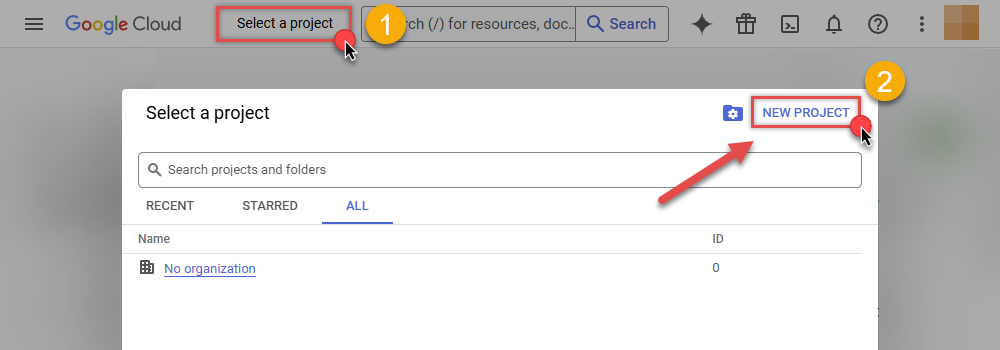
  <li>
    <p>Create a project if needed:</p>
    <img src="https://cdn.zappysys.com/api/Images/authentication/google/start-creating-new-project-in-google-cloud.png"
         loading="lazy" decoding="async" class="img-thumbnail block"
         alt="Start creating a new project in Google Cloud" width="1000" height="340" />
  </li>
  <li>Enable the <strong>Cloud Spanner API</strong> for that project (<strong>APIs &amp; Services &gt; Enable APIs</strong>).</li>
  <li>On this Windows machine run <code>gcloud auth application-default login</code>, or attach a GCP service account to the host.</li>
  <li>Fill Project, Instance, and Database. Leave the JSON path empty for ADC.</li>
  <li>Finish the wizard. Then click <strong>Test Connection</strong> on the DSN Main UI (the wizard does not run Test Connection).</li><li>Done. You can query from C#, Python, PowerShell, and ODBC apps.</li>
</ol>]]>
            </Notes>
        </Auth>
        <Auth Name="ServiceAccount"
              Label="Service account JSON"
              ConnStr="jdbc:cloudspanner:/projects/[$ProjectId$]/instances/[$InstanceId$]/databases/[$Database$]?credentials=[$CredentialsPath$]"
              HelpLink="https://cloud.google.com/spanner/docs/use-oss-jdbc">
            <Params>
                <Param Name="DriverClass" Label="Driver class" Required="False" Value="com.google.cloud.spanner.jdbc.JdbcDriver" Desc="Optional. Leave blank to auto-detect from the JAR unless SPI is ambiguous (e.g. com.google.cloud.spanner.jdbc.JdbcDriver)." HelpLink="https://cloud.google.com/spanner/docs/use-oss-jdbc" />
                <Param Name="DriverFilePaths" Editor="FileOpen" Label="JDBC driver file(s)" Required="True" Value="{DownloadFolder}\google-cloud-spanner-jdbc-2.40.0-single-jar-with-dependencies.jar" Desc="Filled by the wizard after download. Separate multiple JARs with a semicolon (e.g. C:\ZappySys\Jdbc\MyConnector\driver.jar)." HelpLink="https://cloud.google.com/spanner/docs/use-oss-jdbc" />
                <Param Name="ProjectId" Label="Project id" Required="True" Value="MY_PROJECT" Desc="GCP project id (e.g. MY_PROJECT)." HelpLink="https://cloud.google.com/spanner/docs/use-oss-jdbc" />
                <Param Name="InstanceId" Label="Instance id" Required="True" Value="MY_INSTANCE" Desc="Spanner instance id (e.g. MY_INSTANCE)." HelpLink="https://cloud.google.com/spanner/docs/use-oss-jdbc" />
                <Param Name="Database" Label="Database name" Required="False" Value="MyDatabase" Desc="Database, schema, or catalog name (e.g. MyDatabase)." HelpLink="https://cloud.google.com/spanner/docs/use-oss-jdbc" />
                <Param Name="CredentialsPath" Editor="FileOpen" Label="Credentials path" Required="False" Value="C:\keys\spanner.json" Desc="Path to the service-account JSON key (e.g. C:\keys\spanner.json)." HelpLink="https://cloud.google.com/spanner/docs/use-oss-jdbc" />
                <Param Name="credentials" Editor="FileOpen" Label="Credentials file (JSON)" Required="True" Desc="Full path to the service-account JSON key. The wizard maps this to the JDBC credentials property (e.g. C:\keys\spanner.json)." HelpLink="https://cloud.google.com/spanner/docs/use-oss-jdbc" />
            </Params>
            <Notes>
                <![CDATA[<p>Service-account JSON path. Use this for unattended Linked Server, ADF, or Power BI gateway refresh.</p>
<ol>
  <li>In Google Cloud Console open <strong>IAM &amp; Admin &gt; Service Accounts</strong> and create an account.</li>
  <li>Grant a Spanner role such as <code>Cloud Spanner Database User</code> (read) or a writer role if you need DML.</li>
  <li>Create a JSON key and download it to a folder only the DSN process can read. Do not put the key in the connector XML or git/TFVC.</li>
  <li>Set GOOGLE_APPLICATION_CREDENTIALS or paste the JSON file path into <strong>Credentials file</strong>.</li>
  <li>Fill Project, Instance, and Database (from Spanner Studio).</li>
  <li>Finish the wizard. Then click <strong>Test Connection</strong> on the DSN Main UI (the wizard does not run Test Connection).</li><li>Done. You can query from C#, Python, PowerShell, and ODBC apps.</li>
</ol>]]>
            </Notes>
        </Auth>
    </Auths>

    <Examples>
        <Example Default="True" Group="ODBC" Slug="list-tables" Label="List tables" HelpLink="https://cloud.google.com/spanner/docs/reference/standard-sql/query-syntax">
            <Desc><![CDATA[<p>Lists tables available to this connection. Use this in Power BI or a SQL Server Linked Server to confirm the catalog before building reports.</p>]]></Desc>
            <Code>
                <![CDATA[SELECT TABLE_NAME FROM INFORMATION_SCHEMA.TABLES WHERE TABLE_SCHEMA = '' ORDER BY TABLE_NAME]]>
            </Code>
        </Example>

        <Example Group="ODBC" Slug="select-rows" Label="Select rows" HelpLink="https://cloud.google.com/spanner/docs/reference/standard-sql/query-syntax">
            <Desc><![CDATA[<p>Returns rows from <code>MY_TABLE</code>. Replace the identifier with your catalog object. Works in Excel, SSRS, and Crystal Reports.</p>]]></Desc>
            <Code>
                <![CDATA[SELECT * FROM MY_TABLE]]>
            </Code>
        </Example>

        <Example Group="ODBC" Slug="filter-rows" Label="Filter with WHERE" HelpLink="https://cloud.google.com/spanner/docs/reference/standard-sql/query-syntax">
            <Desc><![CDATA[<p>Returns matching rows from <code>MY_TABLE</code>. Swap the column and literal for your schema.</p>]]></Desc>
            <Code>
                <![CDATA[SELECT * FROM MY_TABLE
WHERE id = 1]]>
            </Code>
        </Example>

        <Example Group="ODBC" Slug="join-tables" Label="Join tables" HelpLink="https://cloud.google.com/spanner/docs/reference/standard-sql/query-syntax">
            <Desc><![CDATA[<p>Joins two tables on a key. Use in Azure Data Factory or SSIS when you need a combined extract.</p>]]></Desc>
            <Code>
                <![CDATA[SELECT a.id, a.name, b.amount
FROM MY_TABLE AS a
JOIN my_other_table AS b ON a.id = b.parent_id]]>
            </Code>
        </Example>

        <Example Group="ODBC" Slug="group-by" Label="Aggregate with GROUP BY" HelpLink="https://cloud.google.com/spanner/docs/reference/standard-sql/query-syntax">
            <Desc><![CDATA[<p>Counts rows per group. Typical Power BI import pattern before a visual.</p>]]></Desc>
            <Code>
                <![CDATA[SELECT status, COUNT(*) AS row_count
FROM MY_TABLE
GROUP BY status]]>
            </Code>
        </Example>

        <Example Group="ODBC" Slug="having" Label="Filter groups with HAVING" HelpLink="https://cloud.google.com/spanner/docs/reference/standard-sql/query-syntax">
            <Desc><![CDATA[<p>Keeps groups whose count is at least 10.</p>]]></Desc>
            <Code>
                <![CDATA[SELECT status, COUNT(*) AS row_count
FROM MY_TABLE
GROUP BY status
HAVING COUNT(*) >= 10]]>
            </Code>
        </Example>

        <Example Group="ODBC" Slug="order-limit" Label="Order and limit" HelpLink="https://cloud.google.com/spanner/docs/reference/standard-sql/query-syntax">
            <Desc><![CDATA[<p>Returns the first 100 rows ordered by a column. Useful for preview in Excel or Crystal Reports.</p>]]></Desc>
            <Code>
                <![CDATA[SELECT * FROM MY_TABLE
ORDER BY id
LIMIT 100]]>
            </Code>
        </Example>

        <Example Group="ODBC" Slug="count-all" Label="Count rows" HelpLink="https://cloud.google.com/spanner/docs/reference/standard-sql/query-syntax">
            <Desc><![CDATA[<p>Returns the number of rows in <code>MY_TABLE</code>.</p>]]></Desc>
            <Code>
                <![CDATA[SELECT COUNT(*) AS row_count FROM MY_TABLE]]>
            </Code>
        </Example>

        <Example Group="ODBC" Slug="case-expr" Label="CASE expression" HelpLink="https://cloud.google.com/spanner/docs/reference/standard-sql/query-syntax">
            <Desc><![CDATA[<p>Maps a column to labels with <code>CASE</code>.</p>]]></Desc>
            <Code>
                <![CDATA[SELECT id,
       CASE WHEN status = 'A' THEN 'Active' ELSE 'Other' END AS status_label
FROM MY_TABLE]]>
            </Code>
        </Example>

        <Example Group="ODBC" Slug="select-list" Label="Select specific columns" HelpLink="https://cloud.google.com/spanner/docs/reference/standard-sql/query-syntax">
            <Desc><![CDATA[<p>Returns a column list instead of star. Prefer this in Linked Server views.</p>]]></Desc>
            <Code>
                <![CDATA[SELECT id, name, status
FROM MY_TABLE]]>
            </Code>
        </Example>
    </Examples>
</ApiConfig>