
Endpoint Test Connection
Name
test_connection
Description
Parameters
| Parameter | Required | Options | |||||||||||||||||||||||||||||||||||||||||||||||||||||||||||||||||||||||||||||||||||||||||||||||||
|---|---|---|---|---|---|---|---|---|---|---|---|---|---|---|---|---|---|---|---|---|---|---|---|---|---|---|---|---|---|---|---|---|---|---|---|---|---|---|---|---|---|---|---|---|---|---|---|---|---|---|---|---|---|---|---|---|---|---|---|---|---|---|---|---|---|---|---|---|---|---|---|---|---|---|---|---|---|---|---|---|---|---|---|---|---|---|---|---|---|---|---|---|---|---|---|---|---|---|---|
| There are no parameters | |||||||||||||||||||||||||||||||||||||||||||||||||||||||||||||||||||||||||||||||||||||||||||||||||||
Output Columns
| Label | Data Type (SSIS) | Data Type (SQL) | Length | Description | |||||||||||||||||||||||||||||||||||||||||||||||||||||||||||||||||||||||||||||||||||||||||||||||
|---|---|---|---|---|---|---|---|---|---|---|---|---|---|---|---|---|---|---|---|---|---|---|---|---|---|---|---|---|---|---|---|---|---|---|---|---|---|---|---|---|---|---|---|---|---|---|---|---|---|---|---|---|---|---|---|---|---|---|---|---|---|---|---|---|---|---|---|---|---|---|---|---|---|---|---|---|---|---|---|---|---|---|---|---|---|---|---|---|---|---|---|---|---|---|---|---|---|---|---|
| There are no Static columns defined for this endpoint. This endpoint detects columns dynamically at runtime. | |||||||||||||||||||||||||||||||||||||||||||||||||||||||||||||||||||||||||||||||||||||||||||||||||||
If the column you are looking for is missing, consider customizing FTP/SFTP XML File Connector.
Input Columns
| Label | Data Type (SSIS) | Data Type (SQL) | Length | Description | |||||||||||||||||||||||||||||||||||||||||||||||||||||||||||||||||||||||||||||||||||||||||||||||
|---|---|---|---|---|---|---|---|---|---|---|---|---|---|---|---|---|---|---|---|---|---|---|---|---|---|---|---|---|---|---|---|---|---|---|---|---|---|---|---|---|---|---|---|---|---|---|---|---|---|---|---|---|---|---|---|---|---|---|---|---|---|---|---|---|---|---|---|---|---|---|---|---|---|---|---|---|---|---|---|---|---|---|---|---|---|---|---|---|---|---|---|---|---|---|---|---|---|---|---|
| There are no Static columns defined for this endpoint. This endpoint detects columns dynamically at runtime. | |||||||||||||||||||||||||||||||||||||||||||||||||||||||||||||||||||||||||||||||||||||||||||||||||||
Examples
SSIS
Use FTP/SFTP XML File Connector in API Source or in API Destination SSIS Data Flow components to read or write data.
API Source

API Source - FTP/SFTP XML File
Amazon Ads Connector can be used to get Amazon advertisements using Amazon Advertisements API, download various advertisement-related reports.
FTP/SFTP XML File
Test Connection
| There are no parameters to configure. |

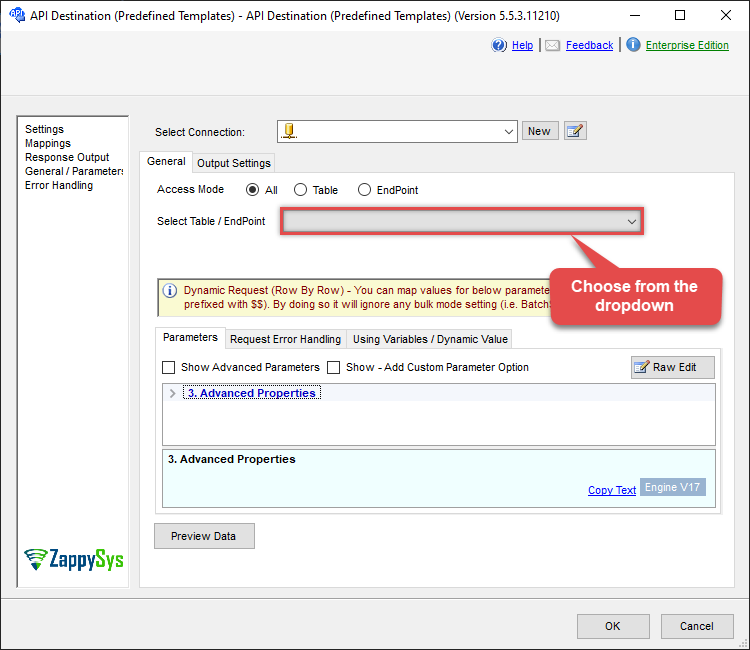
API Destination
API Destination - FTP/SFTP XML File
Amazon Ads Connector can be used to get Amazon advertisements using Amazon Advertisements API, download various advertisement-related reports.
FTP/SFTP XML File
Test Connection
| There are no parameters to configure. |
ODBC application
Use these SQL queries in your ODBC application data source:
Test connection
SELECT * FROM test_connectionSQL Server
Use these SQL queries in SQL Server after you create a data source in Data Gateway:
Test connection
DECLARE @MyQuery NVARCHAR(MAX) = 'SELECT * FROM test_connection';

EXEC (@MyQuery) AT [LS_TO_FTP_SFTP_XML_FILE_IN_GATEWAY];